
Once WordPress is installed, the next important step is deciding which pages your website actually needs. Most beginners pause at this stage, unsure which pages are actually required and which ones can wait.
Creating the essential pages in WordPress early helps your website feel complete, organized, and ready for visitors. In this post, we’ll break down the pages you should create first, explain their purpose, and show how they fit into a solid website foundation.
Before creating these essential pages, make sure your website is set up on a reliable hosting environment. Choosing the best WordPress hosting and domain for beginners helps ensure better performance, security, and a smoother setup process from the start.
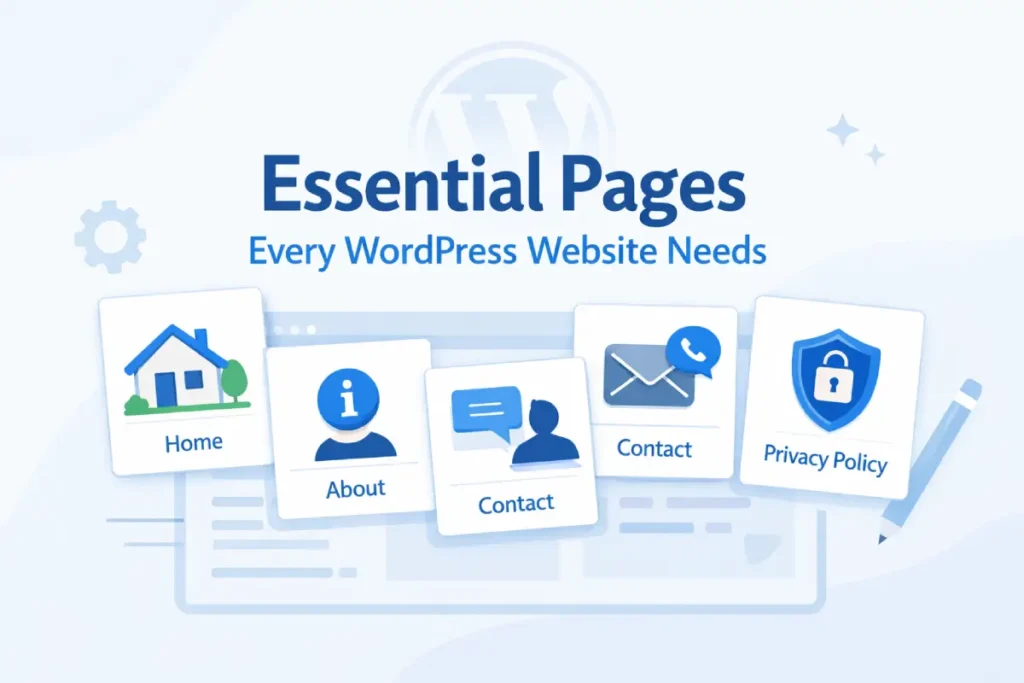
Quick Checklist: Pages to Create in WordPress
If you’re setting up a WordPress site for the first time, start with these core pages:
- Home Page – Introduces your website and guides visitors
- About Page – Builds trust by explaining who you are
- Contact Page – Makes it easy for users to reach you
- Privacy Policy Page – Explains how user data is handled
- Terms and Conditions Page – Defines rules for using your site
- Blog Page – Displays your published posts (if applicable)
These pages form the foundation of most WordPress websites.
Why Essential Pages in WordPress Matter
Before adding content or traffic strategies, a website needs a clear framework. Pages form that foundation.
Essential pages help users understand who you are, what your site offers, and how they can interact with it. They also support navigation, legal compliance, and future SEO efforts. Without these pages, even a well-designed website can feel unfinished.
If you’re just starting out, you might also wonder whether you need multiple pages at all or if a single-page website is enough for your needs.
Pages vs Posts in WordPress (Quick Clarification)
WordPress uses two main content types: pages and posts, and each serves a different purpose.
Pages are used for static content that doesn’t change often, such as About, Contact, or Privacy Policy pages. These pages usually appear in your main navigation menu and remain accessible at all times.
Posts, on the other hand, are used for blog content. They are published regularly, listed in reverse chronological order, and grouped using categories and tags.
In short, essential pages define your website, while posts are used to publish ongoing content.
Essential Pages Every WordPress Website Needs (With Examples)
Not every website needs dozens of pages at launch. However, there are a few must-have pages for a WordPress website that apply to almost every type of site.
Let’s look at each one and why it matters.
Home Page
The home page acts as the central entry point to your website.
It introduces your site’s purpose and guides visitors toward the most important sections—whether that’s reading blog posts, learning about your services, or getting in touch. A clear home page helps visitors quickly decide if your site is relevant to them.
About Page
The About page explains the story behind your website.
Visitors often check this page to understand who is running the site and why it exists. A well-written About page builds credibility by clearly stating your goals, experience, or mission, even if the website is small or personal.
Contact Page
A Contact page makes your website approachable and transparent.
It provides a direct way for visitors, clients, or collaborators to reach you. Even if you don’t expect many messages, having a visible contact page signals trust and professionalism.
Privacy Policy Page
A Privacy Policy explains how your website handles user data.
If your WordPress site uses cookies, analytics tools, contact forms, or email subscriptions, this page becomes essential. Many third-party services and advertising platforms also require it before approval.
Terms and Conditions Page
Terms and Conditions outline the rules for using your website.
While not mandatory for every site, this page is highly recommended for business websites, affiliate blogs, and service-based sites. It helps clarify responsibilities and protects you from potential misuse.
Blog Page (Optional but Recommended)
A Blog page is needed if you plan to publish articles or updates.
Instead of displaying posts on the home page, a dedicated blog page keeps your static pages separate from ongoing content. This improves navigation and keeps your site structure clean.
How to Create Pages in WordPress
Once you know which pages to create, the actual process is straightforward.
WordPress allows you to create pages directly from the dashboard. You can add titles, write content using the block editor, and publish pages individually. Each essential page can be created in just a few minutes, even without technical knowledge.
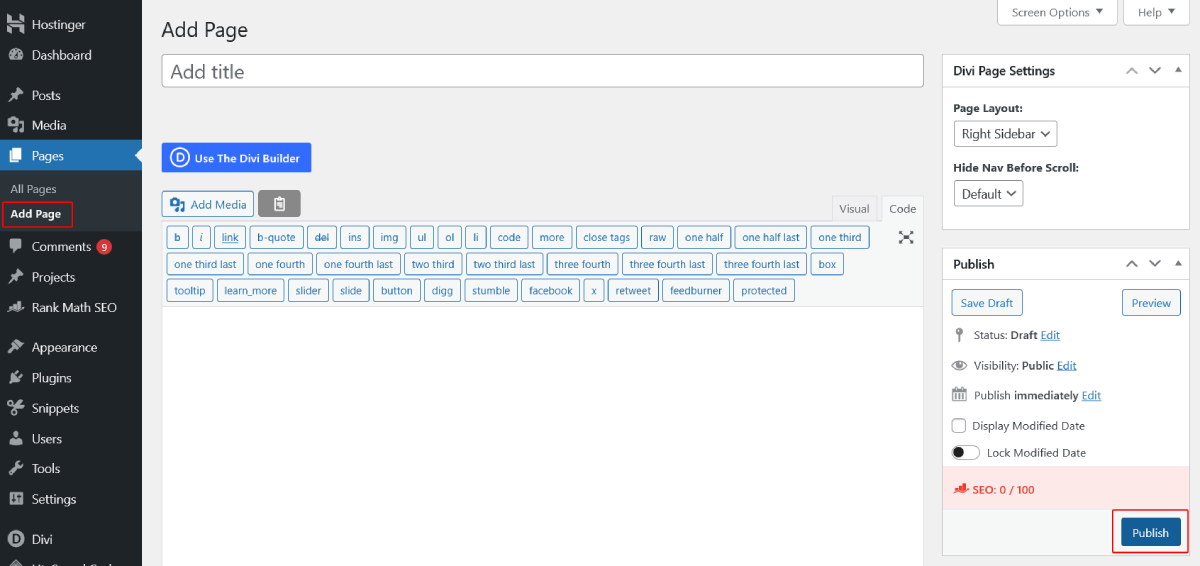
To create a new page in WordPress:
- Go to “Dashboard” → “Pages” → “Add New”
- Enter the page title and content
- Click “Publish”
You can repeat this process for each essential page.
WordPress also provides official documentation on creating and managing pages for reference.
How to Add Pages to the WordPress Menu
After publishing pages, they should be easy for visitors to find.
Adding pages to a navigation menu ensures users can move between sections without confusion. A simple, well-organized menu improves usability and makes your website feel complete from the start.
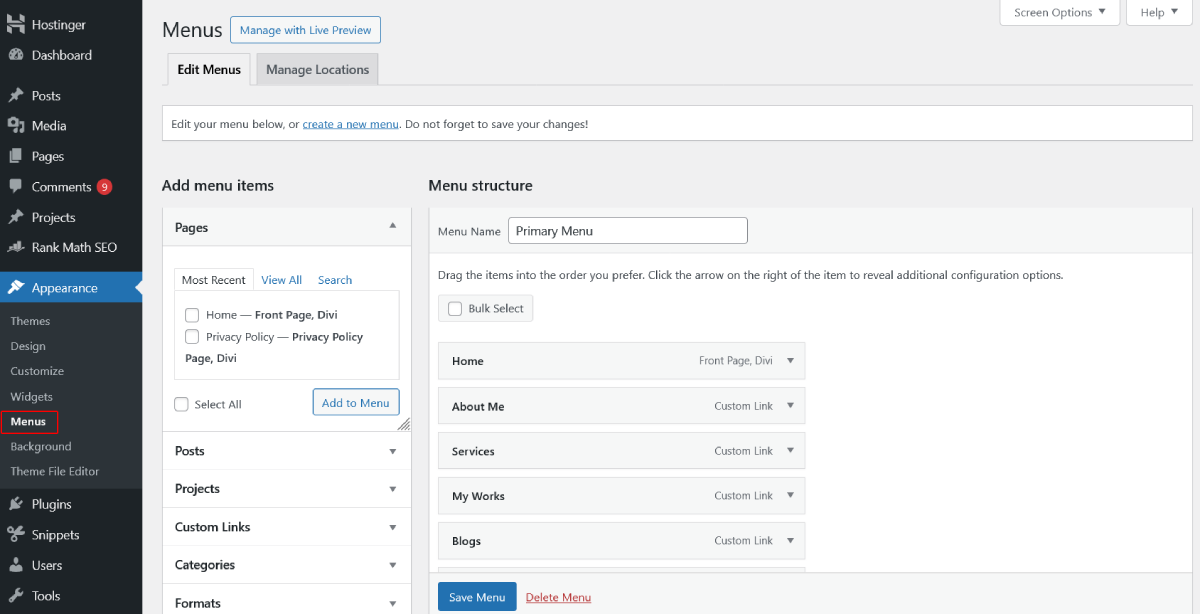
To add pages to your WordPress menu:
- Go to “Appearance” → “Menus”
- Select the pages you want to add
- Add them to the menu and save changes
Common Mistakes to Avoid When Creating Pages
Beginners often rush this stage or overlook important details.
Some common issues include skipping the Privacy Policy, creating too many unnecessary pages, or forgetting to add pages to the menu. Avoiding these mistakes early saves time and prevents future restructuring.
What to Do After Creating Essential Pages
Once your essential pages are live, your website has a solid structure.
From here, you can focus on visual customization, installing useful plugins, and preparing your content strategy. These pages also make it easier to optimize your site for search engines and users as you grow.
Final Thoughts
Creating the essential pages in WordPress is a foundational step that shapes how visitors experience your site.
You don’t need perfect content on day one—but you do need clarity, transparency, and structure. With the right pages in place, your website is ready for the next stage of growth. Once these essential pages are in place, you’re ready to start building traffic — my complete traffic guide walks through the rest, from content to promotion.

