
If your website suddenly shows the message “Error Establishing a Database Connection”, it means WordPress is unable to connect to the database that stores your website’s content and settings.
This error can make your entire website inaccessible, including the admin dashboard. Similar server-side issues can also appear as 502 Bad Gateway errors, which usually occur when the server receives an invalid response while processing a request.
The good news is that this problem is usually caused by a misconfiguration, server issue, or corrupted database, and in most cases it can be fixed with a few troubleshooting steps.
In this guide, we’ll explain why the error establishing a database connection occurs in WordPress and how to fix it step by step.
What Does “Error Establishing a Database Connection” Mean?
WordPress relies on a MySQL database to store information such as:
- Posts and pages
- User accounts
- Plugin settings
- Website configuration
When WordPress tries to load a page, it connects to the database to retrieve this data.
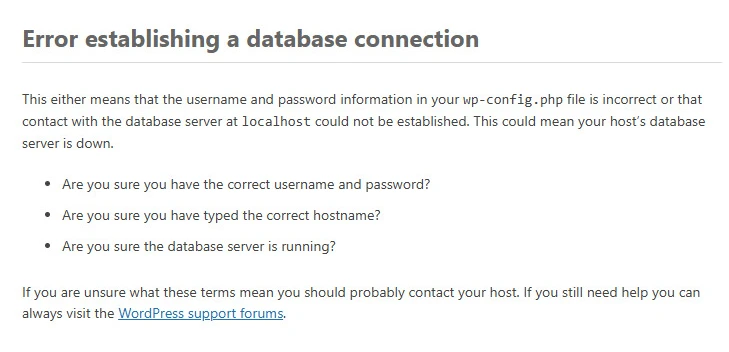
If that connection fails, WordPress displays the following message:
Error establishing a database connection
This means the server cannot communicate with the database.
Common Causes of the Database Connection Error
Before fixing the issue, it’s helpful to understand why it happens.
- Incorrect Database Credentials: If the database name, username, password, or host information in the wp-config.php file is incorrect, WordPress cannot connect to the database.
- Corrupted Database: Sometimes the WordPress database can become corrupted due to plugin conflicts or interrupted updates.
- Database Server Issues: The database server may be temporarily down or overloaded.
- Hosting Server Problems: If the hosting server runs out of resources, the connection between WordPress and the database may fail.
- Plugin or Malware Issues: In some cases, malicious scripts or poorly coded plugins can interfere with database connections. For example, during one malware cleanup project, we discovered compromised files that caused unusual behavior in a WordPress site. You can read more about that in my WordPress malware investigation case study.
Quick Fix Checklist
Before trying advanced fixes, try these quick checks:
- Refresh the page
- Check if other websites on the same hosting server are working
- Clear your browser cache
- Try accessing the WordPress admin dashboard
- Contact your hosting provider to check server status
If the error persists, continue with the steps below.
How to Fix Error Establishing a Database Connection in WordPress
1. Check Database Credentials in wp-config.php
Incorrect database details are the most common cause.
Follow these steps:
- Log in to your hosting control panel or FTP
- Open the WordPress installation folder
- Locate the file wp-config.php
- Check the following database settings
define('DB_NAME', 'database_name');

define('DB_USER', 'database_user');

define('DB_PASSWORD', 'database_password');

define('DB_HOST', 'localhost');
Make sure these values match the database details in your hosting account.
2. Repair the WordPress Database
If the database is corrupted, WordPress includes a built-in repair tool.
Add this line to your wp-config.php file:
define('WP_ALLOW_REPAIR', true);
Then visit:
yourwebsite.com/wp-admin/maint/repair.php
Choose Repair Database.
After the repair process is complete, remove the line you added to the config file.
3. Check Your Database Server
Sometimes the issue is not with WordPress but with the database server itself.
Possible reasons include:
- Server overload
- Database service stopped
- Hosting maintenance
If you suspect a server issue, contact your hosting provider and ask them to check the MySQL server status.
4. Check If the Database User Has Permission
The database user must have proper permissions.
In your hosting control panel:
- Open MySQL Databases
- Ensure the database user is assigned to the database
- Confirm the user has all privileges
If permissions are missing, WordPress will fail to connect.
5. Restore Website From Backup
If the problem appeared after a major update or plugin installation, restoring a backup may solve the issue.
Most hosting providers offer automatic backups.
Restoring a backup can quickly fix database corruption or configuration errors.
How to Prevent This Error in the Future
While this issue can happen unexpectedly, a few best practices can reduce the risk.
- Keep Plugins and Themes Updated: Outdated plugins can sometimes corrupt the database or cause conflicts.
- Use Reliable Hosting: Low-quality hosting environments are more prone to database failures.
- Monitor Website Health: Regularly checking your website performance and logs can help identify problems early.
- Perform Regular Backups: Maintaining recent backups ensures you can quickly recover your website if something goes wrong.
Regular maintenance and performance checks can help prevent many WordPress issues before they affect your website. Running a technical audit of your WordPress site can help identify configuration or optimization problems early.
Related WordPress Errors
While troubleshooting your website, you may also encounter other common errors such as:
- 502 Bad Gateway Error in WordPress
- 500 Internal Server Error in WordPress
- 403 Forbidden Error in WordPress
- 429 Too Many Requests Error
Understanding these issues can help you diagnose website problems more effectively.
Frequently Asked Questions
Why does WordPress say error establishing a database connection?
This error appears when WordPress cannot connect to the MySQL database. It usually happens due to incorrect database credentials, server problems, or database corruption.
Can a plugin cause a database connection error?
Yes. Poorly coded plugins or plugin conflicts can sometimes interfere with database operations and cause connection errors.
Is the database connection error related to hosting?
In many cases, yes. Server overload, database server downtime, or hosting configuration issues can prevent WordPress from connecting to the database.
How do I fix error establishing a database connection in WordPress?
You can fix this error by checking your database credentials in the wp-config.php file, repairing the WordPress database, verifying that the database server is running, and ensuring the database user has proper permissions. If the issue is related to hosting or server resources, contacting your hosting provider may also help resolve the problem.
Conclusion
The error establishing a database connection in WordPress can make your website completely inaccessible, but the problem is usually fixable.
By checking database credentials, repairing the database, verifying server status, and ensuring proper permissions, you can quickly restore your website.
Regular backups, reliable hosting, and proper website maintenance can also help prevent this issue from happening again.
