
This is a common issue caused by invalid or bot traffic in GA4, which can distort analytics and affect monetization. The client had a content-driven WordPress website with a decent number of daily visitors, but her AdSense earnings were not making sense. She had invested time in SEO and was seeing traffic grow, but the revenue was not moving in the same direction.
When she reached out, she was frustrated and genuinely confused. She mentioned it during a conversation about her SEO progress — her site was getting thousands of visits a day but barely earning anything from ads.
That mismatch between traffic volume and revenue is usually a signal worth investigating. In this case, what I found in GA4 explained everything.
Note: This is the same client whose WordPress site I had previously recovered from a malware infection and server instability issue. You can read that full case study here: WordPress Website Recovery & Security Hardening Case Study.
Quick Summary
- Problem: High traffic but very low AdSense revenue
- Root Cause: Bot traffic inflating GA4 data
- Solution: Cloudflare bot protection + filtering
- Result: Cleaner traffic, improved engagement, realistic revenue
Project Background
| Website Type | Content blog (WordPress) |
|---|---|
| Issue Reported | High daily traffic but very low AdSense revenue |
| Traffic at the Time | 2,000 to 3,000 sessions per day in GA4 |
| What Was Expected | Revenue matching the traffic volume |
| What Was Happening | Earnings almost negligible despite visit count |
What I Found in GA4
The first thing I checked was the Traffic Acquisition report in GA4. I wanted to see where the traffic was actually coming from and how it was behaving.
What I saw straight away was unusual.
A few things stood out immediately:
- Extremely high direct traffic
- Very low engagement time
- Engagement rate close to zero
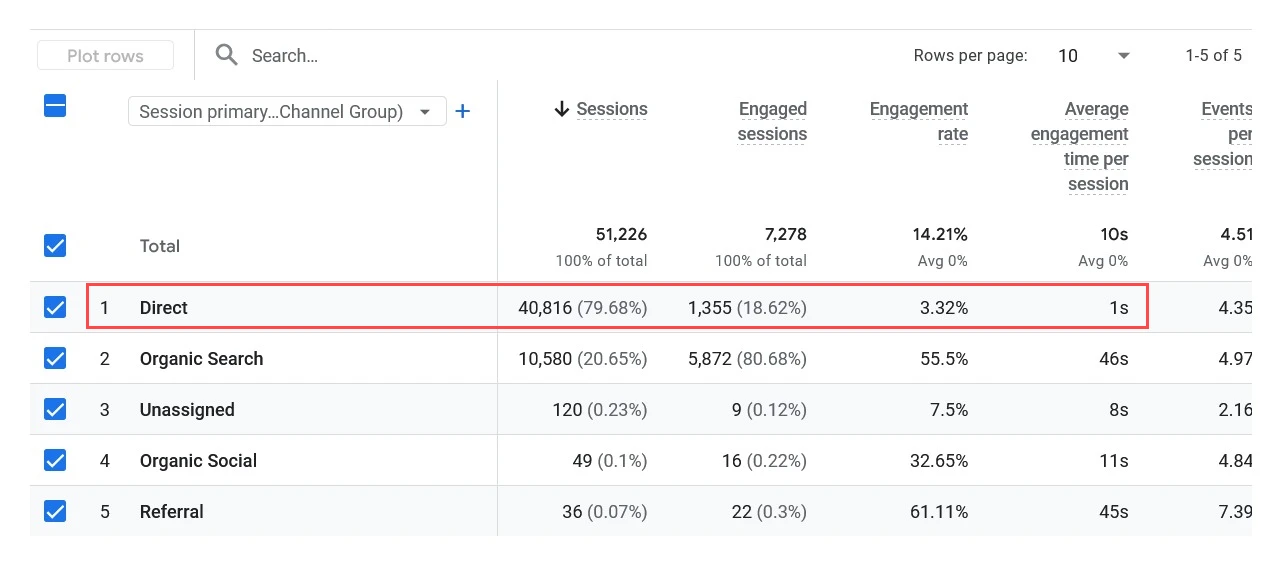
GA4 Traffic Acquisition report showing Direct traffic at 79.68% of all sessions with just 1s average engagement time — shared with the client when the issue was first identified.
Direct traffic was making up 79.68% of all sessions — nearly 41,000 out of 51,000 total visits over the period. That alone is a red flag for any website. But the number that stood out even more was the average engagement time for those direct sessions: 1 second.
For comparison, Organic Search sessions were showing 46 seconds average engagement time and a 55.5% engagement rate. Real visitors who find a page through search read it, scroll through it, and spend time on it. They do not land and disappear in one second.
The direct traffic had an engagement rate of just 3.32%. That is not website visitors — that is automated activity.
I shared this screenshot with the client to explain what was happening. Her SEO was not the problem. Her traffic numbers were inflated by sessions that were never real to begin with.
Digging Deeper: The Country Breakdown
The next step was to look at where this traffic was coming from geographically. I pulled up the Demographic details report filtered by country.
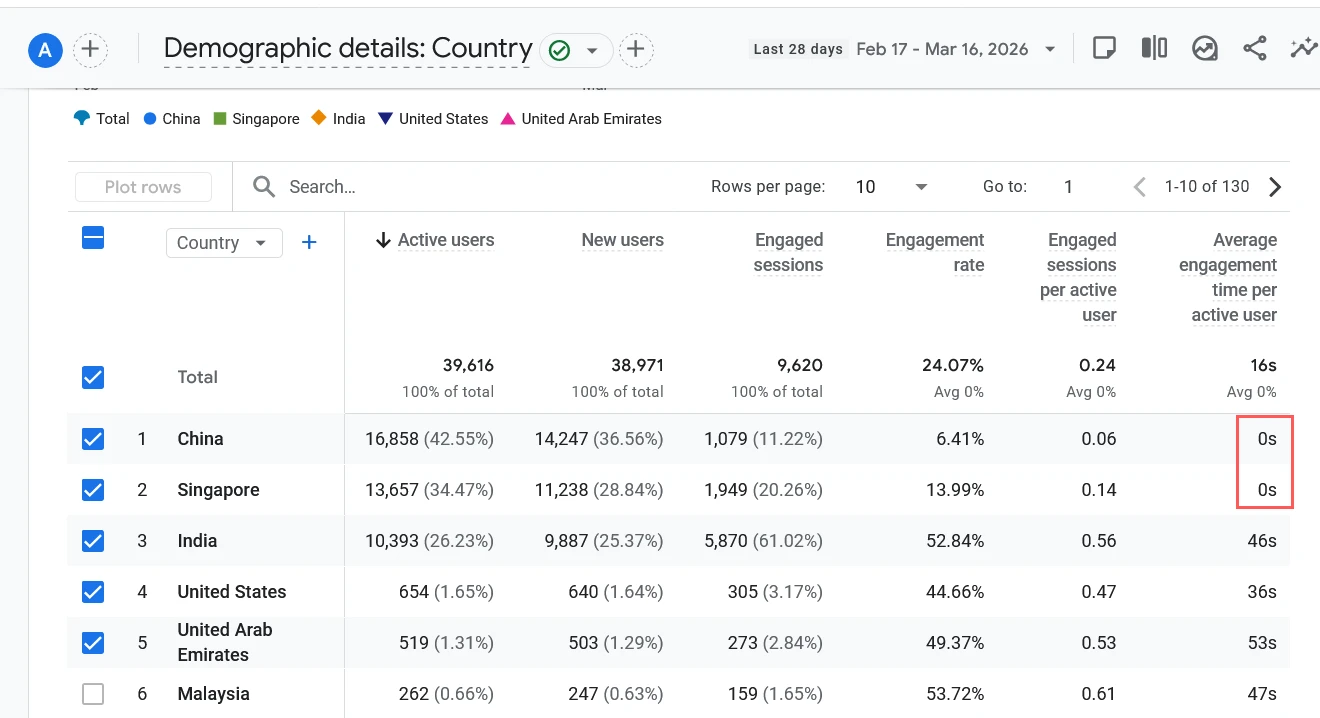
GA4 Demographic details by Country — China at 42.55% and Singapore at 34.47% of active users, both with 0s average engagement time. Together they accounted for over 75% of all traffic.
This made it very clear. China was the top country at 42.55% of active users, followed by Singapore at 34.47%. Both had 0 seconds average engagement time per active user.
India, which accounted for around 26% of users, had a 52.84% engagement rate and 46 seconds engagement time — consistent with real human behaviour. The US and UAE were similar.
The contrast was stark. Traffic from China and Singapore was hitting the site, triggering GA4, and disappearing instantly. Because these automated requests did not carry any referral information, GA4 was categorising every single one of those sessions as Direct traffic.
This is a pattern I have seen before. Bots do not come with a source. They do not arrive via Google or social media or a referral link. They just appear — and GA4 has no choice but to label them as Direct.
So the 79.68% direct traffic figure was not people typing the URL. It was mostly bots.
How Bot Traffic in GA4 Affected AdSense Revenue
Google AdSense pays based on genuine ad interactions and impressions from real users. Bot traffic does not generate valid ad impressions. Even if a bot loads a page that has AdSense ads on it, those impressions are either not counted or filtered out by Google’s own systems. This type of activity is often classified as invalid traffic by AdSense.
So the client had a situation where:
- GA4 was showing 2,000 to 3,000 sessions per day
- The majority of those sessions were bots
- AdSense was only seeing the small fraction of genuine human visits
- Revenue was being calculated on real traffic, not the inflated GA4 number
The website was not underperforming. It was being measured against a false baseline. Once I could show her the real numbers, her actual revenue-per-visitor ratio made much more sense.
What I Did to Fix It
The site was already on Cloudflare from the earlier security hardening work I had done during the WordPress recovery project. Cloudflare sits between the internet and the website, and it can identify and block automated traffic at the network level before it ever reaches the server.
I enabled Cloudflare’s bot protection features and configured traffic filtering for the regions that were generating abnormal activity. This is not a blanket country block — Cloudflare’s bot protection is smarter than that. It identifies automated behaviour based on request patterns, not just location.
The specific things I configured:
- Enabled Bot Fight Mode in Cloudflare Security settings
- Reviewed Firewall Analytics to identify the most active bot sources
- Set up rate limiting rules for suspicious request patterns
- Monitored the GA4 data over the following week to verify the change
Results After Cloudflare Bot Protection
The goal was not to increase traffic — it was to remove fake traffic and improve data quality. The results clearly showed that.
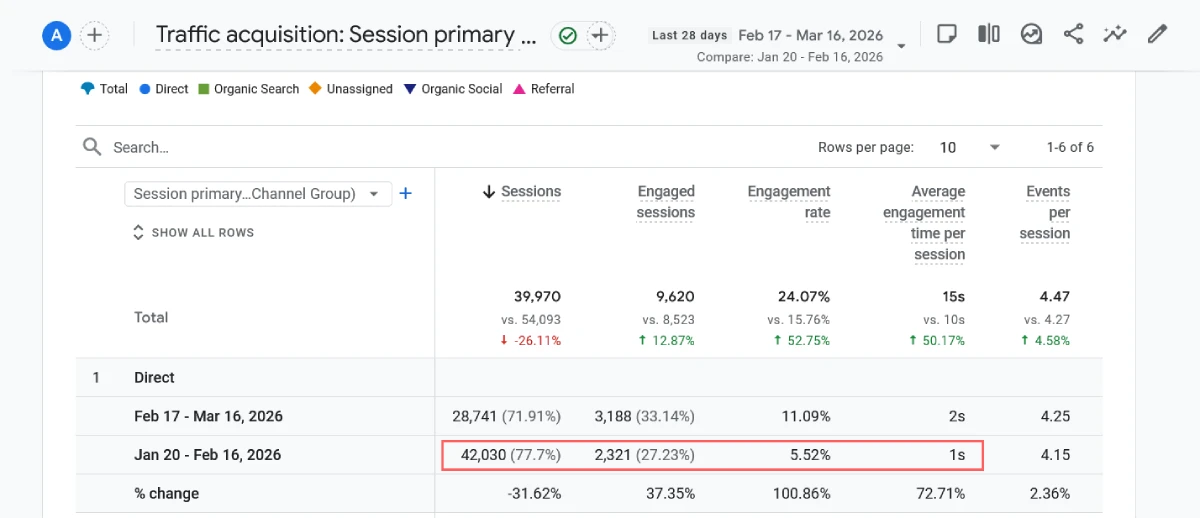
GA4 Traffic Acquisition before and after Cloudflare bot protection — Direct sessions dropped 31.62%, engagement rate improved by over 100%, and average engagement time increased 72.71% compared to the previous period.
The before and after comparison in GA4 shows a clear shift in traffic quality.
| Metric | Before (Jan 20 – Feb 16) | After (Feb 17 – Mar 16) | Change (After Bot Filtering) |
|---|---|---|---|
| Total Sessions | 54,093 | 39,970 | ▼ 26.11% |
| Direct Sessions | 42,030 (77.7%) | 28,741 (71.91%) | ▼ 31.62% |
| Engaged Sessions | 8,523 | 9,620 | ▲ 12.87% |
| Engagement Rate | 15.76% | 24.07% | ▲ 52.75% |
| Avg. Engagement Time | 10s | 15s | ▲ 50.17% |
Total sessions dropped by 26%, but engaged sessions actually went up. The engagement rate went from 15.76% to 24.07% — an improvement of over 52%. Average engagement time increased by 50%.
The traffic that remained after filtering was behaving like real people. They were reading pages, scrolling, clicking, and spending time on the site.
AdSense revenue did not artificially spike — but it aligned correctly with real user traffic, making performance easier to evaluate and optimise. When she looked at earnings per genuine session, it finally made sense.
Key Takeaways
A few things from this case that are worth keeping in mind if you are seeing something similar on your own website:
1. High direct traffic with low engagement time is a bot signal
If your direct traffic in GA4 has an average engagement time of 0 to 2 seconds, that traffic is almost certainly not human. Real users take time to read, even if they bounce quickly. 0s or 1s engagement time across thousands of sessions is automated activity.
2. Check the country breakdown when investigating direct traffic
Bots tend to cluster from specific regions. If you see a large volume of traffic from countries that do not match your content’s audience, and those sessions show zero engagement, that is a strong indicator of automated traffic.
3. A lower session count can mean cleaner data
After filtering, this site went from 54,000 sessions to around 40,000. That might look like a step backwards, but the data became far more useful. Making decisions based on 40,000 real sessions is infinitely better than making decisions based on 54,000 sessions where most of them are bots.
4. GA4 labels bot traffic as Direct because bots have no referral source
This is worth understanding. Bots do not arrive via Google, social media, or referral links. They just access URLs directly. GA4 has no source data to work with, so it defaults to Direct / None. This is one of the less obvious reasons why direct traffic can appear so high in analytics.
5. Cloudflare is effective but not instant
Bot protection worked well in this case, but it took about a week of monitoring before the data in GA4 settled into a consistent pattern. If you enable bot protection and check the next day expecting a complete change, you may not see it right away. Give it time and compare week-over-week.
Signs Your Website Might Have the Same Problem
If your website is in a similar situation, here is what to look for in GA4:
- Direct traffic making up more than 50 to 60 percent of total sessions
- Average engagement time for direct sessions below 5 seconds
- Top countries in your demographics report do not match your target audience
- Revenue or conversions are disproportionately low compared to session count
- Engagement rate for direct traffic below 5 percent
If you are seeing most of these together, bot traffic is worth investigating before assuming your SEO or content strategy is the issue.
For a broader explanation of why websites show so much direct traffic in GA4 and what the other causes are, I have written a detailed guide here: Why Your Website Shows So Much Direct Traffic in GA4.
Frequently Asked Questions
Can bots really affect AdSense revenue?
Yes. Google filters out invalid traffic from AdSense earnings, so bot sessions do not generate real revenue. But if your analytics are showing inflated numbers because of bots, it can make your monetization look worse than it is — because you are comparing earnings to a session count that includes fake traffic.
Does blocking bot traffic hurt SEO?
No. Bot traffic from spam crawlers or automated tools does not contribute to search rankings. Legitimate search engine crawlers like Googlebot are not affected by Cloudflare’s bot protection — they are recognised and allowed through. Blocking spam bots has no negative impact on SEO.
Is Cloudflare free to use for bot protection?
Cloudflare’s free plan includes Bot Fight Mode, which blocks the most common automated traffic. That is what I used in this case and it made a clear difference. Their paid plans offer more granular controls through Super Bot Fight Mode, but the free plan is a good starting point for most small and medium websites.
Will my GA4 session count drop after enabling bot protection?
Very likely yes, at least initially. This is normal and expected. The sessions that disappear were not real visitors. Your engaged sessions and meaningful metrics like average engagement time and engagement rate should hold steady or improve, which is exactly what happened here.
How do I know if my direct traffic is bots or genuine users?
The most reliable indicator is engagement time. Pull up your Traffic Acquisition report in GA4, filter to Direct sessions, and look at average engagement time. Anything under 5 seconds across a large volume of sessions suggests automated traffic. Cross-check with the country breakdown to see if the top sources match your actual target audience.
If your website shows high traffic but poor conversions or revenue, it might not be your SEO — it could be your data.
I can help you audit your GA4 setup and identify bot traffic issues.

