
I kept running into the same problem on longer tutorial posts: readers were bouncing before they got to the section they actually needed. A table of contents fixes that, but I didn’t want to add another plugin just to generate a linked list of headings. Between Rank Math, Divi, and a few other tools already running on my site, I’m careful about what I install — every plugin is one more thing that can slow down LiteSpeed caching or conflict with a theme update.
So I built a small TOC snippet myself: about 30 lines of PHP that auto-generates a linked table of contents from my H2 headings, plus a shortcode I can drop into a Divi sidebar module. No plugin, no extra database calls, no bloat. This is the exact code I’m running on this site today.
Rank Math actually ships with its own TOC block — but it’s a Gutenberg block, and I’m running Classic Editor across my site. Switching editors just for one feature wasn’t worth the disruption to my existing workflow, so I built a shortcode-based version that works with Classic Editor instead.
This is Part 1 of a two-part series. Part 2 covers making that sidebar TOC sticky as visitors scroll, so if you want the full setup, keep this one open and read that next.
How This Approach Works
The snippet does two things:
- It scans your post content for H2 headings and injects a unique
idattribute into each one, so they become anchor targets. - It provides a shortcode,
[toc_sidebar], that reads those same H2 headings and outputs a linked list — which you place anywhere you want the table of contents to appear, like a Divi sidebar module.
Because it hooks into the_content and reads $post->post_content directly, there’s no extra database query beyond what WordPress is already doing to load the post. It only runs on single posts, and it only builds a TOC when there are at least two H2 headings — so it won’t clutter short posts where a table of contents wouldn’t be useful anyway.
A table of contents doesn’t directly improve rankings, but it can help visitors navigate long articles more easily, increasing the chances they’ll find the information they’re need and continue reading.
| Plugin | This snippet |
|---|---|
| Extra plugin | No plugin |
| Extra CSS/JS | Minimal CSS |
| More settings | Simple |
| Works everywhere | Built for Divi sidebar |
Before You Start
- Access to your theme’s
functions.phpfile, or a code snippets plugin if you’d rather not edit the theme file directly. Note: Back up your functions.php file before editing. - A child theme, if you’re editing Divi’s
functions.phpdirectly — otherwise a Divi update will wipe your changes. - Your posts should already use H2 for section headings. This snippet targets H2 only, since that’s how I structure my tutorials. If you use H3 for sections instead, you’ll need to adjust the regex (I’ve noted where below).
Step 1: Add the PHP Snippet
Paste this into your child theme’s functions.php, or into a snippets plugin set to run on the front end:
/**
 * Sidebar TOC Shortcode + H2 ID Injection
 * Usage: [toc_sidebar]
 */

/* 1. Add IDs to H2 headings in post content */
function ms_add_ids_to_h2($content) {
    if (!is_single()) {
        return $content;
    }
    $i = 0;
    return preg_replace_callback('/<h2([^>]*)>(.*?)<\/h2>/i', function ($matches) use (&$i) {
        $id = 'toc-heading-' . $i;
        $i++;
        return '<h2 id="' . esc_attr($id) . '"' . $matches[1] . '>' . $matches[2] . '</h2>';
    }, $content);
}
add_filter('the_content', 'ms_add_ids_to_h2', 20);

/* 2. Generate TOC via shortcode (sidebar-safe) */
function ms_generate_toc_sidebar() {
    if (!is_single()) {
        return '';
    }
    global $post;
    if (!$post) return '';
    preg_match_all('/<h2[^>]*>(.*?)<\/h2>/i', $post->post_content, $matches);
    if (count($matches[0]) < 2) {
        return '';
    }
    $toc  = '<nav class="ms-toc">';
    $toc .= '<h3 class="ms-toc-title">Table of Contents</h3>';
    $toc .= '<ul class="ms-toc-list">';
    foreach ($matches[1] as $index => $heading) {
        $toc .= '<li><a href="#toc-heading-' . $index . '">' .
                esc_html(wp_strip_all_tags($heading)) .
                '</a></li>';
    }
    $toc .= '</ul></nav>';
    return $toc;
}
add_shortcode('toc_sidebar', 'ms_generate_toc_sidebar');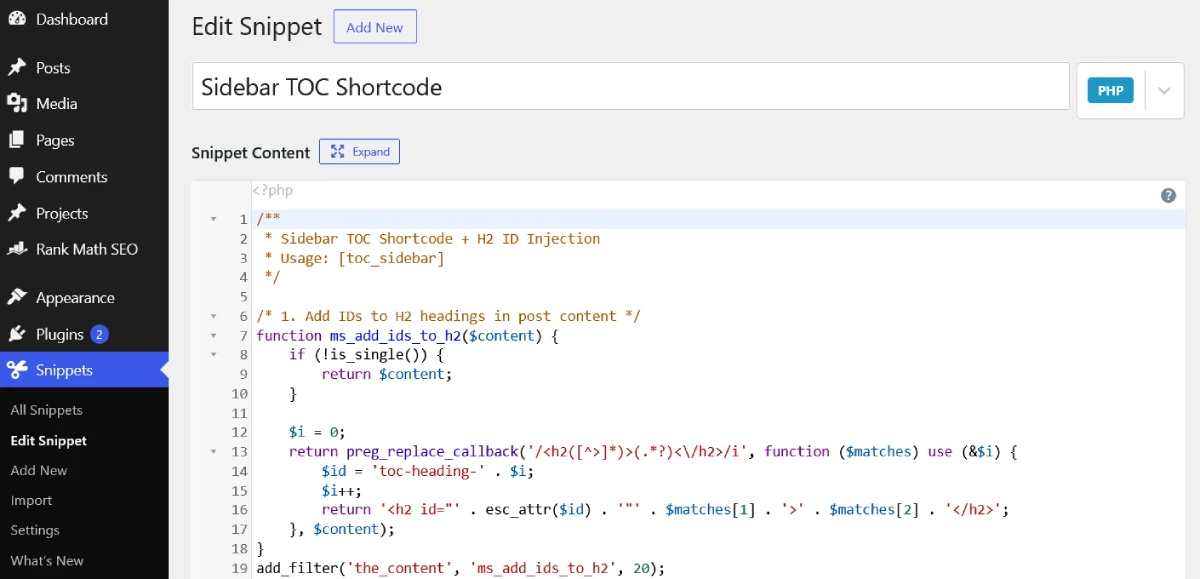
A couple of details worth calling out, since they trip people up when adapting this:
- Both functions run their own regex pass independently — the ID injection happens on
the_contentoutput, and the shortcode reads straight from$post->post_content. That’s deliberate: it keeps the shortcode usable in sidebar widgets, wherethe_contenthasn’t run yet. - The
$icounter in the ID function and the$indexin the shortcode loop only stay in sync because both regexes match H2 tags in the same document order. If you change one pattern, change the other to match. - If your headings use H3 instead of H2, replace every
h2in both functions withh3.
Important: If your site already uses another TOC plugin or custom heading ID generator, disable it before using this snippet to avoid duplicate IDs or conflicting anchor links.
Step 2: Add the CSS
Add this to Divi’s Theme Options > Custom CSS, or your child theme’s stylesheet:
.ms-toc {
  font-size: 14px;
  font-weight: 400;
}
.ms-toc-title {
  font-size: 18px;
  margin-bottom: 10px;
}
ul.ms-toc-list {
  list-style: none;
  padding: 0 !important;
  margin: 0 !important;
}
ul.ms-toc-list li {
  margin-bottom: 8px;
  margin-left: 0px;
  list-style: none;
  line-height: 1.5em;
  font-size: 13px !important;
}
.ms-toc a {
  text-decoration: none;
  color: #555;
  transition: all 0.2s ease;
}
.ms-toc a.active {
  color: #1e73be;
  font-weight: 600;
  padding-left: 8px;
  border-left: 3px solid #1e73be;
}
Note the .ms-toc a.active rule at the bottom. That class doesn’t get added by anything in this post — it’s there so the link highlights as a visitor scrolls past that section, which is the scroll-spy behavior I’m setting up in Part 2 alongside the sticky sidebar. If you skip Part 2, that rule simply won’t do anything, and the TOC will still work fine as a static linked list.
Step 3: Place the Shortcode in Divi
- Edit the sidebar you want the TOC to appear in, under Appearance > Widgets, or edit your post’s sidebar directly in the Divi Builder if you’re using a Divi sidebar module.
- Add a Text widget (or a Divi Text module if you’re placing it inside the builder).
- Enter the shortcode:
[toc_sidebar] - Save and preview a post that has at least two H2 headings.

If you’re using a global sidebar that appears on pages and archive templates too, that’s fine — the is_single() check in both functions means the shortcode quietly returns nothing outside single blog posts, so it won’t throw errors or show an empty box elsewhere.
Final Result
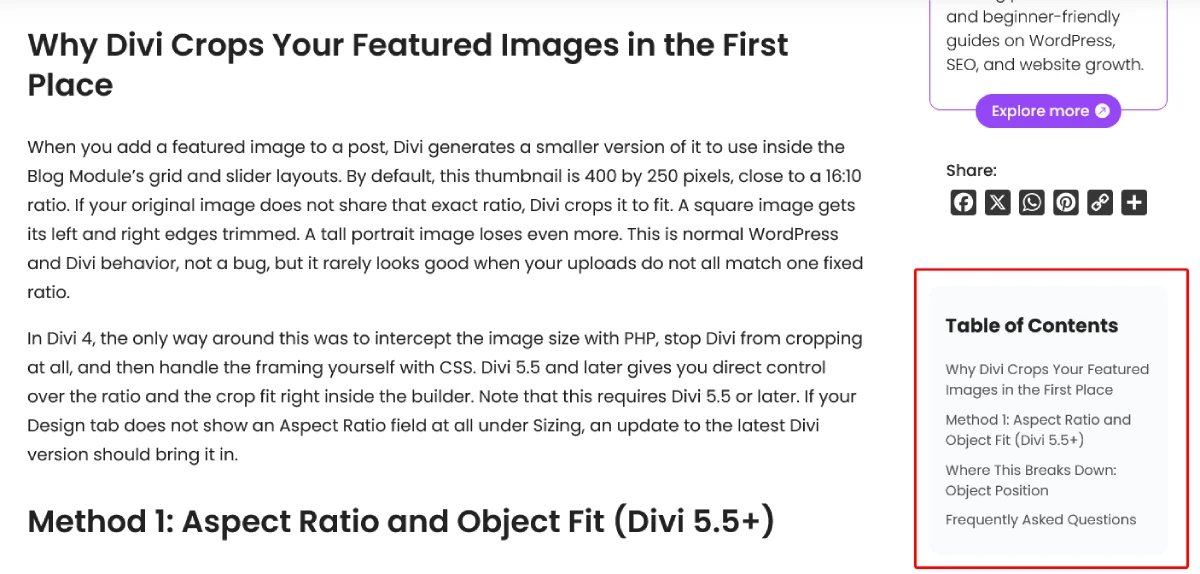
The finished sidebar table of contents generated automatically from your H2 headings.
Troubleshooting
A few things I ran into while testing this on my own posts:
- TOC isn’t showing up at all. Check that the post has at least two H2 headings — the function intentionally skips shorter posts. Also confirm the shortcode is inside a Text widget or module, not pasted as plain text in a module that doesn’t parse shortcodes.
- Links don’t jump to the right section. This usually means the ID injection filter isn’t running before your theme outputs the content. Confirm the priority is set to
20onadd_filter('the_content', 'ms_add_ids_to_h2', 20)— some Divi modules and page builders hook intothe_contentat lower priorities and can render before your IDs are added. - TOC and headings are out of order or mismatched. This happens if you have H2 tags inside code blocks, quoted HTML, or Divi modules that get rendered as literal text in the post content. The regex can’t tell the difference between a real heading and one sitting inside a code sample.
- Caching shows an old version of the TOC after editing headings. Since I’m on LiteSpeed Cache, I purge the page cache after editing heading text in a published post — otherwise visitors will see the cached TOC until it expires naturally.
Frequently Asked Questions
Does this only work with H2 headings?
As written, yes. Both the ID injection function and the shortcode target H2 tags specifically. If your posts use H3 for sections, swap every h2 reference in both functions for h3.
Will this slow down my site compared to a TOC plugin?
It should be lighter, not heavier. The snippet runs a regex against content that’s already loaded in memory for the post — there’s no additional database query, and nothing loads on pages that aren’t single posts. Most TOC plugins add their own CSS and JS files site-wide; this doesn’t.
Can I use this outside of Divi?
Yes. The shortcode works in any widget area or content block that renders shortcodes. Divi is just where I’m placing mine, in a sidebar module.
How do I highlight the current section as someone scrolls?
That requires a small JavaScript scroll-spy script to toggle the active class defined in the CSS above. I’m covering that as part of the sticky sidebar setup in Part 2, since the two work together.
What if I want the TOC to appear inside the post content instead of the sidebar?
Drop the same [toc_sidebar] shortcode directly into the post body using a Text module or the Classic Editor’s shortcode block. It’ll render identically wherever you place it.
What’s Next
This gets you a working, auto-generated table of contents with zero plugins. In Part 2, I’ll walk through making that sidebar sticky so it stays in view as visitors scroll, plus the scroll-spy script that lights up the active class above as they move through each section.

