
If you’ve built a WordPress website and started publishing content, the next big question is: how do you make your pages rank on Google?
That’s where on-page SEO comes in.
On-page SEO is all about optimizing the things inside your WordPress post or page—your content, headings, URLs, images, and internal links—so search engines understand your content and show it to the right audience.
This guide on on-page SEO for beginners is written specifically for WordPress users. No coding. No technical jargon. Just clear, practical steps you can follow before hitting Publish.
What Is On-Page SEO?
On-page SEO refers to the process of optimizing individual web pages so they rank higher in search engines and attract relevant traffic.
It includes:
- Content optimization
- Proper use of headings (H1, H2, H3)
- SEO-friendly URLs
- Internal linking
- Image optimization
- Meta titles and descriptions
Unlike off-page SEO or technical SEO, on-page SEO is fully under your control, making it the best place for beginners to start.
Why On-Page SEO Is Important for WordPress Websites
For new WordPress websites, on-page SEO plays a huge role because:
- It helps Google understand what your page is about
- It improves visibility even without backlinks
- It enhances user experience and readability
- It increases the chances of ranking for the right keywords
If you’ve recently launched your site, mastering on page SEO in WordPress can make a real difference in how quickly your content gets discovered.
On-Page SEO for Beginners: 9-Step WordPress Checklist
Below is a simple WordPress on-page SEO checklist you can follow for every blog post or page.
1. Choose One Focus Keyword
Every page should target one main keyword. This helps search engines clearly understand what your content is about and prevents keyword dilution, which is common in beginner blogs.
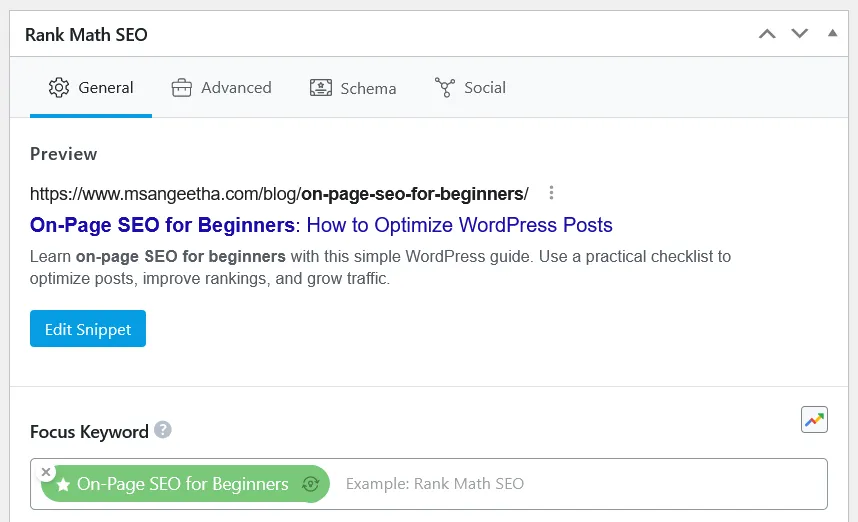
For this post, the focus keyword is: “on-page SEO for beginners”
Why one keyword?
- It keeps your content focused
- Prevents keyword stuffing
- Helps search engines clearly understand the topic
You can naturally include related keywords, but always optimize around one primary keyword.
2. Create an SEO-Friendly URL (Permalink)
Your URL is one of the first elements search engines and users notice. In on-page SEO for beginners, creating a clean, readable permalink helps clearly communicate what the page is about before anyone even clicks.
Your WordPress URL should be:
- Short
- Clean
- Keyword-focused
Bad example:
yoursite.com/?p=123
Good example:
yoursite.com/on-page-seo-for-beginners/

When creating URLs, try to remove unnecessary stop words like and, the, of, and to, unless they are needed for readability.
3. Optimize the H1 Heading
Your H1 heading is the main title users see on the page. It should clearly describe the topic and include your focus keyword naturally.
When writing your H1:
- Use only one H1 per page
- Include the focus keyword
- Make it clear and easy to understand for readers
The H1 heading helps both users and search engines understand what your page is about, but it should always be written for humans first. Keyword placement matters, but readability always comes first.
4. Optimize SEO Title & Meta Description
Your SEO title and meta description control how your page appears in Google search results.
The SEO title should include your focus keyword, stay under 60 characters, and clearly describe what the page is about. This is often different from the on-page heading (H1) and can be edited using an SEO plugin.
The meta description doesn’t directly affect rankings, but it strongly influences click-through rate. Write it for humans, keep it under 160 characters, and clearly explain what the reader will learn.
Most WordPress SEO plugins allow you to edit both the SEO title and meta description in one place, making this step simple for beginners.
Think of it as your page’s search result pitch.
5. Use Proper Heading Structure (H2 & H3)
Headings help both users and search engines understand your content. A clear heading structure makes your content easier to scan and understand. For on-page SEO for beginners, headings act as signposts that guide both readers and search engines through your content logically.
Best practices:
- Use only one H1
- Use H2 for main sections
- Use H3 for sub-points
- Avoid skipping heading levels
A well-structured post improves readability and supports on-page SEO optimization.
6. Write Helpful, Human-Friendly Content
At the core of on-page SEO for beginners is writing content that genuinely helps people. Search engines reward pages that focus on clarity, usefulness, and real answers rather than trying to manipulate keywords.
Before optimizing your content, make sure your site’s technical foundation is solid. Running a proper technical SEO audit ensures search engines can crawl and index your pages correctly, so your well-written content has the opportunity to rank.
When writing:
- Answer the user’s question completely
- Use simple language
- Avoid keyword stuffing
- Add examples and lists where possible
If your content solves the problem clearly, SEO follows naturally.
7. Optimize Images in WordPress
Images improve user experience, but they must be optimized. Image optimization plugins such as Smush or ShortPixel can help compress images without affecting quality, improving page speed and user experience.
For every image:
- Use a descriptive file name
- Add alt text (helps accessibility and SEO)
- Compress images to improve page speed
Image optimization is a small step that supports overall on-page SEO in WordPress.
8. Add Internal Links Strategically
Internal linking is an important part of on-page because it connects related content across your website. When done thoughtfully, internal links help users explore more pages while also helping search engines understand your site structure.
Internal links help:
- Search engines crawl your site
- Distribute SEO value
- Guide users to related content
Link to relevant posts naturally within the content.
Possible internal links from this post:
- Landing page guide
- WordPress plugins post
- Website launch guide
Avoid overdoing it—focus on relevance.
9. Improve Readability for Mobile Users
Most visitors will read your content on a phone or tablet, not a desktop. Paying attention to readability is essential in on-page SEO, as a clean mobile experience keeps users engaged longer.
Simple readability tips:
- Short paragraphs
- Bullet points
- Clear headings
- Plenty of white space
Good readability improves user engagement, which indirectly supports SEO.
Common On-Page SEO Mistakes Beginners Make
Many SEO issues happen not because of complexity, but because of small, avoidable mistakes. Understanding these common errors helps beginners stay focused on best practices without overthinking optimization.
Avoid these common mistakes:
- Targeting multiple keywords in one post
- Keyword stuffing
- Ignoring internal links
- Publishing without checking SEO title and URL
- Writing for search engines instead of users
On-page SEO is about balance, not perfection.
Do You Need an SEO Plugin for On-Page SEO?
Popular WordPress SEO plugins like Rank Math and Yoast SEO help beginners manage SEO titles, meta descriptions, and basic on-page optimization checks.
These plugins don’t do SEO automatically, but they make it easier to follow on-page SEO best practices inside WordPress.
They assist with:
- SEO titles and meta descriptions
- Readability checks
- Basic optimization reminders
Popular options include beginner-friendly WordPress SEO plugins, but the real work is your content.
Simple On-Page SEO Workflow Before Publishing
Before clicking Publish, check:
- Focus keyword selected
- SEO-friendly URL
- Optimized title and headings
- Internal links added
- Images optimized
- Meta description written
Following this workflow consistently improves on-page SEO for beginners over time.
Final Thoughts
On-page SEO may seem overwhelming at first, but it’s simply a set of good habits.
Start small. Optimize one post at a time. With practice, on-page SEO becomes second nature—and your content will be stronger because of it. If you’re just starting out, mastering on-page SEO for beginners is the easiest way to build long-term organic traffic with WordPress.
In the next guide, we’ll cover how to find the right keywords so you know exactly what to optimize for.
