
I get asked about alt text more than almost any other on-page SEO basic, usually by clients who assume it’s either a minor checkbox or a magic keyword-stuffing opportunity. It’s neither. Alt text is one of the few remaining places where you’re writing directly for a machine that genuinely can’t see the image, and getting it right matters for both rankings and accessibility.
Here’s how I handle alt text on every WordPress site I manage, including the sites built on Divi 5.
What Alt Text Actually Is (and What It Isn’t)
Alt text (short for “alternative text”) is the value of the alt attribute on an <img> tag. It describes what’s in the image for anyone or anything that can’t see it: screen reader users, browsers when an image fails to load, and search engine crawlers.
It’s easy to confuse alt text with two other things:
- Image captions — visible text displayed under an image for human readers. Captions and alt text can say different things because they serve different audiences.
- Title attributes — the small tooltip that sometimes appears on hover. Title attributes carry very little SEO weight and aren’t a substitute for alt text.
Only alt text is read by screen readers and alt text remains one of the strongest signals Google uses to understand an image alongside surrounding text, filenames, structured data, and its own computer vision systems. Well-written alt text still provides important context that automated image recognition cannot always infer.
Alt Text vs Caption vs Title Attribute: What’s the Difference?
| Feature | Alt Text | Caption | Title |
|---|---|---|---|
| Visible to visitors | No | Yes | Sometimes |
| Used by screen readers | ✅ | No | Usually No |
| Helps image SEO | ✅ | Indirectly | Minimal |
| Purpose | Describe image | Explain image | Tooltip |
Adding Alt Text in WordPress
Via the Media Library
Upload your image, then click into it from the Media Library. There’s an “Alt Text” field separate from Title, Caption, and Description. This is the field that gets used wherever that image is inserted via the block editor or most page builders — set it once here and you often don’t need to repeat it.
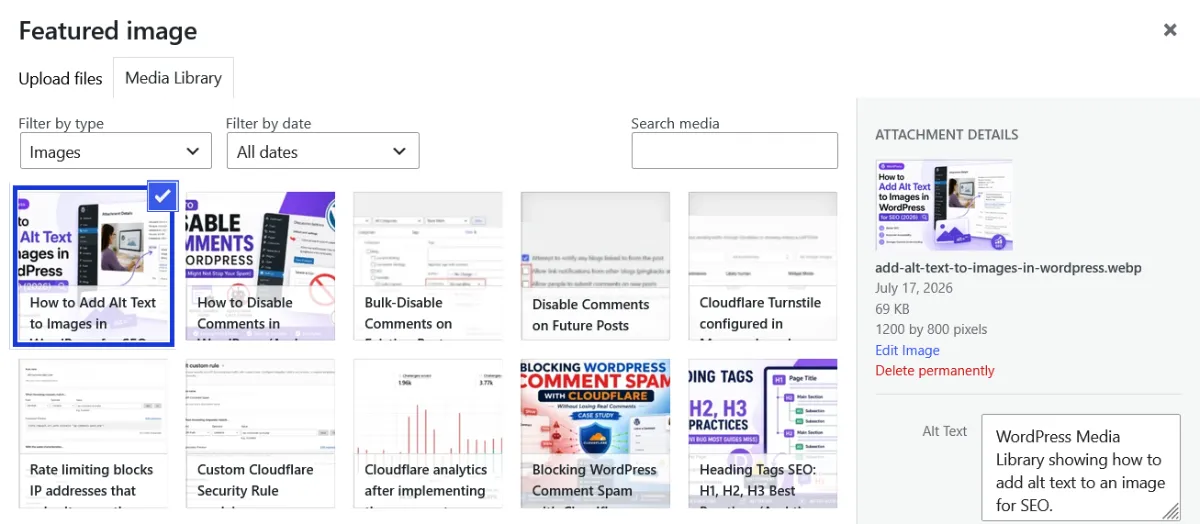
Via the Divi 5 Image Module
If you’re building in Divi, the Image Module has its own Alt Text field under the Content tab, separate from the Media Library value. This is worth knowing because it means you can override the Media Library alt text on a per-instance basis — useful if the same image gets reused in different contexts and deserves a different description each time.
One Divi-specific gotcha: section, row, and column background images do not support alt text at all. Backgrounds are applied as CSS, not as <img> tags, so there’s no attribute for a screen reader or crawler to read. If an image is meaningful to your content — not purely decorative — don’t rely on a Divi background image to carry it. Use an actual Image Module instead.
How to Write Alt Text That Actually Helps
Good alt text is short, specific, and honest about what’s in the image. A few rules I follow:
- Describe the image, not your keyword wishlist. “Golden retriever puppy chewing a rope toy” beats “dog toys pet accessories buy online.”
- Aim to keep alt text concise—usually under about 125 characters. There isn’t a strict character limit, but shorter descriptions are generally easier for screen reader users to understand.
- Don’t start with “image of” or “picture of.” Screen readers already announce it as an image — that phrasing is redundant.
- Use your keyword only if it genuinely describes the image. If your target keyword is “WordPress dashboard tutorial” and the image is a screenshot of the dashboard, “WordPress dashboard screenshot showing the Rank Math SEO panel” is accurate and naturally keyworded. Forcing a keyword into an unrelated image helps no one and can read as spam.
- Include visible text in the image if there is any. If a screenshot has an error message, describe it: “WordPress error screen showing ‘Error establishing a database connection.'”
Don’t Forget the Image Filename
Alt text and filenames work together. Before uploading an image, rename it from something like IMG_4827.jpg to wordpress-media-library-alt-text.jpg. While filenames carry less weight than they once did, they still provide additional context for search engines and make your media library easier to manage.
Decorative Images: When to Leave Alt Text Empty
Not every image needs a description. Purely decorative images — a divider graphic, a background pattern, an icon that repeats information already in nearby text — should have an empty alt attribute: alt="". This isn’t skipping the field out of laziness; it’s telling screen readers to skip the image entirely rather than announce something meaningless like “decorative-swirl-03.png.” Leaving the alt text blank for decorative images is acceptable only when the final HTML outputs an empty alt=”” attribute. Some themes, plugins, or page builders may instead insert the filename or omit the attribute entirely, so it’s worth checking the rendered HTML.
Auditing Alt Text on an Existing Site
If you’re inheriting a site or haven’t been consistent about this, you don’t need to open every post individually. A crawl with Screaming Frog (or Rank Math’s own image SEO reporting if you’re on the Pro plan) will list every image missing alt text site-wide. I run this quarterly on client sites alongside other technical SEO checks — it’s usually a five-minute job to find the gaps, though filling them in properly still takes real time since each one needs an accurate description, not a bulk find-and-replace.
Does Alt Text Still Move the Needle in 2026?
Yes, but not in the way it did a decade ago. It won’t single-handedly rank a page. What it reliably does is help your images surface in Google Images and Google Discover, gives Google additional context to understand a page’s topic when paired with surrounding text, and — most importantly — makes your site usable for people relying on assistive technology. With AI-driven search surfaces now pulling from the same index, accurately described images are also part of how those systems understand what a page is actually about.
Frequently Asked Questions
Does alt text still matter for SEO in 2026?
Yes. It won’t move rankings on its own, but it helps Google understand image content, supports Google Images and Discover visibility, and is essential for accessibility. It’s a foundational signal, not a ranking hack.
Do decorative images need alt text?
No — purely decorative images should use an empty alt attribute (alt="") so screen readers skip over them rather than announce something meaningless.
Does a Divi background image need alt text?
Divi section, row, and column background images are applied via CSS and have no alt attribute at all. If the image carries meaningful content, use an Image Module instead of a background image.

