
A complete strategy checklist covering audits, competitor analysis, keyword mapping, platform migration, and SEO protection — before any design begins.
Planning a website redesign? Before you start browsing templates or picking colour palettes, there is a set of important steps that most business owners skip — and those skipped steps are exactly why so many redesigns end up losing traffic, rankings, and leads.
A poorly planned redesign can wipe out years of SEO progress overnight. But with the right preparation, it can significantly improve your rankings, traffic, and conversions.
A website redesign is not just a design project. It is a strategic decision that affects your SEO, your content, your hosting infrastructure, and how your audience finds you online. Done correctly, it can significantly improve your search rankings and conversions. Done without preparation, it can undo years of SEO work in a matter of days.
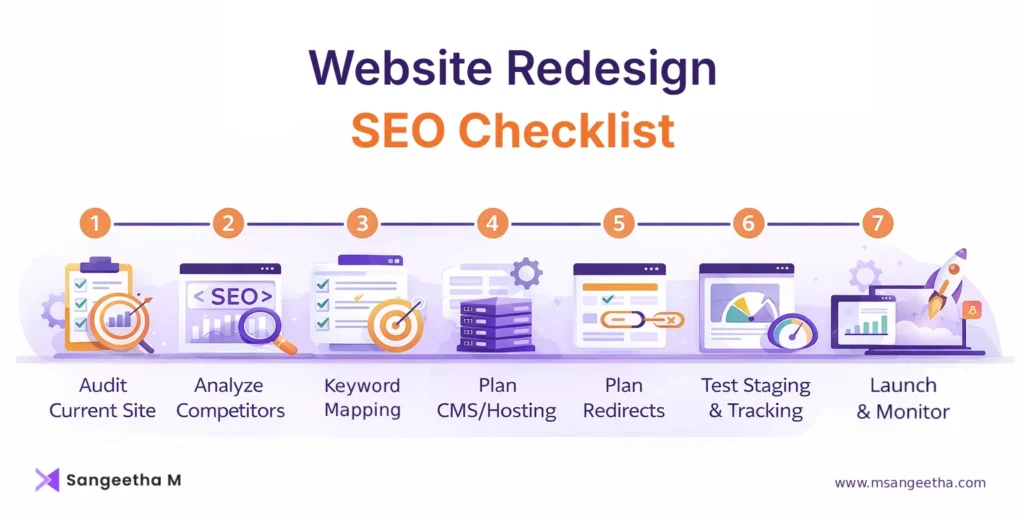
This guide covers everything you need to do before a single design element is touched — from understanding why you want a redesign, to auditing what you currently have, analysing your competitors, identifying content gaps, and deciding whether a platform or server migration is needed.
Quick Summary: Website Redesign SEO Checklist
- Audit current site
- Identify top-performing pages
- Analyze competitors
- Map keywords to pages
- Plan redirects
- Decide on CMS/hosting
- Test tracking before launch
Why Are You Redesigning Your Website?
The starting point of any successful website redesign is not a mood board — it is a clear answer to one simple question: why do you want to redesign your website?
This might seem obvious, but many redesign projects begin with vague goals like “it looks outdated” or “we want something fresh.” While those feelings are valid, they are not a strategy. Without a clear business reason behind the redesign, it becomes very easy to invest time and money into something that looks different but performs the same — or worse.
It also helps to build a clear approval workflow from the start — design sign-off, content sign-off, and a final URL review before go-live. This avoids last-minute scope changes that delay the launch or introduce errors.
Here are the most common and legitimate reasons business owners decide to redesign their websites.
- The website is not generating leads or enquiries. Traffic exists, but visitors are not converting into customers. This is usually a signal of poor user experience, unclear messaging, or a broken conversion path — not just a visual problem.
- The site is slow and not passing Core Web Vitals. Page speed is a confirmed Google ranking factor. If your site is slow to load, it directly impacts both your search rankings and how long visitors stay on your pages.
- The mobile experience is broken. Over 60 percent of web traffic comes from mobile devices. If your site was built before mobile-first became the standard, your visitors on phones are likely having a frustrating experience.
- The business has rebranded or expanded. New services, new locations, a new audience segment, or a new brand direction — if your website no longer reflects where your business is today, a redesign makes sense.
- The site architecture cannot scale. If adding new pages, blog posts, or service areas feels like a workaround rather than a natural extension, the underlying structure may need to be rebuilt from scratch.
- Competitors have overtaken you in search results. If you have noticed a gradual drop in organic traffic or keyword rankings, your competitors may have invested in better content, structure, or technical SEO.
- Compliance or accessibility requirements have changed. WCAG accessibility standards and privacy regulations such as GDPR can require structural and technical changes that are easier to address during a full redesign.
Getting clarity on the real reason — and documenting it before anything else — gives your entire redesign a measurable objective. It helps you and your designer or developer make decisions based on business outcomes, not personal preferences.
Before You Start: The Complete Pre-Redesign Checklist
Before any design work begins, two documents should exist — a site architecture map outlining the new page structure, and a keyword mapping sheet assigning a target keyword to every URL. These become the reference point for every decision that follows.
A successful website redesign starts long before any design work begins. Work through each of these steps in order — skipping any one of them is where most redesigns go wrong. If you’re planning a redesign and want to make sure your SEO is protected, follow this checklist step by step — or use it as a reference during your project.
This post covers everything from auditing your current site and analyzing competitors, to deciding if a platform or server migration is needed.
Here’s how to approach your website redesign the right way:
Step 1: Audit Your Existing Website Before Anything Changes
This is the step that separates a strategic redesign from a cosmetic one, and it is also the step most commonly skipped.
Your current website has data. It has traffic patterns, keyword rankings, backlinks, and page-level performance metrics built up over months or years. Before you change anything, you need to understand what is working, what is broken, and what you absolutely cannot afford to lose.
Check Traffic and Rankings First
Open Google Analytics 4 and Google Search Console before you do anything else. You are looking for specific data points.
- Which pages are bringing in the most organic traffic? These pages have earned their rankings. They must be preserved in the new site — same URL, same topic, improved content if anything.
- Which keywords are you currently ranking for? Export this data from Google Search Console. This becomes your baseline. Any URL changes or content removals during the redesign will need to be mapped against this list.
- Where is your traffic coming from? Organic search, direct, referral, or social? Understanding your traffic sources tells you which channels to protect and which to improve.
- Which pages have the highest conversion rates? These are your most valuable pages regardless of traffic volume. They need special attention during the redesign.
Run a Technical SEO Crawl
Use Screaming Frog (free up to 500 URLs) or a similar crawling tool to get a full picture of your site’s technical health. Look for:
- Broken links (404 errors) — These hurt user experience and waste crawl budget. Note them so they can be fixed in the new site.
- Redirect chains — If a URL redirects to another URL that redirects again, that slows down crawlers and users. Simplify these during the redesign.
- Missing or duplicate meta titles and descriptions — Every page should have a unique, optimised title and description.
- Pages with thin content — Decide whether to improve them, merge them with related pages, or remove them entirely.
- Canonical tag issues — Duplicate content problems caused by incorrect canonical tags can suppress your rankings.
- Orphan pages — Pages that exist on your site but are not linked to from anywhere. Search engines struggle to find and index these.
Document Every URL
Create a complete spreadsheet of every URL on your current website. This is not optional. This spreadsheet becomes the foundation for your 301 redirect map — which you will need if any URLs change in the redesign. Losing a URL without setting up a proper redirect means losing all the SEO value that page had built up.
Review Your Backlink Profile
Use Google Search Console, Ahrefs, or Semrush to check which external sites are linking to your pages. Pay particular attention to pages with strong backlinks — these have the most authority to carry over. If those URLs change without a redirect, that link equity disappears entirely.
Assess Page Speed and Core Web Vitals
Run your most important pages through Google PageSpeed Insights. Check your Core Web Vitals scores in Google Search Console. If your site is already struggling with speed, document where the issues are coming from — heavy images, bloated plugins, a slow hosting environment, or inefficient code. These issues should be fixed in the redesign, not carried over.
Step 2: Identify What Already Exists and What Is Worth Keeping
Not everything on your current website needs to be replaced. In fact, one of the biggest mistakes in a website redesign is treating your existing content as a blank slate.
Some of your current pages and blog posts are likely driving meaningful traffic or holding ranking positions that took months to build. Removing or significantly changing those pages without a plan is one of the fastest ways to lose organic traffic after a website redesign.
Categorise Your Content Into Four Groups
- Keep as-is — High-traffic pages, pages with strong backlinks, and pages performing well in search results. These should move to the new site with the same URL and minimal content changes.
- Keep and improve — Pages that are ranking but could rank higher with better content, clearer structure, or updated information. The redesign is a good opportunity to refresh these without changing the core topic or URL.
- Merge or consolidate — Multiple pages covering the same or very similar topics. These can cause keyword cannibalization, where your own pages compete against each other in search results. Consolidating them into one stronger page — with redirects from the old URLs — usually improves rankings.
- Remove — Outdated content, duplicate pages, thin pages with no traffic or backlinks, and pages that no longer reflect your business. Remove carefully, with redirects pointing to the closest relevant page if they had any inbound links.
One of the most underestimated challenges in a website redesign — especially when taking over someone else’s site — is identifying and preserving the styling of existing inner pages and blog posts. Every site uses its own class names and HTML structure, and when the theme changes, those styles can break silently across hundreds of pages. If you are redesigning your own previous work, this is manageable because you know the structure. For a new client’s site, it requires careful inspection of the existing code before redesigning, so the new CSS accounts for all existing content patterns.
Map Your Current Site Structure
Draw out or document the current hierarchy of your website — how pages relate to each other, how the navigation is structured, and how users move from one section to another. This gives you a clear picture of what the new information architecture needs to preserve or improve. It also helps you identify structural problems like pages buried too deep or navigation menus that hide important content.
Exporting and Importing Posts
If your site has a large blog archive, export your posts by category before the redesign begins. After completing the main pages, import them into the new site and verify that all taxonomies — categories, tags, and custom post types — have carried over correctly. For sites with hundreds or thousands of posts, this is one of the most time-consuming parts of a redesign and needs its own timeline.
Step 3: Competitor Analysis — What Are They Doing That You Are Not?
Once you understand your own site, it is time to look outward. Competitor analysis is not about copying what others are doing — it is about understanding the landscape you are operating in and identifying the gaps you can fill.
Identify Your Real Competitors
Your search competitors may not be the same as your business competitors. Search competitors are the websites currently ranking for the keywords you want to rank for. Use Google Search Console or a tool like Semrush or Ahrefs to find which sites are appearing for your target keywords. Make a list of the top three to five competitors you want to analyse.
Analyse Their Site Structure
Visit each competitor’s website and examine how it is organised. Look at:
- What pages exist in their navigation? Are they covering topics or services that you are not?
- How is their content grouped? Do they use categories, pillar pages, topic clusters, or simple page hierarchies?
- What does their blog or resource section look like? How frequently do they publish?
- How deep is their site architecture? Are there two or three levels of pages?
Find the Gaps in Their Structure
Competitor analysis is equally useful for finding what they are missing. Look for:
- Topics they have not covered — Questions your audience commonly asks that none of your competitors have addressed thoroughly. That is a content gap you can fill.
- Thin content areas — Pages that rank but offer little depth. You can create more comprehensive content on the same topic and potentially outrank them.
- Poor user experience — If competitors have slow load times, confusing navigation, or mobile usability problems, your redesigned site can address these.
- Missing pages — Common sections like FAQs, case studies, comparison pages, or location pages that competitors have not built. Adding these to your new site structure gives you more ranking opportunities.
Use Semrush or Ahrefs to check which keywords competitors rank for that you do not. These keyword gaps become content ideas for your new site structure.
Planning a WordPress website redesign and not sure where to start?
I help businesses redesign their WordPress websites the right way — with full SEO protection, competitor analysis, and a clear strategy from day one.
Step 4: Keyword Research for the New Site Structure
With your audit complete and competitor analysis done, you now have the information needed to build a smart keyword strategy for your redesigned website.
Map Keywords to Pages
Every important page on your new website should be built around a primary keyword. This is called keyword mapping — assigning one target keyword to each URL so that there is no overlap or cannibalization between pages.
- Home page → targets your primary brand or service keyword
- Services page → targets your main service category keyword
- Individual service pages → each targets a specific service keyword
- Blog posts → each targets a long-tail informational keyword
Focus on Search Intent
Google’s priority is matching content to search intent — what the person searching actually wants to find. Each keyword falls into one of three intent categories.
- Informational intent — The person wants to learn something. Blog posts, guides, and how-to articles serve this intent.
- Navigational intent — The person is looking for a specific website or brand. Your homepage and brand pages serve this.
- Transactional or commercial intent — The person wants to buy, hire, or enquire. Your service pages and contact pages serve this.
Include Long-Tail Keywords
While your main service pages target higher-volume, more competitive keywords, your blog and resource section should target long-tail keywords — more specific, lower-competition search phrases. These are often easier to rank for and bring in highly targeted visitors who are further along in their decision-making.
A well-structured blog section built during the redesign gives your site a consistent source of new rankings over time.
Read: Keyword Research: How to Find the Right Keywords for Your Website
Step 5: Do You Need a Platform or CMS Migration?
Many website redesigns are also the right opportunity to move to a different content management system. But this is a decision that should be made carefully, because a CMS migration carries its own SEO risks if not handled correctly.
Common Reasons to Change Your Platform
- Your current CMS is limiting your SEO. If you are using a website builder that restricts SEO controls — such as the ability to customise URL structures, set canonical tags, or add schema markup — switching to a more capable platform like WordPress can significantly improve your visibility.
- The site is hard to update. If making basic content changes requires developer help every time, a more user-friendly CMS saves time and reduces ongoing costs.
- The platform is no longer supported or scalable. Older platforms may lack modern security updates, plugin ecosystems, or integration options.
- You are moving from a custom-built site to a managed CMS. Many businesses move to WordPress during a redesign to get access to a wider plugin ecosystem, easier editing, and better SEO tooling.
What to Check Before Migrating Platforms
If you are changing platforms, the biggest SEO risk is URL structure changes. When a URL changes — even slightly — all the SEO value accumulated at that old URL needs to be transferred using a 301 redirect. Without these redirects, that ranking authority disappears.
Before migrating:
- Document every existing URL exactly as it currently appears
- Map each old URL to its new equivalent on the new platform
- Set up 301 redirects for every changed URL before or immediately at launch
- Test every redirect before the new site goes live
WordPress is the most commonly used CMS for redesigns because of its flexibility, SEO plugin support (such as Rank Math or AIOSEO), and large developer community.
Step 6: Do You Need a Server or Hosting Migration?
A website redesign sometimes reveals that the current hosting environment is part of the problem — either because the server is slow, the hosting plan no longer meets the site’s needs, or you are moving to a new platform that requires a different server setup.
Signs Your Hosting Needs to Change
- Your site is consistently slow despite optimisation efforts. If you have compressed images, minimised code, and used caching but your site is still slow, the hosting environment itself may be the bottleneck.
- You are on shared hosting and outgrowing it. Shared hosting works for small, low-traffic sites. As your site grows, moving to a managed WordPress host or a VPS can significantly improve speed and reliability.
- Your current host does not support your new platform. If you are moving to a platform that requires specific server configurations, you may need to change hosts as part of the migration.
- Security and uptime have been unreliable. Frequent downtime, lack of SSL, or poor security infrastructure are good reasons to migrate to a more reliable hosting provider.
“Most SEO losses during redesigns don’t happen because of design changes — they happen because of poor planning.”
SEO Considerations for a Server Migration
A server migration done incorrectly can cause serious disruption. Here is what to plan for:
- Maintain your domain name and SSL certificate — Your domain and HTTPS status should remain unchanged unless there is a specific reason to move.
- Check server response time (TTFB) after migrating — Run your pages through Google PageSpeed Insights to confirm that Time to First Byte has not increased.
- Monitor Google Search Console daily — Check for any new crawl errors or indexing issues that appear right after the server change.
- Avoid migrating server and platform simultaneously if possible — Changing both at once makes it much harder to diagnose problems when they arise.
Tip: If possible, migrate the server first, let it stabilise, then carry out the redesign or platform change. This makes troubleshooting far easier.
Step 7: Plan Your Redirect Strategy
If any URLs are changing in your redesign — and they almost always are — you need a redirect plan before the new site goes live. This is not something to figure out after launch.
One practical approach is to build the new site in a demo folder on the same server, with the site discouraged in WordPress settings and blocked via robots.txt. Keeping the old and new URLs side by side in the same spreadsheet — with the demo URLs in the next column — makes it much easier to map redirects accurately before going live.
A 301 redirect tells search engines that a page has permanently moved to a new location. It passes the majority of the original page’s ranking authority to the new URL. Without this, you lose that authority entirely.
How to Build Your Redirect Map
Go back to the URL spreadsheet you created during the audit. For every URL that is changing in the new site, document the old URL, the new URL it should redirect to, and whether it is a direct replacement or a consolidation of multiple old pages into one.
Prioritise your redirect map based on:
- Pages with the most organic traffic
- Pages with the most backlinks
- Pages with the highest conversion rates
These are the pages where a missed redirect causes the most damage. Use a tool like Screaming Frog or Redirect Checker to test every redirect before launch and confirm there are no redirect chains or loops.
Step 8: Set Up and Test Your Tracking Before Launch
One of the most common oversights in a website redesign is launching the new site and then discovering that Google Analytics or conversion tracking has stopped working.
Before launch, verify that the following are correctly implemented on the new site:
- Google Analytics 4 (GA4) — Confirm that the tracking code is on every page and that key events such as form submissions and button clicks are being tracked correctly.
- Google Search Console — If your site structure has changed significantly, re-verify your property and submit a new XML sitemap.
- Google Tag Manager — Confirm that the container is correctly installed on the new site and that all tags are firing as expected.
- Conversion goals — Test every form, button, and checkout flow to confirm that conversions are being recorded.
Setting up a staging version of the new site and testing all tracking in a development environment before the live launch saves a great deal of time and avoids gaps in your data.
Final Checks Before Going Live
Before your redesigned website goes live, run through this checklist. These are the things most commonly missed right before launch.
- Page titles and meta descriptions — Every page should have a unique title tag with the target keyword and a meta description that encourages clicks. Check for any pages still carrying placeholder text.
- Internal links — Review all internal links on the new site and confirm they point to the correct new URLs. Broken internal links on launch day are very common after a redesign.
- Contact forms and CTAs — Test every form and call-to-action button before going live. Confirm submissions are reaching the right email address and that thank-you page redirects are working correctly.
- Active PPC landing pages — If you are running paid campaigns, verify that all active landing pages are live and working correctly before launch. A broken landing page after go-live means wasted ad spend.
- Mobile responsiveness — Test every page on an actual mobile device, not just browser preview. Check navigation, buttons, forms, and images.
- Page speed — Run your key pages through Google PageSpeed Insights before launch. Fix obvious issues — uncompressed images, render-blocking scripts, or missing caching.
- robots.txt — Confirm your robots.txt file is not accidentally blocking search engines from crawling the new site. This happens more often than you would expect, especially when migrating platforms
This isn’t about perfection — it’s about making sure nothing obviously broken goes live.
What to Do After the Redesign Launches
The work does not stop when the new site goes live. The first few weeks after launch are critical for catching issues before they affect your rankings.
- Test on multiple devices and browsers — Check that the new site works correctly on desktop, tablet, and mobile, and across Chrome, Safari, and Firefox.
- Re-test all contact forms and CTAs — Even if forms were tested before launch, verify them again on the live site. Staging environments can behave differently from the live server, and a broken form on a live site means lost leads.
- Review .htaccess and security plugin settings — After going live, confirm that your .htaccess file is correctly configured and that your security plugin settings have been reapplied. These are sometimes reset during a migration or platform move.
- Flush permalinks — Go to
Settings → Permalinksin WordPress and click Save Changes without making any edits. This regenerates the .htaccess rewrite rules and prevents unexpected 404 errors after the site goes live. - Check your redirect map — Run a fresh crawl of the new site to confirm all redirects are working and there are no broken links.
- Submit your XML sitemap — Re-submit to Google Search Console to help Google re-crawl and index your new pages faster.
- Monitor Google Search Console daily — Check for any new crawl errors, indexing issues, or manual actions that appear in the first few weeks after launch.
- Watch your keyword rankings — Some fluctuation is normal after a redesign. Significant drops that persist beyond two to four weeks need investigation.
Note: If you notice unusual spikes or drops, don’t panic immediately — sometimes analytics data can be misleading. Understanding traffic sources properly becomes important here, especially when interpreting direct traffic.
Website Redesign Done Right: Key Takeaways
A website redesign is one of the most significant investments a business makes in its online presence. The difference between a redesign that grows your traffic and one that damages it comes down almost entirely to how much preparation happens before the design work begins.
Audit your existing site. Understand what is working. Analyse your competitors and find the gaps. Map your keywords to your new structure. Plan your redirects. Decide on your platform and hosting before you start building. And test everything before you launch.
Done in this order, your redesign becomes a growth strategy — not just a cosmetic update.
A well-planned website redesign protects your SEO — and sets your site up for long-term growth.
Ready to redesign your website without losing SEO?
I work with small businesses and service-based websites to plan and execute WordPress redesigns that protect SEO and improve conversions.
Frequently Asked Questions
Q. What is website redesign in SEO?
Website redesign in SEO refers to updating a website’s design, structure, or platform while preserving and improving its search engine rankings and traffic.
Q. Will a website redesign hurt my SEO?
It can, but it does not have to. The main reasons redesigns hurt SEO are URL changes without proper redirects, removal of high-performing content, and changes to on-page elements like title tags and headings. Following the steps in this guide significantly reduces those risks.
Q. Why does traffic drop after a redesign?
Traffic drops usually happen due to missing redirects, deleted content, broken links, or changes in site structure and URLs.
Q. How long does it take to recover SEO after a website redesign?
If the redesign is handled correctly with proper redirects and preserved content, recovery is usually minimal. Significant drops that do not recover within four to six weeks are usually a sign that something was missed — a redirect, a removed page, or a technical issue.
Q. Do I need to migrate platforms during a redesign?
Not necessarily. If your current platform supports the SEO controls and flexibility you need, staying on it is fine. Platform migration only makes sense if your current CMS is genuinely limiting your SEO or usability.
Q. What is the most important thing to do before a website redesign?
Audit your current site — specifically your top-performing pages, keyword rankings, and backlink profile — so you know what to protect before anything changes.
Q. How do I make sure my forms and tracking still work after a redesign?
Test all tracking and conversion goals on a staging site before launching. Verify that Google Analytics, Google Tag Manager, and any form integrations are correctly configured on the new site before it goes live.
