
You’ve published a new page. You’ve done the keyword research, written quality content, and added internal links. But days — sometimes weeks — go by and it still hasn’t shown up in Google’s search results.
The culprit might not be your content. It could be your crawl budget.
Crawl budget is one of the most misunderstood concepts in technical SEO. Most guides gloss over it with a quick checklist — fix your redirects, block your parameters, done. But for websites that are large, frequently updated, or technically complex, crawl budget directly controls which pages get indexed and how often they get refreshed. And in 2026, with AI crawlers consuming a growing share of server resources, managing crawl budget has become more critical — and more complicated — than ever.
This guide breaks down exactly what crawl budget means, when it genuinely matters for your site, what’s wasting it right now, and the concrete steps you can take to fix it.
What Is Crawl Budget?
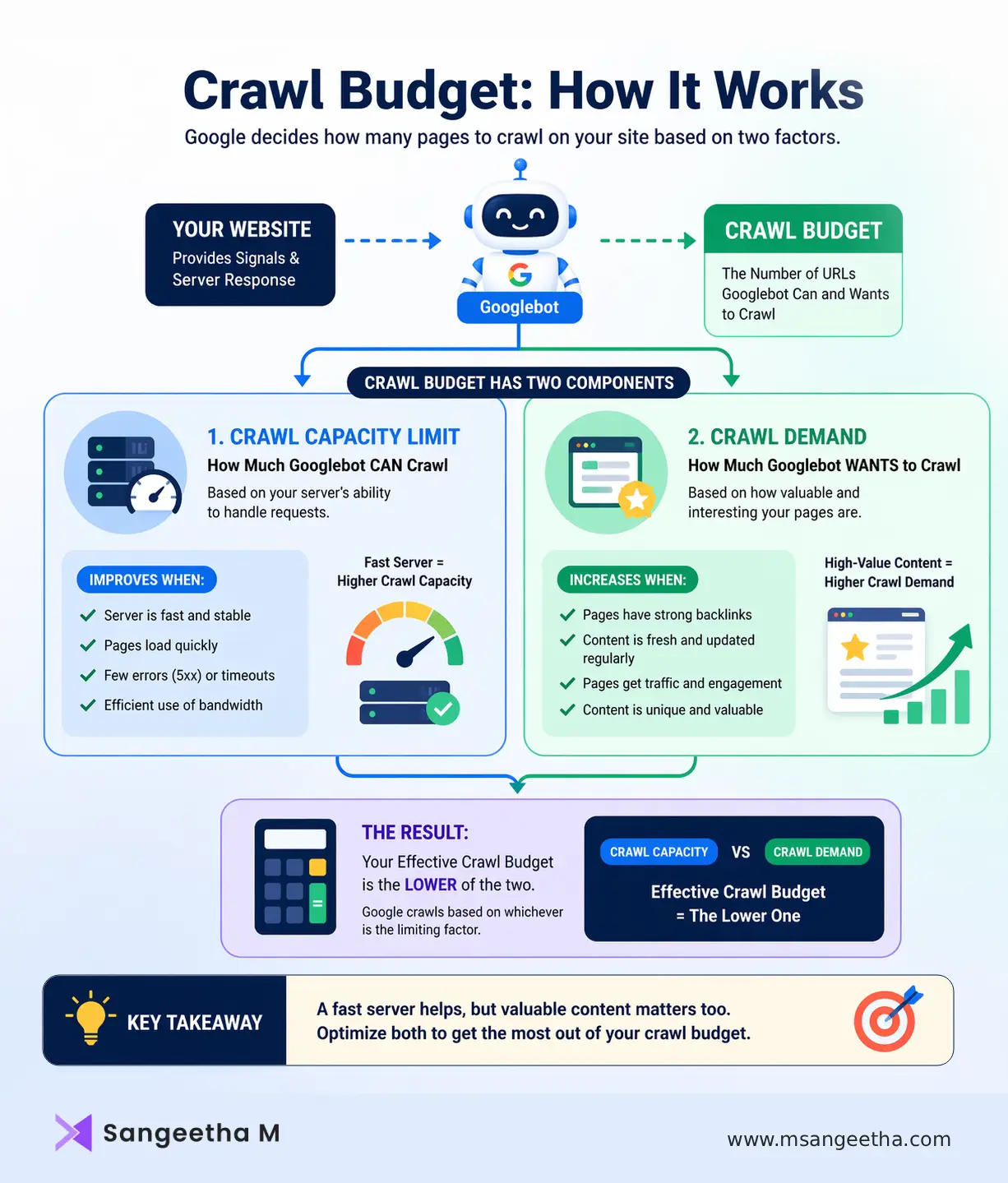
Crawl budget is the number of URLs Googlebot will crawl on your website within a given timeframe. Google’s own documentation defines it as “the number of URLs Googlebot can and wants to crawl” — and that phrasing reveals something important. There are two distinct forces at work: what your server allows, and what Google actually wants to visit.
These two forces map to the two official components of crawl budget:
- Crawl Capacity Limit — the maximum number of simultaneous connections Googlebot can make to your server without degrading user experience. If your server responds slowly, times out frequently, or returns 5xx errors, Googlebot automatically pulls back. A faster, more stable server directly increases how much Google can crawl.
- Crawl Demand — how interested Google is in your pages based on signals like popularity, freshness, and perceived content value. Pages with strong backlinks, consistent traffic, and frequent updates get crawled more often. Pages that are thin, stale, or rarely linked tend to get crawled infrequently or skipped entirely.
Update (July 2026): Google refreshed its Optimize your crawl budget documentation this month, and one clarification is worth calling out: every site starts on the same default, conservative crawl capacity limit, which Google’s systems adjust upward automatically if there’s demand and your server stays healthy. Google also confirmed that crawl capacity is shared across all crawlers — meaning high demand from one bot (an AI crawler, for instance) can reduce the capacity left over for Googlebot. That’s a direct link to the AI crawler competition covered below.
Your effective crawl budget is essentially the lower of these two values. A blazing fast server won’t help if Google doesn’t see your content as worth revisiting. And highly valuable content won’t be crawled efficiently if your server throttles Googlebot at every visit.
Does Your Site Actually Have a Crawl Budget Problem?
Here’s the honest truth that many SEO guides skip: most websites don’t need to worry about crawl budget at all.
Google’s own documentation states this explicitly. If your site has a few hundred or even a few thousand pages that get indexed within a day or two of publishing, crawl budget is not your constraint. Your time is better spent on content quality, backlinks, and on-page SEO.
Crawl budget optimization becomes essential when your site falls into one or more of these categories:
- Your site has 10,000+ indexable URLs
- You run an e-commerce site with faceted navigation (filters, sorting, variants) that generates thousands of parameter-based URLs
- You’re a publisher or news site where indexing speed is time-sensitive
- New content consistently takes weeks to appear in search results
- Google Search Console shows large volumes of “Discovered, currently not indexed” or “Crawled, currently not indexed” pages
- Your server logs show Googlebot spending time on irrelevant URLs
If two or more of these apply to your site, crawl budget optimization deserves a dedicated place in your technical SEO strategy.
What’s Wasting Your Crawl Budget Right Now?
Crawl budget is rarely wasted by accident. There are predictable, recurring patterns that drain it — and once you know them, they’re fixable.
1. Faceted Navigation and URL Parameters
This is the single biggest crawl budget killer on e-commerce sites. When product filters, sorting options, and session IDs generate new URLs for every combination, a single category with five filters and three values each can produce over 200 unique URLs. Googlebot attempts to crawl many of them, consuming crawl budget on near-duplicate pages that offer no unique indexable value.
The fix isn’t just adding a canonical tag — it’s controlling which facet URLs are crawlable at all. Use robots.txt directives to block parameter-based URLs, or configure your URL structure so filters don’t create new pages that search engines can discover.
2. Duplicate Content Without Canonical Control
Thin category pages, auto-generated tag archives, pagination sequences, and print-friendly versions of posts all create duplicate or near-duplicate pages. Without proper canonicalization, Googlebot crawls all of them, splitting its attention across content that brings zero additional indexing value.
A clean canonical strategy — pointing duplicate or thin pages back to the primary canonical URL — eliminates this waste and focuses crawl budget where it matters.
3. Redirect Chains and Broken Links
Each redirect adds an extra crawl step. A chain of three or four redirects means Googlebot uses multiple requests just to reach one final destination. Broken links pointing to 404 pages force crawlers to repeatedly visit URLs that return no value.
Auditing your site for redirect chains and fixing or removing broken internal links is one of the highest-ROI crawl budget fixes available. It’s also good for users.
4. Low-Quality or Orphaned Pages
Pages without internal links are harder for search engines to discover and may be crawled infrequently or not at all. Pages with thin content — empty category pages, auto-generated archives, or stub articles — consume crawl budget without helping your rankings.
One often-overlooked fix is content pruning. Deleting or consolidating low-value pages doesn’t just clean up your site architecture — it can meaningfully shift Googlebot’s attention toward your best content. In practice, sites that remove large volumes of thin content often see faster indexing of the remaining, higher-quality pages.
5. Slow Server Response Times
If your server takes longer than 500ms to respond, Googlebot frequently reduces its crawl rate to avoid overloading it. This is Googlebot being polite — but the result is that your crawl capacity limit drops, and fewer pages get crawled in any given window.
Improving hosting infrastructure, implementing caching, using a CDN, and eliminating performance bottlenecks all contribute to a higher crawl capacity limit.
6. JavaScript-Heavy Pages
Google renders JavaScript, but it’s expensive for crawl budget. Client-side rendered pages require additional rendering resources, and some page content may not be parsed correctly. Reducing reliance on client-side rendering — or implementing server-side rendering for your most important pages — can meaningfully improve how efficiently Googlebot processes your site.
Crawl Budget in 2026: The AI Crawler Problem
Crawl budget has always been a finite resource. But in 2026, it’s under more pressure than ever — from a source that many SEO guides still haven’t caught up with.
AI crawler traffic has exploded. Cloudflare data shows that AI and search crawler traffic grew 18% from May 2024 to May 2025, with Googlebot traffic rising 96% and GPTBot growing 305% during that period. These bots — including GPTBot, ClaudeBot, OAI-SearchBot, PerplexityBot, and dozens of others — are competing for the same server resources as Googlebot.
In practice, enterprise sites have reported AI crawlers consuming up to 40% of total crawl activity. That’s 40% of your server’s crawl capacity being used by bots that, for the most part, do not send referral traffic back to your site. AI training bots like ClaudeBot ingest content to improve large language models but operate no consumer search product that generates clicks. Research shows that ClaudeBot crawls nearly 24,000 pages for every single referral it returns — compared to Google’s 5:1 ratio.
This creates a real crawl budget problem. If AI training bots are consuming a significant portion of your server’s capacity, they’re effectively reducing the bandwidth available for Googlebot — which means slower indexing of your most important pages.
Managing AI Crawlers Without Losing Visibility
The response to AI crawler traffic requires a more nuanced approach than blanket blocking. There are two categories of AI bot to consider:
Training bots (GPTBot, ClaudeBot, CCBot) crawl content to train AI models. They generally don’t return referral traffic. Blocking them in robots.txt reduces server load with minimal impact on search visibility, though it also limits your brand’s inclusion in LLM training data — a trade-off worth considering deliberately.
Retrieval bots (OAI-SearchBot, PerplexityBot) crawl content to provide real-time answers in AI search products. Blocking these can reduce your brand’s visibility in AI-generated responses and citations. As AI search grows, this matters more.
A practical crawl budget strategy in 2026 includes reviewing your robots.txt to distinguish between these crawler types, monitoring server logs to measure actual AI bot traffic, and making deliberate decisions about which bots to allow, rate-limit, or block based on your content goals.
How to Optimize Your Crawl Budget: A Practical Framework
Step 1: Diagnose Before You Fix
Open Google Search Console and navigate to the Crawl Stats report. Look for:
- Total crawl requests over time (spikes often indicate parameter explosion)
- Response codes (watch for 404 and 5xx spikes)
- File type breakdown (excessive CSS/JS crawling vs. HTML)
- Host status issues (DNS, robots.txt, or server errors)
Cross-reference with the Page Indexing report. If important pages consistently show as “Discovered, currently not indexed” while low-value pages are being crawled repeatedly, you have a crawl allocation problem. Log file analysis using tools like Screaming Frog, Botify, or DeepCrawl gives an even more granular view of exactly which pages Googlebot is visiting and how often.
Step 2: Clean Up Your URL Space
The goal is to reduce the total number of URLs Googlebot can discover that don’t add indexing value. This means:
- Blocking parameter-based URLs from crawling via robots.txt (not just noindex — prevention is stronger than cleanup)
- Fixing or removing duplicate pages with proper canonical tags
- Removing defunct URLs with accurate 410 responses (rather than soft 404s)
- Deindexing or consolidating thin pages that don’t serve search intent
For e-commerce sites, this is the most impactful step. Reducing tens of thousands of parameter URLs to a manageable set of canonical product and category pages can dramatically shift where Googlebot allocates its attention.
Step 3: Strengthen Your Internal Linking
Crawl demand — how much Googlebot wants to visit a page — is heavily influenced by internal link signals. Pages that are buried three or more clicks from your homepage are crawled less frequently. Pages with strong internal link equity are revisited more often.
Auditing your internal link structure and ensuring that your most valuable pages receive strong, contextual internal links is one of the most reliable ways to increase crawl frequency for important content.
Step 4: Optimize Your XML Sitemaps
A well-maintained XML sitemap acts as a priority guide for Googlebot. Best practices for crawl budget optimization include:
- Include only canonical, indexable URLs — never include noindex or redirecting pages
- Keep the lastmod tag accurate and up to date so Googlebot knows when content has changed
- Split large sitemaps by section to make it easier to identify indexing gaps per content type
- Remove outdated or deleted URLs promptly
A bloated sitemap full of non-canonical URLs actively misdirects Googlebot. A clean, accurate sitemap focuses crawl demand on your best content.
Step 5: Improve Server Performance
Target a server response time under 500ms. Beyond that threshold, crawl capacity limit starts to drop. Key improvements include:
- Implementing browser and server-side caching
- Using a CDN to reduce latency for geographically distributed crawlers
- Supporting HTTP 304 (Not Modified) responses so Google reuses its cached copy of unchanged pages instead of re-fetching them
- Eliminating redirect chains (each hop costs an additional request)
- Resolving any 5xx server errors, which cause Googlebot to back off aggressively
Fast, reliable server performance is the foundation of a healthy crawl capacity limit.
Step 6: Monitor Continuously
Crawl budget optimization is not a one-time audit. It requires ongoing monitoring because sites change constantly — new filters get added, redirects accumulate, thin pages multiply. Set a recurring schedule to review Crawl Stats in Google Search Console, check for new “Discovered, currently not indexed” patterns, and audit server logs for AI bot traffic trends.
Common Crawl Budget Myths
“Small websites don’t need to think about crawl budget.”
Technically true — but the optimization principles that matter for crawl budget (site speed, internal linking, clean URL structures, content quality) improve every site’s SEO performance regardless of size.
“Blocking pages in robots.txt redirects their crawl budget to other pages.”
This is a significant misconception that Google has addressed directly. Blocking pages does not automatically free up crawl budget for other pages. It only helps if your server is being overwhelmed by bot traffic. Crawl budget increases come from adding server resources or improving content quality — not from blocking pages.
“Submitting a page in a sitemap guarantees it gets crawled quickly.”
Sitemaps guide Googlebot but don’t override crawl demand signals. A page with few internal links and low perceived value will still be crawled infrequently, even if it’s in a sitemap.
“Crawl budget is the same as crawl rate.”
Crawl rate is the speed at which Googlebot makes requests. Crawl budget is about how many URLs get crawled over a period. They’re related but distinct — improving crawl rate doesn’t automatically mean important pages get discovered any faster if the URL space is polluted with low-value pages.
Tools for Crawl Budget Analysis
- Google Search Console (Crawl Stats Report) — The starting point for any crawl budget audit. Monitor response codes, crawl request volumes, and host status issues over time.
- Screaming Frog SEO Spider — Excellent for on-demand site crawls to identify redirect chains, broken links, and duplicate content patterns.
- Server Log Analysis (via Botify, DeepCrawl, or manual parsing) — The most granular view of crawl behavior. Shows exactly which pages Googlebot visited, how often, and at what time — invaluable for identifying crawl drains that GSC alone can’t reveal.
- Cloudflare Bot Analytics — In 2026, this has become an essential tool for understanding AI crawler traffic. Shows which bots are hitting your server, at what volume, and helps inform robots.txt decisions.
- Google Search Console URL Inspection Tool — For diagnosing why specific pages haven’t been indexed, and for requesting indexing of newly published or updated pages.
The Connection Between Crawl Budget and Rankings
Search engines cannot rank what they haven’t crawled. Before a page appears in search results, Googlebot must discover it, render it, process it, and add it to the index. Every step in that chain depends on crawl budget being allocated efficiently.
For large sites, crawl budget inefficiency shows up in predictable ways: new product launches that take weeks to rank, seasonal content that misses its window, updated pages that continue to appear with outdated information in search results. These aren’t ranking problems — they’re discovery problems.
When crawl budget is well-optimized, Googlebot spends its time on your most valuable content. Important pages get indexed faster, updated pages get refreshed more often, and your technical SEO foundation supports — rather than undermines — everything else you’re doing to improve visibility.
Quick-Reference Crawl Budget Optimization Checklist
- Identify pages consuming crawl budget with no indexing value (low-quality, duplicate, parameter-based)
- Block non-indexable parameter URLs in robots.txt
- Implement correct canonical tags on duplicate or thin pages
- Fix redirect chains and resolve broken internal links
- Prune or consolidate low-quality content
- Strengthen internal linking to high-priority pages
- Clean up XML sitemaps to include only canonical, indexable URLs
- Optimize server performance to stay under 500ms response time
- Audit AI bot traffic in server logs and update robots.txt accordingly
- Monitor Crawl Stats in Google Search Console on an ongoing basis
Why Crawl Budget Still Matters in 2026
Crawl budget is not a topic that every website owner needs to act on today. But for anyone managing a large site, an e-commerce catalog, a content-heavy publisher, or any site where indexing speed directly affects revenue, understanding how Googlebot allocates its attention — and how to guide it — is one of the highest-leverage technical SEO disciplines available.
In 2026, that’s even more true. With AI crawlers competing for server resources alongside Googlebot, crawl budget governance has expanded beyond traditional SEO into infrastructure management. The sites that handle this well will have a meaningful edge in both search visibility and AI discovery.
Start with your Crawl Stats report. Find where the budget is going. Fix the leaks. And make sure the pages that matter most are the ones Googlebot keeps coming back to.
Frequently Asked Questions About Crawl Budget
What is crawl budget in simple terms?
Crawl budget is the number of pages Googlebot will crawl on your website within a given time period. It’s determined by how much your server can handle and how valuable Google considers your content to be.
Does crawl budget affect my rankings?
Indirectly, yes. Google cannot rank a page it hasn’t crawled and indexed. If crawl budget is being wasted on low-value pages, your important content may be indexed slowly or missed entirely — which directly impacts visibility and rankings.
How do I check my crawl budget in Google Search Console?
Go to Google Search Console → Settings → Crawl Stats. This report shows total crawl requests, response codes, file types crawled, and host status over the past 90 days. Cross-reference it with the Page Indexing report to identify crawl allocation issues.
Does crawl budget matter for small websites?
Generally, no. If your site has fewer than a few thousand pages and new content gets indexed within a day or two, crawl budget is not your constraint. Focus on content quality and on-page SEO instead.
Can AI crawlers affect my crawl budget?
Yes. In 2026, AI bots like GPTBot, ClaudeBot, and PerplexityBot compete for the same server resources as Googlebot. Enterprise sites have reported AI crawlers consuming up to 40% of total crawl activity — reducing the bandwidth available for Googlebot and slowing indexing.
How do I increase my crawl budget?
According to Google, there are only two ways to increase crawl budget: improve server performance so Googlebot can crawl more without overloading your site, or improve content quality so Google perceives your pages as more valuable and worth revisiting more often.
Not Sure If Your Crawl Budget Is Holding Back Your Rankings?
If important pages aren’t getting indexed or your site is taking weeks to show up in search results, it’s worth finding out why. I can audit your site’s crawl health, identify what’s wasting Googlebot’s time, and fix it before it quietly costs you rankings.

