
My Honest, In-Depth Comparison for WordPress Site Owners
If you’ve ever tried to pick the right WordPress SEO plugin, you already know the debate comes down to two heavyweights: Yoast SEO vs Rank Math. I’ve personally used both on multiple WordPress sites, tested them side by side, and dug deep into every feature, pricing tier, and real-world use case so you don’t have to.
The short answer? Both are excellent plugins — but they are not the same. And which one is right for you depends entirely on your budget, your site type, and how technical you’re willing to get.
By the end of this guide, you’ll know exactly which WordPress SEO plugin to install. I’ll cover features, pricing, schema markup, WooCommerce SEO, site performance, ease of use, and even what it takes to migrate. Let’s get into it.
Yoast vs Rank Math — Quick Verdict
- Best for beginners: Yoast SEO
- Best free features: Rank Math
- Best for multiple sites: Rank Math
- Best for WooCommerce: Rank Math
- Best for simplicity: Yoast SEO
Yoast SEO vs Rank Math — Feature Comparison at a Glance
Before diving deep into each category, here’s a high-level snapshot of where these two plugins stand in 2026. The gap in the free tier is what’s driven Rank Math’s explosive growth — from zero to over 3 million active installations since its 2018 launch.
| Feature | Yoast Free | Yoast Premium | Rank Math Free | Rank Math Pro |
|---|---|---|---|---|
| Focus Keywords | 1 | 5 | 5 | Unlimited |
| Schema Types | 6 basic | More types | 20+ | 800+ |
| Redirect Manager | ❌ | ✅ | ✅ | ✅ |
| 404 Monitor | ❌ | ✅ | ✅ | ✅ |
| GSC Integration | ❌ | ❌ | ✅ | ✅ |
| WooCommerce SEO | ❌ | Separate add-on ($178.80/yr) | ✅ Free | ✅ |
| Image Alt Automation | ❌ | ❌ | ✅ | ✅ |
| Readability Analysis | ✅ | ✅ | Basic | Basic |
| Internal Linking Suggestions | ❌ | ✅ | ❌ | ✅ |
| AI Content Tools | Limited | AI Generate | Content AI (Pro) | Content AI (Pro) |
| Starting Price | Free | $118.80/yr (1 site) | Free | $71.88/yr (unlimited sites) |
If you’re new to WordPress and still figuring out which plugins you actually need, check out this guide on WordPress plugins for beginners before diving into SEO plugins specifically.
What Is Yoast SEO?
Yoast SEO launched in 2010 and quickly became the default answer to “what SEO plugin should I use on WordPress?” With over 13 million active installations and 850 million downloads, it’s the most widely installed SEO plugin in the WordPress ecosystem. Brands like The Guardian, Microsoft, and Spotify have built their on-page SEO foundation on top of it.
Its core philosophy is “SEO for everyone” — making search engine optimization accessible even to beginners who’ve never touched an H1 tag. The signature traffic-light system (green/orange/red) gives you instant, digestible feedback on your content without requiring a deep understanding of the mechanics underneath.
What Yoast SEO Does Well
- Beginner-friendly interface with step-by-step, color-coded guidance
- Excellent readability analysis using the Flesch Reading Ease score — genuinely helpful for content quality
- 15+ years of trust with enterprise-grade clients and a massive support community
- AI Brand Insights (in its AI+ package) that monitors how ChatGPT and Perplexity discuss your brand
- Unified schema graph that links your organization, authors, content, and brand identity into one coherent structure
- Google Docs Add-on for teams who write SEO content outside of WordPress
Where Yoast Falls Short
- The free version is noticeably thin — most features that matter are paywalled
- Premium is priced per site, which gets expensive fast for anyone running multiple sites
- Yoast has 87,200 lines of code vs. Rank Math’s 51,300 — it’s a heavier plugin with more database queries per page load
- Persistent upgrade prompts in the dashboard that many users find disruptive
- No built-in migration importer from other plugins — you need a third-party tool
What Is Rank Math?
Rank Math arrived on the WordPress scene in 2018 — eight years after Yoast — but it’s made up for lost time quickly. It markets itself as the “Swiss Army Knife of WordPress SEO,” and honestly, that’s not far off. Rank Math grew by doing something clever: it made premium-tier features available for free, pulling in bloggers, developers, and agencies who felt Yoast was charging them for things they deserved out of the box.
Today, Rank Math has over 3 million active installations and is widely used by SEO professionals and developers who want granular control without opening their wallets every time they need a new feature. In Facebook community polls across WordPress groups, it’s consistently rated the #1 WordPress SEO plugin.
What Rank Math Does Well
- Generous free version — includes redirects, multi-keyword targeting, 20+ schema types, 404 monitor, and Google Search Console data right inside your WordPress dashboard
- 20+ schema types in the free version (800+ in Pro) — the most comprehensive schema support in the WordPress plugin market
- Module-based system – you can toggle off features you don’t use, keeping the plugin lean
- Built-in WooCommerce SEO support at no extra cost — product schema, breadcrumbs, GTIN/MPN, and Open Graph tags included
- Deep Elementor integration – edit SEO settings directly inside the Elementor editor, including global templates and widgets
- Automatic image alt text generation — a feature WordPress core dropped and Yoast never picked up
- llms.txt support for AI crawler optimization — a forward-looking feature for the post-Google search world
Where Rank Math Falls Short
- Steeper learning curve — the sheer volume of options can overwhelm absolute beginners
- Newer track record (2018 vs. 2010) means less battle-tested history with large enterprise deployments
- The admin panel is heavier on the backend, though this doesn’t affect frontend page speed
- Readability analysis is more basic than Yoast’s — not ideal if you’re focused on content quality scores for editorial teams
Yoast SEO vs Rank Math: Feature-by-Feature Comparison
I’ve tested both plugins across multiple WordPress sites, so this comparison is based on real experience — not just feature lists.
Let’s break down how Yoast SEO and Rank Math stack up across the areas that matter most.
Whether you’re trying to decide between Yoast SEO vs Rank Math for a new site or thinking about switching from one to the other, these eight categories will give you a clear picture of which plugin actually delivers more value.
1. On-Page SEO Analysis
Yoast SEO uses its well-known traffic-light scoring system to rate how well your content targets a focus keyword. The free version limits you to one focus keyword per post. Premium unlocks up to five. The feedback is educational — each suggestion explains why the change helps, which is genuinely useful if you’re learning SEO fundamentals while publishing.
Rank Math takes a more numeric approach with its TruSEO score — a score out of 100 that gives more granular feedback. Even in the free version, you can optimize for up to five focus keywords per post, with unlimited keywords available in Pro. I’ve found this especially useful for competitive content where I’m targeting multiple long-tail variations of the same topic.
| On-Page SEO | Yoast Free | Yoast Premium | Rank Math Free | Rank Math Pro |
|---|---|---|---|---|
| Focus Keywords | 1 | 5 | 5 | Unlimited |
| Content Score | Traffic light | Traffic light | Score /100 | Score /100 |
| Readability Analysis | ✅ Full | ✅ Full | Basic | Basic |
| Internal Link Suggestions | ❌ | ✅ | ❌ | ✅ (Link Assistant) |
| Cornerstone Content | ✅ | ✅ | ❌ | ❌ |
| SEO Writing Assistant | ❌ | AI Generate | ❌ | Content AI |
If you’re running a content-heavy blog and need automated internal linking suggestions to push link equity to your most important pages, Yoast Premium and Rank Math Pro both offer this. However, if you’re building a new site on a budget, consider reading this guide on WordPress on-page SEO best practices to manually build a solid internal linking structure before investing in premium tooling.
2. Schema Markup
Schema markup is one of the most important SEO investments you can make in 2026. Google’s AI Overviews now appear in 64% of commercial searches, and rich results — star ratings, FAQs, recipe cards, product prices — are what get you noticed above the fold. This is the area where the two plugins diverge most sharply.
Yoast SEO takes a quality-over-quantity approach. Its unified schema graph connects your organization, content, authors, and brand identity into one coherent JSON-LD structure. Search engines can reliably interpret your site because all entities are linked with unique IDs and consistent relationships. The implementation is elegant — minimal configuration required — but it only supports six basic schema types in the free version, and advanced types require Premium.
Rank Math gives you 20+ schema types for free, including FAQ, HowTo, Product, Recipe, Review, Event, Job Posting, Local Business, and more. The Pro version expands this to over 800 schema types with a visual, drag-and-drop builder that lets you create custom schema with dynamic variable insertion — pulling post title, author, date, and custom field data automatically. For WooCommerce stores, Product schema with AggregateRating, Offer, and Review markup works out of the box, with no extra plugin or cost.
| Schema Markup | Yoast Free | Yoast Premium | Rank Math Free | Rank Math Pro |
|---|---|---|---|---|
| Schema Types Supported | 6 basic | More types | 20+ | 800+ |
| Visual Schema Builder | ❌ | ❌ | ❌ | ✅ |
| Custom Schema | Requires plugin | Requires plugin | Basic | ✅ Full |
| WooCommerce Product Schema | ❌ | Separate add-on | ✅ Free | ✅ |
| FAQ Schema | ✅ | ✅ | ✅ | ✅ |
| Video Schema (auto) | ❌ | ❌ | ✅ Auto | ✅ Auto |
| Unified Graph Structure | ✅ | ✅ | ❌ | ❌ |
Schema Winner: Rank Math
For most WordPress site owners — especially bloggers, e-commerce operators, and local businesses — Rank Math’s free schema options eliminate the need for separate structured data plugins entirely. Yoast’s unified graph is technically superior at scale, but that advantage is most relevant for sites with 10,000+ pages.
3. Pricing — Where the Real Difference Lives
Let me be direct here: pricing is where Yoast SEO starts to hurt, especially if you run more than one or two sites.
| Plan | Yoast SEO | Rank Math |
|---|---|---|
| Free | Core features, 1 keyword, basic schema | 5 keywords, 20+ schema, redirects, GSC |
| Entry Premium | $118.80/yr — 1 site only | $71.88/yr — unlimited personal sites |
| WooCommerce | $178.80/yr (separate add-on per site) | Included in all paid plans |
| Local SEO | $69/yr (per site) | Included in all paid plans |
| Video SEO | $69/yr (per site) | Included in all paid plans |
| News SEO | $69/yr (per site) | Included in all paid plans |
| 5 Sites Full Stack Cost | ~$500–$1,000+/yr | $71.88–$239.88/yr |
| Agency Plan | Per-site pricing adds up fast | $251–$336/yr (100 client sites) |
If you’re managing a single blog or small business site, Yoast Premium at $118.80/year is reasonable. But if you manage multiple sites or need WooCommerce, local SEO, and video SEO features together, Rank Math bundles everything into one plan at a fraction of the cost. Rank Math Pro at $71.88/year covers unlimited personal sites with no add-on costs.
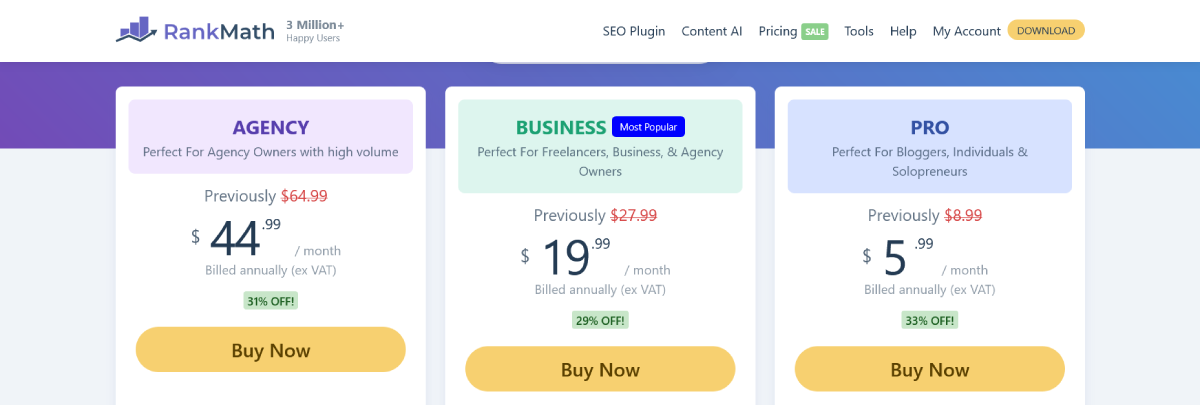
Source: RankMath
For agencies, the math is even more lopsided. Rank Math’s Business plan at ~$252/year covers up to 100 client sites. Yoast’s per-site model for the same feature set across 100 sites would cost thousands of dollars annually.
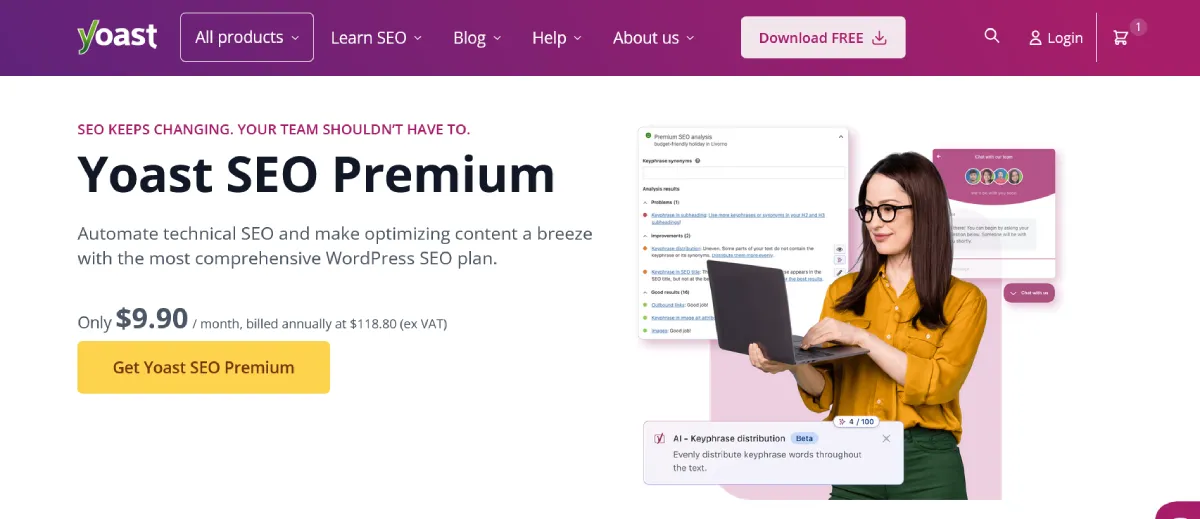
Source: Yoast SEO
4. WooCommerce SEO
If you’re running an online store, this comparison has a clear winner.
Rank Math includes WooCommerce SEO in its free version. Out of the box, it automatically generates Product schema markup with price, brand, availability, and reviews. It manages product URLs, adds gallery images to Open Graph tags and XML sitemaps, supports GTIN/MPN identifiers, and lets you noindex certain store pages to avoid duplicate content issues. You don’t pay a cent extra for any of this.
Yoast requires their WooCommerce SEO extension, which costs $178.80/year per site on top of your existing Premium subscription. It’s a well-built add-on — it handles product schema, smart breadcrumbs, and ecommerce-focused content analysis — but the cost is hard to justify when Rank Math delivers comparable functionality for free.
WooCommerce Winner: Rank Math
No contest. Free WooCommerce SEO support — including product schema, Open Graph, and breadcrumbs — vs. paying $178.80/year for the same functionality. If you run a WooCommerce store, Rank Math is the obvious choice.
5. Site Performance & Speed
Both plugins are more than fast enough for 99% of WordPress sites. But if you’re obsessive about Core Web Vitals scores — and you should be — the technical details are worth knowing.
Code size: Rank Math has 51,300 lines of code vs. Yoast’s 87,200. Rank Math’s plugin ZIP file is roughly three times smaller. Multiple benchmark tests in 2025–2026 show Rank Math generates marginally less JavaScript on the frontend and slightly fewer database queries per page load.
Module system: Both plugins are modular — you can disable features you don’t use. Rank Math’s module system is more granular, letting you strip the plugin down to just what you need.
Admin panel: Yoast’s dashboard is lighter on the backend side. Rank Math’s settings panel is feature-dense and can feel heavy in the WordPress admin, though this has zero effect on your public-facing page speed.
The honest truth: neither plugin will meaningfully hurt your Core Web Vitals on its own. If your site is slow, your hosting, image optimization, and caching plugin deserve attention long before your SEO plugin does.
| Performance | Yoast SEO | Rank Math |
|---|---|---|
| Lines of Code | 87,200 | 51,300 |
| Plugin ZIP Size | Larger (~3x) | Smaller |
| Frontend JS Load | Slightly more | Marginally less |
| Database Queries | Slightly more per page | Slightly fewer |
| Admin Panel Weight | Lighter | Heavier (backend only) |
| CWV Impact | Negligible | Negligible |
6. Ease of Use
Yoast wins this category for beginners. The traffic-light system is intuitive, the guidance is educational rather than just prescriptive, and the interface is clean with fewer decisions to make. If you’re new to SEO and don’t want to think too hard about configuration, Yoast removes the friction.
Rank Math has a well-designed setup wizard and a modern, clean UI — but the sheer number of features can feel overwhelming at first. There are more settings to configure, more modules to evaluate, and more decisions to make. That said, once you’re past the setup phase, most users find it intuitive to work with daily.
| Ease of Use | Yoast SEO | Rank Math |
|---|---|---|
| Setup Process | Simple, minimal decisions | Guided wizard, more configuration |
| Daily Workflow | Very clean, low cognitive load | Feature-rich, slightly more decisions |
| Learning Curve | Low (great for beginners) | Moderate (ideal for intermediate+) |
| Dashboard Ads | Yes (many upgrade prompts) | Fewer, less intrusive |
| Documentation | Extensive (15+ years) | Good but newer |
| Community Support | Massive ecosystem | Growing fast |
7. AI Features in 2026
AI search is reshaping SEO. Google’s AI Overviews now appear in 64% of commercial searches, and ChatGPT processes billions of queries monthly. Your SEO plugin needs to work with both traditional Google search and AI-powered discovery platforms.
Yoast’s AI tools are found in its higher-tier packages. AI Generate (in Premium) creates multiple optimized title and meta description options instantly. The AI Brand Insights feature, part of the $358.80/year AI+ package, monitors how ChatGPT, Perplexity, and other AI platforms represent your brand — a genuinely unique capability for publishers and brands serious about their AI search presence.
Rank Math’s AI tools are centered around Content AI (available in Pro). This gives you keyword suggestions, content scoring, and AI-assisted writing directly inside the WordPress editor. Rank Math also introduced llms.txt support — a file that helps AI crawlers understand your site structure — positioning it well for the AI-driven search landscape. Pro plans include 5,000–7,500 Content AI credits per month, with Business and Agency tiers scaling up from there.
| AI Features | Yoast SEO | Rank Math |
|---|---|---|
| AI Title/Meta Generation | ✅ (Premium) | ✅ (Pro) |
| AI Content Writing | Limited | ✅ Content AI (Pro) |
| AI Brand Monitoring (ChatGPT, Perplexity) | ✅ AI+ ($358.80/yr) | ❌ |
| AI Search Traffic Tracker | ❌ | ✅ (Pro) |
| llms.txt for AI Crawlers | ❌ | ✅ (Free) |
| Google AI Overviews Optimization | Via schema graph | Via schema + llms.txt |
8. Page Builder Compatibility
Rank Math has deeper page builder integration than Yoast. If you use Elementor, you can edit SEO titles, meta descriptions, and schema markup directly inside the Elementor editor sidebar. Rank Math also lets you set global SEO settings for builder-specific content types like templates, landing pages, and widgets — available for free. Divi and other major builders are similarly supported.
Yoast integrates with Elementor but with limitations. You can view Yoast’s analysis in the Elementor sidebar, but for some features you need to return to the standard WordPress editor. Global SEO settings for builder-specific content types are limited, even in Premium. If you’re building primarily in Elementor or Divi, Rank Math’s tighter integration will save you a significant amount of time.
Who Should Use Yoast SEO?
Yoast SEO is still the right call for specific types of users. Here’s when I’d recommend sticking with it:
- You’re brand new to WordPress SEO and want guided, educational feedback while you learn
- You run a single site and the $118.80/year per-site pricing doesn’t feel punitive
- You manage a content team where readability scores and editorial guidance are as important as technical SEO
- You’re already deeply embedded in the Yoast ecosystem with years of settings, redirects, and schema configured
- You want AI-powered brand monitoring across ChatGPT and Perplexity (Yoast’s AI+ package is unique here)
- Enterprise stability matters more to you than feature velocity — Yoast’s 15-year track record is hard to argue with
Who Should Use Rank Math?
Rank Math is the stronger choice for most WordPress site owners in 2026. Here’s when it’s the clear winner:
- You want maximum features without paying for a premium plan
- You manage multiple sites — the unlimited personal sites Pro plan at $71.88/year is a no-brainer
- You run a WooCommerce store and don’t want to pay $178.80/year for a separate SEO add-on
- You need advanced schema markup — FAQ, Product, Recipe, Review, HowTo, Event — without extra plugins
- You use Elementor or Divi and want native SEO settings inside your page builder
- You’re an agency managing client sites — Rank Math’s Business plan at ~$252/year covers 100 client sites
- You want Google Search Console data visible inside your WordPress dashboard without a separate analytics plugin
- You care about performance and want a lighter codebase with a modular feature system
Switching From Yoast to Rank Math: How the Migration Works
One concern I hear often is: “If I switch plugins, will I lose my rankings?” The good news is that Rank Math built a migration tool specifically for Yoast users, and it works extremely well.
The migration imports your meta titles, meta descriptions, schema data, focus keywords, and even your redirect rules from Yoast — all in under five minutes for most sites. After completing the import, you can deactivate and delete Yoast entirely.
One critical rule: never run both plugins simultaneously. Having two active SEO plugins creates duplicate schema markup, conflicting canonical tags, and double XML sitemaps — all of which confuse search engine crawlers and can genuinely hurt your rankings. Migrate fully, verify everything is imported correctly, then delete Yoast.
Common Migration Issues to Watch For
- Custom meta descriptions on important pages may not transfer — manually review and update your top 20 pages after migration
- Verify redirect rules transferred correctly by spot-checking your most important 301 redirects
- Reconnect Google Analytics and Search Console integrations after migration
- Remove any duplicate schema markup that may appear during the transition period
- Monitor your rankings for 2–4 weeks post-migration — minor fluctuations are normal and typically resolve quickly
Before you switch plugins, it’s worth doing a full technical SEO audit to document your current setup. Understanding your baseline schema configuration, redirect inventory, and canonical URL structure will make the migration much smoother.
My Final Verdict: Yoast SEO vs Rank Math
After years of using both plugins across dozens of sites, here’s where I land:
| Use Case | My Pick | Reason |
|---|---|---|
| New WordPress site | Rank Math | Better free tier, modern foundation |
| Single blogger / content creator | Yoast (free or premium) | Simplicity and readability tools |
| WooCommerce store | Rank Math | Free product schema vs. $178.80/yr add-on |
| Agency / multi-site manager | Rank Math | $71.88–$239.88/yr vs. per-site Yoast pricing |
| Enterprise with large content team | Yoast | Stability, readability analysis, ecosystem |
| Elementor / page builder user | Rank Math | Deeper native integration |
| AI brand monitoring focus | Yoast AI+ | Unique feature not available in Rank Math |
| Beginner learning SEO | Yoast | Educational interface with traffic-light system |
| Advanced SEO professional | Rank Math | Schema depth, GSC integration, granular control |
When it comes to Yoast SEO vs Rank Math, most WordPress site owners in 2026 will find Rank Math is the better default choice. Its free tier alone outperforms what Yoast charges $118.80/year for. If you manage multiple sites or run WooCommerce, the case for Rank Math is overwhelming.
That said, Yoast is not dead — far from it. If you’re a beginner who values hand-holding, a content team that relies on readability scores, or an enterprise site that’s been stable on Yoast for a decade, there’s no compelling reason to disrupt what’s working.
The best advice I can give? Install the free version of each plugin on a staging site and spend an hour with both. The one that fits your workflow is the right answer, regardless of what any comparison article says — including this one.
Frequently Asked Questions
Is Rank Math really better than Yoast for free?
Yes, for most use cases. Rank Math’s free version includes five focus keywords, 20+ schema types, a redirect manager, a 404 monitor, and Google Search Console integration — all features Yoast locks behind its $118.80/year Premium plan.
Will switching from Yoast to Rank Math hurt my Google rankings?
Not if you migrate correctly. Rank Math’s built-in import tool transfers your meta titles, descriptions, schema, and redirects automatically. Most sites see no ranking change at all, and some see improvements due to better schema coverage. Monitor your analytics for 2–4 weeks after migration.
Does Rank Math slow down my WordPress site?
Marginally less than Yoast, but practically speaking, neither plugin will noticeably affect your Core Web Vitals on a properly configured site. Hosting quality, image optimization, and caching matter far more than your SEO plugin choice.
Can I use Rank Math and Yoast at the same time?
No — and you should never try. Running two active SEO plugins simultaneously creates duplicate schema markup, conflicting canonical tags, and double XML sitemaps. Always migrate fully from one to the other, then delete the old plugin.
Which plugin is better for WooCommerce stores?
Rank Math, without question. It includes full WooCommerce SEO support — product schema, breadcrumbs, Open Graph, GTIN/MPN — in its free version. Yoast requires a separate WooCommerce SEO add-on at $178.80/year.
Is Yoast Premium worth the price?
For a single site where you value the readability analysis, internal linking suggestions, and AI-generated meta variations, Yoast Premium is a reasonable investment. For anyone managing multiple sites or needing WooCommerce SEO, Rank Math Pro at $71.88/year for unlimited personal sites is a much better deal.
What about Rank Math vs. Yoast for local SEO?
Both plugins support local business schema. Rank Math includes Local SEO features in all paid plans. Yoast charges an additional $69/year per site for its Local SEO add-on. For small businesses and local marketers, Rank Math’s all-inclusive pricing is a significant advantage.
Also Read: Rank Math vs All in One SEO: Which WordPress SEO Plugin Is Better for Beginners?
