
TL;DR
- FAQ rich results are gone, but FAQ schema still matters.
- Schema markup is no longer mainly about SERP decorations.
- Organisation, Article, LocalBusiness, and Breadcrumb schema remain essential.
- Schema helps AI systems understand and verify entities.
- Rank Math still covers most schema needs for WordPress sites.
If you’ve been following SEO news this week, you’ve seen two significant developments land almost simultaneously.
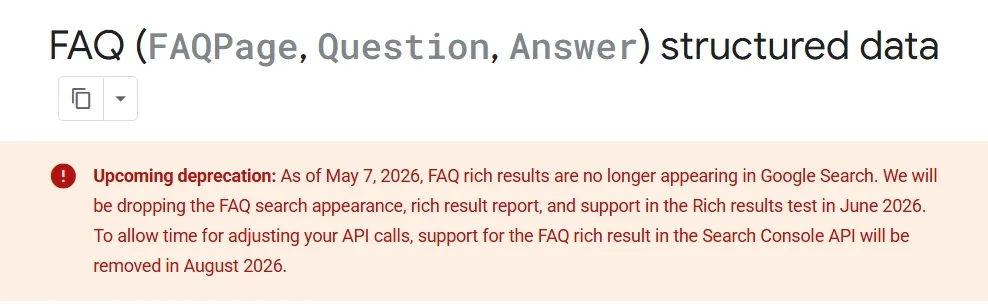
On May 7, 2026, Google officially dropped FAQ rich results from Google Search — the expandable FAQ dropdowns that appeared beneath organic listings are gone for every website, including government and health sites that had retained them since the 2023 restriction.
Then on May 11, 2026, Ahrefs published a study tracking 1,885 pages that added JSON-LD schema, measuring the impact on Google AI Overviews, AI Mode, and ChatGPT citations. Their finding: adding schema produced no major uplift in AI citations across any platform.
Put those two things together and it’s easy to conclude that schema markup is becoming less relevant. That would be the wrong conclusion.
What’s actually happening is more nuanced — and more important. Google is not moving away from structured data. It’s changing what structured data is used for. The era of schema as a SERP decoration tool — adding FAQ markup to earn dropdown snippets, adding Review markup to show star ratings on every page — is ending. The era of schema as an entity verification and AI trust signal is accelerating.
This guide covers what schema markup actually does in 2026, which types still matter for WordPress sites, how to implement them correctly using Rank Math, and what to do about the FAQ schema situation specifically.
This post is part of the Technical SEO: The Complete Guide series.
What Schema Markup Actually Does — And What It Doesn’t
Schema markup is structured data — code you add to your pages in a format (JSON-LD) that search engines and AI systems can read directly, without having to interpret your natural language content.
When you add Article schema to a blog post, you’re explicitly telling Google: this page is an article, written by this person, published on this date, about this topic. When you add LocalBusiness schema, you’re saying: this is a business, at this address, with these hours, offering these services. Instead of Google having to infer these facts from your prose, you’re handing them over directly in a machine-readable format.
What schema markup does not do — and Google has been consistently clear about this for years — is directly improve your rankings. Structured data is not a ranking factor. Adding Article schema to a thin, poorly-written post will not help it rank. Schema markup amplifies what’s already there — it helps Google understand and surface content that’s already good.
What it does do, when implemented correctly on quality content:
- Makes pages eligible for rich results in Google Search — star ratings, product prices, event dates, breadcrumbs, sitelinks
- Helps Google associate your content with specific entities in its Knowledge Graph — people, organisations, topics
- Gives AI systems (Google AI Overviews, ChatGPT, Perplexity, Gemini) a clean, unambiguous signal layer for understanding and citing your content
- Supports brand entity verification — linking your website to your business’s presence across the web
What the Recent Research Actually Shows
Two studies published in the past few months give us the clearest picture yet of what schema markup actually does for search performance in 2026. The findings are more nuanced than most coverage suggests.
The Ahrefs Study (May 2026)
Ahrefs tracked 1,885 pages that added JSON-LD schema between August 2025 and March 2026, matched them against 4,000 control pages, and measured citation changes across Google AI Overviews, AI Mode, and ChatGPT. Their conclusion: adding schema produced no major uplift in citations on any platform.
But there’s an important nuance in the same study: pages that already had schema were almost three times more likely to be cited by AI than pages without it.
Ahrefs’ honest interpretation: this is likely correlation, not causation. Sites that implement schema tend to be better-maintained and more technically sophisticated sites that also publish stronger content, build more authority, and do all the other things that get pages cited. Schema may be riding the wave of every other signal rather than driving citations independently.
The key takeaway isn’t “schema doesn’t matter” — it’s “adding schema to weak pages won’t magically earn AI citations.” The pages being cited already have strong content and authority. Schema is part of the technical foundation those pages are built on.
The Search Engine Land Controlled Experiment (September 2025)
Search Engine Land ran a controlled experiment using three nearly identical pages with the same content and keyword difficulty. The only meaningful variable was schema markup — one page had well-implemented JSON-LD, one had basic schema, and one had none.
The result: only the well-implemented schema page appeared in a Google AI Overview. It also achieved the highest organic ranking at position 3. The no-schema page failed to get indexed at all.
This is a small experiment and shouldn’t be over-generalised, but it points to something real: on pages with comparable content quality, schema implementation may be the differentiating factor that determines which one Google can clearly understand and therefore confidently surface.
The BrightEdge Data
BrightEdge’s ongoing research found that pages with structured data get 30% more clicks compared to standard results. This isn’t about AI citations — it’s about the traditional rich result advantage in organic search. Star ratings, breadcrumbs, sitelinks, product prices — these visual enhancements increase click-through rate on the pages that earn them.
What the Research Tells Us Overall
Schema markup is not a shortcut to AI citations or rankings. But it is part of the technical foundation that well-performing pages are built on. Sites without schema are harder for Google and AI systems to understand confidently, which means they’re less likely to be chosen when there’s a well-structured alternative available.
Implement schema because it helps search engines understand your content precisely — not because you expect it to directly generate AI citations or ranking improvements.
The FAQ Schema Situation — What Actually Changed
Let’s address this properly because there’s a lot of confusion in the coverage this week.
What Google Did
On May 7, 2026, Google dropped the FAQ rich result display from Google Search — completely, for all websites. The expandable FAQ dropdown that used to appear beneath search listings is no longer showing for anyone.
The deprecation timeline:
- May 7, 2026: FAQ rich results stopped appearing in Google Search
- June 2026: FAQ search appearance, rich result report, and support in Rich Results Test will be removed
- August 2026: Support for FAQ rich results in the Search Console API will be removed
This completes a process that started in August 2023, when Google restricted FAQ rich results to government and health websites only. For most sites, FAQ rich results have effectively been gone for nearly three years. The May 2026 announcement removes them for the remaining sites that still had them.
What Google Did NOT Do
Google did not deprecate the FAQPage schema type. This distinction is critical and Google has made it explicitly.
FAQPage structured data is still a valid schema.org type. Google still processes it and uses it to understand your content — it just won’t display the visual rich result dropdown anymore. Two completely different things.
Google’s own documentation says: “You can remove the FAQ structured data from your code, if you want, but you can also leave it. Other search engines may be able to continue to process it and use it for their own purposes.”
Should You Remove FAQ Schema from Your Pages?
No — and here’s why.
FAQ schema on pages with genuine question-and-answer content still has value in 2026 — it’s just not the rich snippet value it used to have. The FAQPage markup gives AI systems a clean, structured way to extract your questions and answers when generating AI Overview responses, ChatGPT answers, and Perplexity citations. It also supports Google’s understanding of your page’s topic structure.
What you should stop doing: adding FAQ sections and FAQ schema to pages purely to chase the rich snippet display. That benefit is gone and has been effectively gone for most sites since 2023.
What you should continue doing: adding FAQ sections with genuine user questions and clear answers on relevant pages — and marking them up with FAQPage schema — because the content serves users and the markup helps AI systems understand and extract that content.
Keep the schema. Update your expectations about what it will do for you visually in Google Search.
Do You Need to Update Your Rank Math Settings?
In terms of removing FAQ schema generation — no immediate action is needed. But there are two things worth doing:
If you previously tracked FAQ rich result performance in Search Console, note that the Enhancement report for FAQ structured data will disappear in June 2026. Export any historical data you want to keep before then.
If you use automated Search Console API calls that include FAQ rich result data, those will break in August 2026. Flag this for whoever manages your reporting integrations.
Which Schema Types Actually Matter for WordPress Sites in 2026
With FAQ rich snippets gone and the research showing schema matters more for entity understanding than AI citation fishing, here’s how to prioritise schema implementation on your WordPress site.
Priority 1: Organisation Schema (Every Site)
Organisation schema is the most important structured data implementation for any website and the one most commonly skipped. It tells Google who you are — your business name, logo, contact details, social profiles, and the topics your organisation is authoritative about.
This is how you get into Google’s Knowledge Graph. Without it, Google has to infer your brand identity from context. With it, you’re explicitly confirming that your website, your LinkedIn, your Twitter/X, your Google Business Profile, and any other digital presence all belong to the same entity.
The sameAs property is particularly powerful here. Including URLs to your verified profiles on LinkedIn, Twitter/X, Facebook, Wikipedia (if relevant), and any industry directories explicitly links your entity across the web.
The knowsAbout property — less commonly implemented — specifies the topics, industries, and subject areas your organisation genuinely has expertise in. Google’s AI Mode uses this to assess source credibility when selecting citations for specific query categories.
How to implement in Rank Math:
Go to Rank Math → Titles & Meta → Local SEO and fill in your business details. For the sameAs and knowsAbout properties, you’ll need to add these via Rank Math’s Custom Schema Builder or by adding a custom JSON-LD block.
Priority 2: Article / BlogPosting Schema (All Blog Posts)
Article schema (or its more specific variant BlogPosting) tells Google and AI systems that a page is a piece of editorial content — who wrote it, when it was published, when it was last updated, and what topic it covers.
The most important properties to include:
- headline — the article title
- author — with nested Person schema including the author’s name and URL to their author profile or LinkedIn
- datePublished — the original publication date
- dateModified — the last updated date (this signals to Google that your content is actively maintained)
- image — your featured image
- publisher — your Organisation schema
Article schema with a properly attributed author — including the author’s credentials and expertise — is one of the most direct implementations of Google’s E-E-A-T (Experience, Expertise, Authoritativeness, Trustworthiness) signals through structured data.
How to implement in Rank Math:
Rank Math automatically generates Article or BlogPosting schema for posts. Go to Rank Math → Titles & Meta → Posts and confirm the Schema Type is set to Article. For individual posts, open the Rank Math panel → Schema tab and verify the schema is correctly populated. Add your author details in your WordPress user profile — Rank Math pulls these automatically.
Priority 3: LocalBusiness Schema (For Local Businesses)
If your site represents a business that serves customers in a specific location, LocalBusiness schema is critical for local search visibility. It confirms your business name, address, phone number, opening hours, and service area to Google in a format that directly supports local search results and Google Maps integration.
The most important properties:
- name — your exact business name
- address — with streetAddress, addressLocality, addressRegion, postalCode, and addressCountry
- telephone
- openingHours
- geo — latitude and longitude coordinates
- url — your website URL
- sameAs — link to your Google Business Profile and other local directory listings
How to implement in Rank Math:
Go to Rank Math → Titles & Meta → Local SEO and complete all fields. Rank Math generates LocalBusiness JSON-LD automatically from these settings and adds it to your homepage.
Priority 4: BreadcrumbList Schema (All Sites)
BreadcrumbList schema tells Google the position of each page in your site hierarchy — Home → Category → Post. This supports Google’s display of breadcrumb navigation in search results (replacing the URL with the breadcrumb path) and helps Google understand your site structure.
How to implement in Rank Math:
Rank Math generates BreadcrumbList schema automatically for all posts and pages based on your site’s category and tag structure. Go to Rank Math → Titles & Meta → Breadcrumbs to verify this is enabled.
Priority 5: FAQPage Schema (Where Genuine FAQ Content Exists)
Despite the rich result deprecation, FAQPage schema remains worth implementing on pages with genuine question-and-answer content — for the reasons described above. The markup helps AI systems extract and cite your FAQ content, even without the visual SERP dropdown.
The key word is genuine. Don’t add FAQ sections to every page just for schema purposes. Add them where users actually have common questions, and mark up those genuine Q&A sections.
How to implement in Rank Math:
In the WordPress editor, add a FAQ block (if using Gutenberg) or write your FAQ section as a list of questions and answers. In the Rank Math panel → Schema tab → Add Schema → select FAQ. Add each question-answer pair in the FAQ schema fields. Rank Math generates the FAQPage JSON-LD automatically.
Additional Schema Types by Site Type
HowTo Schema — for step-by-step guides and tutorial posts. Marks up numbered steps with names and descriptions. Can still earn HowTo rich results in Google Search (unlike FAQ, HowTo rich results have not been deprecated). Use on genuinely step-by-step content where each step is distinct and sequenced.
Product Schema — essential for WooCommerce product pages. Marks up price, availability, SKU, and review ratings. Product rich results (showing price and availability in search) are still supported and drive significant CTR improvements for e-commerce sites.
Review / AggregateRating Schema — for pages with genuine user reviews or ratings. Note: Google’s March 2026 core update reduced rich results for review schema on pages where reviews aren’t the primary content. Use this only on dedicated review pages or product pages with actual customer ratings — not on every service page.
Person Schema — for author pages, personal brand sites, and consultant portfolios. Links the person’s name to their credentials, expertise, social profiles, and published works. Particularly valuable for building E-E-A-T signals for sites where personal expertise is central to the content’s value.
Event Schema — for pages promoting events, workshops, webinars, or courses. Still earns Event rich results in Google Search showing date, location, and ticketing information.
Create Schema Markup Instantly
Generate valid JSON-LD schema markup for FAQ, Product, Recipe, Article, Local Business, Video, and more using our free Schema Markup Generator tool.
How to Implement Schema in WordPress Using Rank Math
Rank Math handles the majority of WordPress schema needs without custom code. Here’s how to set up your core schema stack correctly.
Step 1: Configure Your Global Schema Settings
Go to Rank Math → Titles & Meta → Global Meta. Set your site type — Personal Blog, Company, or Local Business. This determines the base schema Rank Math generates for your entire site.
Go to Rank Math → Titles & Meta → Local SEO. Fill in your business name, address, phone, hours, and logo. Add your social profile URLs to the Social Profiles section — these populate the sameAs property on your Organisation schema.
Step 2: Set Default Schema Types for Post Types
Go to Rank Math → Titles & Meta → Posts. Under Schema Type, set Article or BlogPosting as the default for blog posts. This applies Article schema automatically to all new posts without needing to configure each one individually.
Go to Rank Math → Titles & Meta → Pages. For regular pages, the default is usually WebPage — which is fine for most pages. For your homepage, consider setting it to Website or keeping it as WebPage.
Step 3: Verify Individual Post Schema
For each post, open the Rank Math panel in the WordPress editor and click the Schema tab. Verify that:
- The schema type is correct (Article for blog posts)
- The headline is populated correctly
- The author details are correct — this pulls from your WordPress user profile
- datePublished and dateModified are set
- The featured image is included
For any post where you want to add FAQ schema in addition to Article schema, click Add Schema → select FAQ → add your question-answer pairs.
Step 4: Validate Your Schema
After implementing schema, validate it using:
Google’s Rich Results Test (search.google.com/test/rich-results) — paste your URL and it shows which rich results your page is eligible for and any structured data errors.
Google Search Console → Enhancements — after Google crawls your pages, the Enhancements section shows structured data coverage and any validation errors across your site.
Schema.org Validator (validator.schema.org) — validates your JSON-LD against schema.org standards. Useful for catching property errors that Google’s test might not flag.
Common errors to watch for:
- Missing required properties — each schema type has required fields that must be present for rich result eligibility
- Schema markup that doesn’t match page content — adding Review schema to a page with no reviews, or FAQ schema where the questions aren’t on the page
- Invalid dates — datePublished and dateModified must be in ISO 8601 format (YYYY-MM-DD)
- Missing image — Article schema without an image property reduces eligibility for rich results
Step 5: Monitor in Search Console
Once your schema is implemented and validated, monitor performance in Google Search Console → Enhancements. You’ll see reports for each schema type showing valid pages, warnings, and errors. Address errors promptly — pages with schema errors won’t be eligible for rich results even if the schema is present.
Note: after June 2026, the FAQ Enhancement report will disappear from Search Console as part of Google’s deprecation process. Don’t be alarmed — this is expected.
The Bigger Picture: Schema as Entity Verification, Not SERP Decoration
The shift happening right now with schema markup is a healthy one, even if it’s disruptive in the short term.
For several years, FAQ schema was used as a SERP real estate grab — add FAQ markup to every page, get dropdown snippets, take up more space in the results. Review schema was added to service pages that had no genuine reviews. HowTo schema was added to posts that weren’t really how-to guides. The goal was the visual enhancement, not the semantic signal.
Google’s response — restricting and eventually removing the visual benefits for abused schema types — is a signal that structured data should describe genuine content, not be retrofitted for display purposes.
The schema types that remain valuable in 2026 — Organisation, Article, LocalBusiness, Product, BreadcrumbList, genuine FAQ and HowTo markup — are all schema types that accurately describe what’s actually on the page. They help Google understand your content, verify your entity, and assess your authority. The benefit is structural and semantic, not visual.
This is the right way to think about schema in 2026: implement it to help search engines and AI systems understand what your content is and who produced it. Not to earn dropdown decorations in search results.
Frequently Asked Questions
Does schema markup improve Google rankings?
No — Google has confirmed that structured data is not a direct ranking signal. What schema markup does is make pages eligible for rich results (which improve click-through rate), help Google understand and correctly categorise your content, support entity verification in the Knowledge Graph, and provide AI systems with a clear signal layer for understanding and citing your content. These indirect effects can contribute to better search performance, but adding schema to poor content won’t improve its rankings.
Should I remove FAQ schema from my pages after Google’s May 2026 deprecation?
No — Google explicitly says you don’t need to remove it, and there are good reasons to keep it. FAQPage schema is still valid, Google still processes it to understand your page, and AI systems (ChatGPT, Perplexity, Gemini, Google AI Overviews) still parse it when extracting question-and-answer content for AI-generated responses. The only thing that changed is the visual rich result dropdown in Google Search is no longer displayed. Keep the schema; update your expectations about the SERP display benefit.
What is JSON-LD and why does Google recommend it?
JSON-LD (JavaScript Object Notation for Linked Data) is the code format Google recommends for implementing schema markup. It sits in a script block in your page’s head section, separate from your HTML content — which makes it clean, easy to validate, and easy to update without touching your visible page content. The alternative formats (Microdata and RDFa) embed structured data within the HTML content itself, which is more complex to maintain. Rank Math generates JSON-LD automatically, so for most WordPress sites this is handled without writing code.
How does schema markup help with AI search visibility?
AI systems like Google AI Overviews, ChatGPT, Perplexity, and Gemini use structured data to verify claims and understand content structure when generating AI-generated answers. A page with clear Article schema, a properly attributed author, and accurate dateModified gives an AI system confidence in the content’s recency and authority. FAQ schema gives AI systems pre-formatted question-answer pairs that are easy to extract and cite. The Ahrefs study published this week found that adding schema doesn’t automatically boost AI citations — but sites with good schema implementation are already significantly more likely to be cited than sites without it.
Does Rank Math Free handle all the schema I need?
For most small to medium WordPress sites, yes. Rank Math Free handles Article/BlogPosting schema for posts, WebPage schema for pages, LocalBusiness schema through the Local SEO settings, BreadcrumbList schema automatically, and FAQ schema through the Schema builder. The Pro version adds more schema types, a dedicated schema generator with more property control, and richer integration with dynamic data. For most bloggers, freelancers, and small business sites, the free version covers the essential schema stack.
What’s the difference between schema markup and meta tags?
Meta tags (like meta title and meta description) are HTML elements that provide information about a page primarily for search engine result displays — they control how your listing appears in search results. Schema markup is structured data that describes the content and entities on a page in a machine-readable format that goes beyond what’s visible in the search listing. Both are important, but they serve different purposes: meta tags control the search result display, schema markup helps search engines and AI systems understand the content itself.
Schema Markup Is Infrastructure, Not a Shortcut
The changes this week — Google’s FAQ rich result deprecation and Ahrefs’ schema study findings — are clarifying, not discouraging. They strip away the SERP decoration mindset that drove schema adoption for the wrong reasons, and refocus attention on what structured data actually does well.
Schema markup is infrastructure. It’s the technical layer that helps search engines and AI systems understand who produced your content, what topic it covers, what type of content it is, and whether the claims it makes can be verified. Like any good infrastructure, it’s invisible when working correctly — but its absence makes everything harder.
For WordPress site owners, the practical message is straightforward: implement the core schema stack (Organisation, Article, LocalBusiness if relevant, BreadcrumbList) using Rank Math, keep FAQ schema on pages with genuine Q&A content, validate your implementation in Search Console, and focus your energy on the content quality and authority that schema amplifies.
Schema markup won’t rank a weak page. But it will make sure a strong page is understood correctly — and in a search environment increasingly shaped by AI systems that rely on structured signals to choose what to cite, that matters more than ever.
Part of the Technical SEO: The Complete Guide series.
Related reading: Canonical Tags: The Complete Guide for SEO, GEO, and the Age of AI Search | Technical SEO Audit Checklist for WordPress | Duplicate Content in WordPress: What It Is and How to Fix It

