
I’ve audited dozens of websites over the years, and there’s one thing I keep seeing — businesses that have invested thousands into content and backlinks, but their traffic flatlines. Nine times out of ten, the culprit isn’t the content itself. It’s the structure holding it all together.
Website architecture for SEO is one of those topics that sounds dry until you realize it’s the reason a competitor with half your content budget outranks you every single time. Get it right from the start, and everything else — your content, your links, your conversions — works harder. Get it wrong, and you’re essentially building on sand.
In this post, I’m going to go beyond the usual “use a flat structure and add a sitemap” advice. I want to talk about how site architecture decisions made at the planning stage affect not just your Google rankings, but increasingly, your visibility in AI-generated answers too.
Quick Summary
Website architecture helps you:
- Improve crawlability and indexing
- Make it easier for users to navigate your site
- Distribute link equity across pages
- Boost SEO performance over time
What Website Architecture for SEO Actually Means (And Why Most Definitions Miss the Point)
Most definitions describe website architecture as how your pages are organized and linked together. That’s technically correct, but it undersells the concept. I’d describe it more like this: your site architecture is the logic your website operates on. It determines what Google thinks is important, what users can find without getting frustrated, and whether your content ever gets a chance to rank at all.
It covers your URL structure, your navigation, your internal linking, your category hierarchy, how deep your pages are buried, and how equity flows from page to page. Change any one of these, and you change how both users and search engines experience your entire site.
The reason this matters so much right now is that search has changed. Google’s AI Overviews, ChatGPT, and Perplexity don’t just crawl and index pages the way traditional bots do — they retrieve content at the passage level. That means a poorly structured page, buried three clicks deep with weak internal links pointing to it, may never surface in an AI-generated answer even if the content itself is excellent.
The Real Cost of Poor Site Architecture
Before we get into the how, let’s talk about the why — specifically, what you actually lose when your architecture is a mess.
The most immediate consequence is crawl budget waste. Google allocates a crawl budget to every site — essentially a limit on how many pages its bots will crawl in a given period. If your architecture is bloated with duplicate content, orphaned pages, or unnecessary URL parameters, you’re burning that budget on pages that add zero value. The pages you actually want to rank end up crawled infrequently, if at all.
The second consequence is link equity bleed. PageRank — the authority signal that flows through your site via internal links — doesn’t distribute itself evenly. It follows your link structure. If your most authoritative pages (usually your homepage and top-level category pages) aren’t connected to your money pages through a logical hierarchy, the equity never reaches where it needs to go. You’re essentially hoarding your own authority and starving the pages you want to rank.
Third, and this one gets overlooked: poor architecture hurts your topical authority signals. Google needs to understand that your site is a comprehensive, trustworthy source on a given topic — not just a random collection of pages. A well-structured site, with clear topic clusters and logical parent-child relationships, sends exactly that signal. A disorganized one sends the opposite.
Flat vs. Deep: Which Architecture Actually Works?
The standard advice is to use a flat architecture — meaning any page on your site should be reachable within three to four clicks from the homepage. That’s a solid rule of thumb, and I broadly agree with it, but I want to add some nuance.
Flat architecture works best when you have a manageable number of pages. For blogs, service businesses, and small e-commerce sites, keeping things shallow is almost always the right call. It ensures that link equity flows efficiently, crawlers can access everything quickly, and users don’t have to dig to find what they need.
But for larger sites — think e-commerce stores with thousands of products, or content publishers with extensive archives — a purely flat structure becomes impractical. You’d end up with a homepage linking to thousands of pages, which is useless from a navigation standpoint and doesn’t actually help users or search engines understand what’s important.
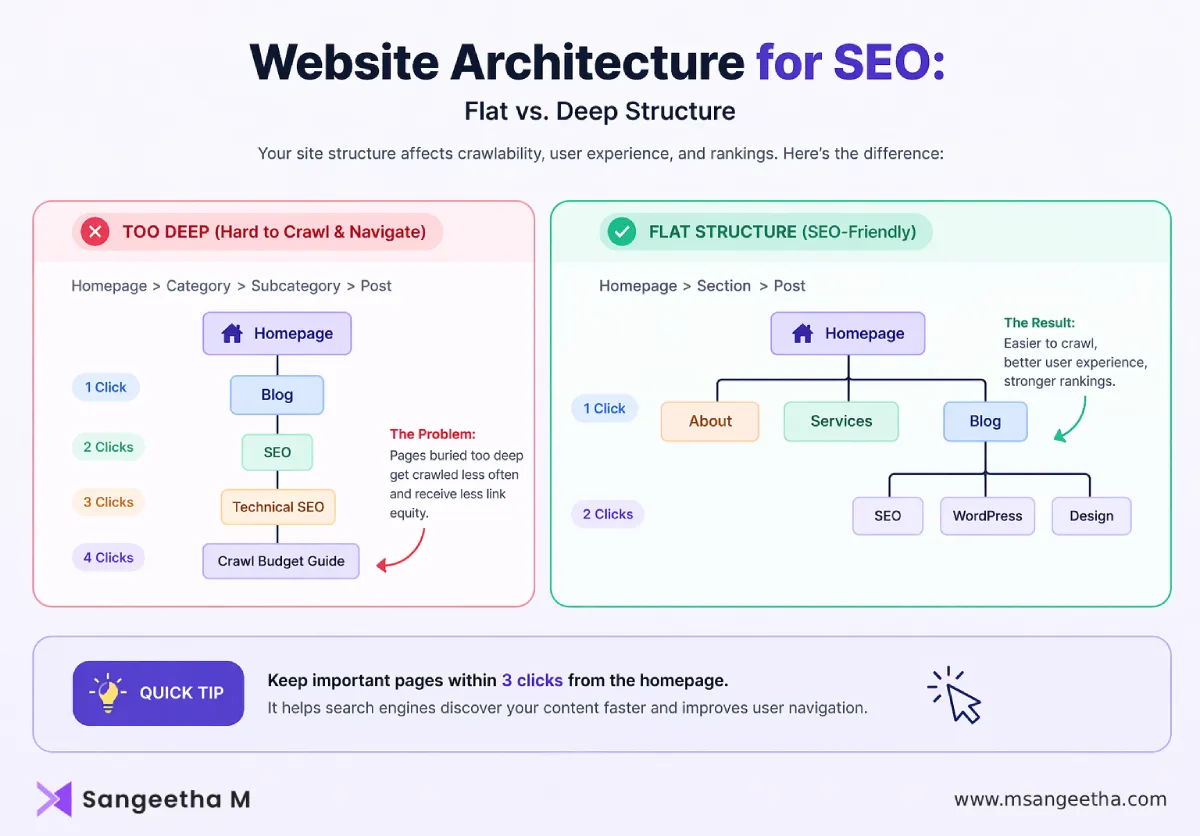
The answer for larger sites is a controlled hierarchy: flat where it counts (for your most valuable pages), with logical depth for supporting content. The key is intentionality. Every layer of depth you add should serve a purpose — grouping related content, establishing topical relevance — not just exist because it was easier to organize things that way at the time.
Topic Clusters: Still the Best Framework, But Only When Done Right
The topic cluster model: a pillar page targeting a broad topic, supported by cluster pages that go deep on related subtopics, all interlinked — is now the dominant site architecture framework for content-heavy sites. And it works. I’ve seen it transform organic performance for sites that previously had no coherent content structure.
But here’s where I see people go wrong: they create the cluster structure on paper, then execute it inconsistently. The pillar page exists, but the cluster content doesn’t actually link back to it. Or the cluster pages are too similar in topic, creating internal keyword cannibalization. Or the pillar page tries to cover too much ground and ends up being useful to nobody.
The rule I use: a topic cluster should map to a single clear search intent, not a broad category. “Digital marketing” is not a topic cluster — it’s a universe. “Local SEO for restaurant owners” is a topic cluster. Your pillar page should answer the broad question comprehensively, and your cluster pages should be the deep dives on specific angles that the pillar can only touch on.
Also, this is something most guides skip — your topic cluster architecture directly affects your AI search visibility. AI Overviews and LLM-powered search engines use passage-level retrieval. They don’t just look at a page’s overall authority; they extract specific passages that directly answer a query. When your cluster content is tightly organized and interlinked, it signals topical depth. Individual well-structured passages within those pages are then far more likely to get cited in AI-generated answers.
Internal Linking: The Part Everyone Agrees on But Nobody Executes Well
If I had to pick one area where site architecture falls apart in practice, it’s internal linking. The theory is simple: link your pages together logically, use descriptive anchor text, and make sure no important page is orphaned. In practice, most sites do this haphazardly at best.
Here’s what a deliberate internal linking strategy actually looks like:
Prioritize your authority-to-destination flow
Your highest-authority pages — typically your homepage, popular blog posts that have earned backlinks, and high-traffic category pages — should link toward your conversion-focused pages. Think of it as directing traffic through a funnel. The pages that attract the most equity should be the ones handing it off to the pages that need it most.
Use contextual links, not just navigation links
Your navigation menu handles the structural layer of internal linking, but that’s not enough. Contextual links — links placed within the body copy of your content, linking to related pages using descriptive anchor text — are what actually help Google understand the semantic relationship between your pages. They also help users go deeper, which improves time on site and reduces bounce rate.
Audit for orphans regularly
An orphaned page is one with no internal links pointing to it. Google may still find it through your sitemap, but it’ll rank poorly because it has no internal authority flowing to it. Run a crawl audit every quarter and make sure every page worth keeping has at least a couple of internal links pointing to it from contextually relevant content.
Keep anchor text natural but descriptive
“Click here” and “read more” are wasted opportunities. Your anchor text should tell both the user and the search engine exactly what the linked page is about. Don’t over-optimize with exact-match keyword anchors — Google’s smarter than that — but make sure your anchor text is meaningful.
URL Structure: The Details That Compound Over Time
Your URL structure is both an SEO signal and a usability feature. A well-structured URL tells Google where a page sits in your hierarchy and what it’s about. A messy URL does neither.
The principles here are fairly settled, but worth repeating because I still see violations constantly:
Keep URLs short and human-readable. A URL like /blog/seo/website-architecture-tips/ is far more useful than /p?id=4721&cat=3&ref=blog. Use hyphens to separate words, not underscores. Keep everything lowercase. Avoid session IDs, timestamps, and other dynamic parameters in URLs that should be permanent.
Mirror your URL structure to your content hierarchy. If you have a services section with individual service pages, your URLs should reflect that: /services/seo/ and /services/content-marketing/ rather than everything dumped under /pages/. This reinforces your site hierarchy for both users and search engines.
Think hard before you change existing URLs. Every URL change needs a 301 redirect, and even well-implemented redirects pass slightly less equity than a direct link. If your site is already live and indexed, mass URL restructuring should be approached carefully, with a full redirect map and monitoring set up before you touch anything.
Navigation Architecture: Designing for Both Humans and Crawlers
Your navigation is the most visible part of your site architecture, and it has to serve two audiences simultaneously: real people trying to find things, and search engine bots mapping your site’s hierarchy.
For users, good navigation means clarity and minimal friction. The main navigation should highlight your most important sections — not every section. A navigation menu with fifteen top-level items isn’t navigation; it’s noise. Be ruthless about what goes in your primary nav and use footer links or secondary menus for less critical destinations.
For search engines, navigation matters because it’s typically where your most powerful internal links live. Nav links appear on every page of your site, which means they pass equity widely. Make sure your navigation links are HTML — not JavaScript or Flash — so crawlers can follow them reliably. Google can handle some JavaScript rendering, but you don’t want your entire navigation hierarchy dependent on it.
Breadcrumbs are worth implementing even if you feel like your site is simple enough not to need them. They reinforce your site hierarchy, improve user orientation, and often appear in search results — giving your listings more visual real estate in the SERPs. They’re also one of the cleaner schema markup opportunities that can support your AI Overview eligibility.
Tools like Microsoft Clarity can show how users actually navigate your site.
Architecture Planning Before You Build (Not After)
This is the section most guides skip because they’re usually written for people who already have a live site. But the most expensive site architecture mistakes I’ve seen are the ones that get baked in at launch and then require a complete restructure twelve months later.
If you’re building a new site or planning a significant expansion, do this before you write a single piece of content:
- Map your intended topic universe first. What are the three to five core themes your site needs to own? Those become your top-level categories. From there, identify the subtopics under each theme — these become your cluster content territory. Only then should you start planning individual pages.
- Think about scale. If you plan to publish fifty blog posts in year one and five hundred by year three, your architecture needs to accommodate that growth without becoming unwieldy. Categories that seem logical at fifty posts can become completely useless at five hundred if they’re not specific enough.
- Stress-test your click depth. Map out the path from your homepage to your deepest intended page. If it’s more than four clicks for important content, reconsider the structure before it becomes load-bearing.
How Site Architecture Affects AI Search Visibility in 2026 and Beyond
This is the part that most existing guides on website architecture haven’t caught up with yet, and it’s where I think the real opportunity lies right now.
AI-powered search — Google’s AI Overviews, ChatGPT search, Perplexity — doesn’t work the same way traditional search does. Rather than simply matching a page to a keyword query, these systems retrieve specific passages from across the web and synthesize them into a direct answer. Your page doesn’t just need to rank; specific passages within your page need to be retrievable, credible, and directly useful at the passage level.
What does this mean for your architecture?
- First, your most answer-worthy content needs to be accessible. If your best FAQ content or your most directly-answerable explanations are buried in pages with weak internal links and high click depth, AI systems are less likely to retrieve them. Surface your best answers through strong internal linking and clear page hierarchy.
- Second, structured data becomes even more important. Schema markup — particularly FAQ schema, Article schema, and HowTo schema — helps AI systems parse your content and understand what kind of answer a given passage provides. Pages with structured data are significantly more likely to surface in AI-generated responses than comparable pages without it.
- Third, topical authority signals matter at the site level, not just the page level. AI systems evaluate trustworthiness partly based on whether your site demonstrates comprehensive expertise in a domain. A well-structured topic cluster — with clearly related content, strong internal linking, and logical hierarchy — sends that signal in a way that a loose collection of individual posts never will.
Common Architecture Mistakes I See Over and Over
Let me end with the errors that keep showing up in audits, because knowing what not to do is just as useful as knowing what to do.
- Pagination without canonical tags. If you have paginated archives or product listing pages, Google can end up indexing dozens of thin, near-duplicate pages. Use canonical tags or proper pagination handling to consolidate this.
- Category pages with no real content. Category pages are some of the most powerful pages in your hierarchy — they sit high up, attract internal links, and should be targeting valuable keyword territory. But many sites treat them as pure navigation, with no unique content whatsoever. Add a proper intro, include your target keywords naturally, and make these pages earn their spot in the hierarchy.
- Internal links pointing to redirected URLs. Every time a redirect is in your internal link chain, you’re losing a small amount of equity and slowing down crawling. Audit your internal links regularly and update any that point to URLs that have been redirected rather than the final destination.
- Duplicate pages from filtering and sorting. E-commerce sites are particularly vulnerable here. Faceted navigation can generate thousands of near-identical URL variations. Use a combination of canonical tags, noindex directives, and parameter handling in Google Search Console to keep this under control.
- Flat architecture applied indiscriminately. As I mentioned earlier, flat architecture is not a universal solution. Flattening your site without a logical organizational system just creates a different kind of mess — one where everything is equally important, which means nothing is.
Where to Start If You’re Auditing an Existing Site
Knowing you have architecture issues and knowing where to start fixing them are two different things. Here’s the order I’d approach it:
- Start with a crawl audit. Tools like Screaming Frog, Ahrefs, or Semrush Site Audit will give you a full picture of your current structure — click depth, internal links, orphaned pages, redirect chains, and more. You need this data before you touch anything.
- Identify your highest-value pages. Using Google Search Console, pull the pages that currently drive the most impressions and clicks. These are your priority pages — the ones you want to ensure are well-positioned in your hierarchy and receiving strong internal links.
- Fix orphans first. Orphaned pages are low-hanging fruit. Either delete them (with a redirect if they have any backlinks), consolidate them into stronger pages, or add internal links to them from relevant existing content.
- Then tackle your topic cluster gaps. Look at your existing content and map it against your intended cluster structure. What’s missing? What’s been published without being properly linked into a cluster? Start filling gaps and building links where they’re absent.
- Finally, revisit your navigation and URL structure. These changes carry the highest risk and should only happen once you’ve stabilized the rest of your architecture and set up proper monitoring.
Website Architecture for SEO: Why It Matters More Than You Think
Website architecture for SEO isn’t the most glamorous part of digital marketing. It doesn’t have the creative appeal of a great content piece or the instant feedback loop of paid ads. But it is, without question, the foundation that everything else depends on.
I’ve seen sites with average content outperform sites with brilliant content, simply because their structure made it easier for Google to understand and trust them. I’ve also seen genuinely great content go completely unnoticed because the architecture around it was a mess.
Get your structure right, and your content works harder. Get it wrong, and you’re pushing uphill on everything else you do. It really is that simple — and that important.
Website Architecture for SEO: FAQs
What is website architecture in SEO?
Website architecture refers to how your pages are structured, organized, and linked. A clear structure helps search engines crawl your site and improves user navigation.
How many clicks should a page be from the homepage?
Ideally, important pages should be within 3–4 clicks from the homepage to ensure better crawlability and user experience.
What is a flat website structure?
A flat structure means users and search engines can access pages quickly without going through many levels.
Does website architecture affect SEO rankings?
Yes. A well-structured site improves crawlability, indexing, and internal linking — all of which impact rankings.
What are orphan pages?
Orphan pages are pages with no internal links pointing to them, making them hard for search engines to discover.

