
You’ve done everything right—published content, targeted keywords, maybe even built backlinks. But your pages still refuse to rank.
In most cases, the problem isn’t your content. It’s your internal linking structure—the invisible system that determines how Google discovers, understands, and ranks your pages.
Internal links for SEO are one of the most powerful—and most overlooked—ranking factors in modern search. When used strategically, they improve crawlability, distribute PageRank, and build strong topical authority across your site.
What this guide covers: Internal links are one of the most powerful — and most misused — levers in technical SEO. This cluster post breaks down how internal linking affects crawlability, PageRank distribution, topical authority, and AI search visibility. You’ll get a step-by-step internal link audit, anchor text formulas, and a common mistakes checklist you can use today.
Google’s algorithm now uses your internal link graph to map entity relationships and topical authority clusters. AI-powered search surfaces like Google’s AI Overviews and ChatGPT’s browsing mode follow structured, crawlable pathways to validate which content deserves to be cited. If your internal links are random, orphaned, or anchor-text-stuffed, you’re leaking link equity and confusing every crawler — human and machine — that visits your site.
This guide covers everything: the technical mechanics of internal links SEO, anchor text strategy, topic cluster architecture, crawl budget optimization, a step-by-step audit process, and how to optimize internal linking for both Google and AI search in 2026.
What Are Internal Links & Why Do They Matter for SEO?
An internal link is a hyperlink that connects one page on your website to another page on the same domain. Unlike external backlinks — which you earn from other sites — internal links are entirely within your control. That makes them one of the highest-leverage, lowest-cost optimizations available in technical SEO.
Internal links serve three core functions simultaneously:
- Crawl pathways: Search engine bots like Googlebot navigate your site by following links. Without internal links pointing to a page, crawlers may never find it — even if it’s in your sitemap.
- PageRank distribution: Every link passes a fraction of the page’s authority to the destination. Internal links let you deliberately funnel that equity toward your most important pages.
- Topical signals: The anchor text and context around an internal link tell search engines what the destination page is about — reinforcing keyword relevance and entity relationships across your content.
The relationship between internal links and SEO is not abstract. Every major ranking improvement from Google’s 2024 core updates rewarded sites with clear, structured internal architecture and punished sites where important pages were orphaned or buried deep in crawl hierarchies.
Types of Internal Links in SEO
Not all internal links carry the same weight. Understanding the different types helps you build a more intentional internal linking strategy.
| Type | Location | SEO Value | Best Used For |
|---|---|---|---|
| Contextual Links | Within body copy | Highest | Passing topical authority; cluster linking |
| Navigational Links | Header menu, sidebar | High (structural) | Establishing site hierarchy; pillar pages |
| Breadcrumb Links | Top of page | Medium | Reinforcing hierarchy; preventing orphans |
| Footer Links | Site-wide footer | Low–Medium | Key service/location pages; utility nav |
| Related Post Links | End of article | Medium | Keeping users on site; cluster discovery |
| Image Links | Within content | Medium | Visual CTAs; product pages (with ALT text) |
Contextual links are your most powerful internal links for SEO because they appear within semantically relevant content, carry descriptive anchor text, and pass stronger topical signals than navigational or footer links. Prioritize them above all other link types.
One type often overlooked: nofollow internal links. If you’ve accidentally added rel="nofollow" to internal links — common in some CMS plugins — you’re blocking authority from passing between your own pages. Audit for this immediately using Screaming Frog or Semrush’s Site Audit.
How Internal Links Distribute PageRank & Link Equity
PageRank — Google’s original algorithm for scoring page importance — still underpins how authority flows across your site. When a high-authority page links to another page, it passes a portion of its link equity through that link. The more outbound links on the source page, the less equity each individual link passes.
This has direct implications for your internal linking structure:
- A page with 10 outbound internal links passes roughly 10× more equity per link than a page with 100 outbound links.
- Your homepage typically holds the highest PageRank on your site — make sure it links to your most strategically important pages.
- Deep cluster pages that only receive links from one source are link equity bottlenecks. Add at least 2–3 internal links pointing to each cluster page.
Deliberately route internal link equity from your highest-authority pages (homepage, evergreen pillar content, high-traffic posts) toward your highest-priority conversion pages (service pages, product pages, location pages). These deep pages often have few external backlinks but can rank competitively when they receive strong internal support.
The 3-Click Rule for Link Depth
Every critical page on your site should be reachable within three clicks from the homepage. Pages sitting 4+ clicks deep are visited significantly less often by crawlers and receive a fraction of the link equity of shallower pages. Use your internal link structure to flatten the hierarchy for your highest-priority content.
For large sites with thousands of pages, this requires deliberate internal link audit work: identifying orphaned pages and deep-buried content, then adding targeted contextual links to bring them closer to the surface.
Internal Linking for Crawlability & Crawl Budget
For sites with fewer than a few hundred pages, crawl budget is rarely a concern — Googlebot will crawl everything. But for sites above 1,000 pages, crawl budget optimization becomes a meaningful technical SEO lever, and internal linking for crawlability sits at the center of it.
Crawl budget is the number of pages Googlebot crawls and indexes within a given time period. When your internal link structure is disorganized — with long redirect chains, orphaned pages, and deep crawl paths — bots waste their budget on low-priority URLs and may never reach your freshest, most valuable content.
How to Use Internal Links to Optimize Crawl Efficiency
Link every new page immediately
Before publishing any new page, identify 2–3 existing pages to link from it and 2–3 existing pages that should link to it. Never publish a page without incoming internal links — it becomes an orphan from day one.
Fix redirect chains in your link graph
If a page you’re internally linking to has been redirected (301), every link through that redirect leaks equity and wastes crawl budget. Update all internal links to point directly to the final destination URL — never to a redirect.
Remove links to noindexed pages
Linking internally to pages marked noindex passes equity into a dead end and wastes crawl allocation. Audit for noindex pages receiving significant internal links and either restore them to index or redirect link equity elsewhere.
Use breadcrumbs site-wide
Breadcrumb navigation automatically creates consistent crawl pathways from every deep page back up through the hierarchy. Implement breadcrumbs with structured data markup (BreadcrumbList schema) to also benefit AI Overview citations.
Redirect chains are one of the most common — and invisible — internal linking problems. If Page A links to Page B (which redirects to Page C), you’re sending crawlers through an extra hop and losing a measurable fraction of link equity at each step. Run a Screaming Frog crawl filtered by “redirect chains” monthly to catch these before they compound.
Internal Links & Topic Cluster Architecture
Topic clusters are the backbone of modern SEO content strategy — and internal linking is what makes them work. The model is simple: one comprehensive pillar page covers a broad topic, while multiple cluster pages explore specific subtopics in depth. Internal links connect everything into a closed authority loop.
Here’s what a technical SEO topic cluster looks like in practice:
| Page Type | Example | Internal Link Direction |
|---|---|---|
| Pillar Page | Technical SEO: The Complete Guide | Links out to all cluster pages |
| Cluster: Site Speed | Core Web Vitals Optimization Guide | Links back to pillar + sibling clusters |
| Cluster: Internal Links | Internal Links for SEO (this page) | Links back to pillar + sibling clusters |
| Cluster: Crawlability | Robots.txt & Crawl Control Guide | Links back to pillar + sibling clusters |
| Cluster: Site Architecture | Website Architecture for SEO | Links back to pillar + sibling clusters |
The key rules for cluster linking:
- Every cluster page must link back to the pillar. This is non-negotiable. Breaking this link severs the authority flow and prevents the pillar from accumulating maximum topical authority.
- Cluster pages should link laterally to relevant siblings, but not to clusters in unrelated topic areas. Cross-silo linking dilutes topical relevance signals.
- The pillar page should link to every cluster page. New cluster posts that aren’t yet linked from the pillar become orphan clusters — they exist within your domain but outside your authority network.
A well-structured topic cluster creates what SEOs call a “closed authority loop”: external backlinks land on your pillar page, that authority flows outward to cluster pages via internal links, and cluster pages funnel it back to the pillar. This compounding structure is why sites with clear cluster architectures dominate competitive SERPs — not just on head terms, but across hundreds of long-tail cluster keywords simultaneously.
Anchor Text Strategy for Internal Links
Anchor text is the visible, clickable text of a hyperlink. For internal links, it is one of the strongest topical signals Google uses to understand what the destination page is about. Getting anchor text right is critical — but over-optimizing it is one of the most common internal linking mistakes that triggers algorithmic scrutiny.
The Anchor Text Distribution Formula
For a healthy, natural-looking internal anchor text profile, use this distribution as a baseline guideline:
| Anchor Type | Example | Target % | When to Use |
|---|---|---|---|
| Partial Match | “technical SEO best practices” | 40–50% | Most contextual links — your default choice |
| Semantic Variation | “how to audit your site structure” | 20–30% | Cluster-to-cluster lateral links |
| Exact Match | “internal links SEO” | 10–15% | High-priority pillar pages only; use sparingly |
| Branded | “our technical SEO guide” | 5–10% | Homepage links; branded resource mentions |
| Generic | “click here,” “learn more” | <10% | Avoid. Use only for UI/UX buttons when unavoidable |
If 80%+ of internal links to a single page use exact-match keyword anchors, Google’s algorithms can interpret this as manipulative and devalue those links — or algorithmically suppress the target page. Diversify anchor text even for your most important pages. The goal is to look like editorial, human-driven linking, not a machine-generated keyword-stuffing pattern.
Anchor Text Best Practices
- Keep anchors 2–5 words. Longer anchors become unwieldy and dilute the keyword signal.
- The anchor should describe what the user will find on the destination page — not your keyword strategy.
- Never use the same exact anchor text for multiple different destination pages. Duplicate anchors confuse Google about which page to rank for a given term.
- Links placed in the top 30% of a page body carry more weight than links in the footer — position your most valuable contextual links early in long-form content.
Internal Linking for AI Search & LLM Visibility
This is the section most internal linking guides are missing. As AI-powered search surfaces — Google AI Overviews, Perplexity, ChatGPT browsing, Gemini — increasingly replace traditional blue-link results for informational queries, your internal linking structure affects whether your content gets cited and surfaced in these AI responses.
Here’s why: AI search systems don’t just crawl individual pages. They crawl and index the relationships between pages. When an AI engine evaluates whether your site is a trustworthy, comprehensive source on a topic, it maps your internal link graph to determine topical coverage depth. A well-linked cluster tells the AI: “This site has comprehensive, structured knowledge on this subject.” A site with scattered, orphaned pages signals the opposite.
How to Optimize Internal Links for AI Search Discoverability
- Add BreadcrumbList schema to every page. AI crawlers use structured data to understand page hierarchy without needing to follow every link path manually.
- Use descriptive, entity-rich anchor text around your internal links. AI systems read the surrounding context of each link — not just the anchor — to understand the relationship between pages.
- Link to your most cited, authoritative cluster pages from your pillar. AI search tools evaluate topical depth. A pillar page that links only shallowly to its clusters signals incomplete coverage.
- Add FAQ sections with structured FAQ schema on all cluster pages. AI Overviews heavily pull from FAQ-structured content, and your internal links to FAQ-equipped pages signal answerable, well-organized knowledge.
- Ensure crawlability with clean internal links. AI engines deprioritize content found behind redirect chains, JavaScript-only link rendering, or more than 3–4 crawl hops from the homepage.
Google’s enhanced entity understanding — introduced through 2024–2025 algorithm updates — uses your internal link graph to map topical relationships between pages. Random or irrelevant internal linking doesn’t just fail to help; it actively confuses entity mapping and can suppress pages that should rank for specific entities and topics. A Semrush 2025 case study found that a startup with contextually relevant internal linking achieved over four times the monthly organic traffic of a competitor with similar domain authority scores but unstructured internal links.
Step-by-Step Internal Link Audit (With Tools)
An internal link audit is the process of systematically crawling your site to identify orphaned pages, broken links, redirect chains, anchor text issues, and link depth problems. Run a full audit every quarter — and a lightweight check every time you publish new content.
Tools You Need
| Tool | Primary Use | Cost |
|---|---|---|
| Screaming Frog SEO Spider | Full-site crawl; orphan pages; redirect chains; anchor text export | Free (up to 500 URLs) / £259/yr |
| Semrush Site Audit | Internal link report; link depth map; broken links; nofollow audit | Included in Semrush plans |
| Ahrefs Site Audit | Orphan page finder; internal link opportunities; crawl depth | Included in Ahrefs plans |
| Google Search Console | Links report; coverage issues; crawl anomalies | Free |
| Sitebulb | Visual link graph; crawl depth visualization; stakeholder reports | From $13.50/mo |
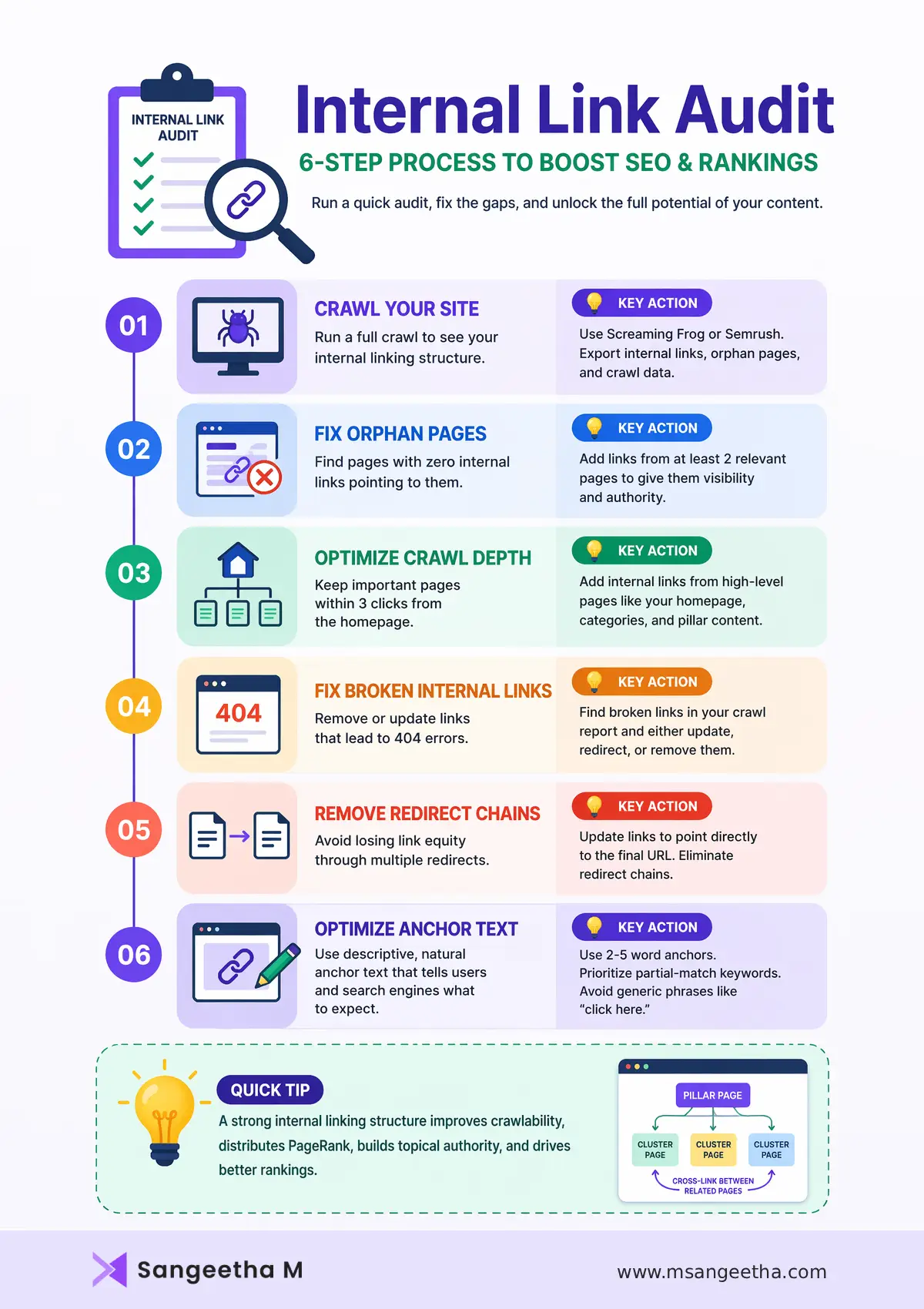
The 6-Step Internal Link Audit Process
1. Crawl your entire site
Run a full Screaming Frog crawl. Export the “All Inlinks” report and the “Orphan Pages” list. This becomes your baseline data for every subsequent step.
2. Identify and fix orphan pages
Any page receiving zero internal links is invisible to crawlers unless it’s in your sitemap — and even then, it receives no link equity. For every orphan page, identify 2 relevant existing pages to link from. Prioritize service pages, location pages, and high-converting landing pages first.
3. Map crawl depth for priority pages
In Screaming Frog or Sitebulb, filter pages by crawl depth. Every page you care about ranking should sit at depth 3 or less. For any priority page at depth 4+, add internal links from shallower pages to pull it up the hierarchy.
4. Fix broken internal links (404s)
Export all internal links returning a 4xx status code. For each broken link, either update the anchor to point to the correct live URL, set up a 301 redirect from the dead URL, or remove the link entirely. Broken internal links waste crawl budget and send users to dead ends.
5. Eliminate redirect chains
Filter your crawl for “redirect chains” — internal links that pass through one or more 301s before reaching the final URL. Update every chained internal link to point directly to the final destination. This is one of the most impactful, most overlooked internal link fixes available.
6. Audit anchor text diversity
Export your anchor text report. Flag any destination page where more than 40% of internal anchors are exact-match. Identify pages still using “click here” or “read more” anchors and update them to descriptive keyword-relevant phrases. Apply the anchor text distribution formula from Section 6.
Seven Internal Linking Mistakes That Kill Rankings
After auditing hundreds of sites, the same internal linking mistakes appear repeatedly. Each one is fixable — but each one is also actively suppressing rankings right now.
| # | Mistake | Impact | Fix |
|---|---|---|---|
| 1 | Orphan Pages | Pages never discovered; zero link equity received | Link every page from at least 2 relevant sources |
| 2 | Generic Anchor Text | No topical signal; wasted ranking potential | Replace “click here” with descriptive 2–5 word anchors |
| 3 | Exact-Match Anchor Over-Optimization | Algorithmic suppression; looks manipulative | Apply the anchor text distribution formula |
| 4 | Redirect Chains in Link Graph | Equity leakage; wasted crawl budget | Update all internal links to final destination URLs |
| 5 | Linking Only to Top-Level Pages | Deep service/location pages starved of authority | Create a deliberate deep-page link equity plan |
| 6 | Broken Cluster Links (Orphan Clusters) | Cluster pages disconnected from pillar authority flow | Ensure every cluster page links back to pillar + is linked from pillar |
| 7 | Nofollow on Internal Links | Authority blocked from flowing between your own pages | Audit and remove rel="nofollow" from internal links |
Of these seven, orphan pages cause the most invisible damage. A site audit revealing that 30–40% of pages have zero internal links pointing to them is common — and each of those pages represents content that search engines cannot reliably discover, index, or rank, regardless of how good the content is.
FAQs: People Also Ask
How many internal links per page is optimal for SEO?
There is no fixed number, but a practical guideline is 2–5 contextual internal links per 1,000 words of body content. For a 2,000-word blog post, aim for 5–10 contextual links. Keep the total number of links per page (navigation + contextual + footer) under 150 to avoid diluting link equity. Quality and contextual relevance always matter more than raw count.
Do internal links help with Google rankings?
Yes, significantly. Internal links directly affect three core ranking factors: crawlability (ensuring pages are discovered and indexed), PageRank distribution (passing authority to priority pages), and topical relevance (using anchor text to signal keyword context). Google has confirmed that internal links are a critical signal for understanding site structure and ranking pages appropriately. Sites with strong internal linking structures consistently outperform poorly-linked competitors, even with similar external backlink profiles.
What is the best anchor text for internal links?
The best anchor text for internal links is descriptive, 2–5 words long, and clearly tells both users and search engines what the destination page is about. Partial-match keyword anchors (variations of your target keyword, not the exact phrase) should make up 40–50% of your internal anchor text. Avoid generic anchors like “click here” or “read more,” and don’t overuse exact-match keyword anchors — keeping them below 15% of total internal anchors to avoid over-optimization signals.
What are orphan pages in SEO and why are they a problem?
Orphan pages are pages on your website that have no internal links pointing to them from other pages. Even if an orphan page exists on your domain and is submitted in your XML sitemap, search engine crawlers rarely discover it organically because they follow links rather than relying on sitemaps alone. Orphan pages receive no link equity from the rest of your site, are crawled infrequently, and often fail to rank even for terms where the content is strong. Fix orphan pages by linking to them from at least 2 contextually relevant existing pages.
How often should I audit internal links?
Run a full internal link audit quarterly using tools like Screaming Frog or Semrush Site Audit. Additionally, build a lightweight pre-publish checklist: before every new page goes live, confirm that it links to 3–5 relevant existing pages and that 1–2 existing pages link back to it. For sites publishing more than 10 pages per month, monthly automated crawls are recommended to catch orphan pages and broken links before they compound.
What is the difference between internal links and external links in SEO?
Internal links connect one page on your website to another page on the same domain. External links (or backlinks) connect your site to another domain, or connect an external site to yours. Internal links are fully within your control and primarily influence crawlability, PageRank distribution, and topical structure within your own site. External backlinks are earned from other sites and signal authority and trust to search engines. Both matter for SEO — internal links optimize how existing authority is distributed, while external links build the authority pool your site draws from.
Can too many internal links hurt SEO?
Yes, in two ways. First, overlinking a page (50+ body links) dilutes the equity each individual link passes and makes the content harder to read — hurting both rankings and user experience. Second, using repetitive exact-match anchor text across many internal links can trigger algorithmic scrutiny for over-optimization. Aim for fewer, higher-quality contextual links with natural anchor text variation rather than linking every possible keyword occurrence on a page.
How do internal links help with AI search and AI Overviews?
AI search engines map your internal link graph to evaluate topical comprehensiveness and content authority. A well-structured topic cluster — with a pillar page linking to detailed cluster pages and cluster pages linking back — signals to AI systems that your site has deep, structured knowledge on a subject, increasing the likelihood of being cited in AI Overviews and LLM responses. Supporting this with BreadcrumbList schema, FAQ schema, and descriptive anchor text around internal links further improves machine readability and AI citation probability.
The Bottom Line
Internal links for SEO are not a one-time task. They are ongoing infrastructure — the connective tissue that determines whether your site’s authority is concentrated in a few high-performing pages or distributed intelligently across every page that deserves to rank.
Start with the audit. Fix orphan pages. Resolve redirect chains. Build your topic clusters with deliberate pillar-to-cluster linking. Diversify your anchor text. And do it all with both Google’s crawlers and AI search systems in mind — because in 2026, your internal link graph is evaluated by both.
If your internal link structure needs a full audit rather than a DIY fix, that’s part of what I cover in technical SEO services — orphan pages, crawl depth, anchor text, the works.
Need Your Internal Link Structure Audited?
Orphan pages, redirect chains, and weak anchor text quietly cap how well your best content can rank. I’ll find the gaps and fix them.

