
I’ve been doing technical SEO long enough to remember when canonical tags were considered a niche concern — something you only had to worry about if you ran a massive e-commerce site with thousands of filtered product URLs. That’s no longer the case. In 2026 and beyond, canonical tags sit at the intersection of traditional SEO, generative engine optimization (GEO), and how large language models decide which version of your content to cite. If you’re not thinking about canonicalization from all three angles, you’re probably leaking ranking equity and AI visibility without even knowing it.
This guide covers everything — from the basics of what a canonical tag is and how to implement one, to the advanced stuff that most SEO blogs skip entirely: headless CMS pitfalls, edge rendering risks, and what your canonical strategy means for getting cited in ChatGPT, Perplexity, and Google’s AI Overviews.
What Is a Canonical Tag?
A canonical tag is a single line of HTML that you place inside the
<head>section of a webpage. It tells search engines which version of a URL should be treated as the authoritative one when multiple URLs serve similar or identical content. Here’s what it looks like:<link rel="canonical" href="https://yoursite.com/preferred-page/" />
The concept isn’t new. Google, Bing, and Yahoo jointly introduced the rel="canonical" element back in 2009 specifically to help site owners deal with duplicate content. What’s changed significantly is the context in which it operates. Today, that canonical tag doesn’t just signal to Googlebot — it signals to GPTBot, ClaudeBot, OAI-SearchBot, and every other AI crawler that’s building the training data and retrieval indexes that power modern AI search.
One thing worth clarifying upfront: canonical tags are hints, not directives. Google has said this explicitly — it takes your preference into account alongside other signals, but it can and sometimes will override a canonical tag if it thinks another URL is more relevant. That said, a correctly implemented canonical tag is a strong signal that the major search engines overwhelmingly respect.
Why Duplicate Content Happens (Even on Well-Managed Sites)
The misconception I run into most often is that duplicate content only happens when someone copies your articles without permission. The reality is that the vast majority of canonicalization problems are entirely self-generated and completely unintentional. Here are the most common culprits:
URL parameters are probably the biggest one. If you’re running UTM tracking on ad campaigns, your analytics setup might be creating hundreds of unique URLs that all serve identical content — /product?utm_source=google, /product?utm_source=facebook, /product?ref=newsletter — every one of those is technically a different URL to a search engine.
HTTP vs. HTTPS and trailing slash variations still trip up sites that haven’t been meticulously configured. http://example.com/page, https://example.com/page, https://example.com/page/, and https://www.example.com/page are four distinct URLs in the eyes of a crawler.
E-commerce filtering and sorting is another major source. A product category page with 200 items can generate dozens of near-duplicate URLs when users apply filters for color, size, price range, or sort order. Each filtered view typically has a unique URL, and unless you’re canonicalizing them back to the base category URL, you’re creating a crawl budget problem and diluting your link equity across dozens of low-value URLs.
Category and tag archive pages on blogs generate similar issues. A single blog post might be accessible under its own permalink, under one or more category URLs, under tag URLs, and potentially via a paginated archive. All of these represent the same content under different addresses.
Session IDs embedded in URLs, print-friendly page versions, and mobile subdomains (m.example.com) round out the usual suspects.
How Canonical Tags Actually Work
When a search engine crawls your site and encounters a canonical tag, it processes it as a strong suggestion to consolidate all ranking signals — backlinks, crawl priority, and indexation — into the canonical URL. The non-canonical versions might still get crawled occasionally, but they won’t accumulate ranking authority. That authority flows to the page you’ve designated as the master.
This signal consolidation is what makes canonicalization so valuable. If you have three URLs with identical content and each has picked up five backlinks from external sites, without a canonical tag you’ve got three pages each with five backlinks — potentially competing against each other. With a canonical tag pointing them all to one URL, that URL effectively benefits from all fifteen links.
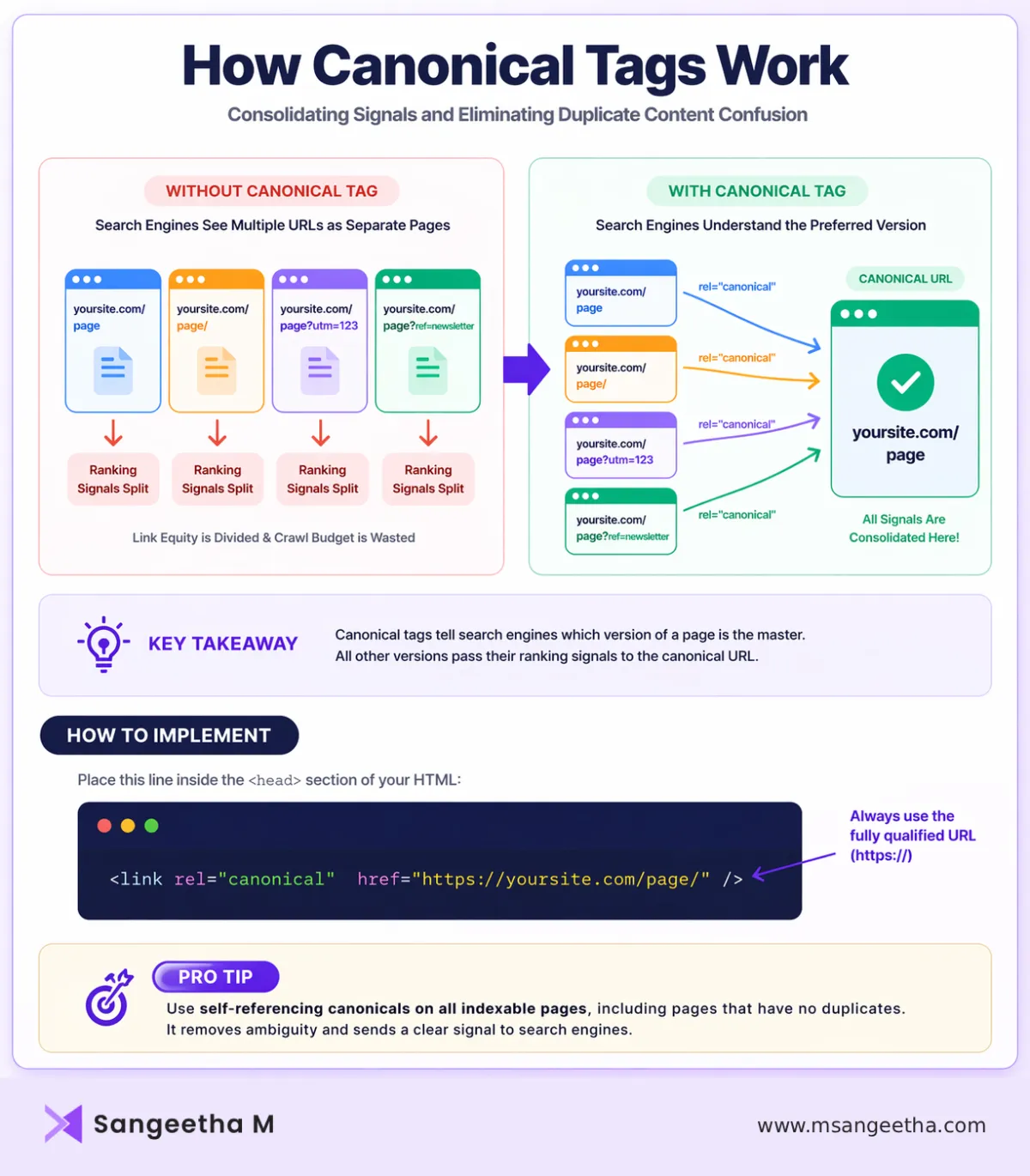
There are a few ways canonical tags get implemented:
The most common method is the <link rel="canonical"> tag in the HTML <head>. This is the standard approach and works well for most situations. You can also declare canonicals in HTTP response headers — useful for non-HTML files like PDFs. Sitemaps can also hint at canonical URLs, though the HTML tag is the most reliable signal.
Self-Referencing Canonicals: The Step Everyone Skips
Every indexable page on your site should have a canonical tag — including pages that have no duplicate. A self-referencing canonical (where the canonical URL points to the page itself) explicitly tells search engines that this is the intended version, removing any ambiguity. It’s a small implementation effort that closes the door on a category of canonicalization errors before they even start.
Many SEO plugins handle this automatically. Yoast SEO, Rank Math, and similar tools will generate self-referencing canonicals by default. If you’re on a custom build or headless architecture, you’ll need to make sure this is being handled programmatically — more on that shortly.
When to Use a Canonical Tag vs. a 301 Redirect
This is a question I get regularly, and the answer hinges on whether you want the non-canonical URL to remain accessible to users. A canonical tag allows the duplicate URL to stay live and still serve visitors, while communicating to search engines that it’s not the preferred version. A 301 redirect, on the other hand, permanently forwards users and search engines away from the old URL entirely.
Use a canonical tag when the content at the non-canonical URL still serves a legitimate user purpose — a printer-friendly page, a filtered product listing that users might bookmark, or a paginated archive that needs to remain accessible. Use a 301 redirect when you’re retiring a URL completely, such as when you’ve rewritten old content under a new URL or when a discontinued product page should forward to a category page.
There’s one critical trap to avoid: never use both a canonical tag and a 301 redirect between the same pair of URLs. The redirect takes precedence anyway, and the canonical on a page that redirects often gets ignored or creates confusing signals.
Canonical Tags for E-Commerce Sites
If you run an online store, canonicalization deserves its own dedicated strategy session. E-commerce sites are uniquely susceptible to canonical chaos because of the volume of near-identical URLs that product catalogs naturally generate.
Product variations are the most common problem. If a t-shirt comes in five colors and three sizes, you could be looking at fifteen distinct URLs for what is essentially the same product page. The typical approach is to canonicalize all variant URLs back to the base product page, though there are situations where a variation page has its own distinct search demand — a specific color that’s a popular search term, for instance — where you might want to treat it as an independent page with its own canonical.
Faceted navigation (filtering by brand, price, rating, etc.) almost always needs to be canonicalized back to the base category URL unless specific filter combinations have genuine standalone search value and unique content that justifies independent indexation.
Pagination is a separate concern. For product category pages that span multiple pages, the current best practice is for each paginated page to carry a self-referencing canonical rather than all pointing back to page one. Google has confirmed this approach, though your SEO goals for paginated content may also factor in whether you want to consolidate crawl budget to the first page.
Canonical Tags for Content Syndication and Guest Posting
This is an underused application of canonical tags that can genuinely protect your content. If you write a piece and publish it on a third-party platform — or if you want to republish your own blog post on Medium, LinkedIn Articles, or an industry publication — the version on the external site can include a canonical tag pointing back to the original on your site.
This is exactly how major publishing platforms like Forbes and HuffPost have historically handled syndicated content. The syndicated copy carries a canonical tag referencing the original source, which tells search engines where the authoritative version lives and ensures the original URL gets the ranking benefit.
From a practical standpoint, when syndicating your own content you should always request that the publisher implement the canonical pointing to your original URL. If they won’t or can’t, weigh the traffic benefit against the potential dilution of your content’s authority.
Canonical Tags in JavaScript-Heavy Environments
This is where things get more technically interesting — and where most canonical tag guides fall short. If your site relies heavily on client-side rendering, or if you’re running a headless architecture with a JavaScript framework like Next.js, Nuxt, or Remix on the front end, canonical tags come with a specific set of risks that traditional server-rendered sites don’t face.
The core problem is that AI crawlers and some search engine bots don’t reliably execute JavaScript. They ingest the raw HTML they receive. If your canonical tag is being injected into the DOM by JavaScript after the initial page load, these crawlers may never see it. They’re looking at a blank <head> and making their own canonicalization decisions in the absence of your signal.
The solution is to ensure canonical tags are present in the server-side rendered HTML response — not added later by client-side JavaScript. With Next.js, use the built-in Head component with server-side data fetching (getServerSideProps or generateMetadata in the App Router) to ensure canonicals are rendered in the initial HTML. With Nuxt, useHead with SSR enabled achieves the same outcome. Static site generation (SSG) bakes canonical tags into pre-built HTML files at build time, which is actually the most reliable approach for content that doesn’t change frequently.
A second headless-specific risk: if you’re serving simplified or edge-rendered HTML to AI crawlers specifically (a common optimization to avoid JavaScript hydration delays), make sure the edge-rendered output includes identical canonical tags to the full user-facing version. Inconsistency between these two versions can introduce new canonicalization conflicts that didn’t exist before.
Canonical Tags and Headless CMS Platforms
Headless CMS platforms — Contentful, Sanity, Prismic, Strapi — add a layer of abstraction between your content management and your front-end rendering. This flexibility is powerful, but it means canonical tag implementation requires deliberate architecture rather than relying on built-in CMS defaults.
Best practice here is to store the canonical URL as a dedicated field within each content type in the CMS, then retrieve it via API at render time and inject it into the <head> during server-side rendering or at build time. If you’re using WordPress as a headless backend with a decoupled front end, the WPGraphQL plugin combined with the Yoast SEO addon lets you query canonical URLs alongside other SEO metadata and apply them in your front-end framework’s head management.
The risk with headless setups is that canonical tags can silently break during a deployment or when a CDN caching configuration changes. A CDN or edge layer that caches and strips HTTP response headers can remove canonical declarations served via headers, and poorly configured caching rules can serve stale HTML with outdated canonical values. Audit canonical tag output at the raw HTML level — not just through browser DevTools — on a regular cadence.
Common Canonical Tag Mistakes (and How to Avoid Them)
1. Canonicalizing to a redirecting URL
If your canonical tag points to a URL that 301 redirects to another page, search engines may not follow the chain reliably. Always make sure your canonical URL resolves to a 200 status code directly.
2. Using relative paths instead of absolute URLs
Always use full absolute URLs in canonical tags — https://yoursite.com/page/ — not relative paths like /page/. Relative paths can be interpreted differently across different crawling contexts.
3. Pointing canonicals to a noindexed page
This creates a contradiction: you’re telling search engines the canonical version is a page they’re also being told to ignore. Resolve noindex directives before setting canonicals, or vice versa.
4. Canonicalizing paginated pages all to page one
As mentioned earlier, this approach was once recommended but is no longer current best practice. Each paginated page should self-reference unless there’s a specific SEO reason to consolidate them.
5. Ignoring invalid HTML in the head
If your <head> section contains invalid HTML elements, browsers and crawlers may treat the head as ending earlier than it actually does. Any canonical tags placed below the invalid element get interpreted as body content and are effectively ignored. Web Almanac data shows this affects over 10% of sites, so it’s worth validating your HTML structure.
6. Setting up conflicting canonicals
Canonical conflicts happen when Page A canonicals to Page B, but Page B canonicals to Page A, or when multiple pages all canonical to each other in a loop. Use a crawler like Screaming Frog to audit for canonical chains and conflicts.
The Part Most Blogs Don’t Talk About: Canonical Tags and AI Search
Here’s where I want to spend extra time, because this is a genuine gap in most of the canonical tag content I’ve read. Your canonical tag strategy now directly affects how AI-powered search tools — ChatGPT, Perplexity, Google AI Overviews, Microsoft Copilot — attribute and cite your content.
LLMs build their understanding of the web in two phases. During training, they ingest large amounts of web content and effectively merge near-duplicate documents into shared internal representations. If your content exists across multiple URLs without clear canonical signals, the model may merge them all under an incorrect or internally chosen “canonical” concept — not necessarily the URL you’d want cited. During retrieval (in RAG-powered tools like Perplexity or ChatGPT with web browsing), AI tools query live indexes and pull content from whatever URL they encounter. If your canonical URL isn’t what’s getting crawled, it’s not what gets cited.
There’s a specific Bing-ChatGPT connection that most SEO guides completely overlook. ChatGPT relies heavily on Bing’s index for its web-connected responses. That means the URL Bing treats as canonical directly determines which URL ChatGPT cites, regardless of what you’ve declared in your canonical tag. If Bing has indexed a parameterized variant or a non-canonical URL, ChatGPT will cite that version. You need to verify canonical coverage in Bing Webmaster Tools separately from Google Search Console, because the two don’t always agree — and those discrepancies can create cross-engine citation inconsistencies.
To diagnose citation leakage in AI tools, query ChatGPT, Perplexity, and Google AI Overviews with the exact questions your target audience asks and document which URLs appear in the citations. If the cited URL is a parameterized variant, a cached copy, or a syndicated version rather than your canonical, you have a problem that standard Google Search Console monitoring won’t surface.
Monitoring your server logs for AI crawler user agents — GPTBot, OAI-SearchBot, ClaudeBot, Google-Extended — and verifying that they’re reaching your canonical URLs with 200 status codes is a step most sites haven’t taken yet. If these crawlers are hitting non-canonical URLs more than canonical ones, your internal link structure or sitemap is guiding them to the wrong pages.
Canonical Tags and GEO (Generative Engine Optimization)
Canonical tags are increasingly a GEO concern, not just an SEO one. The same consolidation principle that protects your link equity in traditional search also protects your authority in generative search. AI engines are explicitly designed to reduce redundancy. When they encounter multiple near-identical URLs covering the same topic, they filter the noise — and the version they pick to represent your content may not be the one you’d choose.
An aggressive canonicalization strategy is therefore directly aligned with GEO goals. Consolidating thin or near-duplicate location pages, pruning low-quality URL variants, and ensuring every substantive page has a clean self-referencing canonical all contribute to a cleaner content signal for AI systems. A site with 50 nearly identical location pages looks like noise to a language model. The same content architecture with proper canonicalization and unique content signals looks like authority.
llms.txt — the emerging standard for communicating with LLM crawlers, analogous to robots.txt — doesn’t replace canonical tags, but it works alongside them. If you’re implementing llms.txt, make sure it references your canonical URLs rather than duplicate variants, and ensure the content it points crawlers toward is the same content your canonical tags declare as authoritative.
GEO Canonical Checklist
- Ensure canonical URLs are crawlable by GPTBot / OAI-SearchBot
- Avoid parameter URLs in internal linking
- Verify Bing index matches canonical
- Test AI citations manually
How to Audit Your Canonical Tags Right Now
A canonical audit doesn’t have to be complicated. Here’s the practical sequence I follow:
Start with a full site crawl using Screaming Frog or a similar tool. Export the canonical URL for every page and compare it to the actual page URL to identify self-referencing gaps, canonical chains, and conflicts. Flag any canonicals that resolve to a redirect or a non-200 status code.
Cross-reference your sitemap. Every URL in your XML sitemap should be a canonical URL, not a redirect or a non-canonical variant. If your sitemap contains URLs that differ from the declared canonicals on those pages, that’s a conflict worth fixing.
Check Google Search Console under the Coverage report. The “Duplicate without user-selected canonical” and “Duplicate, Google chose different canonical than user” reports will show you where Google is overriding your canonical decisions — usually a sign that the canonical URL you’ve declared is weaker than a competing variant in Google’s estimation.
Verify canonical tags in raw HTML, not just in a rendered browser view. Use Screaming Frog with JavaScript rendering disabled, or curl a URL and inspect the response headers and raw source to confirm your canonical is present before any JavaScript executes.
For AI search specifically, query your key topics in ChatGPT and Perplexity and note which URLs are cited. Cross-check those against your declared canonicals. Then open Bing Webmaster Tools and verify that the URLs Bing has indexed match your canonical declarations.
Quick Implementation Reference
If you just need the code and the checklist, here it is:
Standard canonical tag in HTML head:
<link rel="canonical" href="https://yoursite.com/preferred-url/" />Canonical via HTTP header (for PDFs and non-HTML content):
Link: <https://yoursite.com/preferred-url/>; rel="canonical"The non-negotiables: always use absolute URLs, always point to a 200-status page, never create canonical loops, include a self-referencing canonical on every indexable page, and verify that your canonical tag appears in the raw HTML response — not just after JavaScript has run.
Key Takeaways
- Canonical tags consolidate ranking signals
- Always use self-referencing canonicals
- Avoid canonical loops and redirects
- Ensure canonicals exist in raw HTML
- Canonical strategy now impacts AI search visibility
Canonical Tags in 2026: What Actually Matters Now
Canonical tags haven’t changed in their fundamental mechanics since 2009. What’s changed is everything around them — the search landscape they operate in, the AI crawlers that read them alongside Googlebot, and the generative tools that use them (or ignore them) when deciding what to cite. Getting canonicalization right is no longer just a hygiene task you check off during a technical audit. It’s an active, ongoing part of both your SEO and your GEO strategy.
The sites I see doing this well share a few traits: they audit canonical output at the raw HTML level, they monitor AI crawlers in their server logs, they’ve verified their canonical coverage in Bing as well as Google, and they’ve mapped their canonical strategy to their content consolidation goals. The sites that struggle are the ones that set up a canonical plugin years ago and assumed the job was done.
Start with the audit. Find out where your canonicals are broken, overridden, or simply absent. Fix those first. Then layer in the AI-era considerations — checking your citations in generative tools, monitoring AI crawler access, and thinking about how your canonical structure communicates authority to systems that are increasingly shaping how your content is found.
Frequently Asked Questions
Do canonical tags prevent duplicate content penalties?
Canonical tags don’t “prevent penalties” in the strict sense. Instead, they help search engines understand which version of a page should be treated as the primary one. This avoids ranking dilution and consolidates SEO signals like backlinks and crawl priority.
Can Google ignore canonical tags?
Yes. Canonical tags are treated as a hint, not a directive. Google may choose a different canonical URL if it believes another version is more relevant or has stronger signals.
Should every page have a canonical tag?
Yes. Every indexable page should include a self-referencing canonical tag. This removes ambiguity and ensures search engines clearly understand the preferred version of each page.
What is the difference between a canonical tag and noindex?
A canonical tag tells search engines which version of a page to prioritize, while still allowing all versions to exist. A noindex tag, on the other hand, instructs search engines not to include a page in search results at all.
Do canonical tags affect AI search results?
Yes. Canonical tags influence which URL AI systems (like ChatGPT, Perplexity, and Google AI Overviews) treat as the authoritative source. If canonical signals are unclear, AI tools may cite non-preferred or duplicate URLs.

