
I’ve done enough site audits to know that orphan pages are one of those issues that keeps showing up regardless of how big or polished a website is. A startup with 30 pages has them. A well-funded e-commerce brand with 50,000 URLs definitely has them. And in most cases, nobody realizes the damage being done until rankings start slipping or a crawl report raises a red flag.
Here’s the thing — orphan pages aren’t a flashy problem. They don’t break your site. They don’t throw 500 errors. They just sit there, cut off from everything, quietly dragging your SEO down. And now with AI Overviews and generative search changing how content gets discovered, disconnected pages are becoming an even bigger liability than they were two years ago.
In this guide, I’m going to walk you through everything you need to know about orphan pages — what they actually are, why they happen more often than you’d think, how they’re hurting you beyond just rankings, and exactly what to do about them.
Quick Summary:
- Orphan pages = pages with no internal links
- They don’t receive link equity
- They hurt crawl efficiency and topical authority
- Fix: connect, merge, redirect, or noindex
What Are Orphan Pages?
An orphan page is any page on your website that has no internal links pointing to it from other pages on the same domain. It exists — it has a URL, it might even have solid content — but nothing on your site links to it. No navigation menu, no sidebar, no contextual link within a blog post. Nothing.
Search engines like Google discover content primarily by following links. Googlebot crawls from page to page, building a map of your site’s structure and understanding which pages matter based on how they’re connected. When a page sits completely outside that linking structure, it doesn’t get the crawl attention it deserves, doesn’t inherit any authority from related pages, and search engines have almost no way to judge its relevance or importance.
Here’s a simple visual to understand how orphan pages differ from properly linked pages:
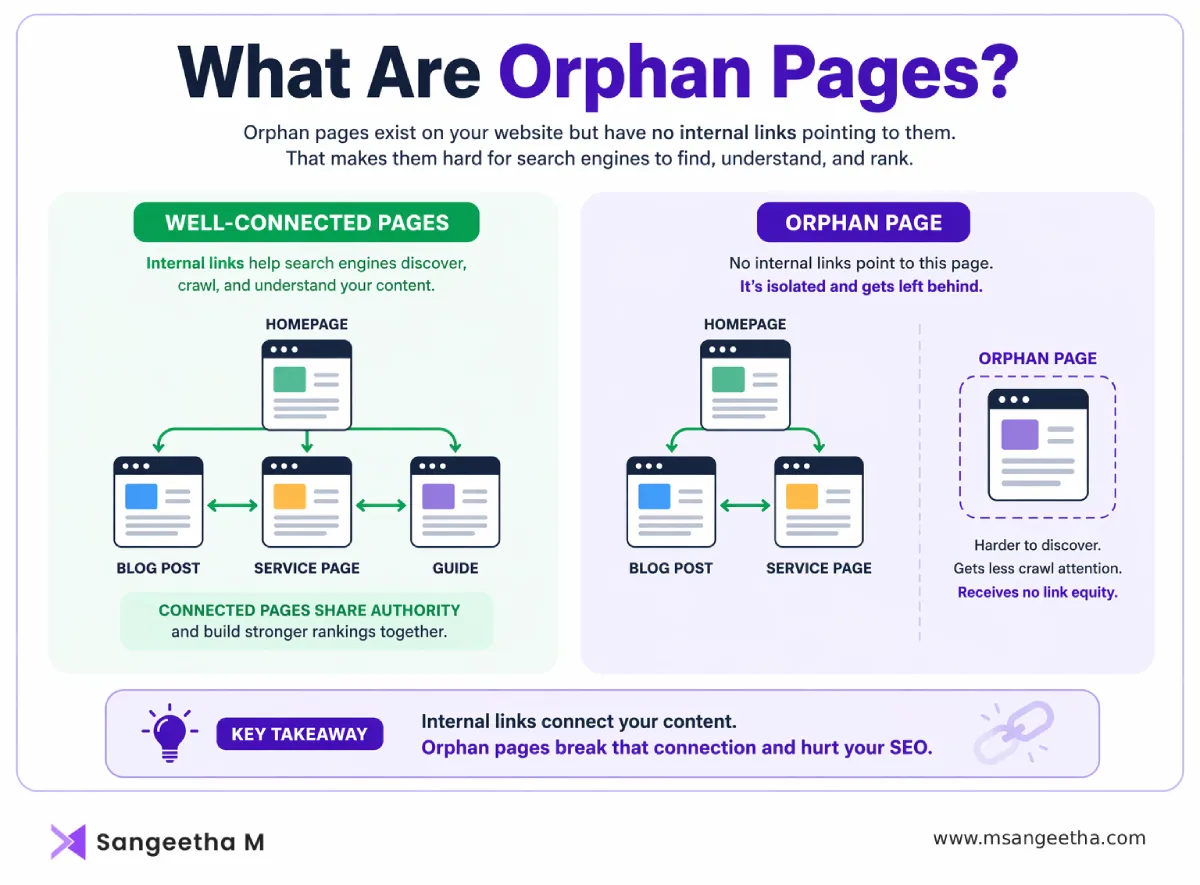
From a user perspective, orphan pages are effectively invisible. Unless someone has a direct URL or stumbles onto the page from an external source, there’s no way to find it by browsing your site. That means no engagement, no conversions, no value returned on whatever time and money you spent creating that content.
How Orphan Pages Are Different From Zombie Pages
These two terms get mixed up a lot, so it’s worth clearing up. An orphan page may have genuinely good content and be technically clean — the problem is purely structural. It’s isolated, not broken. A zombie page, on the other hand, has the opposite issue: it might have internal links pointing to it, but the content itself is thin, outdated, or irrelevant. It gets crawled but does nothing useful for users or rankings.
Both types consume crawl budget. Both hurt your overall site health. But the fixes are different — orphan pages need structural reconnection, while zombie pages need a content decision (update, consolidate, or remove). Knowing which one you’re dealing with saves a lot of wasted effort.
Why Orphan Pages Happen (And Why It’s Almost Never Intentional)
In my experience, orphan pages are almost always accidents. They accumulate gradually during normal site operations, and by the time anyone notices, there can be dozens or even hundreds of them. Here’s where they typically come from:
Site Redesigns and Migrations
This is probably the single biggest cause. When a site gets a new design or moves to a new CMS, navigation menus change, URL structures shift, and old internal links get broken or removed. Pages that were previously well-connected can end up completely cut off. I’ve seen clients go through a migration and lose internal links to over 200 blog posts in one go — all of them turning into orphans overnight.
URL Structure Changes
Moving from date-based URLs like example.com/2022/06/post-title to category-based URLs like example.com/blog/post-title is a common improvement. But if you redirect the old URLs without also rebuilding the internal links pointing to the new URLs, you end up with pages that are technically live but referenced by nothing.
WordPress and Shopify-Specific Causes
WordPress auto-generates pages for tags, author archives, and date archives that often have no meaningful internal links pointing to them. Plugins can also quietly create URLs — think WooCommerce checkout pages, form confirmation pages, or search results pages — that never get wired into your site’s link structure. On Shopify, product pages for variants or seasonal collections regularly get orphaned after campaigns end or inventory changes.
Expired Campaigns and Landing Pages
You build a landing page for a Black Friday promotion. The campaign ends, the menu link gets removed, but the page itself stays live. It’s now an orphan. Same thing happens with event registration pages, webinar landing pages, or seasonal offer pages that outlive their campaigns.
Poor Content Publishing Processes
A new blog post goes live, but the writer doesn’t add internal links to it from older relevant posts, and no one updates the category page or sidebar to include it. The post sits in a silo from day one. This is extremely common in teams where SEO isn’t part of the publishing checklist.
How Orphan Pages Hurt Your SEO
No Link Equity Reaches Them
Internal links pass authority (PageRank) from page to page. When a page has no internal links pointing to it, that flow of authority stops completely. Even if the content is excellent and the page targets a high-value keyword, it starts at a disadvantage because search engines can’t evaluate its importance relative to the rest of your site. This is why you can sometimes have a technically perfect page that just refuses to rank — it’s been cut off from the equity that would support it.
Crawl Budget Gets Wasted
Google allocates a finite amount of crawl budget to each site. For small sites, this isn’t usually a problem. But for large e-commerce sites with thousands of product and category URLs, crawl budget management becomes critical. Orphan pages sitting in your XML sitemap pull crawl attention toward pages that aren’t serving any purpose, taking it away from new product listings, updated category pages, or freshly published content that actually needs to be indexed quickly.
Topical Authority Gets Fragmented
This is a point that doesn’t get nearly enough attention in most orphan page guides. Search engines build a picture of what topics your site is authoritative on through the semantic relationships between your pages — which pages link to which, what anchor text is used, how topics cluster together. When you have orphan pages on relevant topics, those pages can’t contribute to your topical authority model. You’re essentially leaving expertise signals unclaimed.
Indexation Becomes Inconsistent
Google may still find orphan pages through your sitemap or external backlinks, but without internal link signals providing context, indexation becomes unpredictable. Pages may get indexed initially, then quietly dropped. They may index but never rank because Google can’t determine their relevance. The result is an inconsistent coverage gap across your site — content that should be working for you simply isn’t showing up.
The AI Overview Problem Nobody’s Talking About
Here’s a gap that most blogs on this topic don’t address, and it’s becoming increasingly important: orphan pages are a significant liability in the age of AI Overviews and generative search.
When Google generates an AI Overview or when ChatGPT and Perplexity synthesize answers, they rely on a page’s relationship to its surrounding content ecosystem to assess credibility and relevance. A page that sits inside a well-structured internal linking network — connected to related articles, cited by authoritative hub pages, positioned within a clear topic cluster — sends strong signals that the content is trusted and contextually relevant.
An orphan page sends none of those signals. Even if the content itself is well-written and accurate, its isolation from the site structure makes it much harder for AI systems to assess its authority and place it confidently within a knowledge graph. You could have the best answer on the internet sitting on an orphan page and it still might not appear in an AI Overview, simply because the structural signals aren’t there to back it up.
In a search environment where AI Overviews are appearing in a growing share of results, getting your internal linking structure right isn’t just a technical SEO task. It’s a prerequisite for GEO — generative engine optimization. Clean site architecture with well-connected pages makes it far easier for AI systems to understand your content, map your expertise, and cite you in generated answers.
Not Every Orphan Page Is a Problem — Know the Difference
This is where I’d push back on some of the more alarmist takes you’ll find on this topic. Not all orphan pages need to be fixed, and treating them all the same is a mistake.
There are situations where an orphan page is perfectly fine, even intentional. PPC landing pages are the classic example — these pages are built for paid traffic and deliberately kept out of the site’s navigation to avoid indexation. The right move there is to add a noindex tag, not to create internal links to them. Similarly, thank-you pages, one-time event registration pages, and pages built specifically for A/B testing don’t belong in your internal linking structure.
The pages you should be actively concerned about are the ones that have SEO value — pages targeting keywords you care about, blog content that supports your topical authority, product pages that should be driving organic traffic — but are cut off because of an oversight rather than a deliberate decision.
A useful way to think about it: ask whether the page should logically appear in search results for anything relevant to your business. If yes, it needs internal links. If no, it needs a noindex tag or a 301 redirect.
How to Find Orphan Pages
The process comes down to finding the gap between your crawl data and your analytics data. Here’s the approach I use:
Step 1 — Crawl Your Site
Use a tool like Screaming Frog, Sitebulb, or Ahrefs Site Audit to crawl your website and export a list of all URLs that are discoverable via internal links. This is your “linked pages” list.
Step 2 — Pull Your Full URL List
Export all URLs from your Google Search Console (under Coverage or Pages), your XML sitemap, and your Google Analytics (under Pages and Screens). This gives you every URL that either exists or has received traffic, regardless of whether it’s internally linked.
Step 3 — Find the Gaps
Any URL that appears in your sitemap or Search Console data but does not appear in your crawl data is an orphan page. These are the pages your crawler couldn’t reach because nothing links to them. A simple spreadsheet comparison or a tool like Screaming Frog’s “Orphan Pages” report (which cross-references sitemap URLs against crawl data) can surface these quickly.
Step 4 — Check Server Log Files
For larger sites, server log analysis is particularly valuable. Logs tell you which URLs Googlebot has actually visited, including pages it found through your sitemap even though no internal links point to them. Pages that Googlebot visits regularly but that your crawl misses are almost certainly orphans worth investigating.
How to Fix Orphan Pages — A Priority Framework
Not every orphan page deserves the same urgency. Once you’ve found them, use this framework to prioritize:
| Type | Action |
|---|---|
| High-value | Add links |
| Supporting content | Connect |
| Thin content | Merge |
| Irrelevant | Noindex |
Fix First — High-Value Orphans
These are pages with existing traffic, backlinks, or keyword rankings that have become disconnected. They’re already contributing something — they just need to be plugged back in. Add internal links from two or three topically related pages, update your category or hub pages to include them, and add them to relevant navigation elements where appropriate.
Fix Second — Content That Supports Topical Authority
Pages that don’t currently have traffic or rankings but cover topics that matter to your overall content strategy. These pages should be reconnected because they contribute to your expertise signals. Even a couple of contextual internal links from related posts can make a meaningful difference.
Merge or Redirect — Thin or Duplicate Orphans
Pages with weak content that overlap significantly with existing pages on your site. Rather than adding internal links to them (which would just split ranking signals), consolidate the content and redirect the orphan URL to the stronger, better-connected version.
Noindex or Remove — Intentional or Irrelevant Orphans
Campaign landing pages, test pages, and other pages that were never meant to rank. If they’re still needed for operational reasons (like ongoing PPC campaigns), add a noindex tag. If they serve no current purpose, delete them and set up a 410 (content permanently gone) or 301 redirect to the most relevant live page.
Preventing Orphan Pages From Coming Back
Fixing orphan pages is only half the job. If you don’t change the processes that created them, they’ll keep coming back. A few habits that make a real difference:
Build internal linking into your content publishing checklist. Every new post or page that goes live should have at least two to three internal links pointing to it from existing relevant content, added on the same day it’s published. This takes maybe 15 minutes and prevents an entire category of orphan pages from forming in the first place.
Any time you make site-wide navigation changes — whether that’s restructuring menus, changing your footer links, or removing a category — do a quick audit of what those nav links were pointing to. If those destinations are still valuable, find new homes for them before removing the links.
Before any site migration or redesign, map your existing internal link structure and confirm that every page in that map has a clear path to being linked in the new design. This should be a standard pre-launch checklist item, not an afterthought.
Finally, schedule quarterly crawl audits — or monthly for large sites. Orphan pages tend to accumulate quietly, and regular audits catch them early before they become a performance problem.
The Bottom Line
Orphan pages are one of those technical SEO issues that’s easy to deprioritize because they don’t cause obvious, visible damage. But they represent a real and compounding cost — content investments that aren’t paying off, ranking opportunities left unclaimed, and authority signals that never reach the pages that need them.
In an environment where Google’s AI Overviews and generative AI search tools are increasingly determining what content gets surfaced, having a clean, well-connected internal linking structure matters more than it ever has. Disconnected pages don’t just miss out on traditional rankings — they miss out on the structural signals that AI systems use to assess credibility and relevance.
Find your orphan pages, prioritize the ones that matter, fix the structure, and put a process in place to catch new ones early. It’s not the most exciting SEO work, but it’s some of the highest-leverage work you can do — especially on sites that have been around long enough to accumulate a fair amount of content without consistent internal linking hygiene.
Frequently Asked Questions
Do orphan pages get indexed by Google?
Sometimes. Google can find orphan pages through your XML sitemap or via external backlinks pointing to them. But even when they do get indexed, they typically perform poorly in rankings because they receive no internal link equity and search engines struggle to establish their topical relevance within your site structure.
How many orphan pages is too many?
There’s no universal threshold, but if more than 10% of your indexed URLs are orphan pages, it’s worth treating as a priority. For large e-commerce sites, even a smaller percentage can have a meaningful impact on crawl budget and indexation consistency.
Can orphan pages hurt pages that are properly linked?
Yes, indirectly. Large numbers of orphan pages can dilute crawl budget across your domain, meaning Googlebot spends time on disconnected pages instead of revisiting and re-evaluating your important content. They can also contribute to a fragmented topical authority signal across your site.
Is it okay to have orphan pages that are noindexed?
Yes — intentional orphan pages like PPC landing pages or A/B test variants that are properly noindexed are generally fine. The key word is intentional. The problem arises when pages that should be contributing to your SEO end up orphaned by accident.
What’s the fastest way to find orphan pages?
The most efficient approach for most sites is to run a Screaming Frog crawl and cross-reference the crawled URLs against your XML sitemap and Google Search Console coverage data. Pages in your sitemap or GSC that don’t appear in your crawl results are your orphan pages. Screaming Frog also has a built-in orphan page report if your sitemap is connected.

