
If you’ve been checking Search Console and noticed something new under Settings, you’re not imagining it. Google has been quietly building out a whole layer of AI-specific tools this year: a way to control whether your content appears in AI Overviews and AI Mode, and a new performance report showing how your site shows up inside those AI features. Neither has gotten as much attention as a core update, but both are genuinely useful, and I wanted to walk through what they do and whether you should touch them.
This ties directly into the shift I covered in my Google AI Optimization Guide post — Google isn’t just changing how it ranks pages anymore, it’s changing what “appearing in search” even means.
The New Search Generative AI Control
Google rolled out a genuinely new control in Search Console: the ability to explicitly include or exclude your site from AI Overviews, AI Mode, and the generative AI features inside Google Discover. This went into effect in early June 2026, and Google published a detailed help document explaining exactly how it works.
There are three settings:
- Include (default): Your content can appear in AI features, including as linked sources that help ground AI-generated answers, and you can receive impressions and traffic from them.
- Exclude: Your content is kept out of AI features entirely — no visibility, no traffic, no impressions from that surface. Google has stated this control is not used as a ranking or inclusion signal anywhere else in Search, so excluding yourself from AI features doesn’t hurt your regular organic rankings.
- Inherit from parent: If your property sits under a parent property (like a subdomain under a root domain), it follows whatever setting the parent uses, and you can override this at any time.
One detail worth knowing if you manage multiple properties or subdomains: the inheritance logic runs up the chain to the nearest parent that has explicitly stopped inheriting, and if none of your parent properties have set a manual value, everything defaults to whatever the top-level domain property is set to. If you’re managing a site with several subdomains in Search Console, it’s worth checking this setting at each level rather than assuming it’s consistent across all of them.
As of writing, Google has confirmed this control for UK-verified properties in Search Console. I haven’t seen it appear in any of my own India-based properties yet, so if you’re outside the UK, don’t be surprised if it’s not showing up for you either — based on how quickly the related AI performance report expanded (see below), I’d expect this to reach more regions before long.
The New AI Performance Report
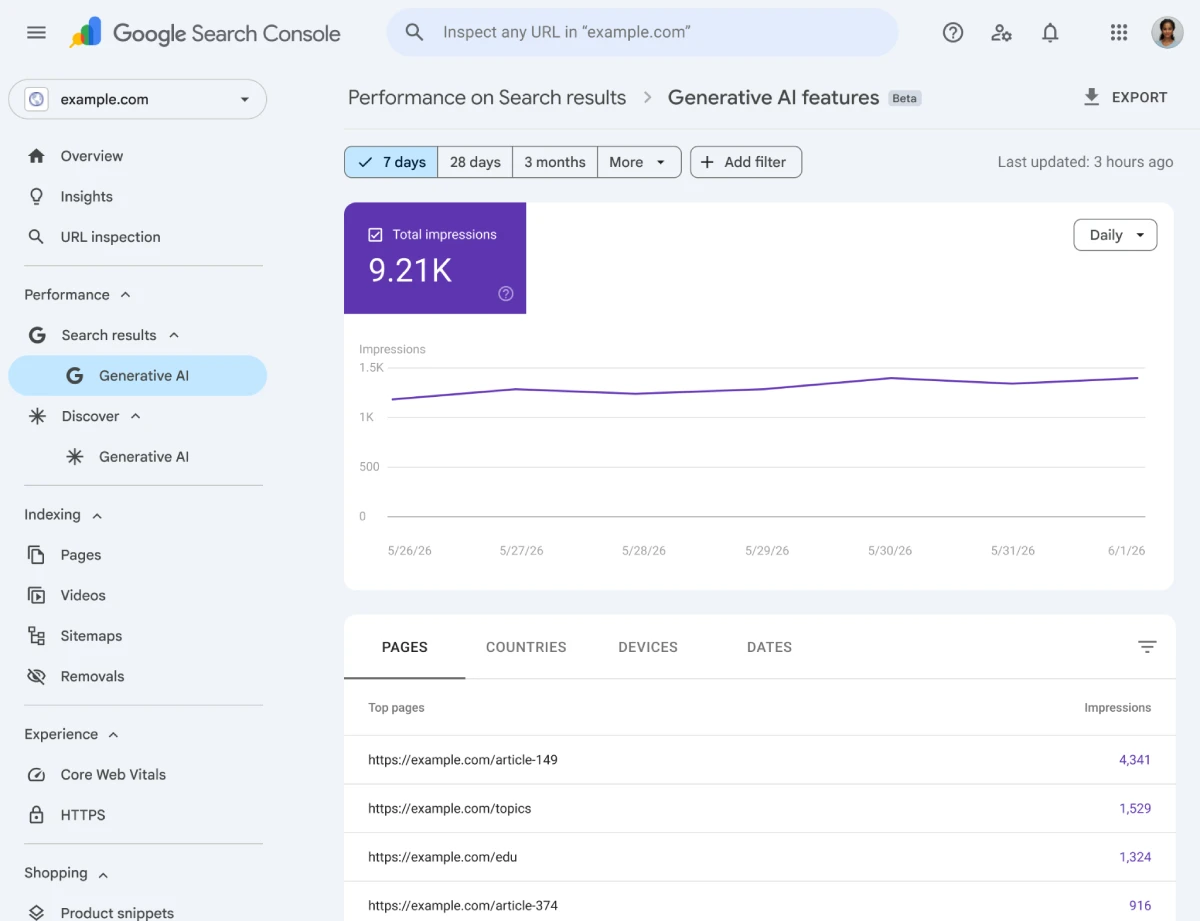
Source: Google Search Central Documentation
Separately, Google has been rolling out a new Search Console report specifically for generative AI features — sometimes labeled “Generative AI” in the Performance section. It doesn’t show clicks yet, but it does show:
- Impressions — how often your URLs appeared inside AI Overviews, AI Mode, or AI-powered Discover results
- Pages — which specific URLs are surfacing in these AI features
- Countries — visibility broken down by country
- Devices — which devices people were using when they saw your content in AI features
- Dates — hourly, daily, weekly, and monthly views of performance over time
This started as a UK-only beta but expanded quickly — reports from India, the US, and Switzerland started surfacing within weeks, and Google’s John Mueller confirmed it’s a gradual, feedback-driven rollout rather than a single global launch. I’ve seen this firsthand: it’s already showing up in Search Console for one of my US-based client sites, but hasn’t appeared yet for my own site (India-based). That inconsistency seems to be normal right now — if you’re not seeing it everywhere you manage, it’s very likely just a matter of time rather than something wrong with your setup.
Should You Turn On the Exclude Control?
For almost every client site I manage, no. AI Overviews and AI Mode are increasingly how people find sites in the first place, and excluding yourself cuts off a growing traffic source for no upside — Google has been explicit that this control doesn’t affect your regular search rankings either way. The exclude option makes more sense for narrow cases: paywalled content you don’t want summarized for free, or publishers with specific licensing concerns about how their content gets reused in AI-generated answers.
What to Actually Do Right Now
- Check Search Console‘s Settings for the generative AI control, and confirm your subdomains are inheriting (or not inheriting) the way you expect.
- If you see the new AI performance report available for your property, start watching it alongside your regular Performance report — it’s a different lens on visibility, not a replacement for click data. This is the first official way to measure how often your content appears inside Google AI Overviews and AI Mode without relying on third-party visibility tools.
- Don’t panic if you don’t see either feature yet. Based on the rollout pattern so far, this is reaching more properties every few weeks.
Frequently Asked Questions
Does excluding my site from AI features hurt my regular Google rankings?
No. Google has stated this control isn’t used as a ranking or inclusion signal for the rest of Search — it only affects whether your content appears specifically within AI Overviews, AI Mode, and generative AI Discover features.
Why don’t I see the AI performance report in my Search Console yet?
Google is rolling this out gradually and reviewing feedback as it expands access, rather than launching it to all properties at once. It’s expanded well beyond its original UK-only beta, so if you don’t see it yet, it’s likely a matter of time.
Does the AI performance report show clicks?
Not currently. It reports impressions, which pages appeared, country and device breakdowns, and performance over time — but click data isn’t part of the report yet.
Google has spent years giving website owners data about traditional search performance. These new AI controls and reporting tools show that generative search is becoming a first-class part of Search Console rather than an experiment. Even if the reports haven’t reached your account yet, they’re worth understanding now because they’ll likely become part of every SEO workflow over the coming months.

