
I get some version of this question in nearly every client onboarding call: “Do I need to fill in the title, the alt text, and the caption for every image?” The short answer is these three fields do three completely different jobs, and treating them as interchangeable is where most of the confusion — and most of the wasted effort — comes from.
Here’s what each one actually is, what it’s for, and where I’d spend your time if you’re triaging a large image library.
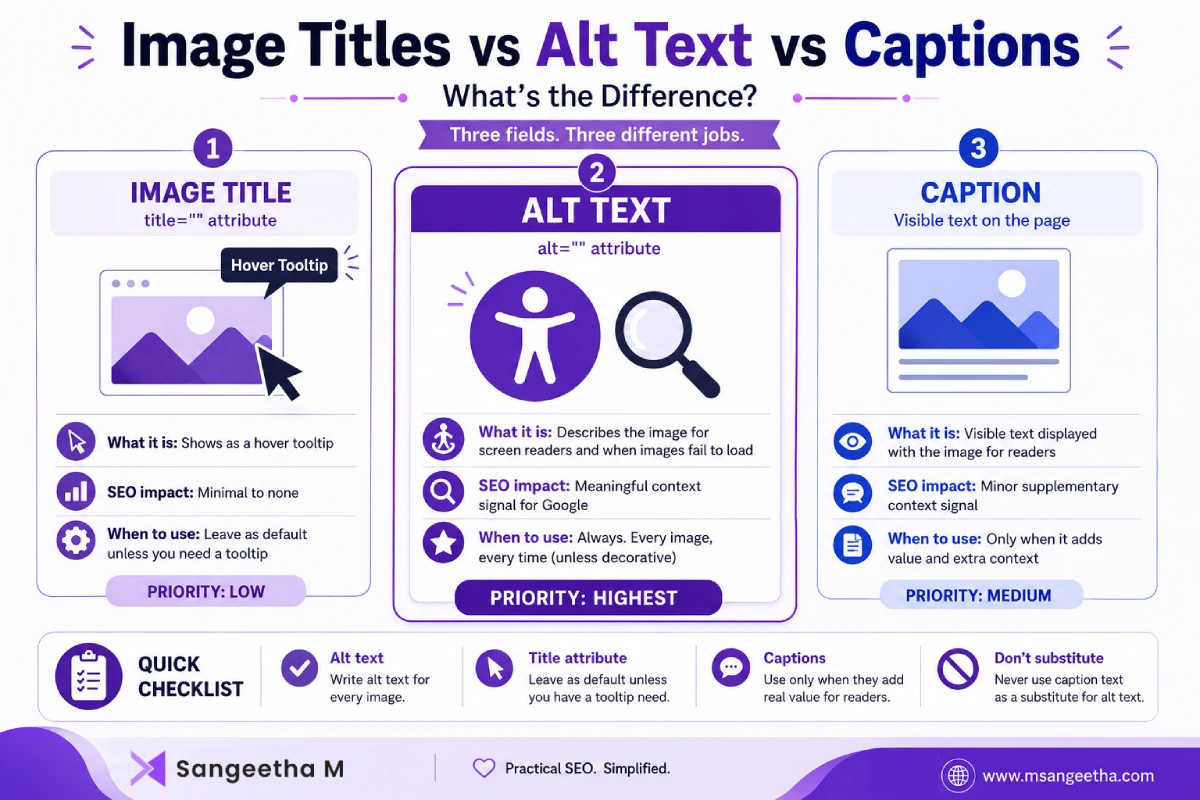
The Three Fields, Defined
Title Attribute
This is the title="" attribute on the <img> tag. In most browsers it shows up as a small tooltip when someone hovers over the image. In WordPress, it’s the “Title” field in the media library, and by default it’s auto-filled from the file name when you upload. It’s primarily used to identify the media item inside WordPress and may be used by some themes or plugins as the image’s HTML title attribute, but it isn’t guaranteed.
Alt Text
This is the alt="" attribute. It describes the image for screen readers and displays in place of the image if it fails to load. It’s also what Google reads to understand image content when there’s no other context available. I cover this one in full in How to Add Alt Text to Images in WordPress for SEO.
Caption
This is visible text displayed under (or beside) the image on the page itself, for human readers. In WordPress it renders inside a <figcaption> element when you use the caption field on an image block.
Do Title Attributes Matter for SEO?
Barely, and I want to be direct about this because it’s the most common misconception I run into. Google has been clear that the image title attribute carries little to no weight as a ranking signal. It’s not indexed the way alt text is, and it’s not treated as descriptive content the way surrounding page copy is.
The tooltip behavior is really its only functional purpose now, and honestly, most visitors never hover long enough to see it. I don’t spend client time filling these in manually. If you leave the default WordPress behavior (auto-filled from file name), that’s fine — as long as your file names are already descriptive, which is exactly why file naming matters upstream of this. I go through that in Image File Names for SEO.
Where Alt Text Actually Earns Its Keep
Alt text is the one field in this trio that does real work in two directions at once: accessibility compliance and search context. It’s also the field I see skipped most often, ironically, because people assume the title field covers it.
If you only have time to complete one field, make it the alt text.
When Captions Actually Help (and When They’re Just Clutter)
Captions are for the reader, not the crawler, though Google does use caption text as supplementary context when it’s present. I use captions when:
- The image needs attribution (a client screenshot, a licensed stock photo, a diagram sourced elsewhere)
- There’s a detail worth calling out that isn’t obvious from the image alone (e.g., “Rank Math’s live preview showing the 580px title cutoff”)
- The image is a chart or screenshot where a one-line explanation saves the reader from squinting at fine print
I don’t add a caption to every image just for the sake of it. On a post with 15 screenshots, captioning all of them adds visual clutter and dilutes the ones that actually need the extra context.
Quick Reference Table
| Field | Who it’s for | SEO weight | Fill in every time? |
|---|---|---|---|
| Title attribute | Hover tooltip (rarely seen) | Minimal to none | No — default is fine |
| Alt text | Screen readers, Google, broken-image fallback | Meaningful context signal | Yes, always |
| Caption | The reader viewing the page | Minor supplementary signal | Only when it adds real value |
A Client Example
On one enterprise site audit, I found a pattern where every product image had a carefully written caption and an empty alt attribute — someone had it backwards, treating the caption as the accessibility field. Screen reader users got nothing on any product image, while sighted users got redundant text repeating what was already in the surrounding copy. Fixing that meant moving the descriptive work into alt text and trimming captions down to only the images where they added something the surrounding text didn’t already say.
Quick Checklist
- Alt text: written for every image, every time — this is the non-negotiable one
- Title attribute: leave as default unless you have a specific tooltip need
- Captions: only where they add context the reader wouldn’t otherwise have
- Don’t use caption text as a substitute for alt text — they’re not interchangeable
Frequently Asked Questions
Should the title attribute and alt text ever be identical?
They can be, but there’s no benefit to forcing it. Since the title attribute carries minimal SEO weight, it’s not worth the extra time to make sure they match exactly. Focus your effort on the alt text being accurate.
Does adding a caption improve image SEO?
Marginally, as supplementary context, but it’s not a substitute for alt text and shouldn’t be treated as the primary descriptive field.
What happens if I leave alt text blank?
Screen readers will either skip the image entirely or read out the file name, and Google loses a meaningful context signal for that image. For purely decorative images with no informational value, an empty alt attribute is actually the correct accessibility practice — but that’s different from simply forgetting to fill it in.
Can I use the same alt text as my caption?
You can, but it’s usually a sign one of the two isn’t doing its job. Alt text should describe the image; captions should add something the description alone doesn’t cover.
Does WordPress automatically create alt text from the image title?
No. WordPress doesn’t automatically generate meaningful alt text from the image title or file name. You should write alt text manually so it accurately describes the image.
Should decorative images have alt text?
Decorative images should use an empty alt="" attribute so screen readers ignore them. Only images that convey information need descriptive alt text.

