
Most advice for dealing with WordPress comment spam boils down to one option: turn comments off entirely. I’ve written about that approach in my guide to disabling comments in WordPress, and it’s the right call for a lot of sites. But one of my clients wanted the opposite — she still wanted genuine reader comments coming through, she just wanted the spam gone. This case study walks through how I set that up using Cloudflare, and what actually happened once it went live.
The Problem
The client’s comment form was getting hit with roughly 50 spam comments a day, arriving in a mix of different languages — a clear sign of automated, international bot traffic rather than anything targeted. She was manually deleting all of it every single day just to keep the comment section usable, and was close to disabling comments altogether just to make the daily cleanup stop. The catch was that her site does get occasional genuine reader engagement, and she didn’t want to lose that along with the spam.
The Setup: Building on Existing Bot Protection
This wasn’t the first time Cloudflare had been configured on this site. Cloudflare was originally set up during a WordPress website recovery and security hardening project for the same client, after her site had been hit with a malware infection and server instability.
Once that foundation was in place, I later used the same Cloudflare setup to diagnose and fix a bot traffic issue that was distorting her GA4 data and suppressing her AdSense revenue — the full story of that fix is in my Bot Traffic in GA4 case study. That work had already put a Bot Country Challenge, a Headless Bot Block, and a Direct Traffic Challenge in place, targeting the same countries that were generating abnormal direct traffic at the time.
The multi-language spam hitting her comment form was coming through some of those same channels, so rather than starting from scratch, I added two more targeted layers on top of the existing setup:
WP Comment Spam rule — a Managed Challenge applied specifically to requests hitting wp-comments-post.php, the actual WordPress endpoint that processes comment submissions. This targets spam at the exact point it tries to submit, regardless of which page it came from, and was set to fire after the existing Direct Traffic Challenge rule in the execution order.
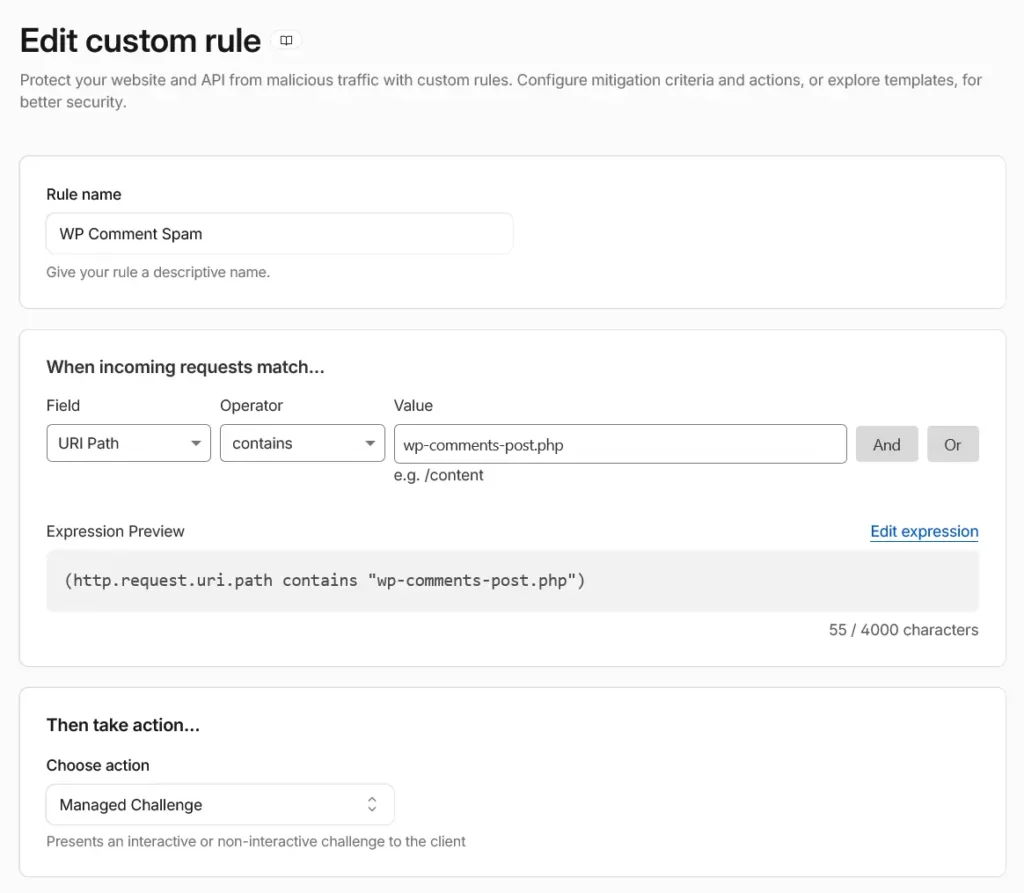
Custom Cloudflare Security Rule applying a Managed Challenge to requests targeting the WordPress comment submission endpoint (wp-comments-post.php).
WP Comment Rate Limit — a hard Block on any IP sending more than 3 requests to that same comment endpoint within a 10-second window. Genuine visitors don’t submit multiple comments in rapid succession; scripted spam bots do.
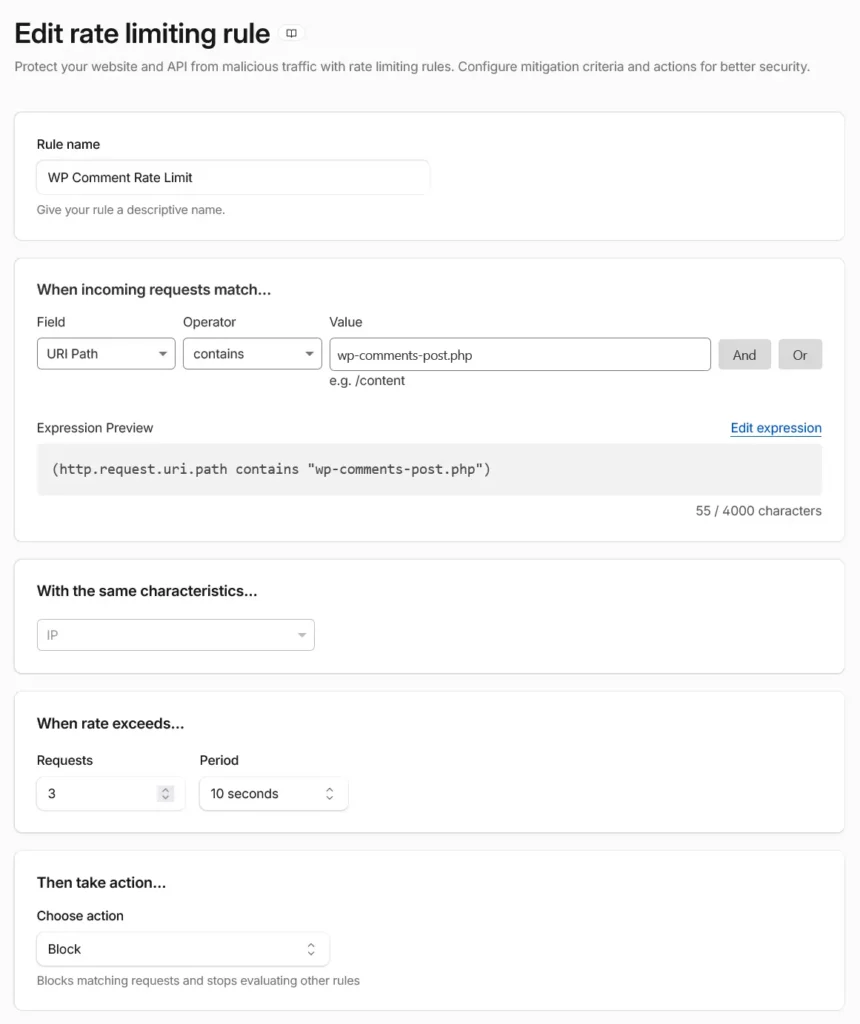
Rate limiting blocks IP addresses that submit more than three comment requests within ten seconds, preventing automated spam bursts.
I also added a Turnstile widget directly to the comment form itself, alongside the Bot Fight Mode already running site-wide from the earlier fix. Turnstile is Cloudflare’s alternative to a traditional CAPTCHA — it runs largely invisible checks in the background rather than forcing every visitor to click image grids or checkboxes, which matters for keeping the form usable for real people.
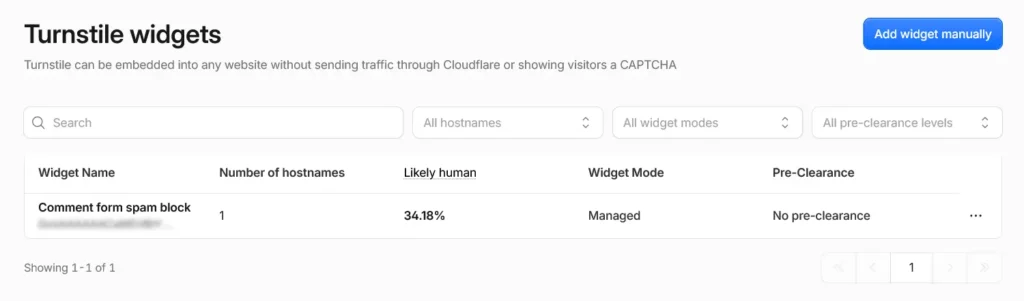
Cloudflare Turnstile configured in Managed mode, allowing legitimate visitors to pass background verification without traditional CAPTCHA challenges.
The Results
Looking at a 24-hour window from Cloudflare’s analytics for the comment form protection: 5,740 total requests hit the comment submission endpoint. Of those, 65.81% were issued a challenge and never solved it — meaning that traffic was turned away before it could submit anything. The remaining 34.19% passed through a non-interactive challenge successfully, with zero invalid tokens recorded, which is the detail that matters most here: those were real visitors passing through automatically, without ever seeing a CAPTCHA or being asked to prove they weren’t a bot.
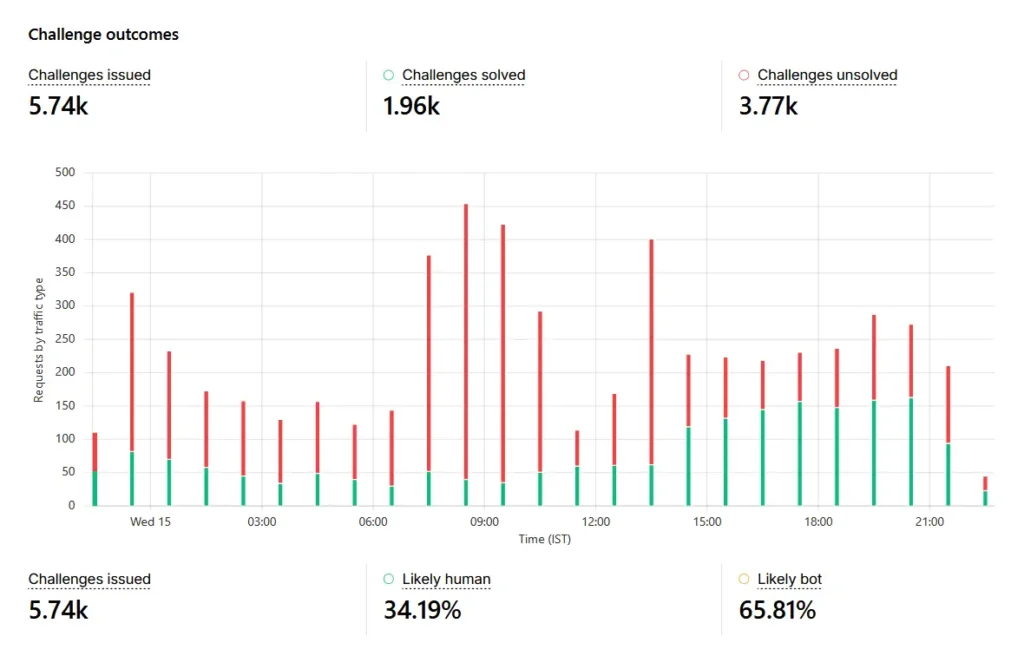
Cloudflare analytics after implementing the comment protection rules. Nearly two-thirds of requests to the WordPress comment endpoint were identified as likely bot traffic and challenged before reaching WordPress.
That split is really the whole point of a layered setup like this over a blanket block: nearly two-thirds of the traffic hitting that endpoint was filtered out as bot activity, while genuine visitors passed through without friction. The client no longer needed to spend time deleting dozens of spam comments every day.
Verifying It Actually Works: Real Comments Still Get Through
Numbers in an analytics dashboard are one thing; actual proof that legitimate comments still work is another. After the client reported that spam volume had dropped off noticeably and asked me to confirm the comment form itself was still functioning, I tested it directly — submitting a comment myself and confirming it posted and displayed correctly on the live site, no issues, no CAPTCHA friction.
Shortly after that, the client received a genuine comment from an actual reader, submitted through the same form these rules were protecting. That’s the real-world confirmation that matters here: the spam volume dropped, and real engagement kept coming through.
Is This Approach Right for Your Site?
This layered Cloudflare setup is worth considering if:
- You still want genuine comments and reader engagement on your site
- Your spam is coming from identifiable patterns — specific countries, missing referrers, or hitting the comment endpoint directly — that you can actually target with rules
- You’re comfortable managing Cloudflare’s security rules, or have someone who can set them up and monitor them
If comments aren’t adding real value to your site regardless of spam levels, disabling them outright is simpler and requires no ongoing rule maintenance — I cover that full process in my Disable Comments in WordPress guide.
Frequently Asked Questions
Does blocking comment spam through Cloudflare require a paid plan?
No. The rules used in this case study — custom Security Rules, Rate Limiting, Bot Fight Mode, and Turnstile — are all available on Cloudflare’s free plan, though free plans do have a limit on the number of custom rules you can create.
Will visitors see a CAPTCHA when submitting a comment?
In most cases, no. Turnstile and Cloudflare’s Managed Challenges are designed to run non-interactive checks in the background for the majority of legitimate visitors. Only traffic that looks suspicious based on the rule criteria gets an interactive challenge.
Why target the country and referrer patterns instead of just blocking by IP?
Spam bots typically rotate through large pools of IP addresses, making IP-based blocking a losing game long-term. Targeting behavioral patterns — country combined with missing referrers or suspicious user agents — catches the underlying bot behavior rather than chasing individual IPs.
Could this setup accidentally block real visitors from those countries?
It’s a real risk worth watching for, which is why Managed Challenge (rather than an outright Block) was used for the broader country-based rules — genuine visitors who pass the challenge still get through. The harder Block rules were reserved for more specific bot signatures, like headless browsers or rapid repeated requests to the comment endpoint.
Should I use Akismet as well?
Yes. Cloudflare filters unwanted traffic before it reaches WordPress, while Akismet analyzes comments that do reach your site. Using both provides layered protection.

