
I was reviewing a client site a few weeks ago. They had videos on six of their key service pages — well-produced, genuinely useful content. Not one of them showed up in Google Video Search. When I checked Google Search Console, the videos weren’t indexed at all. Google had crawled the pages, but completely missed the videos.
The fix was straightforward: a video sitemap XML file. Within two weeks of submitting it, four of those six videos were indexed and appearing in Google Video results.
This is more common than most people realize. Google can struggle to detect embedded videos — especially when they load via JavaScript, sit inside custom players, or are hosted on external platforms. A video sitemap XML file gives Google a direct roadmap to your video content: where it lives, what it’s about, and how to display it.
In this guide, I’ll explain what a video sitemap is, why it matters for SEO, how to create one correctly, how it relates to VideoObject schema markup, and how to submit it to Google Search Console. I’ll also cover the common mistakes I see people make that quietly kill video indexing.
Quick Summary
- A video sitemap XML file helps Google discover and index videos on your website.
- It contains important metadata like video title, description, thumbnail URL, and video location.
- Video sitemaps improve video SEO and increase the chances of appearing in Google Video search results.
- You should use a video sitemap if you self-host videos or embed videos on important pages.
- Google recommends using video sitemaps for better crawling and indexing.
- You can generate a video sitemap automatically using my free tool.
What Is a Video Sitemap XML File?
A video sitemap XML file is a special XML sitemap that provides search engines with detailed information about videos on your website.
Unlike a standard XML sitemap that only lists page URLs, a video sitemap includes additional metadata such as:
- Video title
- Video description
- Thumbnail URL
- Video content URL
- Video player URL
- Video duration
- Publication date
This extra information helps Google better understand your video content and display it properly in search results.
Why Video Sitemaps Matter for SEO
Many people assume Google automatically discovers all videos on a website. In reality, that does not always happen.
Google can struggle to detect videos when:
- The video is loaded using JavaScript
- The video is hidden behind tabs or lazy loading
- The video is embedded using custom players
- The website has weak internal linking
- The video is hosted on external platforms
A video sitemap XML file gives Google a direct roadmap to your video content.
Based on Google’s documentation, video sitemaps help search engines discover video content faster and improve indexing. Competitor research also shows that many ranking guides focus only on basic sitemap generation but rarely explain practical indexing problems and watch page issues properly.
Benefits of Using a Video Sitemap
- Faster video indexing
- Better video SEO visibility
- Higher chances of appearing in Google Video results
- Improved crawling efficiency
- Better understanding of video metadata
- Helpful for self-hosted videos
Who Should Use a Video Sitemap?
You should create a video sitemap if:
- You host videos on your own website
- You use product videos or tutorials
- You publish educational video content
- You run a news or media website
- You want videos indexed in Google search
- You use embedded videos on important landing pages
If you only upload videos to YouTube and link to them externally — without embedding them on your own pages — a video sitemap for your domain is less critical. YouTube handles its own indexing. But if you embed those YouTube videos on key pages of your site and want Google to associate that video content with your domain, a video sitemap helps establish that connection. If your embedded YouTube videos aren’t appearing in Google search at all, here’s how to diagnose and fix that.
Video Sitemap XML Example
Here is a simple video sitemap example:
<?xml version="1.0" encoding="UTF-8"?>
<urlset xmlns="http://www.sitemaps.org/schemas/sitemap/0.9"
        xmlns:video="http://www.google.com/schemas/sitemap-video/1.1">

  <url>
    <loc>https://example.com/video-page/</loc>

    <video:video>
      <video:thumbnail_loc>https://example.com/thumb.jpg</video:thumbnail_loc>
      <video:title>Sample Video Title</video:title>
      <video:description>This is a sample video description.</video:description>
      <video:content_loc>https://example.com/video.mp4</video:content_loc>
      <video:player_loc>https://www.youtube.com/embed/VIDEO_ID</video:player_loc>
      <video:duration>183</video:duration>
      <video:publication_date>2026-01-15T00:00:00+00:00</video:publication_date>
    </video:video>

  </url>

</urlset>
Required Video Sitemap Tags
Google requires certain tags inside your video sitemap XML file.
1. video:thumbnail_loc
This specifies the video thumbnail URL.
2. video:title
The title of the video.
3. video:description
A short description of the video content.
4. video:content_loc or video:player_loc
You need at least one of these:
- content_loc = direct video file URL
- player_loc = embedded player URL
Common Video Sitemap Mistakes
During competitor research, I noticed many tutorials skip important technical mistakes that directly affect indexing.
Here are the most common video sitemap issues:
- Invalid Thumbnail URLs: Your thumbnail image must be publicly accessible and crawlable.
- Missing Video Watch Pages: Google prefers videos to exist on dedicated watch pages with supporting content.
- Blocking Videos in robots.txt: If your video files or thumbnails are blocked, Google cannot access them.
- Incorrect XML Formatting: Even a small XML syntax error can break the sitemap.
- Empty Metadata: Weak titles and descriptions reduce the chances of ranking in video search.
How I Create a Video Sitemap XML File
I’ve tried a few approaches over the years and settled on what actually works in practice.
For WordPress sites with a handful of videos, I use a free video sitemap generator tool. It’s the fastest option — you paste in the video URL, page URL, title and description, and it outputs a clean XML file ready to upload. No plugin conflicts, no settings buried inside a pro upgrade.
For WordPress sites with lots of videos across many posts and pages, a custom plugin that auto-scans content and generates the sitemap dynamically is the better approach. This way the sitemap stays current automatically every time a new post is published — you don’t have to manually update a file.
For non-WordPress sites, generating the XML manually or using a standalone tool is usually the simplest path. The XML structure isn’t complicated once you understand the required tags.
What I don’t recommend is relying on your general SEO plugin to handle it unless you’re on a paid plan. RankMath, Yoast, and AIOSEO all lock video sitemap features behind their pro versions. For most sites, paying $69–$118 per year just for a video sitemap isn’t worth it when the same result is achievable for free.
I built a free tool specifically for this — it generates a properly formatted video sitemap XML file for YouTube, Vimeo, and self-hosted videos without needing a plugin or a paid subscription.
Free Video Sitemap Generator Tool
I created a free tool that helps generate valid video sitemap XML files quickly. You can generate properly formatted video sitemap XML files without manually writing XML code.
How to Submit a Video Sitemap to Google
- Open Google Search Console
- Select your property
- Go to Sitemaps
- Enter your video sitemap URL
- Click Submit
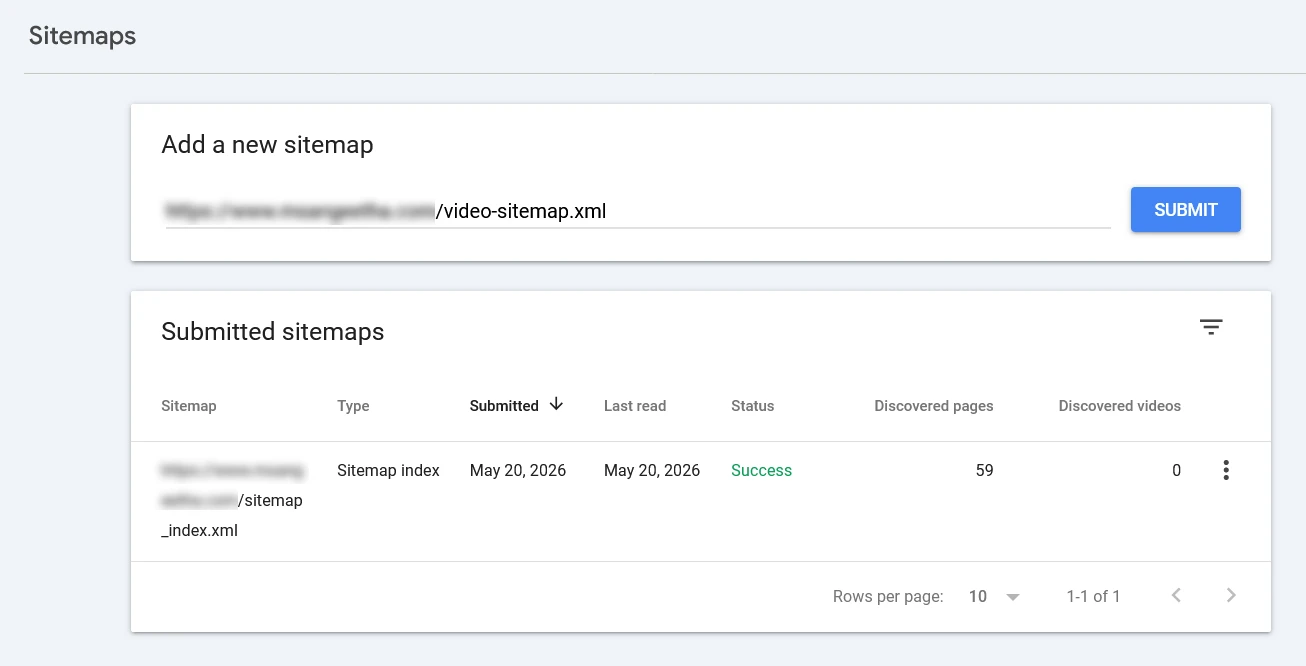
Google will then crawl and process the sitemap.
Also Read: What Is an XML Sitemap? The Complete Guide to Faster Indexing (2026)
Video Sitemap Best Practices
- Keep metadata accurate and descriptive
- Use high-quality thumbnails
- Create dedicated video pages
- Update the sitemap regularly
- Use HTTPS URLs
- Avoid blocked resources
- Match sitemap metadata with on-page schema markup
Should You Use a Video Sitemap AND VideoObject Schema?
This is one of the most common questions I get — and most guides don’t explain the difference properly. The short answer is: yes, use both. They serve different purposes and work together.
A video sitemap XML file is a separate file you submit to Google Search Console. Its job is discovery — it tells Google that videos exist on your site and gives it a list of URLs to crawl. Think of it as a directory.
A VideoObject schema markup is structured data added directly to the page where the video is embedded. Its job is understanding — it gives Google (and AI systems like Google AI Overviews, ChatGPT, and Perplexity) detailed machine-readable information about the video content on that specific page.
Here’s how they work together in practice:
- The video sitemap tells Google where your video pages are
- VideoObject schema tells Google what the video is about, who made it, when it was published, and how long it runs
- Together, they give Google every signal it needs to confidently index and display your video in search results
Using only a video sitemap without VideoObject schema means Google can find your video but has less context about it. Using only VideoObject schema without a video sitemap means Google has great metadata for the page it crawls — but may miss video pages it hasn’t discovered yet.
For the best video SEO results, implement both.
What VideoObject Schema Looks Like
Here’s a basic VideoObject JSON-LD example for a YouTube video embedded on a page:
<script type="application/ld+json">
{
  "@context": "https://schema.org",
  "@type": "VideoObject",
  "name": "How to Create a Video Sitemap XML",
  "description": "A step-by-step guide to creating and submitting a video sitemap XML file to Google Search Console.",
  "thumbnailUrl": "https://img.youtube.com/vi/VIDEO_ID/maxresdefault.jpg",
  "uploadDate": "2026-05-21T00:00:00+00:00",
  "duration": "PT3M3S",
  "embedUrl": "https://www.youtube.com/embed/VIDEO_ID",
  "url": "https://www.msangeetha.com/your-video-page/"
}
</script>
You can generate VideoObject schema for free using my Free Schema Markup Generator — just select the Video schema type, fill in the details, and copy the code.
Note that the duration property uses ISO 8601 format — PT3M3S means 3 minutes and 3 seconds. PT stands for Period Time, M for minutes, S for seconds.
Video Sitemap vs Regular XML Sitemap
| Feature | Regular XML Sitemap | Video Sitemap XML |
|---|---|---|
| Lists Page URLs | Yes | Yes |
| Includes Video Metadata | No | Yes |
| Supports Video SEO | Limited | Yes |
| Helps Video Indexing | Partially | Strongly |
Can You Combine Video Sitemaps With Normal XML Sitemaps?
Yes. You can either:
- Create a separate video sitemap XML file
- Add video tags inside an existing XML sitemap
Most SEO experts recommend keeping video sitemaps separate for easier management and debugging.
Do Video Sitemaps Guarantee Indexing?
No. A video sitemap improves discovery and crawling, but Google still evaluates:
- Page quality
- Video relevance
- User experience
- Structured data
- Content quality
However, using a video sitemap significantly improves your chances of getting videos indexed correctly.
🎬 Free Video Sitemap Generator
Skip the manual XML writing. I built a free tool that generates a Google-compliant video sitemap for YouTube, Vimeo, and self-hosted videos — download and submit in minutes. No login, no plugin, no cost.
Try the Free Video Sitemap Generator
Frequently Asked Questions
What is a video sitemap XML file?
A video sitemap XML file is a specialized sitemap that provides search engines with metadata about videos hosted on your website.
Does Google require a video sitemap?
No, but Google strongly recommends video sitemaps for better video discovery and indexing.
Can I include videos in a regular XML sitemap?
Yes, you can add video tags inside a normal XML sitemap, although separate video sitemaps are often easier to manage.
How do I create a video sitemap in WordPress?
You can use SEO plugins, custom code, or a video sitemap generator tool to create a video sitemap in WordPress.
How often should I update my video sitemap?
You should update your video sitemap whenever you add, remove, or modify video content.
Can video sitemaps improve SEO?
Yes. Video sitemaps help search engines discover and index videos, which can improve visibility in Google Video search results.
What is the difference between a video sitemap and schema markup?
A video sitemap helps search engines discover video URLs, while schema markup provides structured metadata directly on the page.
Do embedded YouTube videos need a video sitemap?
Usually not, unless you want the video indexed as part of your own website’s content. If your embedded YouTube videos still aren’t showing up in Google search, see my guide on fixing that.
What is the difference between a video sitemap and VideoObject schema?
A video sitemap is a separate XML file submitted to Google Search Console that helps Google discover your video pages. VideoObject schema is structured data added directly to each page that tells Google detailed information about the video — title, description, duration, thumbnail, and upload date. Both serve different purposes and work best when used together.
Do I need a video sitemap if I already use VideoObject schema?
Yes, ideally both. VideoObject schema helps Google understand a video once it finds the page. A video sitemap helps Google find the page in the first place — especially useful for newer pages or sites with weaker internal linking. Using both gives Google every signal it needs to index and display your videos correctly.
Improve Video SEO With a Proper Sitemap
If your website uses videos, creating a video sitemap XML file is one of the easiest technical SEO improvements you can make.
Many websites lose valuable traffic simply because search engines cannot properly discover their videos. A well-structured video sitemap helps solve that problem.
I recommend combining video sitemaps with proper schema markup, optimized watch pages, and strong internal linking for the best results.

