
When you are starting out as a small business, the last thing you want is to spend weeks planning a ten-page website before you have even spoken to your first customer. A single-page website for small business is often the smarter starting point — faster to build, cheaper to maintain, and surprisingly effective when your offer is focused.
But it is not the right choice for every business. Some small businesses outgrow a single-page site within months. Others run one for years and it does exactly what they need.
This guide breaks down when a single-page website works well for small businesses, what it should include, how to make it findable on Google, and when you should be thinking about moving to a multi-page setup instead. I have also included specific business types so you can see exactly where you land.
What Is a Single-Page Website?
A single-page website puts everything on one scrollable page — your services, your story, testimonials, and a way to contact you. There are no separate pages to click through. Navigation links scroll visitors to different sections of the same page using anchor links.
The visitor’s journey is entirely vertical. They scroll, read, and either contact you or leave. That simplicity is both the biggest strength and the biggest limitation of the format.
Why Small Businesses Choose Single-Page Websites
Lower Cost and Faster Setup
A single-page site costs less to design and build than a multi-page site. There are fewer design decisions, less content to write, and less to test. If you are working with a web designer, that translates directly into fewer hours and a lower invoice. If you are building it yourself with WordPress and Divi, you can get something professional live in a weekend rather than a month.
For a small business just establishing an online presence, this matters. Getting online quickly — even with a focused one-page site — beats waiting months for a perfect multi-page site.
Easier to Maintain
One page means one set of content to keep updated. When your phone number changes, your pricing updates, or you add a new testimonial, there is one place to make that change. Multi-page sites require you to check every page for consistency. For a business owner who is also the sole marketer, developer, and customer service team, that simplicity has real value.
Mobile-First by Nature
Scrolling is what mobile users do. Single-page websites map naturally onto the way people use their phones — swipe down, read, swipe down again. There is no navigation menu to tap through, no pages to wait for. The experience is smooth and familiar, which reduces friction and keeps visitors on your site longer.
Every Backlink Points to One URL
When you are featured in a local directory, mentioned in a blog post, or listed on Google Business Profile, every link points to your main URL. On a multi-page site, links get distributed across different pages. On a single-page site, all that link authority concentrates in one place, which can give you a stronger foothold in search results for your main keywords.
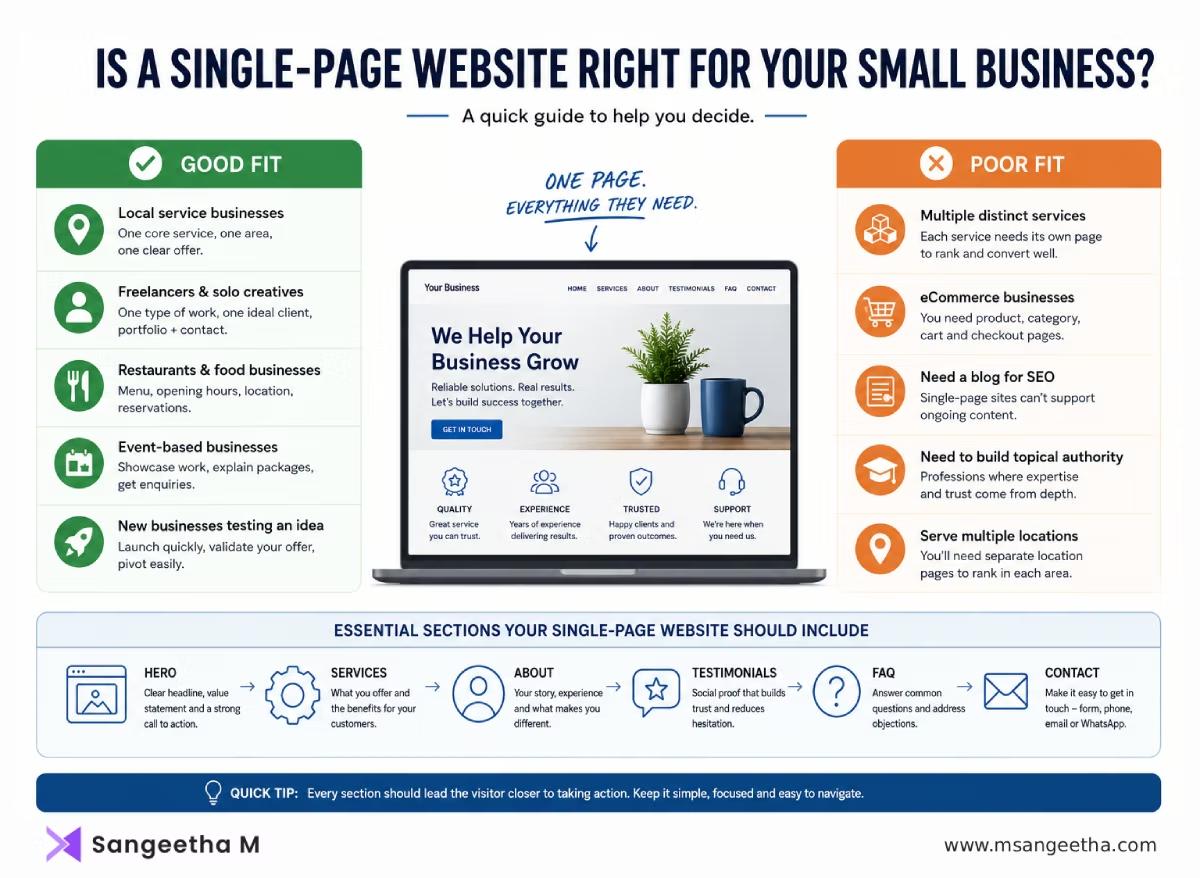
What Small Businesses Benefit Most from a Single-Page Website?
This is the question most guides avoid answering clearly. Here is a direct breakdown.
Good Fit
- Local service businesses with one core service – Plumbers, electricians, cleaners, mobile hairdressers, driving instructors, personal trainers. You offer one thing, to one local area, and you want the phone to ring. A single page with your service, your area, your credentials, testimonials, and a call to action is all you need.
- Freelancers and solo creatives – Copywriters, photographers, graphic designers, illustrators, consultants. Your portfolio can live in a section, your process in another, and your contact form at the bottom. If you offer one type of work to one type of client, one page is enough.
- Restaurants, cafes, and food businesses – Menu, opening hours, location, reservation link. Customers want those four things. Everything else is a distraction. A well-designed single-page site serves this audience perfectly.
- Event-based businesses – Wedding photographers, DJs, event planners, florists. The customer journey is simple: see your work, understand your packages, get in touch. One page handles this cleanly.
- New businesses testing an idea – If you are not sure your service offering will stick, a single-page site lets you launch quickly and pivot the copy without rebuilding your whole site. Treat it as a starting point, not a permanent decision.
Poor Fit
- Businesses with multiple distinct services – If you offer web design, SEO, and social media management, each of those services needs its own page to rank on Google and to give the service enough room to breathe. A single page that squashes all three together will rank poorly for all three and convert worse than dedicated pages.
- eCommerce – You need product pages, category pages, a cart, checkout, and order confirmation. None of that works on a single page.
- Businesses that need a blog for SEO – If organic search is central to your growth strategy, you need multiple pages and ongoing content. A single page cannot support that.
- Businesses that need to build topical authority – If you are a solicitor, accountant, financial advisor, or any professional where trust and depth of knowledge matter, a single page will look thin. Clients in these sectors expect content that demonstrates expertise across multiple areas.
What a Single-Page Website for Small Business Must Include
A common mistake is treating a single-page site as a short site. It is not. A well-built single-page business site usually runs 1,000 to 2,000 words of visible content. Every section has a job. Here is what needs to be there, in order.
Hero Section
The first thing a visitor sees when they land on your page. It needs to answer three questions in five seconds: Who are you? What do you do? Who is it for? Your headline should be specific — not “Welcome to my website” but “Mobile Dog Grooming in South Kerala — We Come to You.”
Include a clear call to action here. A phone number, a booking button, or a contact link. Do not make people scroll to find how to reach you.
Services or What You Offer
A brief description of what you do and what is included. Keep it focused. If you offer three services, list them clearly. If you offer one service with a few options, show the options. Avoid jargon. Write for the customer who has never heard of you.
About You or Your Business
People buy from people they trust. A short paragraph or two about who you are, how long you have been doing this, and why you do it goes a long way. Include a photo if you can — a real one, not stock. Local businesses especially benefit from this: customers want to know the face behind the name.
Testimonials or Social Proof
Three to five real testimonials from actual customers. If you are just starting out and have no reviews yet, a before-and-after, a case study summary, or a quote from a trial customer works. Even one strong testimonial is better than none.
FAQ Section
Answer the questions every customer asks before they contact you. Pricing ranges, turnaround times, service area, what is included. This section does two things: it reduces the time you spend answering the same emails, and it gives Google more keyword-rich content to index — particularly question-based searches like “does X cover my area” or “how much does X cost in Kerala.”
Contact Section
Phone number, email, a simple contact form, and your location or service area. If you have a physical premises, embed a Google Map. Make it genuinely easy to contact you — not just a contact form with five required fields.
How to Make a Single-Page Small Business Site Rank on Google
This is where most small business single-page sites fall short. The site looks good, but nobody finds it.
Choose One Primary Keyword and Build Around It
A single page can realistically rank strongly for one primary keyword and a handful of closely related terms. For a local business, that keyword is usually your service plus your location — “plumber in Thiruvananthapuram,” “wedding photographer in Kochi,” “mobile cleaner in Ernakulam.”
Put that keyword in your page title, your H1, your meta description, your URL, and naturally throughout the content. Do not stuff it — use it where it makes sense.
Use Anchor Links as Section Signals
Each section of your single-page site should have a clean anchor link — for example #services, #about, #contact. These are not separate URLs, but they do help search engines understand your page structure. They also let you link directly to a section from your Google Business Profile or social media profiles.
Write More Than You Think You Need
Thin content is the most common SEO problem with single-page sites. A three-sentence “about” section and a list of four services gives Google almost nothing to work with. Aim for real depth in each section — explain your process, describe your service area in detail, answer common questions in the FAQ. Content length is not the goal, but depth signals to Google that this page genuinely serves the topic.
Add Schema Markup
Local Business schema tells Google exactly what your business does, where it is located, what your hours are, and how to contact you. This directly improves your chances of appearing in local search results and on Google Maps. RankMath Free makes this straightforward — you can add local business schema from the RankMath settings without touching code.
For more on this, see the Schema Markup for WordPress guide.
Set Up and Optimise Google Business Profile
For a local service business, your Google Business Profile often drives more enquiries than your website. Make sure your profile is complete — name, address, phone, opening hours, services, photos, and a link to your website. Encourage every happy customer to leave a review. Your Business Profile and your website reinforce each other in local search.
Local SEO Basics
Mention your service area specifically on the page — not just in the meta data, but in the visible content. “Serving Thiruvananthapuram, Kollam, and surrounding areas” in your hero or services section tells both Google and your visitor exactly where you operate. This is particularly effective for service-area businesses that do not have a physical shopfront.
Building Your Single-Page Site in WordPress with Divi
WordPress is a strong choice for a small business single-page site, even though it is usually associated with multi-page blogs and larger sites. The advantage is flexibility — you can start with one page and expand to a full multi-page site without switching platforms or rebuilding from scratch.
Divi makes the single-page layout straightforward. You build each section as a row within one page, assign anchor IDs to each section, and wire up the menu links to those anchors. The result looks and behaves exactly like a purpose-built single-page site.
For the full steps on how to set this up in WordPress, see How to Create a Single-Page Website in WordPress.
On Hostinger, you get free SSL, fast LiteSpeed servers, and a clean one-click WordPress install. For a small business site that needs to be live quickly and reliably, that combination works well.
What Does a Single-Page Small Business Site Cost?
Cost varies depending on how you build it.
| Approach | Typical Cost | Time to Launch |
|---|---|---|
| DIY with WordPress and a free theme | Hosting only (~₹150–300/month on Hostinger) | 1–2 weekends |
| DIY with WordPress and Divi | Hosting + Divi (~₹8,000–12,000/year) | 1 weekend |
| Freelance web designer | ₹15,000–40,000 one-time | 1–3 weeks |
| Web design agency | ₹40,000–1,00,000+ | 2–6 weeks |
For most small businesses, DIY with WordPress and Divi sits in the sweet spot — professional enough to build trust, affordable enough to justify the investment before you know exactly how much traffic the site will get.
When to Upgrade from One Page to Multi-Page
A single-page site is a starting point, not a permanent structure for every business. Here are the signs that you have outgrown it.
- You are adding a second distinct service that deserves its own ranking opportunity and more detailed explanation than a section allows.
- Customers keep asking questions your site does not answer — that is a signal you need more content, which means more pages.
- You want to start a blog for SEO or to establish authority in your field.
- Your contact page is overwhelmed with enquiries from people who are not a good fit — separate service pages with more detail filter leads better.
- You are ranking on Google but conversions are low — a more detailed, page-by-page structure often converts better for complex or higher-value services.
The good news is that if you built your single-page site on WordPress, upgrading is straightforward. Your existing content, domain authority, and backlinks all carry over. You add pages rather than rebuild.
Related Reading
Frequently Asked Questions
Can a single-page website rank on Google?
Yes — especially for local service keywords. A single-page site with well-written content, proper schema markup, and a strong Google Business Profile can rank well for one primary keyword and a cluster of related terms. The limitation is breadth: you cannot rank for many different keywords the way a multi-page site can.
How many sections should a single-page small business website have?
Most small business single-page sites work well with five to seven sections: a hero, services, about, testimonials, FAQ, and contact. Some businesses add a gallery or a process section. Keep it focused — every section should help a visitor decide to contact you.
Is WordPress good for a single-page website?
Yes. WordPress with Divi or a similar page builder lets you create a professional single-page layout with anchor navigation, fast load times, and full SEO control. The added benefit is that you can expand to a multi-page site later without switching platforms.
Do I need a blog on my small business website?
Not necessarily at the start. A blog is valuable for SEO over the long term, but a single-page site without a blog can still rank well for local search terms. Add a blog when you have the time to publish consistently — an empty or outdated blog does more harm than no blog.
What is the difference between a single-page website and a landing page?
A landing page is a single page designed for one specific campaign or offer — it usually has no navigation menu and one conversion goal. A single-page website is your main business website, with full information about your business and navigation anchors to different sections. Both are single pages, but their purpose and scope are different.
Should I use a single-page website if I serve multiple locations?
If you serve several distinct towns or cities and want to rank in each of them separately, you will eventually need separate location pages. A single-page site can cover one primary service area well, but multi-location businesses generally need a multi-page structure with a dedicated page for each area.
Ready to Build Yours?
A single-page website is one of the fastest ways for a small business to get a professional, working online presence without a large budget or months of planning. For local service businesses, freelancers, and new businesses still finding their footing, it is often the right starting point.
If you are ready to build yours in WordPress, the How to Create a Single-Page Website in WordPress guide walks you through the full setup.
And if you want help building it, the contact form is the place to start.

