
If you’re building your first website — or helping a client decide on the right structure — the question of whether to go with a single-page website comes up almost immediately.
It’s an appealing idea. One page, everything in one place, scroll to navigate, clean and focused. Many of the most beautifully designed websites on the internet are single-page layouts. Portfolio sites, product launches, freelancer sites, event pages — the format works incredibly well in the right context.
But it also gets recommended in the wrong context constantly. Beginners get told a one-page website is “easier” without being told about the SEO limitations. Small business owners choose it because it looks modern, not realising it may cap their organic traffic growth significantly.
This guide gives you the complete picture — what a single-page website actually is, how it works technically, its real advantages and limitations, how SEO works (and where it struggles), how it compares to multi-page sites, and how to build one in WordPress if you decide it’s the right fit for your goals.
By the end, you’ll know exactly whether a single-page website is right for your specific situation — and what to do either way.
What Is a Single-Page Website?
A single-page website is a website where all content lives on one scrolling page rather than being spread across multiple separate pages with their own URLs.
Instead of clicking menu items to load new pages, visitors navigate by scrolling — or by clicking anchor links in the navigation that smoothly jump to different sections of the same page. The URL in the browser doesn’t change as you move through the content (or changes only with a # anchor identifier).
Everything the site needs to communicate — who you are, what you offer, your portfolio, testimonials, contact details — is presented in one continuous flow from top to bottom.
You’ll often hear single-page websites called one-page websites, one-pagers, or scrolling websites. They all mean the same thing.
How Single-Page Websites Work Technically
Understanding the technical side helps when it comes to SEO and performance decisions.
A single-page website loads one HTML document. All sections — About, Services, Portfolio, Contact — exist within that single document, separated by HTML section or div elements. When a visitor clicks a navigation link, JavaScript smoothly scrolls the browser to the relevant section rather than loading a new page.
Anchor links (the # links in navigation, like yourdomain.com/#contact) tell the browser which section to scroll to. These are not separate URLs in the way that yourdomain.com/contact/ would be — they’re positions within the same page.
This is important to understand because it’s precisely why single-page websites have SEO limitations that multi-page sites don’t. More on that shortly.
Single-Page Website vs Landing Page — Are They the Same?
This is one of the most commonly confused comparisons, so it’s worth being clear.
A landing page is a single page built for a specific campaign goal — usually to convert traffic from an ad, email, or social post into a lead or sale. It’s focused, stripped of navigation in many cases, and designed purely around one conversion action.
A single-page website is your actual website — it contains all the information someone would need to understand who you are and what you offer. It has navigation (anchor links), multiple sections, and acts as a complete online presence rather than a campaign destination.
You can use a landing page as your only web presence temporarily, but it serves a different function. A single-page website is a more permanent, complete representation of a business or individual.
What Are Single-Page Websites Good For?
Single-page websites genuinely excel in specific situations. The key is knowing which situations those are.
Portfolios and Personal Brands
This is where single-page websites shine most consistently. A freelancer, designer, photographer, or consultant who wants to showcase work, introduce themselves, and provide a contact form doesn’t need dozens of pages. A single scrolling page can present everything beautifully and guide a visitor from introduction to inquiry in one seamless experience.
Small Service Businesses With a Simple Offering
A local plumber, yoga instructor, personal trainer, wedding photographer, or independent consultant often has one clear service, one target audience, and one goal — getting a call or enquiry. A single-page website handles this perfectly. There’s no need for a blog, a resources section, or separate service pages when the offering is focused.
Event and Campaign Pages
A single-page layout is the natural format for event websites — a concert, conference, workshop, or product launch. The information has a natural flow: what it is, when and where, who’s involved, why attend, how to register. One page, one scroll, one action.
Product Landing Pages and Startup MVPs
When launching a new product or validating an idea, a single-page website lets you get online fast with a focused pitch. Hero section, features, social proof, pricing, call to action. Clean, fast, and purpose-built.
Microsites and Campaign-Specific Pages
Larger brands sometimes use single-page sites as standalone microsites for specific campaigns, products, or initiatives — separate from their main multi-page website.
When Should You Avoid a Single-Page Website?
Despite how appealing the format looks, there are situations where choosing a single-page website will actively work against your goals.
When You Need SEO-Driven Organic Traffic
This is the biggest limitation and it’s worth understanding properly. A single-page website has one URL. One URL means one opportunity to rank in Google. Multi-page websites have separate URLs for every page — each one can target a different keyword, rank for different searches, and bring in traffic from different audiences.
If your business goal includes getting consistent traffic from Google over time — for different services, different locations, or different search queries — a single-page website will cap that growth significantly.
When You Offer Multiple Services or Products
A business that offers web design, SEO, and social media management, for example, benefits enormously from separate pages for each service. Each page can rank for its own keywords, speak directly to that specific audience, and be found by people searching for that specific service. Cramming all three services onto one page means you’re competing against yourself for ranking space and diluting your message to each audience.
When You Plan to Publish Blog Content
Content marketing — writing articles, guides, and tutorials to attract search traffic — requires a multi-page structure by definition. Each blog post needs its own URL to rank. If content marketing is part of your growth strategy, a single-page website simply can’t support it.
When You Have a Large or Complex Product Range
E-commerce, SaaS products with multiple features, membership sites, educational platforms — all of these require multi-page structures to work properly. Trying to force complex content into a single scrolling page creates a poor user experience and an impossible SEO situation.
Single-Page Website Pros and Cons
Here’s the honest breakdown — not just the advantages that get listed to make one-page sites sound appealing, but the real trade-offs you need to weigh.
Advantages
- Faster to build and launch. With only one page to design, write, and set up, you can go from nothing to live in a fraction of the time a multi-page site takes. For beginners or for getting something online quickly, this is a genuine advantage.
- Simpler to maintain. One page means one thing to update, one thing to test on mobile, one thing to back up and worry about. For non-technical site owners, this simplicity has real value.
- Focused user experience. Visitors don’t get lost in navigation. There’s no decision about where to go — just scroll. When your goal is guiding someone through a linear story (here’s who I am, here’s what I do, here’s why you should work with me, here’s how to contact me), a single page does this beautifully.
- Better mobile experience in some cases. Scrolling is the native interaction on mobile. A well-designed single-page site can feel very natural on a phone.
- All backlinks point to one URL. Any links you earn from other websites all point to the same URL, concentrating link authority rather than spreading it across multiple pages.
Disadvantages
- Severely limited SEO potential. One page, one set of keywords, one ranking opportunity. If your business depends on organic search traffic from multiple queries, this is a serious constraint.
- Harder to scale. As your business grows and you add services, your single-page site becomes cluttered and increasingly difficult to navigate. The clean simplicity that made it appealing starts working against you.
- Limited analytics granularity. With everything on one URL, it’s much harder to understand what content users engage with, which sections drive conversions, and where visitors drop off. Multi-page sites give you page-by-page behavioural data.
- No room for content depth. Explaining a complex service, product, or concept properly requires space. Cramming that explanation onto a section of a single-page site either means oversimplifying or creating a page so long it loses the clean focused quality that made it appealing in the first place.
- Navigation limitations. Anchor link navigation works well for 4-6 sections. With more content, scrolling becomes unwieldy and anchor link menus get cluttered.
For a deeper look at both sides, read the full post on single-page website pros, cons, and best use cases.
Single-Page Website vs Multi-Page Website
The choice between a single-page and multi-page structure isn’t really about which one looks better — it’s about which structure supports your specific goals.
| Feature | Single-Page Website | Multi-Page Website |
|---|---|---|
| Number of URLs | One | One per page |
| Navigation | Scroll / anchor links | Click to new pages |
| SEO flexibility | Limited — one keyword focus | Strong — each page targets different keywords |
| Setup time | Faster | More planning required |
| Content depth | Short and focused | Detailed and expandable |
| Scalability | Difficult to expand | Easy to add pages over time |
| Best for | Portfolios, freelancers, simple services, events | Businesses, blogs, e-commerce, service companies |
| Content marketing | Not supported | Fully supported |
The honest summary: if organic traffic growth and long-term content expansion are part of your plan, start with a multi-page website. If you need a clean, focused online presence quickly and SEO is not your primary acquisition channel, a single-page website is a perfectly valid choice.
For a full breakdown of how these two structures differ in practice, read the detailed comparison of single-page vs multi-page websites.
Is a Single-Page Website Good for SEO?
This is the question that matters most for anyone choosing a website structure, so I want to give it a proper answer rather than a vague “it depends.”
The short answer is: a single-page website can rank, but it has real structural limitations that put it at a disadvantage compared to multi-page sites for most SEO goals.
Here’s why.
One URL Means One Ranking Opportunity
Google ranks individual pages, not websites. Each URL you have is one entry point from search. A multi-page website with 20 pages has 20 potential entry points from Google. A single-page website has one.
If you want to rank for “web design services,” “logo design freelancer,” and “brand identity designer” — those are three different search queries with different intents. On a multi-page site, you’d have three dedicated pages, each optimised for one of those queries. On a single-page site, you’re trying to rank one URL for all three, which is structurally much harder.
Topical Authority Is Harder to Build
Google rewards websites that demonstrate deep expertise on a topic — what’s often called topical authority. Building topical authority typically involves having multiple pages that together cover a topic comprehensively. With only one page, your ability to cover a topic in enough depth to signal expertise to Google is constrained.
Internal Linking Doesn’t Work the Same Way
Internal links — links from one page on your site to another — are one of the main ways Google understands the structure and hierarchy of your content. They pass authority from stronger pages to weaker ones. On a single-page website, anchor links to sections don’t work the same way as links to separate URLs. The structural SEO benefit of internal linking is largely absent.
Where Single-Page SEO Can Work
That said, a single-page website can rank well when the approach is right. Specifically:
- One tightly focused keyword cluster — rather than trying to rank for multiple unrelated terms, targeting one core topic and its close variations gives a single page a realistic chance.
- Strong off-page signals — if your single-page site earns quality backlinks, those all point to one URL, concentrating authority rather than spreading it. A well-promoted single-page site can outrank multi-page competitors that have weak link profiles.
- Local SEO — for local businesses targeting one specific location and service, a single-page website with proper local SEO signals (Google Business Profile, local schema, NAP consistency) can rank in local search results.
For a detailed breakdown of how to optimise a single-page website for SEO — including keyword strategy, section structure, schema markup, and anchor link best practices — read the full guide on whether a single-page website is good for SEO.
What Sections Should a Single-Page Website Include?
The structure of a single-page website follows a natural flow — from introducing yourself or your business at the top to prompting action at the bottom. Every section should move the visitor one step closer to the goal of the page.
Here’s the structure that works for most single-page websites:
- Hero section: The first thing visitors see. Your headline, a brief description of what you offer, and your primary call to action. This section needs to communicate your value proposition clearly within 5 seconds. If a visitor doesn’t understand what you do from your hero, many will leave without scrolling further.
- About section: Who you are, your background, your experience, and why you’re worth trusting. For freelancers and personal brands, this often includes a photo. For businesses, it covers the company story or mission.
- Services or offerings section: What you actually do or sell. Keep this focused — if you have more than 4-5 services, a single-page format starts to become unwieldy and a multi-page site would serve you better.
- Portfolio or work samples section: Relevant examples of previous work, case studies, or project outcomes. For many freelancers, this is the most important section — clients make decisions based on seeing relevant previous work.
- Testimonials or social proof section: Reviews, client quotes, logos of companies you’ve worked with, or quantified results. This section addresses the trust question — why should I choose you over someone else?
- FAQ section: Answers to the questions you’re commonly asked. This section also carries SEO value — FAQ content can appear in Google’s featured snippets and People Also Ask boxes.
- Contact section: How to reach you. A contact form, email address, phone number, or booking link depending on your business model. This is your conversion destination — make it easy and friction-free.
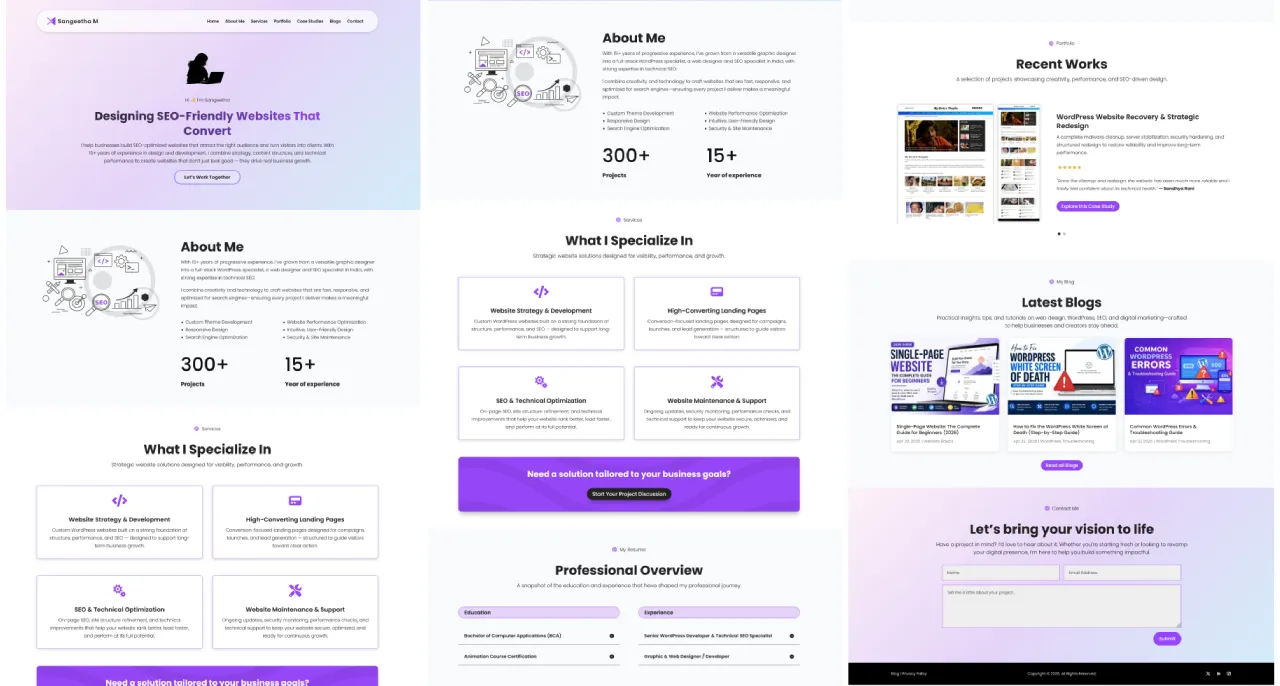
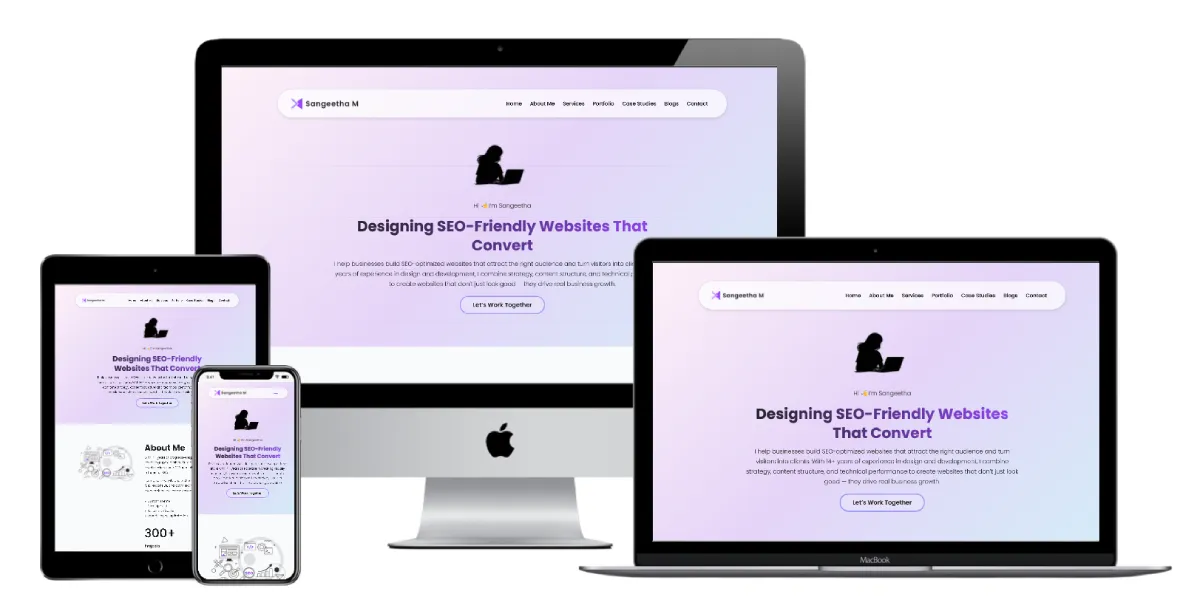
Here’s how a typical single-page website flows in practice:
Notice how each section flows into the next, and navigation links jump to specific sections instead of loading new pages.
How to Build a Single-Page Website in WordPress
WordPress is the most flexible platform for building a single-page website because it gives you full control over design, SEO, performance, and future expansion. Unlike website builders that lock you into their ecosystem, WordPress is yours to own and customise.
Here’s how to approach it.
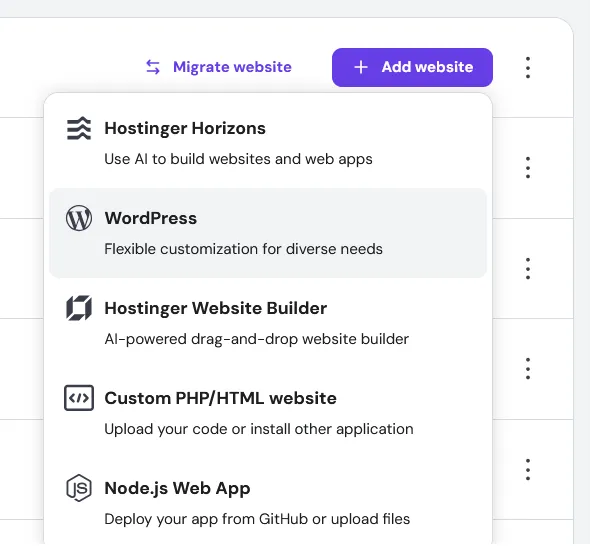
Step 1: Set Up WordPress Hosting
You’ll need a domain name and a hosting account before anything else. For a single-page WordPress site, almost any shared hosting plan is sufficient — the site is lightweight by nature. Hostinger, SiteGround, and Cloudways are all reliable options for beginners.
Once hosting is set up, install WordPress through your hosting panel’s one-click installer. Most hosts include this by default.
Step 2: Choose the Right Theme or Page Builder
For a single-page WordPress site, you have two main approaches:
Use a page builder: Divi, Elementor, or Beaver Builder all make it straightforward to design a single-page layout visually without coding. You design the entire page in the builder, then set that page as your homepage in WordPress settings. This gives you the most design flexibility.
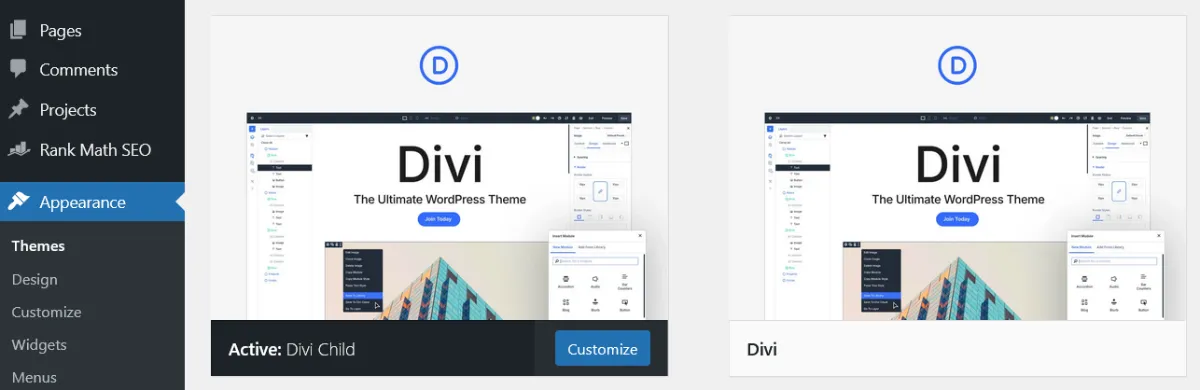
Use a single-page theme: Some WordPress themes are specifically designed as one-page layouts with built-in section structure and anchor navigation. These are faster to set up but less flexible than a full page builder.
For most beginners, a page builder gives the best balance of flexibility and ease of use.
Step 3: Create Your Homepage and Disable the Blog
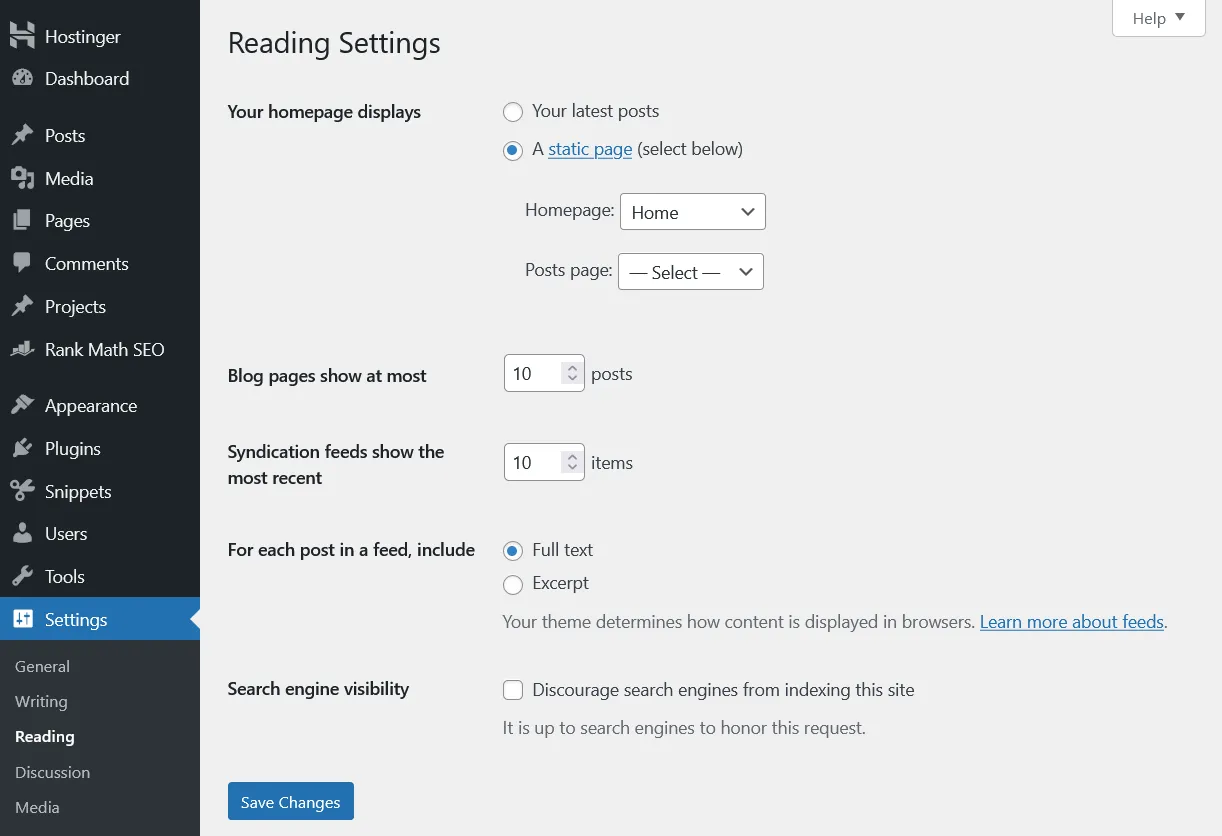
In WordPress, go to Settings → Reading and set “Your homepage displays” to “A static page.” Select your single page as the homepage. This tells WordPress to show your designed page rather than a blog post feed.
If you don’t plan to have a blog, you don’t need to assign a Posts page. Simply leaving it blank is fine.
Step 4: Build Your Sections
Using your page builder or theme, build out each section of your page — hero, about, services, portfolio, testimonials, FAQ, contact. Give each section a meaningful HTML ID (for example, id=”services” or id=”contact”) — this is what your anchor navigation links will point to.
Keep each section visually distinct with clear headings so visitors always know where they are on the page.
Step 5: Set Up Anchor Navigation
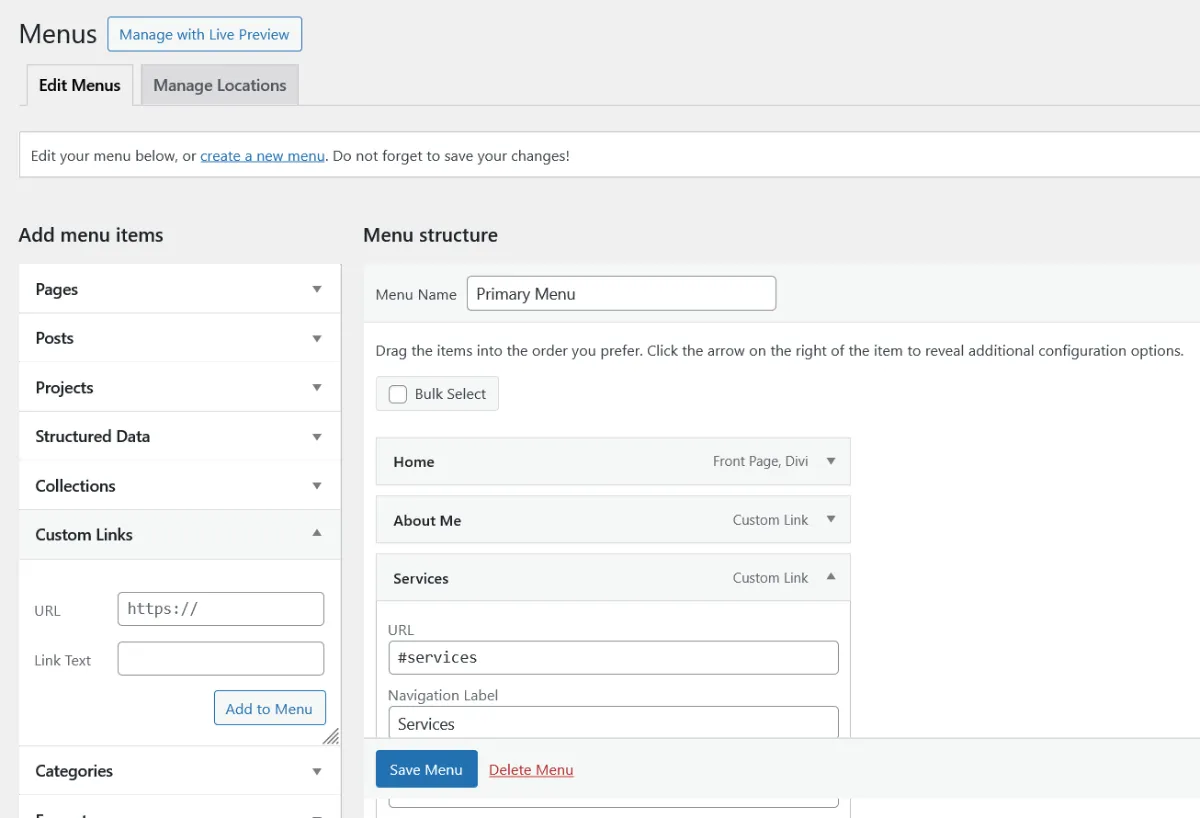
Your navigation menu links should point to the section IDs you set up. In WordPress, go to Appearance → Menus and add Custom Links pointing to #services, #about, #contact, and so on. When a visitor clicks a menu item, the page will smoothly scroll to that section.
For smooth scrolling behaviour, most page builders include this as a built-in setting. If yours doesn’t, a small CSS addition or a lightweight plugin can handle it.
Step 6: Install an SEO Plugin and Optimise
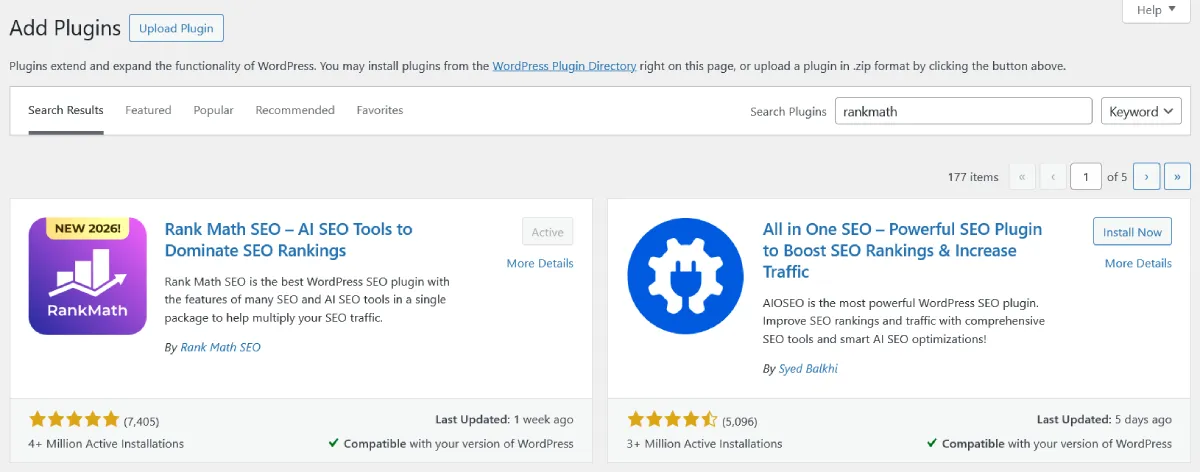
Install Rank Math or Yoast SEO and configure the page’s meta title, meta description, and focus keyword. Set up your XML sitemap — even a single-page site benefits from being properly submitted to Google Search Console.
Add FAQ schema to your FAQ section if you have one, and make sure your page loads quickly — compress images, use WebP format, and avoid loading unnecessary scripts.
Step 7: Make It Mobile-Responsive
Check your single-page site on a mobile device before publishing. Scrolling behaviour, section spacing, font sizes, and button sizes all need to work properly on smaller screens. Most page builders have mobile preview modes — use them thoroughly.
Single-Page Website Performance and Speed
Performance matters for both user experience and SEO. Single-page websites have a specific characteristic worth understanding: everything loads at once on the initial page load.
On a multi-page site, only the content for the current page loads when a visitor arrives. On a single-page site, all sections — including images, fonts, and scripts used lower on the page — typically load upfront. This means initial load time can be heavier than expected if the page isn’t optimised carefully.
Key performance practices for single-page websites:
- Lazy load images.
Images below the fold should load only when a visitor scrolls toward them, not all at once on initial load. Most page builders support this natively, and it’s also a setting in most WordPress caching plugins. - Use WebP image format.
WebP files are significantly smaller than JPG or PNG for the same visual quality. Converting your images to WebP before uploading reduces page weight considerably. - Minimise JavaScript.
Single-page sites often rely on JavaScript for smooth scrolling, animations, and section transitions. Every JavaScript library you add increases load time. Keep it lean — use only what’s necessary. - Use a caching plugin.
LiteSpeed Cache, WP Rocket, or W3 Total Cache all help serve your page faster to repeat visitors. - Check Core Web Vitals.
Google’s Core Web Vitals — Largest Contentful Paint, Interaction to Next Paint, and Cumulative Layout Shift — are ranking signals. Use Google PageSpeed Insights to check your single-page site’s scores and follow its specific recommendations.
Common Single-Page Website Mistakes to Avoid
Having worked on single-page WordPress sites for clients across different industries, these are the mistakes I see most consistently — and they’re all avoidable.
- Trying to rank for too many keywords.
The temptation with a single page is to target every keyword your business could possibly be relevant to. This dilutes your focus and makes ranking for any of them harder. Pick one primary keyword cluster and build the page around that. - Making it too long.
The appeal of a single-page site is its focused, streamlined feel. When you keep adding sections because you want to cover everything, the page becomes exhausting to scroll and loses its clarity. If you find yourself needing more than 8-10 sections, that’s usually a signal you need a multi-page site. - Ignoring analytics limitations.
Tracking user behaviour on a single-page site requires additional setup — scroll depth tracking, section engagement events — that standard analytics doesn’t provide out of the box. Set this up from the start so you have meaningful data to work with. - No clear primary call to action.
Every section having its own CTA creates confusion about what you actually want the visitor to do. Pick one primary action — book a call, send a message, get a quote — and make every section point toward it. - Skipping structured data.
FAQ schema, LocalBusiness schema, and Person schema are all available for single-page sites and can earn rich snippet visibility in Google results. Most site owners skip this entirely and lose a meaningful SEO advantage. - Building a single-page site when the business needs a multi-page one.
This sounds obvious, but it happens more than you’d think. A business with five distinct services, a blog strategy, and organic traffic goals choosing a single-page site because it looks clean is making a decision that will cost them significantly in SEO and scalability later.
Should You Start With a Single-Page Website and Expand Later?
This is a common beginner question — can I start with a single-page site and add pages later when I need them?
The answer is yes, with caveats.
WordPress makes this genuinely easy. If you build your single-page site in WordPress with a page builder like Divi, adding new pages later is straightforward — you’re not locked into the single-page format. The architecture supports expansion naturally.
However, expanding from single-page to multi-page does involve some rework — you’ll need to create separate service pages, potentially update your navigation from anchor links to real page links, and restructure how your homepage works. It’s manageable, but it’s not frictionless.
If you know from the outset that content marketing or multiple service pages are in your near-term plan, starting with a multi-page structure from day one is cleaner and avoids that rework. If you genuinely just need a simple online presence right now and expansion is a distant maybe, starting single-page in WordPress is a pragmatic choice.
Frequently Asked Questions
Is a single-page website good for beginners?
Yes — a single-page website is one of the most beginner-friendly website structures because it involves less planning, less content to write, and less technical setup than a multi-page site. It’s a practical way to get online quickly. Just be aware of the SEO limitations before committing, especially if organic search traffic is part of your long-term plan.
Can a single-page website rank on Google?
Yes, but with significant limitations compared to multi-page sites. A single-page website has one URL, which means one opportunity to rank. It can rank well for one focused keyword cluster, especially in local search or low-competition niches. For broader organic traffic goals targeting multiple keywords, a multi-page structure performs considerably better.
How long should a single-page website be?
Long enough to cover everything a visitor needs to know to make a decision — not longer. For most businesses and freelancers, 6-8 well-designed sections is the sweet spot. Beyond that, the scroll becomes tedious and the focused feel that makes single-page sites effective starts to erode.
Can I add a blog to a single-page website?
Technically yes — you can add a separate blog section to a WordPress site that has a single-page homepage. In practice, this means your site becomes a hybrid: a single-page homepage with a separate blog section. This is actually a sensible middle ground for many small businesses — a clean, focused homepage with a blog for content marketing. WordPress handles this well with its static homepage + posts page setup.
What’s the difference between a single-page website and a single-page application (SPA)?
These terms are often confused but they’re different things. A single-page website is a standard website where all content is on one scrolling page — built with regular HTML, CSS, and minimal JavaScript. A single-page application (SPA) is a web application built with frameworks like React, Vue, or Angular that dynamically renders content in the browser without full page reloads. SPAs are more complex to build and have their own distinct set of SEO challenges around JavaScript rendering.
Is a one-page website the same as a single-page website?
Yes — one-page website, single-page website, one-pager, and scrolling website all refer to the same structure. All content on one URL, scroll-based navigation, no separate pages for different sections.
How much does it cost to build a single-page website?
In WordPress, the main costs are hosting (typically $4-19/month) and a domain name ($13-19/year). If you’re using a premium page builder like Divi or Elementor Pro, add around $63-113/year. A professional designer or developer building it for you would typically charge anywhere from $378 to $2,520+ depending on complexity and experience. Compared to a multi-page site, a single-page site is generally faster and therefore cheaper to build professionally.
Explore the full single-page website series:
The Right Website Structure Starts With the Right Goal
A single-page website is not a shortcut or a compromise — in the right context, it’s the most effective structure available. Focused, fast, and purposeful.
But it’s also not the right choice for every business or goal. If SEO-driven traffic, content marketing, or a growing service offering are part of your plan, a multi-page structure will serve you significantly better from day one.
The decision isn’t about which format looks better. It’s about which structure supports where you’re trying to go.
If you’re still deciding, start by asking yourself one question: is organic search traffic from Google part of how I plan to grow this website? If yes, build multi-page. If no — or not yet — a single-page WordPress site is a clean, capable starting point that you can always expand from later.
Have a question about whether a single-page website is right for your specific situation?

