
If you’ve read a few hosting comparisons already, you’ve probably noticed they all lean on the same analogy — shared hosting is a shared apartment, VPS is your own unit in the building, cloud is renting space across an entire network. That’s fine as a starting picture, but it doesn’t tell you anything about your actual site.
I manage hosting decisions on both ends of the spectrum — my own site runs on straightforward hosting, and I’ve handled enterprise-scale WordPress sites for clients that outgrew shared and even VPS entirely. So here’s what actually separates these three, and the real signals for which one fits where you are right now.
The Three Options, With Real Numbers
| Shared | VPS | Cloud | |
|---|---|---|---|
| Typical cost | $3–15/month | $15–80/month | $30–300+/month, scales with usage |
| Resources | Shared pool, limits vary by host, no guarantee | Dedicated CPU/RAM slice, fixed | Pooled across servers, scales up automatically |
| Who manages the server | The host, fully | You (unmanaged) or the host (managed VPS, costs more) | Usually the host, though unmanaged options exist |
| Handles traffic spikes | Poorly — a neighbor’s spike can slow you down too | Better, but capped at your plan’s fixed resources | Well — resources scale to meet the spike |
| Best for | Blogs, portfolios, small brochure sites | Established business sites with predictable, moderate traffic | WooCommerce stores, high-traffic sites, anything where downtime costs money |
Shared Hosting: Still Fine for Most Sites
Shared hosting gets dismissed too quickly in a lot of comparisons. For a genuinely small site — low, steady traffic, mostly static content, no heavy plugins — a well-run shared plan performs fine. I cover what to actually look for in a shared plan in my WordPress hosting comparison for beginners, and I go deeper on managed-vs-shared specifically in this post if you haven’t ruled it out yet.
Where shared hosting actually fails you is unpredictability — not your own traffic, but your neighbors’. You’re sharing CPU and RAM with other sites on the same server, and you have no visibility into what they’re doing. A resource-heavy neighbor having a bad day becomes your site’s bad day too.
VPS: A Real Step Up, With a Catch Most Guides Skip
VPS gives you a dedicated slice of a server — fixed CPU and RAM that nobody else touches. That solves the “noisy neighbor” problem shared hosting has, and it’s a legitimate step up for a business site with predictable, moderate traffic that’s outgrown shared but doesn’t need full cloud scaling.
Here’s the catch most comparisons gloss over: unmanaged VPS means you’re the system administrator now. Server security patches, PHP version updates, firewall configuration — that’s all on you, and it doesn’t pause because you’re busy with something else. I’ve seen this recommended to small business owners as a straightforward “step up” without ever mentioning that it comes with real ongoing technical responsibility.
Managed VPS solves that — the host handles server administration while you keep the dedicated resources — but it also erases most of the price advantage over managed cloud hosting. If you’re going to pay for management either way, compare the actual managed VPS price against managed cloud before assuming VPS is the cheaper middle step.
Cloud: Where I’d Point Anything With Real Stakes
Cloud hosting spreads your site across multiple servers instead of relying on one, so resources scale to meet a spike instead of capping out. This is the tier I’d point a WooCommerce store, a site running a time-sensitive campaign, or anything where an hour of downtime costs actual revenue or leads.
It’s also where a chunk of the client work I do for enterprise WordPress sites lives — sites with enough concurrent traffic, plugins, and logged-in-user activity that shared or even a single VPS genuinely can’t keep up cleanly. That’s a different scale than most personal or small business sites need, but it’s worth knowing the ceiling exists and what pushes a site toward it: consistent high traffic, heavy WooCommerce or membership activity, or a business that can’t absorb even brief downtime.
A Simple Way to Decide
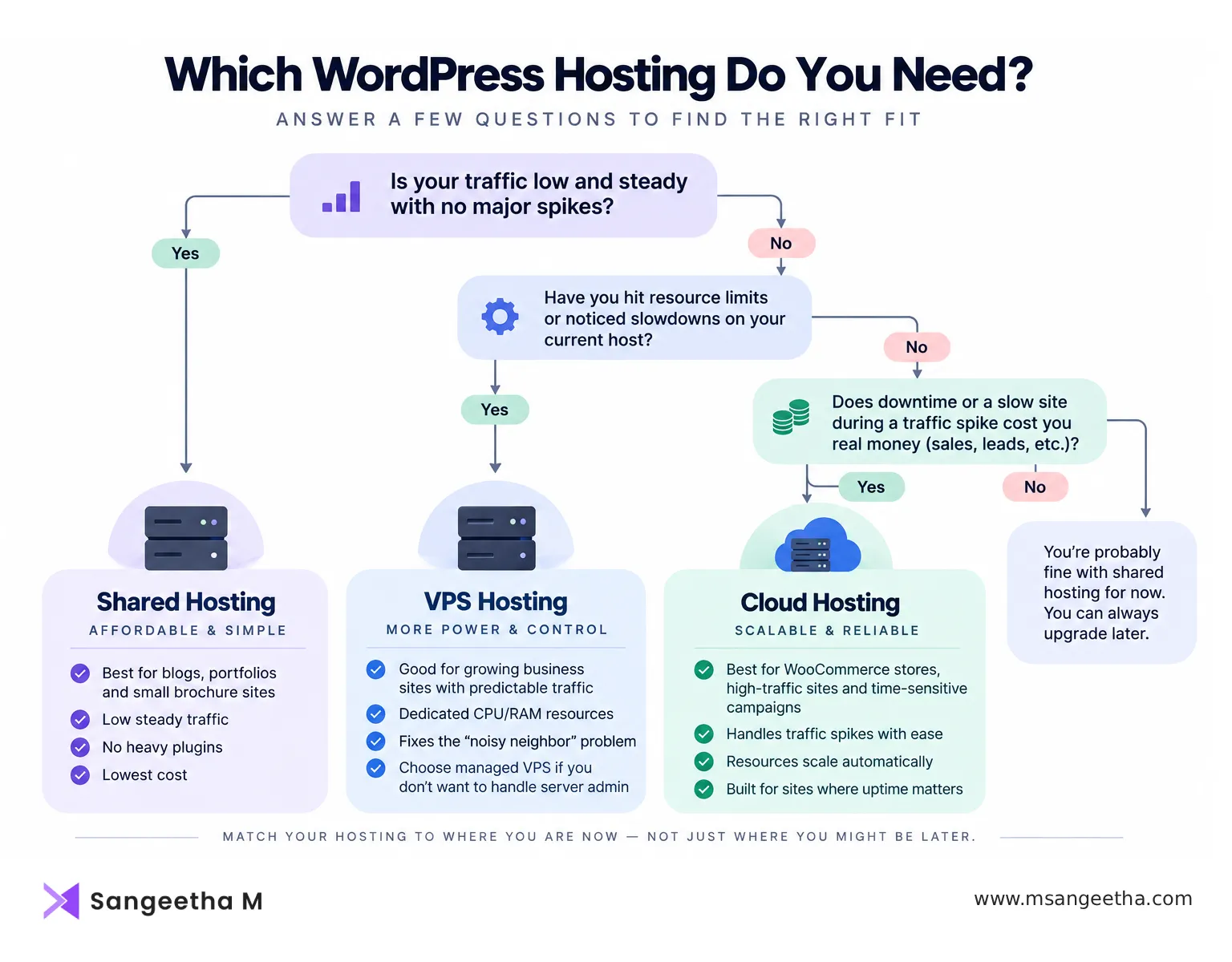
- Is your traffic low and steady, with no spikes? Shared hosting is fine. Don’t overspend on a problem you don’t have.
- Have you hit resource limits or noticed slowdowns tied to your host, not your own site? That’s the shared-to-VPS signal.
- Do you have someone who can manage a server, or budget for managed VPS? If not, and you need more than shared, look at managed cloud instead of unmanaged VPS.
- Does downtime or a slow site during a traffic spike cost you real money? That’s the case for cloud, regardless of your current traffic level — you’re paying for resilience, not just current capacity.
My own hosting runs through Hostinger, which is a reasonable starting point across more than one of these tiers — their shared plans cover the basics well, and their cloud hosting is worth a look once a site outgrows shared without forcing you straight into unmanaged VPS. I go into more detail on their shared-tier performance specifically in my full Hostinger review.
Whichever tier you land on, none of them replace basic WordPress-side performance work — caching, image optimization, and keeping plugins lean matter regardless of what server you’re on. My caching plugin comparison is worth a look once your hosting decision is settled, since a slow site on great hosting is still a slow site.
Frequently Asked Questions
Can I move from shared to VPS or cloud hosting without losing my site?
Yes. Migrating WordPress between hosting types moves your files and database over, and DNS changes can typically be handled with little to no downtime if it’s planned properly.
Is cloud hosting always more expensive than VPS?
Not always — cloud pricing scales with actual usage, so a small site on cloud hosting can sometimes cost less than a fixed VPS plan sized for peak traffic it rarely hits. Compare based on your real usage, not the sticker price.
Do I need technical skills to manage a VPS?
For unmanaged VPS, yes — you’re responsible for server updates, security, and configuration. Managed VPS removes that requirement but costs more, closing much of the price gap with managed cloud hosting.
Is shared hosting bad for SEO?
Shared hosting itself isn’t a direct SEO penalty, but the slower, less consistent load times it can cause during traffic spikes or a noisy-neighbor server issue do affect Core Web Vitals, which is an indirect ranking factor.
How do I know if a “cloud hosting” plan is real cloud infrastructure or just relabeled VPS?
Ask directly whether resources scale automatically in response to traffic, or whether you’re on a fixed resource allocation regardless of the “cloud” label — some hosts market VPS-tier infrastructure as cloud hosting without true auto-scaling behind it.

