
If you’ve been searching for an honest Hostinger WordPress hosting review — one written by someone who actually uses it, not just copies spec sheets — you’re in the right place.
I host my own website (msangeetha.com) on Hostinger and have used it alongside Bluehost and SiteGround for client projects. This review reflects real daily experience with the platform.
The short answer: for WordPress beginners in 2026, Hostinger is the best balance of ease, affordability, and performance. But it’s not perfect, and I’ll tell you exactly where the limitations are.
Hostinger at a Glance
- Founded: 2004, headquartered in Lithuania. Serves over 3 million customers globally.
- Best for: Beginners, bloggers, and small business owners on a budget.
- Starting price: ~$2.99/month (Premium plan, 48-month term).
- Free domain: Yes, included for the first year.
- Control panel: hPanel (custom, beginner-friendly).
- WordPress install: One-click via hPanel.
- Support: 24/7 live chat + comprehensive knowledge base
Pros and Cons — Honest Summary
| ✅ Pros | ⚠️ Cons / Watch out for |
|---|---|
| hPanel is the easiest dashboard for beginners | Renewal prices are higher than intro rates |
| Free domain included for first year | Basic plan limits you to 1 website |
| LiteSpeed servers = good speed out of the box | Phone support not available (live chat only) |
| Free SSL certificate on all plans | Storage on Premium plan is 20 GB SSD — sufficient for a blog but limited for image-heavy sites |
| 30-day money-back guarantee | No free daily backups on Premium plan(weekly only) |
| 24/7 live chat support | Some advanced features require higher-tier plans |
Performance — Speed & Uptime Test Results
Speed
Hostinger uses LiteSpeed web servers with LiteSpeed Cache built in. LiteSpeed is significantly faster than the Apache servers used by many budget hosts, and the cache plugin (free from the WordPress repository) integrates directly with Hostinger’s server-level cache.
For a new WordPress blog with a lightweight theme like Astra or GeneratePress, page load times typically fall under 1.5 seconds — strong performance for shared hosting at this price point.
Uptime
Hostinger guarantees 99.9% uptime. In practice, shared hosting rarely achieves 100%, but 99.9% means less than 9 hours of potential downtime per year. For a new blog or small business site, this is sufficient.
I have not experienced unexpected downtime on my own Hostinger-hosted site in the time I’ve been using it.
Hostinger WordPress Hosting Plans — Which One Should a Beginner Choose?
| Plan | Premium | Business + AI | Cloud Startup + AI |
|---|---|---|---|
| Starting price | $2.99/mo | $3.99/mo | $7.99/mo |
| Renewal price | $10.99/mo | $16.99/mo | $25.99/mo |
| Websites | Up to 3 | Up to 50 | Up to 100 |
| Storage | 20 GB SSD | 50 GB NVMe | 100 GB NVMe |
| Free domain | Yes (1 year) | Yes (1 year) | Yes (1 year) |
| 2 mailboxes/site | 5 mailboxes/site | 10 mailboxes/site | |
| Daily backups | No (weekly) | Yes | Yes |
| Free CDN | No | Yes | Yes |
| Staging | No | Yes | Yes |
| AI tools | No | Yes | Yes |
| Node.js web apps | No | 5 | 10 |
| Best for | First website / blog | Growing blog / small biz | High-traffic sites |
*Pricing is based on current promotional rates and may change. Check the latest pricing on Hostinger’s official website. All prices based on 48-month plan paid upfront. Best pricing is available on longer plans (24–48 months). Shorter terms cost more.
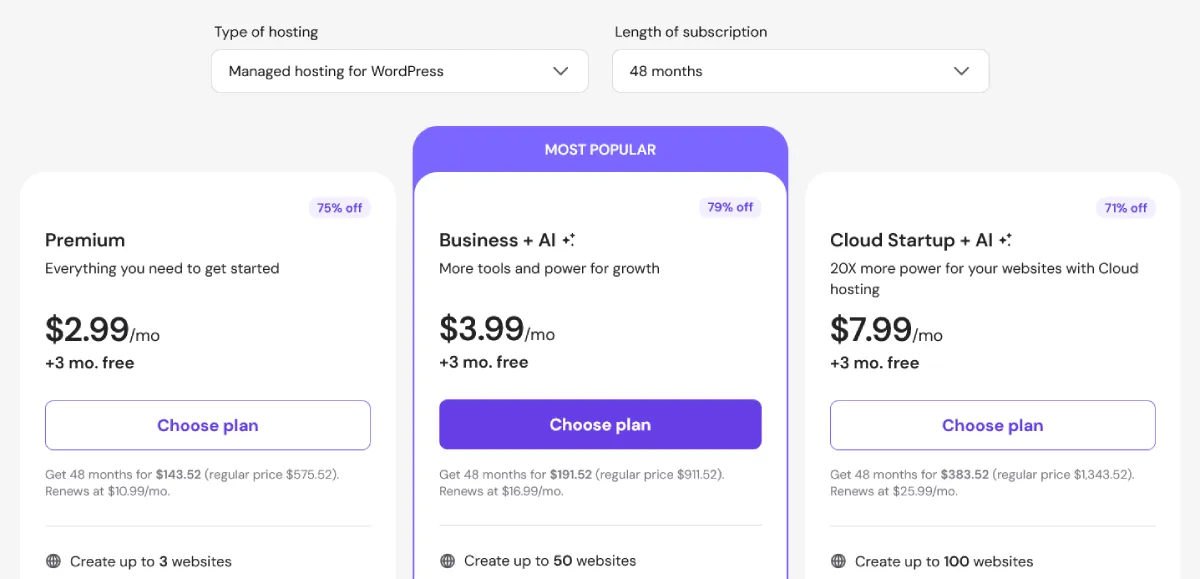
Source: https://www.hostinger.com/pricing
For most beginners, the Premium plan at $2.99/mo is the right starting point — it covers up to 3 websites, includes a free domain, SSL, and weekly backups, which is everything you need to launch. Upgrade to Business + AI at $3.99/mo when you want daily backups, free CDN, staging, and AI tools. The Cloud Startup + AI is for high-traffic sites and not necessary until your site grows significantly.
Upgrade to Business when: you want daily backups (important once you have real content), a CDN for faster global loading, or you plan to run more than one site.
Hostinger Support — What to Expect
Hostinger’s 24/7 live chat support has improved significantly. Response times are generally fast — under a few minutes during normal hours.
More importantly, their knowledge base is excellent. Most questions a beginner has (how to install WordPress, how to connect a domain, how to restore a backup) are answered with step-by-step articles that include screenshots.
What Hostinger doesn’t offer: phone support. If you strongly prefer talking to someone, this is worth knowing. In practice, live chat resolves most issues just as effectively.
How to Get Started with Hostinger WordPress Hosting
Getting a WordPress website live on Hostinger takes about 20 minutes. Here’s the basic flow:
- Sign up for a plan (use the link below for best pricing)
- Claim your free domain during checkout
- Log in to hPanel and go to Websites → Add Website
- Click ‘Install WordPress’ and fill in your site name and admin details
- Log in to WordPress and install a theme and plugins
For a full step-by-step walkthrough, see my guide: How to Launch Your First WordPress Website
Ready to Get Started? Sign up for Hostinger WordPress Hosting
Best beginner plan · Free domain · 30-day money-back guarantee
*Discount applies on first purchase of 12-month plan or longer.
How Hostinger Compares to Bluehost and SiteGround
Hostinger vs Bluehost: Both are good for beginners. Bluehost has WordPress.org’s official recommendation, but Hostinger’s hPanel is simpler and their LiteSpeed servers are faster at the same price point. For pure beginners with no brand loyalty, Hostinger wins on value.
Hostinger vs SiteGround: SiteGround has excellent performance and premium support, but starts more expensive and has no free domain. SiteGround makes more sense for established sites that need staging environments and advanced caching. If you want a simple, beginner-friendly hosting setup, Hostinger is currently the easiest option to start with.
Hostinger vs Bluehost vs SiteGround (Quick Comparison)
| Feature | Hostinger | Bluehost | SiteGround |
|---|---|---|---|
| Price | Low | Medium | High |
| Speed | Fast | Medium | Fast |
| Ease of Use | Very Easy | Easy | Medium |
| Free Domain | Yes | Yes | No |
| Best For | Beginners | Beginners | Growing Sites |
Choosing between all three? See my full side-by-side breakdown in my guide to the best WordPress hosting for beginners 2026.
My Verdict
Hostinger is the hosting provider I recommend to most beginners in 2026 — and it’s what I use for my own website. It offers:
- The easiest dashboard for non-technical users (hPanel)
- Solid LiteSpeed speed without extra configuration
- Competitive pricing with a free domain
- Responsive 24/7 live chat support
- A genuine 30-day money-back guarantee
The limitations are real (renewal prices, no daily backups on Premium, no phone support) but they’re not dealbreakers for a beginner. You can always upgrade once your site is established.
Start with Hostinger — Best Beginner Plan with Free Domain
Starts at ~$2.99/mo · hPanel (easiest dashboard) · 30-day money-back guarantee · Use my link and get 20% off
Start with Hostinger — 20% Off
*Discount applies on first purchase of 12-month plan or longer.
If you’ve settled on hosting and are ready to start growing your site’s visibility, my traffic guide covers content, SEO, and promotion end to end.
Frequently Asked Questions
Is Hostinger WordPress hosting good for beginners?
Yes. Hostinger is particularly well-suited to beginners because of its hPanel dashboard, one-click WordPress install, and responsive 24/7 live chat support. I use it for my own website and it has been reliable for everyday management.
Is Hostinger’s performance good enough for a new WordPress blog?
Yes. LiteSpeed servers and built-in caching mean your site loads fast from day one, without configuring anything extra. For new blogs and small business sites, Hostinger’s performance is more than adequate.
What happens after the first year — does the price go up?
Yes. Like most hosts, Hostinger’s introductory pricing is lower than renewal rates. Check the renewal price before committing. The Business plan renews higher but includes daily backups and CDN which are worth the upgrade for a growing site.
Does Hostinger include WordPress automatically?
Not automatically installed — but the one-click WordPress installer in hPanel makes it a two-minute process. You also get an ‘AI Website Builder’ option, but for a proper WordPress site, use the WordPress installer.
Can I move my website away from Hostinger later?
Yes. You own your domain and your files. Hostinger also offers migration assistance if you decide to move to or from their platform.
Is Hostinger better than Bluehost?
Yes, for most beginners, Hostinger is better than Bluehost due to its simpler dashboard, faster performance with LiteSpeed, and lower pricing. Bluehost is still a solid option, but Hostinger offers better overall value for a first website.
Is Hostinger safe and secure for WordPress?
Hostinger includes free SSL on all plans, DDoS protection, and automatic malware scanning. For additional security, pair it with a plugin like Wordfence or the security features built into RankMath.
Still Not Sure Which Hosting to Choose?
If you’re confused about choosing the right WordPress hosting for your website, I can help. Based on your goals, budget, and type of site, I’ll recommend the best option for you — no guesswork.
Disclosure: This post contains affiliate links. If you sign up through my Hostinger link, I earn a small commission at no extra cost to you. I only recommend products I use and trust.

