
What “Driving Traffic” Actually Means (And Why Most Advice Skips the Real Problem)
If you’ve searched for this topic before, you’ve probably read a dozen lists with titles like “20 Ways to Get More Traffic” or “13 Proven Tips.” I’ve read most of them too, and they tend to repeat the same surface-level advice: write good content, post on social media, build backlinks, use email. All true. None of it explains why so many websites do all of that and still get almost no visitors.
Driving traffic means increasing the number of relevant visitors to your website through organic search, paid advertising, social media, email marketing, referrals, and other online channels.
Here’s what I’ve learned after 15+ years of building and optimizing WordPress sites, including my own: traffic problems are rarely just a content problem. They’re usually a stack of smaller issues sitting on top of each other. A page can be well-written and still get zero traffic because Google never indexed it. A site can rank for the right keywords and still bleed visitors because of a redirect loop. A blog can publish weekly and still plateau because every post is competing with itself due to keyword cannibalization.
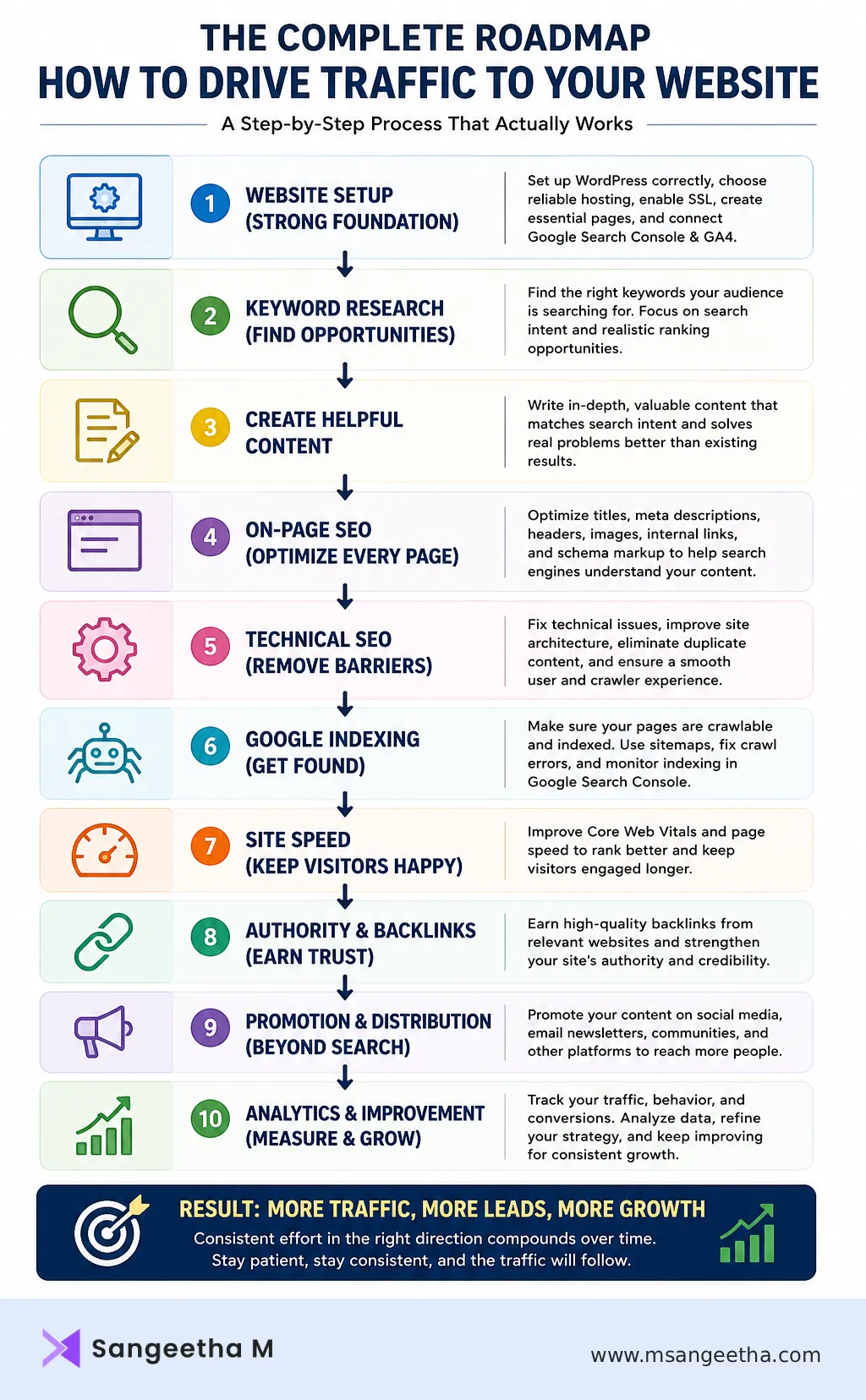
I’ve fixed every one of those problems on client sites and on my own site, msangeetha.com, and I’m going to walk through the whole picture here: foundation, content, technical SEO, promotion beyond search, and how to actually measure whether any of it is working. This is a long guide, so use the table of contents to jump to what’s relevant to you right now. If you’re just starting out, read it top to bottom once. If you’ve been at this a while, the technical SEO and measurement sections are probably where your gaps are.
Part 1: The Foundation You Need Before Traffic Can Arrive
Before you write a single blog post or run a single ad, your site needs to be technically capable of holding traffic once it shows up. I see a lot of beginners skip straight to “publish content” and find out six months later that their site had a robots.txt file blocking Google the entire time, or that half their pages were duplicate content fighting each other for rankings.
Run through this list first:
- Your site is installed and configured correctly. If you’re still setting up, my WordPress installation guide and beginner’s guide to launching your first website cover this end to end.
- You’re not blocking search engines by accident. Check your robots.txt file and confirm it isn’t disallowing pages you want indexed.
- You have an XML sitemap submitted to Google and Bing. Here’s what an XML sitemap is and why it matters for indexing.
- Google Search Console and GA4 are connected. I’ll come back to this in Part 6, but set these up now, even before you have traffic to track. My Search Console setup guide and GA4 for beginners guide walk through both.
- Your essential pages exist. Homepage, about page, contact page, and any core service or category pages. See essential pages every WordPress site needs.
- Your hosting can handle traffic when it arrives. I’ve reviewed a few options if you’re choosing or switching: best WordPress hosting for beginners and my Hostinger hosting review.
Skipping this stage is the single biggest reason I see traffic strategies fail before they even start. You can’t pour water into a bucket that has holes in it.
Organic vs Paid Traffic: What to Focus on First
For now, the short version: organic traffic (visitors who find you through unpaid search results) compounds over time. A blog post I wrote two years ago is still bringing in visitors today without me touching it again. Paid traffic (Google Ads, social ads) gets you visibility immediately, but it stops the moment you stop paying for it.
If you’re a beginner or solo site owner with limited budget, I’d put almost all of your early effort into organic. It’s slower, but it’s the only channel that keeps working while you sleep. Paid traffic makes more sense once you already have something proven to convert and you want to scale it faster, or if you need visibility for a time-sensitive launch and can’t wait for SEO to kick in.
Part 2: Building Your Content Engine
Content is still the single biggest lever for organic traffic. But “write good content” isn’t actionable advice on its own, so here’s how I actually approach it.
Start With Keyword Research, Not With Ideas
Don’t write about what you think people want to read. Find out what they’re actually typing into Google first. My keyword research guide walks through finding the right keywords for your specific site, including how to spot long-tail opportunities that are realistic to rank for as a smaller or newer site.
One mistake I made early on, and still see often, is writing five different posts that all secretly target the same keyword. Google has to pick one to rank, and usually picks the weakest one, or none at all. I wrote a full guide on diagnosing and fixing this: keyword cannibalization, what it is and how to fix it.
Match Search Intent Before You Match Keywords
Once you have a keyword, search it yourself and look at what’s already ranking. If the top 5 results are all listicles, writing a single long-form opinion piece probably won’t outrank them, no matter how well-written it is. Google has already worked out what searchers want for that query; your job is to match that format and then do it better.
Structure Every Post So It’s Actually Readable
Even great research gets ignored if it’s a wall of text. I cover my approach to this in blog post structure for SEO and how to write blog content for beginners. Short paragraphs, descriptive subheadings, and answering the core question early all help both readers and search engines.
Build E-E-A-T Into Every Post
Google’s quality guidelines focus on Experience, Expertise, Authoritativeness, and Trustworthiness. In practice, that means: write from things you’ve actually done, not generic advice you’ve seen elsewhere. Show your credentials. Link out to genuinely authoritative sources when you reference data or claims. Keep an author bio that actually says who you are and why you know this. I built my own about page with exactly this in mind, and it’s one of the more underrated pages on a site for this purpose.
Repurpose What You Already Have
Briefly: every long-form post you write can become a LinkedIn carousel, a short video script, or an FAQ section you reuse elsewhere. I’ve turned a single bot-traffic case study into a full LinkedIn carousel before, and it took less time than writing a new post from scratch.
Part 3: On-Page and Technical SEO
This is the part most generic “drive traffic” guides treat as a single bullet point: “optimize your titles and meta descriptions.” In reality, on-page SEO is dozens of small decisions that compound. Here’s where I’d start.
On-Page Basics
My on-page SEO for beginners guide covers the full checklist: title tags, meta descriptions, header structure, keyword placement, and image alt text. A couple of things worth calling out specifically:
- Meta tags matter more than people think. See what meta tags are and why they matter for SEO.
- Internal linking is not optional. Every post you publish should link to and from related posts on your site. I go deep into this in internal links for SEO, the complete technical guide, and I’m practicing exactly that throughout this post.
- Orphan pages quietly kill rankings. If a page has no internal links pointing to it, Google has a much harder time finding and trusting it. Here’s how to find and fix orphan pages.
- Site architecture should be planned, not accidental. See website architecture for SEO.
Choosing the Right SEO Plugin
Most of this is far easier with the right plugin handling the technical layer for you. I’ve compared the major options here: Yoast vs Rank Math and Rank Math vs All in One SEO.
Schema Markup
Schema markup helps search engines (and increasingly, AI search tools) understand exactly what your content is, which can earn you rich results and featured snippets. I cover what’s still effective in schema markup for WordPress, what still works in 2026.
Get a Full Technical Audit
If you’ve been publishing for a while and growth has stalled, a technical SEO audit usually surfaces the actual blockers. Here’s my full technical SEO audit checklist for WordPress and the broader technical SEO complete guide.
Part 4: Crawling, Indexing, and Why Great Content Sometimes Gets Zero Traffic
This is the part almost no generic traffic guide covers, and it’s where I’ve personally lost the most sleep on client and personal projects. You can do everything right, content, on-page SEO, promotion, and still get zero organic traffic if the page was never properly indexed in the first place.
I went through this myself with my own Schema Markup Generator tool. After ruling out WAF, CDN, caching, and server-level issues one by one, the actual fix turned out to be a URL change that forced a fresh crawl. It’s a good reminder that indexing problems don’t always have obvious causes, and they’re worth ruling out methodically rather than guessing.
A few posts that walk through this in detail:
- Why is my page not indexed by Google?
- GSC indexing status explained
- How to use the GSC coverage report to find and fix indexing issues
- How to fix crawl errors in WordPress
- What is crawl budget and how to optimize it
- How to fix redirect loops and redirect chains
- Duplicate content in WordPress, complete fix guide
- Canonical tags, the complete guide for SEO and AI search
- Bing Webmaster Tools, a complete guide (don’t only submit to Google)
If a page you’ve published isn’t showing up in search at all after a few weeks, this is the section to come back to before assuming the content itself is the problem.
Site Speed and Core Web Vitals
Speed affects both rankings and whether visitors stay once they land. A slow site quietly leaks traffic that you’ll never see in any report, because those visitors leave before anything gets tracked.
My practical guide is here: WordPress speed optimisation, a practical step-by-step guide. For the ranking-signal side specifically, see Core Web Vitals for WordPress and the GSC Core Web Vitals report explained.
If you’re deciding on a caching setup, I compared the two most common WordPress options in WP Rocket vs LiteSpeed Cache.
Link Building: Earning Authority Beyond Your Own Site
Backlinks remain one of the strongest authority signals search engines use, but quality matters far more than quantity. A single relevant link from a respected site in your niche is worth more than dozens of low-quality directory links. The realistic path for most solo site owners is creating genuinely useful resources (tools, original guides, data) that people want to reference naturally, rather than chasing links directly.
Part 5: Traffic Beyond Search
Search isn’t the only channel, and depending on your goals, it shouldn’t be the only one you invest in.
Social Media Traffic for Beginners
Social media doesn’t directly improve your search rankings, but it extends your reach and can earn you backlinks when content gets shared widely. The mistake I see most often is treating every platform the same way. Pick the one or two platforms where your actual audience spends time, rather than spreading effort thin across all of them.
Email Traffic Basics for New Websites
Your email list is the one channel you fully own. No algorithm change can take it away from you. Even a small list gives you a reliable way to bring readers back to new content the moment you publish, instead of waiting on search engines to notice.
How to Promote Blog Posts After Publishing
Publishing is the easy part. Most traffic guides assume the work ends there, but the first few days after publishing are when early engagement signals matter most. That’s the gap this future post should cover: where to share it, who to notify, and how to get those crucial early visits before you’re relying on organic rankings alone.
Video as a Traffic Channel
If your videos aren’t even showing up in search the way you’d expect, that’s usually fixable. See YouTube videos not showing in Google search, 9 reasons and fixes, plus video SEO, the complete guide, video sitemap XML guide, and video schema markup in WordPress. If you’re wondering whether you need both a video sitemap and video schema, I answered that directly in video sitemap vs video schema markup.
Website traffic is the number of visitors who come to your website through search engines, social media, direct visits, referrals, email, or paid advertising.
Local SEO for Businesses
If you run a business with a physical location or a defined service area, local SEO is often a faster and less competitive path to traffic than competing for national keywords. A claimed and well-optimized Google Business Profile, consistent name/address/phone details across the web, and local schema markup all play into this. I’ll be covering this in full detail in a dedicated post soon.
Common Reasons Websites Get No Traffic
| Problem | Solution |
|---|---|
| Site not indexed | Check GSC |
| Wrong keywords | Keyword research |
| Poor internal linking | Build topic clusters |
| Slow website | Improve Core Web Vitals |
| Duplicate content | Canonical tags |
| Keyword cannibalization | Merge pages |
| No backlinks | Build authority |
| No promotion | Share after publishing |
Part 6: Tracking Traffic Properly (Without Lying to Yourself)
You can’t improve what you don’t measure accurately, and this is the part where I see the most self-deception. People look at a GA4 dashboard, see a number going up, and assume things are working, without checking whether that number means what they think it means.
Set Up the Right Tools First
Both Google Search Console and GA4 are non-negotiable, and they tell you different things. Search Console shows what’s happening in search specifically (impressions, clicks, average position). GA4 shows what visitors do once they arrive (sessions, behavior, conversions). Setup guides: Google Search Console setup and GA4 for beginners.
Understand Your Traffic Sources, Not Just Your Traffic Numbers
A rising session count means very little if you don’t know where it’s coming from. I wrote a dedicated guide on this exact distinction: GA4 traffic sources explained, channel vs source vs medium.
Two specific traps worth knowing about:
- Inflated “direct” traffic. A lot of what GA4 labels as direct traffic isn’t actually someone typing your URL in. It’s often misattributed organic or referral traffic. I dig into the real causes in why does my website have so much direct traffic in GA4 and the fix in how to fix direct traffic in GA4.
- “Unassigned” traffic. This one confuses almost everyone the first time they see it. See GA4 unassigned traffic explained for what it means and when it’s actually worth worrying about.
Microsoft Clarity for Behavioral Data
Numbers tell you what happened; session recordings and heatmaps tell you why. I use Clarity alongside GA4, and walk through the setup in how to install Microsoft Clarity on WordPress.
Why You’re Getting Traffic But No Conversions
This deserves its own callout because it’s one of the most common messages I get: “my traffic is going up, but nothing’s converting.” Traffic and conversions are genuinely separate problems, and growing one doesn’t automatically fix the other.
I cover this in detail in why your website gets traffic but no leads. The short version: check whether the traffic you’re attracting actually matches the intent of the people you want to convert. A spike in informational-keyword traffic is great for visibility, but it won’t generate leads if those visitors were never going to buy anything in the first place. If your numbers feel off in the opposite direction, where traffic itself seems too low to begin with, start at why your website is not getting traffic.
How Long This Actually Takes
I get asked this constantly, so I wrote a dedicated, honest answer here: how long does SEO take to work, a realistic timeline for new websites. The short version is that there’s no universal number, but most new sites see meaningful movement somewhere between 4 to 12 months of consistent work, not weeks.
Frequently Asked Questions
What’s the fastest way to get traffic to a brand-new website?
Realistically, paid traffic is the only channel that can produce visible results within days. Organic SEO, social growth, and email all take sustained time to build. If you need traffic immediately for a launch or event, budget for paid; if you’re building for the long term, start your SEO and content work from day one rather than waiting.
Do I need to be active on every social media platform?
No. Pick the one or two platforms where your specific audience actually spends time and go deep there. Spreading thin effort across five platforms usually produces worse results than focused effort on one.
Why did my traffic suddenly drop?
Common causes include a Google algorithm update, a technical issue like a crawl error or accidental noindex tag, lost backlinks, or a drop in publishing frequency. Check Google Search Console first for any manual actions or coverage issues, then work through the indexing and crawling checks in Part 4 above.
Is organic traffic still worth it with AI Overviews and AI search tools taking over search results?
Yes, but the game is shifting. Structured, clearly answered content with proper schema markup has a better chance of being pulled into AI Overviews and cited by AI search tools, which can still send you traffic. I cover this angle specifically in my guide to canonical tags for SEO, GEO, and the age of AI search.
How do I know if my traffic problem is content, technical, or promotion?
Check Search Console first. If a page has impressions but very few clicks, it’s likely a title/meta description or ranking-position problem (content or on-page SEO). If a page has almost no impressions at all, it’s likely not properly indexed (technical, see Part 4). If it ranks and gets clicks but visitors don’t engage, that’s usually a content-match or page-experience problem.
This is a living guide. As I publish the standalone posts on organic vs paid traffic, content repurposing, social media, email, link building, and local SEO, I’ll link each one back into the relevant section above.

