
Meta Tags Are Instructions Your Page Sends to the World
When someone visits your website, they see the content on screen — the headings, the images, the paragraphs. But before any of that renders, your page sends a set of invisible instructions to browsers and search engines. Those instructions live in the <head> section of your HTML, and they are called meta tags.
Meta tags do not appear on the page itself. They work behind the scenes, telling Google what your page is about, how it should be indexed, whether it should be followed, how it should appear in search results, and how social platforms should display it when someone shares the link.
If you are working on on-page SEO, understanding meta tags is foundational. And if you have ever run a technical SEO audit on your WordPress site, you have almost certainly come across meta tag issues — missing descriptions, incorrect robots directives, or duplicate title tags.
In this post, I will walk you through every meta tag that matters, explain what each one does, and show you how to handle them correctly in WordPress.
What Is a Meta Tag?
A meta tag is an HTML element placed inside the <head> section of a webpage. It provides metadata — data about the page — rather than visible content. The basic structure of a meta tag looks like this:
<meta name="description" content="Your page description here.">Meta tags use attributes to define their purpose. The most common attributes are name, content, http-equiv, and property (used for Open Graph tags). Some meta tags, like the charset declaration, use neither name nor content in the usual way.
Not all meta tags affect SEO directly. Some influence how browsers behave, some control social sharing previews, and some are specifically for search engine crawlers. I will cover each category separately.
| Meta Tag | SEO Impact | Purpose |
|---|---|---|
| Title Tag | High | Search result title |
| Meta Description | Indirect | Improves CTR |
| Robots | High | Controls indexing |
| Canonical | High | Prevents duplicate content |
| Open Graph | No direct SEO | Social sharing |
| Twitter Cards | No direct SEO | X/Twitter previews |
| Viewport | Indirect | Mobile usability |
| Charset | Technical | Character encoding |
Meta Tags That Directly Affect SEO
1. Meta Title (Title Tag)
Technically, the title tag is not a meta tag in the strictest HTML sense — it uses <title> rather than <meta> — but it is so closely related to meta tags in SEO practice that it always belongs in this conversation.
<title>Meta Tags Explained: A Complete Guide for WordPress (2026)</title>The title tag is what appears as the clickable blue link in Google search results. It is one of the most important on-page SEO elements. Google uses it to understand the primary topic of your page, and users use it to decide whether to click.
Best practices for title tags:
- Keep it between 50 and 60 characters to avoid truncation in search results
- Include your primary keyword, ideally toward the beginning
- Make it descriptive and compelling — it needs to earn the click
- Every page on your site should have a unique title tag
Google sometimes rewrites titles shown in search results if it believes another version better matches the query.
If you are doing keyword research for your posts, the primary keyword you identify should almost always appear in your title tag.
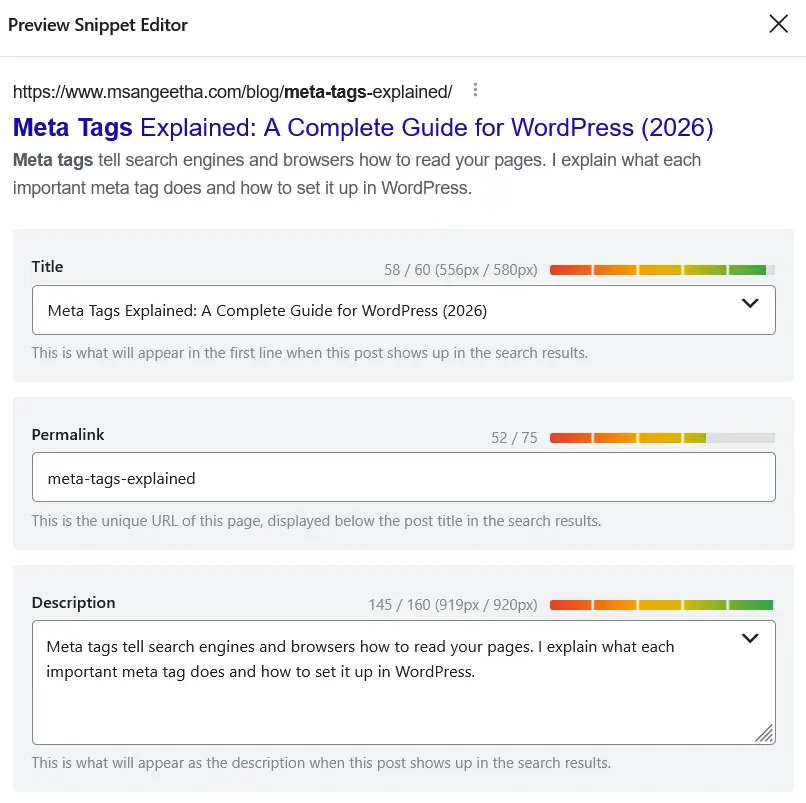
2. Meta Description
<meta name="description" content="Meta tags tell search engines and browsers how to read your pages. Learn every important meta tag and how to set it up correctly in WordPress.">The meta description is the short paragraph that appears below your title in search results. Google does not use it as a direct ranking factor, but it heavily influences click-through rate, which indirectly affects your rankings.
A well-written meta description tells the user what the page covers and gives them a reason to click. A poor or missing description means Google will pull whatever text it finds on your page, which is often not ideal.
Best practices for meta descriptions:
- Keep it between 150 and 160 characters (roughly 920px in pixel width — Google truncates beyond this)
- Include your primary keyword naturally — Google bolds it when it matches the search query
- Write it like a call to action, not just a summary
- Each page needs a unique meta description — duplicate descriptions are a common audit finding
In WordPress, your SEO plugin handles the meta description field. If you are using Rank Math or Yoast, you will see the meta description input in the editor panel for every post and page. I have compared both plugins in detail — see my Yoast SEO vs Rank Math and Rank Math vs All in One SEO posts if you are still deciding which to use.
3. Meta Robots Tag
<meta name="robots" content="index, follow">The meta robots tag tells search engines what to do with your page. It is one of the most important — and most dangerous — meta tags to get wrong. A single misconfigured robots tag can prevent an entire page or section of your site from appearing in search results.
The two main values are:
- index / noindex — tells crawlers whether to include the page in search results
- follow / nofollow — tells crawlers whether to follow the links on the page
These values can be combined. Common combinations include:
index, follow— the default; page is indexed and links are followednoindex, follow— page is not indexed but links are followed (useful for thank-you pages, tag archives)noindex, nofollow— page is excluded entirely (useful for admin pages, login pages)noindex, nofollow, noarchive— adds a directive to prevent Google from showing a cached version
Additional robots values worth knowing:
noarchive— prevents Google from showing a cached version of the pagenosnippet— prevents Google from showing a description snippet in search resultsnoimageindex— prevents images on the page from being indexed separately
The meta robots tag works at the page level. If you want to block crawlers at the site or directory level, that is handled by your robots.txt file instead. Both serve different purposes and are often used together.
In WordPress, Rank Math and Yoast both let you set robots directives per page without touching code. This is one reason I always recommend using an SEO plugin rather than editing meta tags manually.
⚠️ Be careful with noindex. Accidentally applying it to important pages can remove them from Google search results.
4. Canonical Tag
<link rel="canonical" href="https://www.msangeetha.com/blog/meta-tags-explained/">Strictly speaking, the canonical tag uses <link> rather than <meta>, but it lives in the <head> and is always discussed alongside meta tags in SEO.
The canonical tag tells Google which version of a URL is the “official” one. This is critical for preventing duplicate content issues in WordPress, which can arise from URL parameters, pagination, category archives, and other sources that generate multiple URLs for the same content.
https://example.com/post
https://example.com/post/?utm_source=facebookBoth pages are identical.
Canonical tells Google:
<link rel="canonical" href="https://example.com/post">
I have written a dedicated canonical tags complete guide that goes much deeper on this topic. If you are dealing with duplicate content or URL parameter issues, that post is the right place to start.
5. Meta Keywords Tag
<meta name="keywords" content="meta tags, SEO, WordPress">I am including this one only to explain why you should not spend time on it. Google officially stopped using the meta keywords tag as a ranking signal in 2009. Bing also ignores it. Adding a list of keywords to this tag does nothing for your search rankings and may actually signal to some search engines that your page is trying to manipulate rankings.
Leave it out entirely. Modern SEO plugins either omit it automatically or give you the option to disable it.
Meta Tags That Affect Social Sharing
6. Open Graph Tags
Open Graph tags control how your page appears when shared on Facebook, LinkedIn, and other platforms that support the Open Graph protocol. They use the property attribute rather than name.
<meta property="og:title" content="Meta Tags Explained: A Complete Guide">
<meta property="og:description" content="Learn every important meta tag and how to handle them in WordPress.">
<meta property="og:image" content="https://www.msangeetha.com/wp-content/uploads/meta-tags-explained.jpg">
<meta property="og:url" content="https://www.msangeetha.com/blog/meta-tags-explained/">
<meta property="og:type" content="article">
Without Open Graph tags, social platforms will attempt to pull a title and image from your page automatically, often with poor results. Defining these tags yourself gives you control over exactly how your content appears when shared.
The most important Open Graph tags for a blog post are og:title, og:description, og:image, and og:url. Your SEO plugin handles all of these if you fill in the social preview fields in the editor.
7. Twitter Card Tags
<meta name="twitter:card" content="summary_large_image">
<meta name="twitter:title" content="Meta Tags Explained: A Complete Guide">
<meta name="twitter:description" content="Learn every important meta tag and how to handle them in WordPress.">
<meta name="twitter:image" content="https://www.msangeetha.com/wp-content/uploads/meta-tags-explained.jpg">
Twitter (now X) uses its own card tags to control how links appear on the platform. The twitter:card value determines the card format — summary_large_image shows a large image preview, which tends to perform better for blog content.
If Open Graph tags are already present and Twitter card tags are missing, Twitter will fall back to the Open Graph values for title, description, and image. So at minimum, always set the twitter:card type explicitly.
Meta Tags That Affect Browser Behavior
8. Charset Meta Tag
<meta charset="UTF-8">This tag declares the character encoding of the page. UTF-8 is the standard for modern websites and supports virtually every character and language. WordPress sets this automatically. You should never need to change it, but it should always be present and it should always be the first tag in your <head>.
9. Viewport Meta Tag
<meta name="viewport" content="width=device-width, initial-scale=1">This tag controls how your page is displayed on mobile devices. Without it, mobile browsers render your page at a desktop width and then scale it down, which produces a poor user experience. Google also uses mobile-friendliness as a ranking factor through its mobile-first indexing approach.
WordPress themes set this tag automatically. If you are using a well-maintained theme like Divi, this is already handled for you. But if you ever see Google Search Console reporting mobile usability issues, checking whether this tag is present and correctly set is a good first step.
10. HTTP-Equiv Meta Tags
<meta http-equiv="X-UA-Compatible" content="IE=edge">These tags mimic HTTP response headers. The most common example is the X-UA-Compatible tag for Internet Explorer compatibility, which is now largely obsolete. Another common use is for cache control or content security policies, though these are better handled at the server level.
For most WordPress sites in 2026, you will rarely need to add http-equiv meta tags manually.
How to Manage Meta Tags in WordPress
You do not need to edit your theme files to manage meta tags in WordPress. An SEO plugin handles all the important ones for you. Here is how the workflow looks in practice:
- Title tag and meta description — set per post/page in the SEO plugin panel inside the editor
- Meta robots — set per post/page in the Advanced tab of your SEO plugin; site-wide defaults are set in the plugin settings
- Canonical tag — automatically generated by your SEO plugin based on the page URL; can be overridden manually when needed
- Open Graph and Twitter card tags — set in the Social tab of your SEO plugin; you can upload a custom image per post
- Viewport and charset — handled by your WordPress theme; no action needed
If you are using Rank Math, all of these are accessible from the Rank Math panel on the right side of the Classic Editor or block editor. Yoast has a similar structure. Both plugins generate clean, properly formatted meta tags without requiring you to write any HTML.
For more advanced meta tag implementations, like adding structured data through schema markup, see my guide on schema markup for WordPress. Schema lives in the <head> alongside meta tags and extends what you can communicate to search engines beyond what standard meta tags allow.
If you want to generate schema markup without writing code, try my free Schema Markup Generator — it supports all major schema types and outputs clean JSON-LD ready to paste into WordPress.
How to Check the Meta Tags on Your Site
Methods:
- View Page Source
- Detailed SEO Extension
- Rank Math Analyzer
- URL Inspection Tool
Common Meta Tag Mistakes to Avoid
In my audits, I see the same meta tag mistakes come up repeatedly:
- Missing meta descriptions — not every page needs a unique meta description urgently, but high-traffic pages absolutely do
- Duplicate title tags — often caused by pagination or archive pages using the same title as the main post
- Noindex left on after development — a very common issue where a site was set to noindex during staging and the setting was never reversed after launch; I cover this in my technical SEO complete guide
- Overly long titles and descriptions — both get truncated in search results, which can make your listing look incomplete
- Missing Open Graph image — results in a blank or random image when the page is shared on social media
- Conflicting robots directives — having noindex in the meta robots tag but index in your SEO plugin settings at the same time causes confusion; always check both
If you want a structured way to check all of these, walk through my WordPress technical SEO audit checklist — meta tags are covered as a dedicated section.
Key Takeaways
Most website owners only need to focus on four meta tags: the title tag, meta description, robots tag, and canonical tag. Open Graph and Twitter tags help with social sharing, while viewport and charset tags are usually handled automatically by WordPress. Understanding what each tag does makes it much easier to diagnose SEO issues and control how your pages appear across search engines and social platforms.
Frequently Asked Questions
Do meta tags still matter for SEO in 2026?
Yes, but the ones that matter have changed over time. The title tag, meta robots tag, and canonical tag are still highly relevant. The meta description does not directly influence rankings but affects click-through rate significantly. The meta keywords tag is completely obsolete and can be ignored.
How do I view the meta tags on any webpage?
Right-click on any page and select View Page Source. The meta tags will be visible in the <head> section near the top of the HTML. Alternatively, browser extensions like Meta SEO Inspector or Detailed SEO Extension show meta tags in a cleaner format directly in the browser toolbar.
Can I have multiple meta robots tags on one page?
Technically yes, but it is not recommended. If conflicting directives are present — for example, one tag says index and another says noindex — Google will use the most restrictive directive, which is noindex. Keep one meta robots tag per page with a clear, combined directive.
What happens if I leave the meta description blank?
Google will auto-generate a description by pulling text from the page. The auto-generated snippet is often relevant but rarely optimized for click-through rate. It is always better to write your own meta description for important pages.
Does the meta viewport tag affect SEO?
Indirectly, yes. Google uses mobile-first indexing, which means it primarily uses the mobile version of your page for ranking. A missing or incorrect viewport tag can cause mobile display issues that negatively affect user experience signals and Core Web Vitals scores.
How long should a meta title be?
Between 50 and 60 characters is the general guideline. Google measures title length in pixels rather than characters (approximately 600px), so the exact cutoff depends on the characters used. Rank Math and Yoast both show a pixel-width indicator in their title fields to help you stay within limits.
What is the difference between meta robots and robots.txt?
The meta robots tag controls indexing at the individual page level. The robots.txt file controls crawl access at the site or directory level. A page blocked in robots.txt may still be indexed if it is linked from other sites — Google can index a URL without crawling it. A noindex meta robots tag, however, will prevent indexing even if Google crawls the page. For complete control, you often need both.

