
I’ve been doing technical SEO for over fifteen years. In that time, I’ve audited hundreds of websites — and video SEO is consistently one of the most neglected areas I find. Not because people don’t care about it, but because most guides treat it as a YouTube optimization exercise and stop there.
Getting your videos to rank on Google — in Google Video Search, as rich results with thumbnails, and increasingly in Google AI Overviews — requires a completely different set of steps from optimizing a YouTube channel. It involves technical setup on your own website: sitemaps, structured data, dedicated pages, GSC configuration, and more.
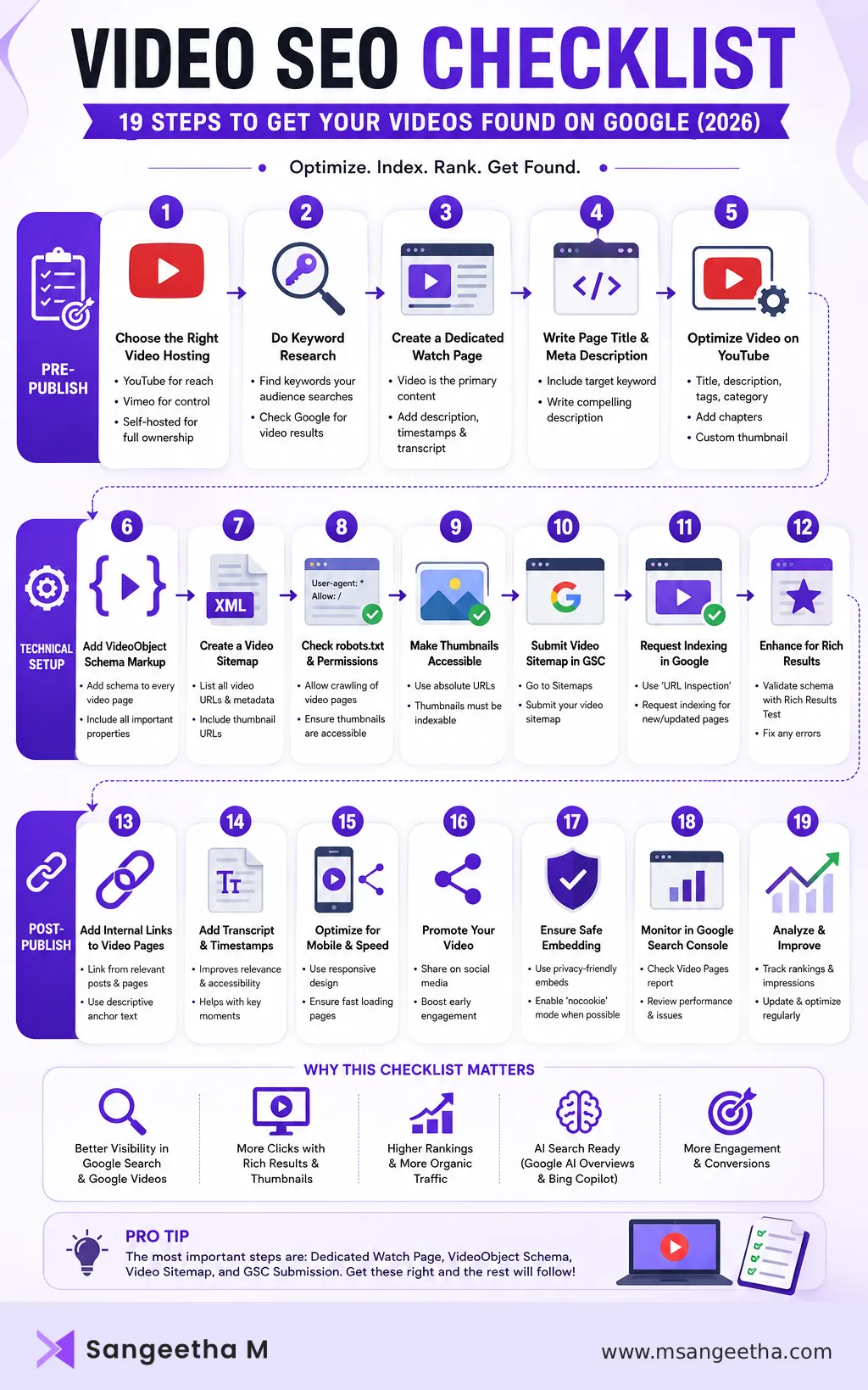
I put this checklist together based on what I actually implement for client sites. It covers everything from pre-publish setup to post-publish monitoring, and it’s specifically focused on getting videos found and indexed in Google search — not just on YouTube.
Quick Summary
- Video SEO for Google requires more than just uploading to YouTube — it needs technical setup on your own website.
- The most important steps are: dedicated watch pages, VideoObject schema, a video sitemap, and GSC submission.
- AI search engines like Google AI Overviews and Bing Copilot rely on structured data to surface video content.
- Most of these steps are free to implement — no premium plugin required.
- This checklist covers both YouTube-hosted and self-hosted videos embedded on your website.
This checklist is a quick reference — each step links to a dedicated guide where you need more detail.
Before You Publish: Pre-Publish Video SEO Checklist
1. Choose the Right Video Hosting Option
Your hosting choice directly affects how your video performs in Google search. Here’s the quick breakdown:
- YouTube — best for reach, discoverability, and free hosting. YouTube videos are indexed on YouTube.com automatically, but getting them indexed as part of your own website requires additional setup (covered below). The downside: YouTube shows related videos and competitor content after playback, which can pull users away from your site.
- Vimeo — better for a clean, ad-free embed with no competitor videos shown. Slower to index than YouTube. Good for professional or client-facing content where you want full control over the viewing experience.
- Self-hosted — full control, no traffic leaks to competitor videos, but requires more technical work (encoding, CDN, bandwidth) and can slow down your site if done incorrectly. Best for short videos used on landing pages where site speed is critical.
For most small businesses and bloggers, YouTube for reach plus proper on-site SEO setup is the most practical combination. I’ll reference this throughout the checklist.
2. Do Keyword Research for the Video
Treat video keyword research the same way you would for a blog post. Find the term your target audience is searching for, check Google search results to confirm videos appear for that query (look for a video carousel or video tab), and use that term in your video title, description, and page title.
A quick way to check: search your target keyword in Google. If you see a “Videos” section in the results, Google considers it a video-intent query — your video has a good chance of appearing there if it’s properly optimized.
3. Create a Dedicated Watch Page on Your Website
This is the single most important step most websites skip. Since November 2023, Google requires that a video be the primary content of a page to index it as a video result. A video buried halfway down a long article is unlikely to be indexed as a video page.
Create a dedicated page for each important video. The page should have:
- A clear H1 title related to the video topic and target keyword
- The video embed as the main visible element — ideally at the top of the page
- A written description of the video (at least 150 words) below the embed
- Key timestamps or chapter headings if the video is longer than 5 minutes
- A transcript if possible — this significantly helps Google understand the video content
You can still embed the same video on your blog post or landing page — that’s fine. But the dedicated watch page is what Google will index as the video result.
4. Write a Strong Page Title and Meta Description
Your video watch page needs a properly optimized title tag and meta description — the same as any other SEO page. Include your target keyword in the title, keep it under 60 characters, and write a meta description that clearly describes what the viewer will learn or see.
This is separate from your YouTube video title. The page title is what appears in Google search results — make it compelling enough to earn a click.
5. Optimize the Video Title and Description on YouTube
If you’re hosting on YouTube, optimize directly on the platform as well:
- Include the target keyword in the first 60 characters of the video title
- Write a description of at least 200 words — include the keyword naturally in the first two sentences
- Add chapters using timestamps in the description — this enables Key Moments in Google search
- Add relevant tags — 5 to 10 is enough, don’t stuff them
- Choose the correct category
- Upload a custom thumbnail — custom thumbnails significantly improve click-through rates compared to auto-generated ones
Technical Setup: The Core Video SEO Checklist
6. Add VideoObject Schema Markup to Every Video Page
VideoObject schema is structured data you add directly to your video watch page. It tells Google — and AI search engines like Google AI Overviews, Bing Copilot, and Perplexity — the video’s title, description, thumbnail, duration, upload date, and embed URL in a machine-readable format.
Without it, Google has to guess at this information from your page text. Sometimes it gets it right. Often it doesn’t — and a video without clear structured data is far less likely to appear as a rich result with a thumbnail in search.
Here’s the minimum VideoObject schema you need for a YouTube-hosted video:
<script type="application/ld+json">
{
  "@context": "https://schema.org",
  "@type": "VideoObject",
  "name": "Your Video Title Here",
  "description": "A clear description of what the video covers.",
  "thumbnailUrl": "https://img.youtube.com/vi/YOUR_VIDEO_ID/maxresdefault.jpg",
  "uploadDate": "2026-01-15T00:00:00+00:00",
  "duration": "PT5M30S",
  "embedUrl": "https://www.youtube.com/embed/YOUR_VIDEO_ID",
  "url": "https://www.yourwebsite.com/your-video-page/"
}
</script>
The duration uses ISO 8601 format — PT5M30S means 5 minutes and 30 seconds. You can generate this schema code for free using my Free Schema Markup Generator — select the Video schema type and fill in the fields.
7. Create and Submit a Video Sitemap
A video sitemap is an XML file submitted to Google Search Console that gives Google a direct list of your video pages and their metadata. It’s especially important for YouTube-hosted videos because YouTube embeds load via JavaScript — which can be hard for Googlebot to process during a regular crawl.
A video sitemap entry looks like this:
<?xml version="1.0" encoding="UTF-8"?>
<urlset xmlns="http://www.sitemaps.org/schemas/sitemap/0.9"
        xmlns:video="http://www.google.com/schemas/sitemap-video/1.1">
  <url>
    <loc>https://example.com/your-video-page/</loc>
    <video:video>
      <video:thumbnail_loc>https://img.youtube.com/vi/VIDEO_ID/maxresdefault.jpg</video:thumbnail_loc>
      <video:title>Your Video Title</video:title>
      <video:description>Description of the video.</video:description>
      <video:player_loc>https://www.youtube.com/embed/VIDEO_ID</video:player_loc>
      <video:duration>330</video:duration>
      <video:publication_date>2026-01-15T00:00:00+00:00</video:publication_date>
    </video:video>
  </url>
</urlset>
Important: the metadata in your sitemap must match your VideoObject schema exactly — same title, same description, same thumbnail URL, same duration. Inconsistency sends conflicting signals to Google and can suppress rich results.
You can generate a properly formatted video sitemap for free using my Free Video Sitemap Generator — no plugin or paid subscription needed.
For a detailed walkthrough, see my full guide on how to create and submit a video sitemap XML file.
8. Confirm the Thumbnail Is Publicly Accessible
Google requires a publicly accessible thumbnail image to display your video as a rich result. For YouTube videos, this URL always works without any setup:
https://img.youtube.com/vi/YOUR_VIDEO_ID/maxresdefault.jpgFor self-hosted video thumbnails, open the thumbnail URL in an incognito browser window. If it loads correctly, it’s publicly accessible. Also check your robots.txt file to confirm the image directory isn’t blocked from Googlebot.
9. Check robots.txt Is Not Blocking Video Resources
Go to yoursite.com/robots.txt and look for any Disallow rules that might block:
- /wp-content/uploads/ — common on WordPress, blocks thumbnails and self-hosted video files
- JavaScript directories — can prevent Google from rendering the video player
- Specific file extensions like .mp4 or .webm
You can use the URL Inspection tool in Google Search Console to test any page and see exactly what Googlebot can and cannot access.
10. Confirm the Page Is Set to Index
Check that your video watch page doesn’t have a noindex tag. In RankMath or Yoast, confirm the page visibility is set to public. Also check your page source for:
<meta name="robots" content="noindex">I’ve seen this accidentally left on video pages more times than I’d like to admit — usually from a draft revision that was never corrected before publishing.
11. Add Internal Links to the Video Page
An orphan page — one with no internal links pointing to it — signals to Google that the content is low priority and will be crawled infrequently. Add at least two or three internal links to your video watch page from relevant existing pages or blog posts on your site.
For example, if your video is about how to create a video sitemap, link to the watch page from your blog post on video sitemap XML and from your tools page. This helps Google find the page faster and signals its relevance.
After Publishing: Post-Publish Video SEO Checklist
12. Submit the Video Sitemap to Google Search Console
Go to Google Search Console → Sitemaps → enter your video sitemap URL (e.g. video-sitemap.xml) → Submit. Google will then crawl and process the sitemap, typically within a few days.
13. Request Indexing for the Video Watch Page
In Google Search Console, go to URL Inspection, enter your video watch page URL, and click Request Indexing. This tells Google to prioritize crawling this page rather than waiting for it to be discovered naturally.
14. Validate the Schema in Google’s Rich Results Test
Go to search.google.com/test/rich-results, enter your video page URL, and confirm Google can read the VideoObject schema correctly. If any fields show errors or warnings, fix them before expecting rich results to appear.
15. Share the Video Page URL — Not Just the YouTube Link
When promoting your video on social media, in newsletters, or in other blog posts, link to your video watch page on your website — not to the YouTube URL. This builds authority and signals to Google that your page is the primary source of the video content.
You can embed the video in your blog post and share that blog post link. The goal is to drive traffic and links to your own domain, not to YouTube.
Monitoring: Ongoing Video SEO Checklist
16. Check the GSC Video Pages Report Weekly
In Google Search Console, go to Indexing → Video pages. This shows which video pages Google has found, whether they are indexed, and any errors or reasons they may have been excluded. Common issues to watch for:
- Video not indexed — Google found the page but chose not to index the video. Usually means the video isn’t the primary content of the page.
- Video outside sitemap — Google found a video on a page that isn’t listed in your video sitemap. Add it.
- Thumbnail cannot be fetched — your thumbnail URL is returning an error. Fix the URL in both your sitemap and schema.
17. Monitor Video Performance in GSC Search Results
In Google Search Console, go to Search Results, click Search type at the top, and switch to Video. This shows impressions, clicks, and average position for your video pages in Google Video Search. Check this monthly to see which videos are gaining traction and which need improvement.
18. Update the Sitemap When Adding or Removing Videos
Whenever you publish a new video page, add it to your video sitemap and resubmit to GSC. If you remove or significantly change a video, update the sitemap entry accordingly. Stale or incorrect sitemap entries can create confusion for Googlebot over time.
19. Keep Metadata Consistent Across All Signals
Every time you update a video’s title or description — on YouTube, on your page, in your schema, or in your sitemap — update all of them at the same time. Inconsistent metadata across these sources is one of the most common causes of rich result suppression I encounter during audits.
🎬 Free Tools for Steps 6 and 7
You don’t need a premium plugin to implement VideoObject schema or create a video sitemap. I’ve built two free tools that handle both:
- Free Schema Markup Generator — generates VideoObject JSON-LD schema and 11 other schema types
- Free Video Sitemap Generator — creates a Google-compliant XML sitemap for YouTube, Vimeo, and self-hosted videos
No login. No plugin. No cost.
The first time you complete this checklist, expect to spend around 30–60 minutes per video. Once you’ve created templates for your watch pages, schema, and sitemap, the process usually takes 10–15 minutes for each new video.
Video SEO for AI Search in 2026
This deserves its own section because it’s changing quickly. Google AI Overviews, Bing Copilot, and Perplexity are increasingly surfacing video content in AI-generated responses. The signals these systems use are different from traditional search ranking signals.
For AI search visibility, the most important steps from this checklist are:
- VideoObject schema — AI systems use structured data as the primary mechanism for understanding and citing video content. Without it, your videos are largely invisible to AI search.
- A clear written description on the watch page — AI systems read the surrounding text to determine relevance. A page with only a video and no description gives AI very little to work with.
- A transcript or key chapters — if your video answers a specific question, having that answer in text form on the page significantly increases the chance of AI surfacing it in a response.
AI search is not replacing traditional video SEO — it’s adding to it. Every step on this checklist improves both traditional search visibility and AI search visibility simultaneously.
The Complete Video SEO Checklist at a Glance
Before Publishing
- Choose the right video hosting platform for your goals
- Research the target keyword and confirm video intent on Google
- Create a dedicated watch page with the video as primary content
- Write a strong page title and meta description
- Optimize the video title, description, chapters, and thumbnail on YouTube
Technical Setup
- Add VideoObject schema markup to every video page
- Create and submit a video sitemap — with matching metadata
- Confirm the thumbnail URL is publicly accessible
- Check robots.txt is not blocking video resources
- Confirm the page is set to index
- Add internal links from relevant pages to the video watch page
After Publishing
- Submit the video sitemap to Google Search Console
- Request indexing for the video watch page in GSC
- Validate schema in Google’s Rich Results Test
- Share the video page URL — not just the YouTube link
Ongoing Monitoring
- Check the GSC Video Pages report weekly
- Monitor video performance in GSC Search Results (Video type)
- Update the sitemap when adding or removing videos
- Keep metadata consistent across page, schema, sitemap, and YouTube
Frequently Asked Questions
What is video SEO?
Video SEO is the process of optimizing video content and the pages it lives on so that search engines like Google can discover, index, and display that video content in search results. It includes technical steps like video sitemaps and structured data, as well as on-page steps like dedicated watch pages and keyword optimization.
Do I need to do video SEO if I’m already on YouTube?
Yes — if you want your videos to appear in Google search results as part of your own website. YouTube handles its own indexing on YouTube.com, but getting your embedded videos indexed and ranked on your own domain requires separate technical setup including VideoObject schema, a video sitemap, and a dedicated watch page.
How long does it take for a video to rank on Google?
After implementing a video sitemap and VideoObject schema, most sites see their video pages appearing in Google Search Console’s Video Pages report within two to four weeks. Appearing as a rich result with a thumbnail in search results can take a further two to four weeks after that. Ranking for competitive search terms takes longer and depends on your site’s overall authority.
Is a video sitemap the same as VideoObject schema?
No. A video sitemap is an XML file submitted to Google Search Console that helps Google discover your video pages. VideoObject schema is structured data added to each page that helps Google understand the video content. They serve different purposes and should both be implemented. For a detailed explanation see my guide on video sitemap vs schema markup.
Does video SEO work for self-hosted videos?
Yes. The same checklist applies to self-hosted videos — in fact, some steps like the video sitemap and VideoObject schema are even more important for self-hosted videos because Google cannot discover them through YouTube’s own index. Use the content_loc field in your sitemap and schema instead of the embedUrl field.
Do I need a premium plugin for video SEO on WordPress?
No. The main features that require paid plugins — video sitemap generation and VideoObject schema — can both be implemented for free using standalone tools. RankMath Pro, Yoast Premium, and AIOSEO all include these features in paid plans, but they’re not required. Both free tools I mentioned in this checklist handle these steps without any plugin.
What is the most important step in this video SEO checklist?
If I had to pick one, it’s creating a dedicated watch page for each important video with the video as the primary content. Without this, Google is unlikely to index the page as a video result regardless of how well the other technical steps are implemented. This is the foundation everything else builds on.
Work Through the Checklist Once, Then Maintain It
The good news about video SEO is that most of the technical setup is a one-time investment. Once you have VideoObject schema templates, a video sitemap process, and a watch page structure in place, adding new videos becomes a repeatable workflow rather than a research project.
Start with your most important existing videos — the ones on your key service pages, highest-traffic blog posts, or most valuable landing pages. Work through steps 6 to 14 for each one. Then set up the monitoring steps so you can track progress in GSC over the following weeks.
If you’ve been wondering why your videos aren’t showing up in Google search despite being properly embedded on your pages, the answer is almost always somewhere in this checklist. The fixes are rarely complicated — they’re just steps that most guides don’t cover in one place.
For more on specific issues, see my guides on why YouTube videos aren’t showing in Google search, how to create a video sitemap XML file, and the video sitemap vs schema markup comparison — all part of the same video SEO topic cluster.

