
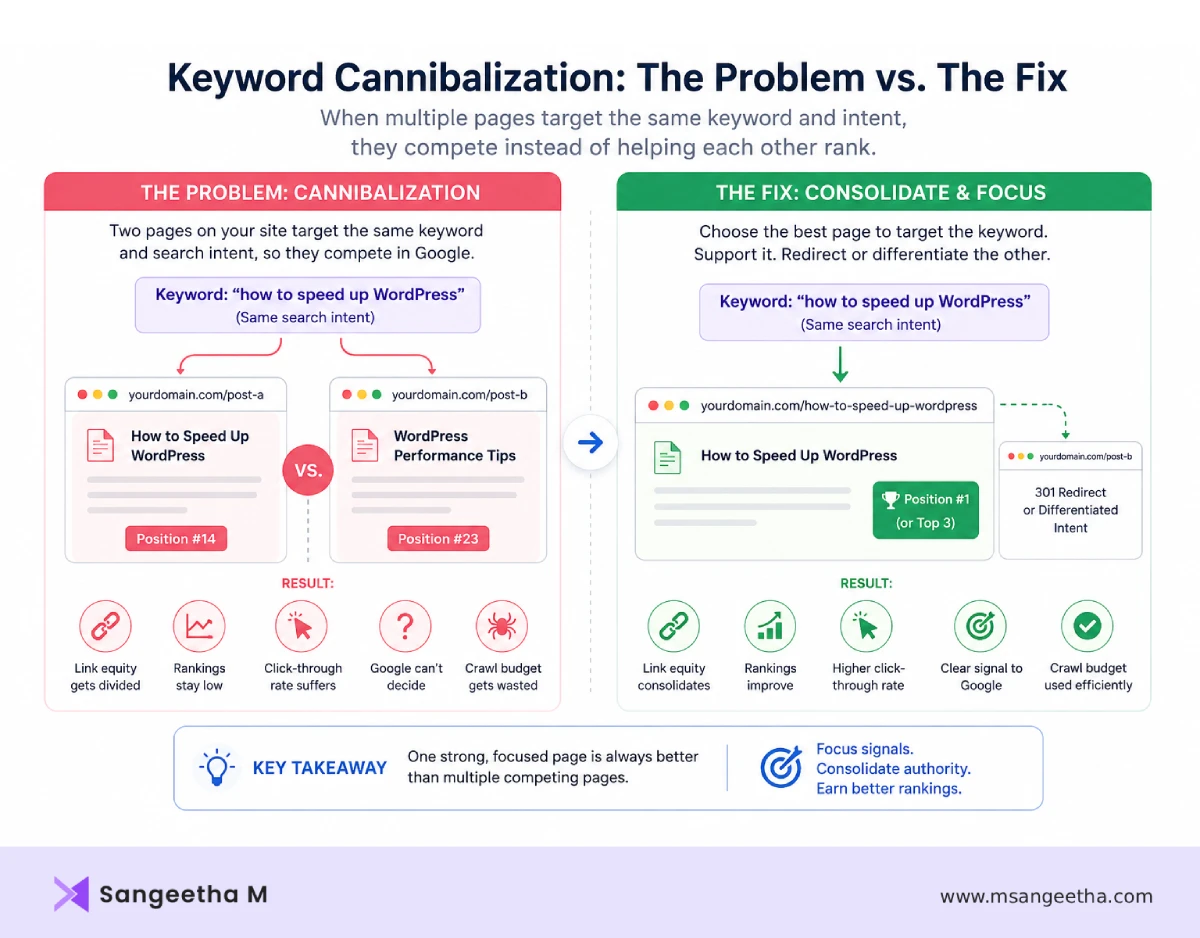
Here’s a situation that’s more common than most site owners realise: you check Google Search Console and notice that two of your posts are appearing for the same keyword. One is ranking at position 14, the other at position 23. Neither is on page one. You’ve been publishing content consistently, building internal links, and doing everything right — but these two posts are quietly working against each other instead of reinforcing each other.
That’s keyword cannibalization. And the frustrating part is that it’s almost always unintentional. You didn’t set out to create competing pages. You wrote what felt like two distinct posts on related topics, and over time Google decided they were close enough to compete.
The good news is that keyword cannibalization is entirely diagnosable and fixable — often without deleting a single piece of content. This guide covers what it actually is, how to find it on your site using free tools, how to choose the right fix for your specific situation, and how to prevent it going forward.
This post is part of the Technical SEO: The Complete Guide series.
What Is Keyword Cannibalization?
Keyword cannibalization is when multiple pages on the same website compete for the same keyword and search intent in Google search results rather than supporting each other.
The key phrase there is “same search intent.” Two pages that use the same keyword but serve different intents are not cannibalizing each other. They’re doing their jobs.
For example:
- A post titled “What Is Technical SEO?” (informational intent — explaining the concept) and a post titled “Technical SEO Services” (commercial intent — selling a service) can both use the keyword “technical SEO” without cannibalizing each other. Google can clearly distinguish the different purposes.
- Two posts both titled variations of “How to Fix WordPress Errors” targeting beginner site owners with nearly identical content — that’s cannibalization. Same keyword, same intent, same audience. Google has to guess which one to rank and often ranks neither well.
This distinction matters because many guides treat any keyword overlap as a problem worth fixing. It isn’t. The question to ask isn’t “do these two pages use the same keyword?” — it’s “are these two pages trying to satisfy the same search query for the same type of user?”
How Keyword Cannibalization Affects Your Rankings
When Google encounters two pages from your site competing for the same query, a few things happen — none of them good:
- Google can’t decide which page to rank. Search engines are trying to return the single best result for each query. When your site offers two similar results, Google has to pick one — and it often picks the wrong one. Your newest, most comprehensive post might lose to an older, thinner post that happened to accumulate more links over time.
- Your ranking fluctuates unpredictably. One of the clearest signals of cannibalization in Google Search Console is a keyword that oscillates between two different URLs in the Pages report — ranking one URL this week, a different URL next week. Google keeps reconsidering which one is better and never settles on either.
- Link equity gets divided. Any backlinks pointing to your site for that topic get split between two URLs instead of consolidating on one. Two pages with 5 links each are weaker than one page with 10 links — the authority doesn’t accumulate the way it needs to for strong rankings.
- Click-through rate suffers. If Google does rank both pages for the same query — one at position 8 and one at position 14 — neither gets the clicks a single position 5 result would receive. You’re splitting whatever traffic the query generates rather than capturing it efficiently.
- Crawl budget gets wasted. On larger sites, Google spending crawl budget on multiple thin competing pages means it has less budget for your new content. This slows down indexing of your best posts.
Signs You May Have Keyword Cannibalization
- Two URLs appearing for the same query in Search Console
- Rankings fluctuating between different pages
- Multiple posts stuck between positions 10–30
- Newer posts failing to outrank older weaker posts
- Several articles covering almost identical topics
Common Causes of Keyword Cannibalization on WordPress Sites
Understanding where cannibalization tends to originate saves you time when auditing your site.
Writing Multiple Posts on the Same Topic Over Time
This is the most common cause by far. You wrote a post on “how to speed up WordPress” in 2023. In 2024, you wrote a more detailed post on “WordPress performance optimisation.” Both target the same intent — helping WordPress site owners make their sites faster. Over time, both accumulate some authority, both rank in the 20-40 position range, and neither ever reaches page one because they’re splitting signals.
This happens naturally to any blogger or content creator who publishes consistently over an extended period. Topics you covered early in your blogging journey get revisited with better writing and more depth — but the old post doesn’t disappear.
Pillar Posts and Cluster Posts Overlapping
In a hub-and-spoke content structure, a pillar post covers a broad topic comprehensively and cluster posts cover specific subtopics in depth. The problem arises when a cluster post covers its subtopic so broadly that it starts to overlap with the pillar — or when the pillar is so detailed that it effectively contains the entire content of several cluster posts.
For example, a pillar post on “single-page websites” that includes a detailed SEO section, and a separate cluster post on “is a single-page website good for SEO” — the overlap between those two pages needs to be carefully managed so the pillar summarises the SEO angle and links to the cluster post, rather than fully covering it.
Category Pages Competing With Posts
WordPress category archive pages can rank in Google — and when they do, they sometimes compete with the individual posts they contain. A category page for “WordPress Troubleshooting” might rank for “wordpress troubleshooting” alongside your individual fix posts. This is a WordPress-specific form of cannibalization that’s managed differently from post-level competition — through category page configuration and duplicate content settings in Rank Math rather than content consolidation.
Similar Titles and Meta Descriptions Across Posts
Two posts with nearly identical title tags — both optimised for the same focus keyword — send a confusing signal to Google. Even if the content is substantively different, Google’s initial assessment of a page’s topic starts with the title tag. Similar titles on similar topics increase the chance of cannibalization.
Updating Old Posts Without Redirecting
Sometimes site owners publish a new, improved version of an old post rather than updating the existing one. The new post targets the same keyword as the old one. Unless the old post is redirected to the new one, both sit in the index competing for the same queries.
How to Find Keyword Cannibalization on Your Site (Free Methods)
Most guides default to recommending Ahrefs or Semrush for cannibalization audits. These are excellent tools — but they’re not free, and you don’t need them for a thorough diagnosis on a site of typical size.
Method 1: Google Search Console (Most Reliable)
Google Search Console is the most accurate source of cannibalization data because it shows you exactly what Google is doing — not what a third-party tool estimates Google is doing.
Step 1 — Find the query you’re concerned about:
Go to Search Console → Performance → Search Results. Click on the Queries tab and find the keyword you want to investigate. Click on it to filter the data by that query.
Step 2 — Switch to the Pages tab:
With the query filter active, click on the Pages tab. This shows you every URL from your site that received impressions for that specific query over the selected time period.
If you see more than one URL appearing for the same query — you have confirmed cannibalization for that keyword.
Step 3 — Check positions over time:
Click on each URL to see its average position for that query. If both URLs are appearing at weak positions (15-40), they’re splitting the ranking signal. If one is at position 3 and another at position 25, Google has chosen a winner but the second page is still creating noise.
Step 4 — Check for position fluctuation:
Set the date range to 6 months and look at the Position graph for the query. If the line fluctuates significantly — jumping up and down repeatedly rather than trending steadily — that’s a strong signal of cannibalization, even if only one URL appears in the Pages tab (Google may be alternating which URL it ranks between crawls).
Method 2: Google Site Search
For a quick manual check without opening any tools:
Go to Google and search: site:yourdomain.com “keyword phrase”
The results show every page Google has indexed on your site for that keyword phrase. If you see multiple results that appear to target the same query, those are your cannibalization candidates.
For example, searching site:yourdomain.com “single page website seo” would surface all pages on your site that Google associates with that term — giving you a quick visual overview of potential competition.
Method 3: Content Audit Spreadsheet
For a comprehensive site-wide audit, create a simple spreadsheet with these columns:
- URL
- Post title
- Focus keyword
- Secondary keywords
- Search intent (informational / commercial / navigational / transactional)
- Target audience
Fill it in for every post on your site. Then sort by focus keyword and look for rows where the same keyword appears more than once. For any matches, check whether the intent and audience columns also match — if they do, you have a cannibalization pair to address.
This spreadsheet becomes your keyword map going forward — the tool that prevents new cannibalization from being introduced as you publish new content.
Method 4: Rank Math’s SEO Analysis
In your WordPress dashboard, Rank Math’s free version includes a basic content analysis. While it doesn’t have a dedicated cannibalization report like paid tools, checking the focus keywords you’ve assigned across your posts gives you a quick overview of where you’ve duplicated keyword targets. Go to Posts → All Posts and look at the Focus Keyword column — any keyword that appears on more than one post is worth investigating.
How to Fix Keyword Cannibalization
There is no single right answer for every case. The correct fix depends on the specific pages involved, their authority, their traffic, and whether the content genuinely overlaps or just appears to. Here are the four main approaches, in order of how often they’re the right choice.
Fix 1: Consolidate — Merge the Two Posts Into One
When to use this: Both posts solve essentially the same problem for the same audience. Neither has significantly more authority, traffic, or backlinks than the other. Merging them into one comprehensive post would create something genuinely stronger than either individual post.
This is the most common and usually most effective fix. You take the best content from both posts, combine it into one definitive piece on the topic, publish it at the URL of the stronger post, and 301-redirect the URL of the weaker post to it.
How to do it:
- Decide which URL to keep — generally the one with more backlinks, more traffic, or the cleaner URL slug
- Copy the strongest content from the post you’re retiring into the post you’re keeping
- Rewrite where needed so the merged post reads naturally, not like two separate articles stitched together
- Update the title, meta title, and focus keyword to clearly target the primary keyword
- Publish the updated post
- Set up a 301 redirect from the retired post’s URL to the kept post’s URL — in Rank Math, go to Rank Math → Redirections → Add New and set the source URL to the old post and the destination to the new one
- Update any internal links on your site that pointed to the retired URL, changing them to the new URL
What to expect: After consolidation, Google needs time to process the redirect and recrawl the merged post. Rankings typically stabilise within 4-8 weeks as Google indexes the stronger merged content and consolidates the authority from both URLs.
Fix 2: Differentiate — Reoptimise Each Post for a Distinct Angle
When to use this: The two posts cover genuinely different angles or depths of the same topic, but they’ve drifted toward the same keyword through similar title tags and focus keywords. The content itself is different enough to justify both posts existing — they just need clearer differentiation in their SEO targeting.
How to do it:
- Assign each post a clearly distinct primary keyword that reflects its specific angle — not just slightly different phrasing of the same thing
- Rewrite the title tag and H1 of each post to reflect that distinct angle unambiguously
- Review the introduction of each post — does it make clear within the first paragraph what specific question this post answers? If not, rewrite it
- Add internal links from the broader post to the more specific one (and vice versa where natural), using descriptive anchor text that signals the relationship
- Make sure the focus keyword in Rank Math is set differently for each post
A real example: On this site, the single-page website cluster has three posts that cover related but distinct angles — pros and cons (decision intent), vs multi-page comparison (comparison intent), and SEO considerations (informational/technical intent). When those three posts started appearing for the same keywords in Search Console, the fix wasn’t to delete two of them — it was to make each one’s distinct angle unmistakably clear in its title, introduction, and internal linking. The pillar post sits above all three, and each cluster post links clearly to the others.
Fix 3: Redirect — Delete the Weaker Post and Redirect to the Stronger
When to use this: One post is clearly stronger — more backlinks, more traffic, more comprehensive content — and the other post is thin, outdated, or simply a worse version of the same content. The weaker post adds no unique value and isn’t worth updating.
This is the most aggressive fix and should only be used when you’re confident the weaker post has nothing worth keeping. Deleting content and redirecting is permanent — make sure you’re not losing something genuinely useful.
How to do it:
- Export any useful data from the weaker post (traffic in Google Analytics, any backlinks it has)
- Check whether any internal links on your site point to the weaker post — update those to point directly to the stronger post
- Set up a 301 redirect from the weaker post’s URL to the stronger post
- Delete or unpublish the weaker post
Fix 4: Internal Linking — Signal the Priority Page Without Changing Content
When to use this: You have two pages that legitimately cover different aspects of a topic, neither should be deleted or merged, but you need Google to understand which one is the primary page for the main keyword.
This is the most conservative fix and doesn’t require changing either post’s content. You simply make it clear through internal linking which page is the authority page for the keyword.
How to do it:
- From the secondary page, add an internal link to the primary page using the exact target keyword as anchor text — something like “for a complete overview of [keyword], see [link to primary page]”
- Make sure all other pages on your site that mention the topic link to the primary page, not the secondary one
- If you have a pillar post on the topic, ensure it links to the primary page and treats the secondary page as a supporting resource
This approach relies on Google using your internal linking structure as a signal for which page you consider more authoritative. It works well for mild cannibalization cases but is less effective when the two pages are very closely matched in content and authority.
Fix 5: Canonical Tag — Tell Google Which Version to Index
When to use this: You need both pages to remain accessible but you want only one to be indexed and ranked. This is more common in e-commerce (product variations, filtered pages) than in blogging, but it applies when you have a good reason to keep a page accessible without it competing in search.
In Rank Math, go to the post → Advanced tab → Canonical URL, and enter the URL of the primary page. This tells Google to treat the secondary page’s content as belonging to the canonical URL, consolidating ranking signals on the primary page.
Note: canonical tags are suggestions, not directives. Google may choose to ignore them if it disagrees with your choice. They work best when the pages are genuinely similar and the canonical choice is logical.
When to Do Nothing
Not every keyword overlap needs intervention. Before spending time on a fix, ask yourself:
- Is either page actually getting meaningful traffic or impressions for the overlapping keyword?
- Are both pages appearing in Search Console for the same query, or just one?
- Are the positions weak (20+) for both pages, or is one performing reasonably well?
If only one page is appearing in Search Console for the query and it’s in a reasonable position, the “cannibalization” may be theoretical rather than actual. Google has already resolved the competition by choosing one page — and if it’s chosen well, you don’t need to intervene.
Also consider: sometimes apparent cannibalization resolves itself over time as one page accumulates more signals. If you’ve recently published a post that overlaps with an older one, give it 2-3 months before assuming it needs fixing. Google may sort it out on its own as it recrawls and reassesses both pages.
The time to act is when:
- Both pages are appearing in Search Console for the same query
- Both are at weak positions (neither is reaching page one)
- The positions have been fluctuating for more than 2-3 months with no improvement
- You can identify a clear content overlap that explains the competition
How to Prevent Keyword Cannibalization Going Forward
Fixing existing cannibalization is one half of the job. The other half is setting up a system that prevents new cannibalization from being introduced as you publish more content.
Build and Maintain a Keyword Map
A keyword map is a simple document that assigns one primary keyword and one search intent to each published or planned URL on your site. Before writing any new post, check the keyword map — if the keyword and intent combination already belongs to an existing post, you need to either differentiate your angle or update the existing post instead of publishing a new one.
Your keyword map doesn’t need to be complicated. A spreadsheet with columns for URL, post title, focus keyword, search intent, and target audience is sufficient. The habit of checking it before creating new content prevents the vast majority of cannibalization before it starts.
Use a Hub-and-Spoke Content Structure
A well-structured site architecture naturally prevents cannibalization by giving every topic a clear home. The pillar post owns the broad keyword. Each cluster post owns a specific subtopic. Internal linking flows from cluster posts up to the pillar, and from the pillar down to cluster posts.
When every piece of content has a defined role in the hierarchy, it’s much harder for two posts to accidentally drift into the same keyword territory — because each one’s scope is defined by its position in the structure.
Write New Subtopics, Not New Versions of Existing Topics
The most common source of new cannibalization is writing a “better” version of an existing post rather than updating the existing one. If a topic is already covered on your site and you want to do it better, update and expand the existing post — don’t publish a new one. Save new posts for genuinely new angles, deeper subtopics, or questions that aren’t already answered elsewhere on your site.
Conduct a Regular Content Audit
Every 6 months, review your content against your keyword map and Search Console data. Look for posts that have drifted toward each other’s keyword territory over time — particularly posts that both showed impression growth for the same query. Catching cannibalization early, when both posts are still relatively new, makes consolidation much easier than untangling two posts that have each accumulated backlinks and traffic over years.
Keyword Cannibalization vs Duplicate Content — The Difference
These two concepts are often confused and sometimes treated as the same problem. They’re related but distinct.
Duplicate content is a technical issue — the same or very similar content is accessible at multiple URLs. It’s primarily caused by WordPress’s architecture (archives, pagination, URL variations) and is fixed through canonical tags, noindex settings, and 301 redirects. The duplicate content in WordPress guide covers this in full.
Keyword cannibalization is a content strategy issue — two or more pages targeting the same keyword and intent, competing against each other in search results. The content may be completely different between the two pages — they just happen to target the same query. It’s fixed through content decisions: merging, differentiating, redirecting, or internal linking.
The overlap occurs when WordPress archive pages compete with individual posts for the same query — that’s both duplicate content (technically) and cannibalization (strategically). In those cases, the fix comes from the duplicate content side: configuring archives correctly in Rank Math so they don’t compete with your posts.
How Long Does It Take to Recover From Keyword Cannibalization?
After implementing fixes, expect 4-8 weeks before you see meaningful changes in Search Console. Here’s why the timeline is that long:
Google needs to recrawl the affected pages after your changes. Recrawl frequency depends on how often Google visits your site — a site with frequent new content gets recrawled more often than a static one. After recrawling, Google needs to reassess which page to rank for each query and update its index. This process doesn’t happen instantly — it happens gradually as Google reprocesses the signals.
What to monitor after making fixes:
- The Pages tab in Search Console for the affected queries — you should start seeing only one URL appearing rather than two
- The position trend for the query — it should stabilise and hopefully improve as authority consolidates on the primary page
- Impressions and clicks for the primary page — these should gradually increase as the consolidated authority improves its position
If positions haven’t improved after 8 weeks, the cannibalization fix may not have been the primary issue — or the consolidation may need strengthening through better internal linking or content improvement on the primary page.
Frequently Asked Questions
Is keyword cannibalization always bad for SEO?
No. Keyword overlap is only a problem when two pages target the same keyword with the same search intent. Two pages using the same keyword but serving different intents — one informational and one commercial, for example — can coexist without cannibalizing each other. Google is sophisticated enough to distinguish between “what is keyword cannibalization” (informational) and “keyword cannibalization fix service” (commercial) even though both use the same phrase.
Can I use the same keyword on multiple pages?
Yes — mentioning a keyword on multiple pages is completely normal and expected. The issue is when multiple pages are specifically optimised to rank for that keyword as their primary target. You can have a pillar post on “technical SEO” and multiple cluster posts that mention “technical SEO” throughout without cannibalization, as long as each cluster post has its own distinct primary keyword and the pillar post is clearly the authority page for the broad “technical SEO” query.
How do I know which page to keep when consolidating?
Generally keep the page with more backlinks, more organic traffic, or a stronger URL slug. If both pages have roughly equal authority, keep the one that’s more comprehensive or the one with the cleaner, more keyword-relevant URL. The other page’s content gets merged in, and that URL redirects to the kept page.
Will a 301 redirect pass all the link equity from the redirected page?
Google has confirmed that 301 redirects pass the vast majority of link equity — historically described as losing a small percentage, though Google has said in recent years that the loss is negligible for permanent redirects. For practical purposes, a 301 redirect consolidates authority effectively. The bigger the redirect chain (A → B → C → D), the more equity is lost — so keep redirect chains as short as possible.
Do I need a paid SEO tool to find keyword cannibalization?
No. Google Search Console gives you the most accurate cannibalization data available — directly from Google. The site:domain.com search method and a content audit spreadsheet cover the rest. Paid tools like Ahrefs and Semrush are helpful for large sites with thousands of pages where manual auditing isn’t practical, but for most small to medium WordPress sites, free methods are entirely sufficient.
How is keyword cannibalization different from having a pillar post and cluster posts on the same topic?
In a healthy pillar-cluster structure, each post has a clearly distinct keyword target and role — the pillar owns the broad keyword, each cluster post owns a specific subtopic. Cannibalization occurs when the pillar and a cluster post start competing for the same keyword because the cluster post’s scope is too broad, or the pillar covers the subtopic in as much depth as the cluster post. The fix is to clarify the boundaries — the pillar summarises, the cluster post details — and make sure internal linking clearly signals the hierarchy to Google.
Do PPC landing pages cause keyword cannibalization?
Not usually. Many businesses create PPC landing pages targeting the same keywords as their organic content pages, but these pages are commonly set to noindex so they don’t appear in Google’s organic search results. Since properly noindexed pages aren’t indexed, they won’t create keyword cannibalization in SEO. Problems typically occur only when PPC landing pages are accidentally left indexable and begin competing with existing organic pages targeting the same search intent.
One Clear Page for Every Query — That’s the Goal
Keyword cannibalization is one of those SEO problems that’s easy to overlook because it doesn’t announce itself with an error message or a Search Console warning. It shows up as frustratingly stable weak rankings, positions that fluctuate without improving, and traffic that should be growing but isn’t.
The fix starts with understanding which of your pages are actually competing — and that diagnosis is entirely possible with free tools. Once you know what’s cannibalizing what, the right fix becomes clear: merge, differentiate, redirect, or signal priority through internal linking.
Going forward, a keyword map and a content audit every six months keep new cannibalization from accumulating. The goal is simple: one clear, authoritative page for every query you want to rank for. When Google knows which page to rank, it can rank it well.
Part of the Technical SEO: The Complete Guide series.
Related reading: Duplicate Content in WordPress: What It Is and How to Fix It | Website Architecture for SEO: How to Structure Your Site Properly | Internal Links for SEO: The Complete Technical Guide

