
Most people who publish videos online focus entirely on view counts and engagement on the platform where the video lives — YouTube, Vimeo, their own website. What they miss is a completely separate opportunity: getting those videos to appear directly in Google Search results, Google’s video tab, and Google Discover.
That is what video SEO is about. It is not the same as optimizing your YouTube channel. It is about making your video content discoverable and indexable by Google so it can surface in search results where your audience is already looking.
Video SEO is the process of optimizing video content so Google can discover, index, understand, and rank it in search results.
I have been working on video SEO for client sites for several years now, and I built a free video sitemap generator tool specifically because the technical side of video SEO is where most sites fall apart — not because the content is bad, but because Google simply cannot find or understand what the video contains. That tool now ranks on the first page of Google, which tells me this is a topic people are actively searching for help with.
This guide covers how Google discovers and evaluates videos, what signals actually influence video rankings, and the complete technical and on-page setup you need to get your videos appearing in search results.
How Google Discovers and Indexes Videos
Before you can optimize anything, you need to understand how Google actually finds videos. It is different from how it finds regular web pages, and the distinctions matter.
Google discovers videos through three main paths.
Crawling pages that contain videos: When Googlebot crawls a page and finds an embedded video — whether self-hosted or from YouTube — it attempts to identify the video content. For this to work, the video must be in a supported format, rendered in a way Googlebot can detect, and accompanied by enough surrounding context for Google to understand what it is about.
Video sitemaps: A video sitemap is a dedicated XML file that tells Google exactly where your videos are, what they contain, their duration, thumbnail URLs, and other metadata. This is the most reliable way to ensure Google finds and correctly understands every video on your site. I cover the full technical process in my video sitemap XML guide.
Structured data (VideoObject schema): Schema markup embedded in your page’s HTML tells Google explicitly that a video exists, what it is called, what it is about, how long it is, and when it was published. This is separate from a video sitemap — both serve different purposes, and using them together gives Google the clearest possible signal. I explain the difference in detail in my post on video sitemap vs video schema markup.
The key point here is that Google does not automatically index every video it encounters. It makes a judgment call about whether the video is the primary content of the page, whether it can extract enough information to understand what the video covers, and whether indexing it would serve searchers. Your job is to make all of those decisions as easy as possible for Googlebot.
Where Videos Can Appear in Google Search
Understanding the different placements helps you prioritize your optimization effort correctly.
Video rich results in web search: These are the thumbnail-plus-title video results that appear within the main search results page, often in a video carousel or as a standalone rich result for the page. These require either VideoObject schema markup or a video sitemap — without one of these, Google is unlikely to generate a rich result even if the video is indexed.
Google’s Videos tab: A dedicated tab in Google Search that surfaces only video results. Appearing here requires the video to be properly indexed as a video, not just as a page that happens to contain a video. This is where your video sitemap becomes especially important for self-hosted videos.
Google Discover: Google’s feed-based content discovery surface, shown on Android devices and in the Google app. Videos from YouTube tend to appear here more naturally, but self-hosted videos with strong VideoObject schema and a good thumbnail can also surface.
Image search (thumbnail): Video thumbnails sometimes appear in Google Image Search, linking back to the source page. A high-quality, properly specified thumbnail in your schema or sitemap improves this.
YouTube search results: If your videos are on YouTube, YouTube SEO is a separate discipline covered later in this guide. YouTube videos that rank well on YouTube often also appear in Google web search results — Google gives YouTube strong placement, especially for how-to and tutorial queries.
The Difference Between YouTube Videos and Self-Hosted Videos
This distinction matters a great deal for your SEO strategy, and most video SEO guides blur it.
YouTube-hosted videos: When you embed a YouTube video on your site, Google already knows the video exists — it is already in Google’s index via YouTube. Your page embedding it gets some benefit from the association, but the primary indexed entity is the YouTube video itself. For YouTube videos to appear in Google search with rich results on your specific page, you still need VideoObject schema on the embedding page.
Self-hosted videos: When you host video files directly on your server (mp4, WebM, etc.) and embed them using a native video player, Google has no prior knowledge of that video. It is invisible to Google unless you explicitly tell it about the video through a video sitemap entry, VideoObject schema, or both. This is the scenario where proper technical video SEO makes the biggest difference — and where most sites fail completely.
I see self-hosted videos on client WordPress sites all the time with zero video sitemap entries, no schema markup, and no transcript — Google has crawled the page, seen a video player loading via JavaScript, and moved on with no idea what the video contains. The page gets no video rich results and the video never surfaces in the Videos tab.
Key Ranking Signals for Video SEO
Google uses a combination of signals to decide which videos to rank and how prominently. These are the ones that matter most in practice.
Video Relevance to the Page
Google evaluates whether the video is actually the primary content of the page or a secondary element. A page where the video is embedded at the top above the fold, with supporting text directly related to the video’s topic, signals that the video is the main event. A video buried at the bottom of a long article with no surrounding context signals the opposite.
For video rich results to appear, Google generally wants the video to be a significant part of the page, not an afterthought. Position the video prominently and make the surrounding text directly relevant to what the video covers.
Thumbnail Quality
Thumbnail images are one of the most important signals for video rich results — and also for click-through rate once you are ranking. Google requires a thumbnail to generate a video rich result. A blurry, auto-generated, or irrelevant thumbnail will not perform well even if Google accepts it.
Your thumbnail should be at least 1200 pixels wide, have a 16:9 aspect ratio, and clearly represent the video content. Specify it explicitly in your VideoObject schema and video sitemap rather than leaving Google to auto-select one from the video itself.
Video Metadata Accuracy
The title, description, and duration you specify in your schema markup and video sitemap need to accurately represent the actual video content. Google cross-references this metadata against what it can extract from the video (via auto-captions, audio analysis, and visual signals). Mismatches between your declared metadata and the actual content can result in Google ignoring your schema entirely.
Page Quality and Authority
Video SEO does not exist in isolation from general page SEO. A video on a page with strong on-page SEO signals — a clear title, well-structured content, proper heading hierarchy, good internal linking — will outperform the same video on a thin or poorly structured page. The page needs to rank for the video to surface. Your overall technical SEO foundation directly affects your video SEO results.
Video Accessibility Signals
Transcripts and captions give Google something it can actually read and index. A video with no transcript relies entirely on Google’s audio processing to understand the content — which is inconsistent and language-dependent. Adding a full transcript to the page, or at minimum a detailed description that covers what the video discusses, gives Google explicit textual content to index alongside the video.
For YouTube videos, adding closed captions (manually, not auto-generated) significantly improves Google’s ability to understand and rank your video both on YouTube and in Google search.
Video Load Speed and Accessibility
Self-hosted videos that are slow to load or require JavaScript to render can cause Googlebot to miss them entirely during the crawl. Use the poster attribute on your video tag to specify a thumbnail image — this gives Googlebot something visible even if the video itself does not load during rendering. Add preload="none" to avoid blocking page rendering. These small technical details directly affect whether Google registers the video as present on the page during crawling.
This matters for your Core Web Vitals too — a large autoplaying video without proper optimization is a common cause of LCP failures.
The Technical Video SEO Checklist
These are the non-negotiable technical elements for every page with a video you want Google to index and surface in rich results.
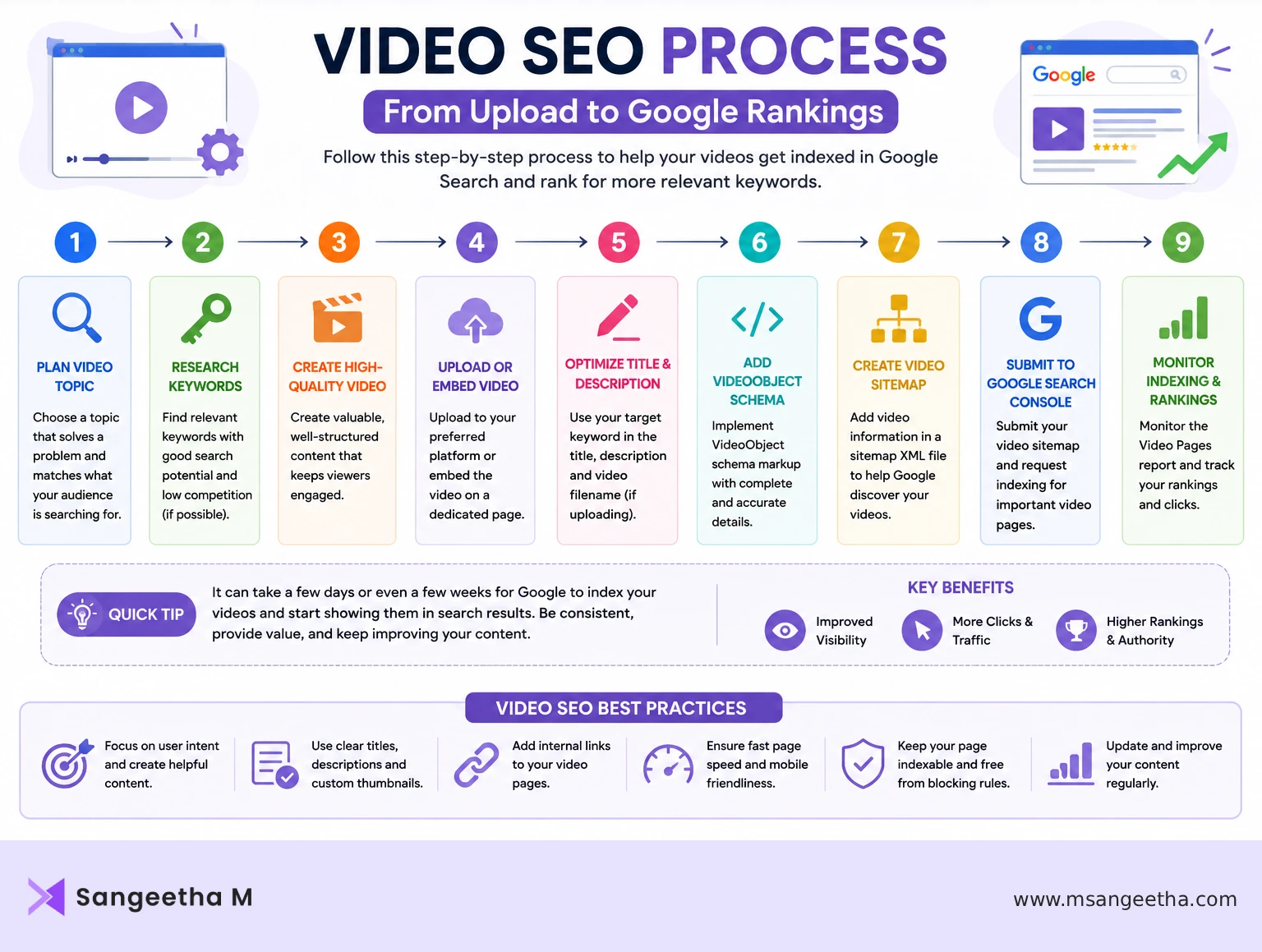
1. VideoObject Schema Markup
Add VideoObject structured data to every page containing a video you want indexed. At minimum, include:
- name — the video title
- description — a detailed description of what the video covers (not a copy of the page meta description)
- thumbnailUrl — the full URL of your thumbnail image
- uploadDate — the ISO 8601 formatted date the video was published
- duration — in ISO 8601 duration format (PT5M30S for a 5 minute 30 second video)
- contentUrl — the direct URL to the video file (for self-hosted videos)
- embedUrl — the embed URL (for YouTube videos, the standard youtube.com/embed/ URL)
You can generate the correct JSON-LD format for VideoObject schema using my free schema markup generator. I also cover the broader context of schema markup for WordPress including how to implement it correctly without a plugin dependency.
2. Video Sitemap
A video sitemap is a separate XML file (or an extension of your existing XML sitemap) that lists all your video pages with video-specific metadata. It is especially important for self-hosted videos that Google might not discover through crawling alone.
Each video entry in your sitemap should include the video thumbnail URL, title, description, content URL or player URL, and optionally the duration, publication date, family friendliness indicator, and tags.
For a complete walkthrough of video sitemap structure and how to submit it in GSC, see my video sitemap XML guide. If you want to generate one without manually writing XML, my free video sitemap generator handles the technical formatting for you.
3. Proper Video Tag Implementation
For self-hosted videos embedded using the HTML5 video element, make sure:
- The
posterattribute points to a high-quality thumbnail image - The video source is in a format Googlebot can process (MP4 with H.264 is most reliable; WebM is also supported)
- The video is not hidden behind a JavaScript interaction that Googlebot would need to trigger to see it
- The video is positioned above the fold or near the top of the page content
4. Transcript or Detailed Text Description
Include either a full transcript below the video or a sufficiently detailed written description that covers the main topics the video addresses. This gives Google indexable text content tied directly to the video and improves your chances of ranking for the specific terms the video covers.
5. Sitemap Submission in GSC
After creating your video sitemap, submit it separately in Google Search Console under Sitemaps. Check back after a few days to confirm GSC processed it without errors. A video sitemap with formatting errors will show a processing failure in GSC and Google will not use it.
YouTube Video SEO Specifically
If your videos live on YouTube — either exclusively or as a primary host — there are additional optimization steps specific to YouTube that also influence how the videos appear in Google Search.
Title optimization: Your YouTube video title is the primary ranking signal on YouTube and also what Google surfaces as the result title in web search. Write titles that clearly state what the video covers and include the primary keyword naturally. Avoid clickbait titles — YouTube’s algorithm now penalizes high click-through rate combined with poor watch time, which clickbait titles tend to produce.
Description: The first 150 characters of your YouTube description appear in search results. Write this as a clear, keyword-informed summary of the video. The full description can be much longer and should include timestamps, related links, and context about what the video covers.
Tags: YouTube tags have reduced in ranking influence over time but are still worth including. Use a mix of specific and broader tags related to your video topic.
Chapters: Adding timestamps with chapter titles to your YouTube description (using the 0:00 format) enables chapter markers in the video player and also allows Google to surface specific video segments directly in search results — a feature called key moments. For tutorial or how-to videos, this significantly improves visibility and click-through rate.
Closed captions: Upload a manually edited SRT file rather than relying on YouTube’s auto-generated captions. Accurate captions improve accessibility, improve Google’s understanding of the content, and directly influence search rankings for the specific terminology used in the video.
Thumbnail: Custom thumbnails consistently outperform auto-generated ones for click-through rate. On YouTube, higher CTR combined with strong watch time is a direct ranking signal.
If your YouTube videos are not appearing in Google Search at all, I have a detailed troubleshooting guide covering the nine most common reasons in my post on why YouTube videos are not showing in Google Search.
Video SEO for WordPress Sites Specifically
WordPress has some specific considerations for video SEO that are worth addressing directly.
The WordPress shortcode video player: WordPress has a built-in [video] shortcode that renders an HTML5 video player. This is generally Googlebot-friendly as it outputs standard HTML — but you still need to add the poster attribute for the thumbnail and ensure VideoObject schema is present on the page. Schema is not added automatically by WordPress core.
Page builders and video blocks: If you use Divi, Elementor, or the Gutenberg block editor, video embeds are often rendered via JavaScript or in ways that Googlebot may not process reliably. Always test using the URL Inspection tool in GSC and use “View Crawled Page” to confirm Google can see the video player and thumbnail on the rendered page.
Caching plugins: WP Rocket, LiteSpeed Cache, and similar plugins can sometimes cache pages in a way that serves Googlebot a version of the page before video-related JavaScript has executed. If you are seeing your video pages indexed but without video rich results, check whether the cached HTML version of the page contains the video tag and schema markup, or whether these are added only after JavaScript runs.
SEO plugin video support: Rank Math has built-in VideoObject schema support that can auto-generate schema from YouTube embeds. It does not handle self-hosted videos as reliably. For self-hosted videos, adding schema manually via a custom HTML block is often more reliable than relying on the plugin’s automation.
How to Check If Google Has Indexed Your Video
There are two reliable ways to check whether Google has properly indexed a video on your site.
URL Inspection in GSC: Enter the URL of the page containing the video. In the inspection results, look for a “Video” section under the Indexing information. If Google has successfully identified and indexed the video, it will appear here with the thumbnail and metadata it extracted. If no video section appears, Google either did not find the video or could not extract enough information to index it.
Rich results test: Go to search.google.com/test/rich-results and enter the page URL. This will show whether your VideoObject schema is valid and whether it would generate a rich result. Errors and warnings here tell you exactly what metadata is missing or incorrectly formatted.
Google Search: Search for the exact title of your video in Google. If it appears with a video thumbnail in the results, it is indexed and generating rich results. If it appears as a plain text result with no thumbnail, the video may be indexed but without rich result eligibility.
The GSC Video Indexing Report
Most people know the URL Inspection tool for checking individual pages, but GSC also has a dedicated Video Indexing report that gives you a site-wide view of how Google is handling your video content. It is worth checking regularly if you publish videos frequently.
You can find it in GSC under Indexing → Videos in the left sidebar.
The report shows three things: the total number of pages with videos that Google has indexed, pages where videos were detected but not indexed, and specific error reasons for the ones that failed. Unlike URL Inspection where you check one page at a time, the Video Indexing report lets you spot patterns across your entire site — for example, if a batch of pages all have the same thumbnail error or missing duration field.
The most common error messages you will see here and what they mean:
- Thumbnail cannot be read — the thumbnail URL specified in your schema or video sitemap is returning an error, is too small, or is in an unsupported format. Verify the thumbnail URL is accessible, at least 1200px wide, in a 16:9 ratio, and in JPG, PNG, or WebP format.
- Video outside the page content — Google detected the video but found it in a part of the page it considers outside the main content area — typically in a sidebar, footer, or a section hidden behind a tab or accordion. Move the video into the main body content.
- Video too short to be indexed — Google has a minimum duration threshold for video indexing. Very short clips under around 30 seconds may not qualify for video rich results.
- Missing video duration — your VideoObject schema does not include the duration field, or it is formatted incorrectly. Duration must be in ISO 8601 format — PT5M30S for a 5 minute 30 second video, not 5:30 or 330.
Use the Video Indexing report alongside URL Inspection for a complete picture — the report tells you what is happening across your whole site, and URL Inspection tells you exactly what went wrong on a specific page.
Common Video SEO Mistakes
These are the mistakes I see most consistently on WordPress sites when auditing video SEO.
Self-hosted video with no schema and no sitemap: This is the single most common issue. The video plays fine for visitors but is completely invisible to Google as a video. Google may index the page but has no idea a video exists on it.
VideoObject schema with incorrect duration format: Duration must be in ISO 8601 format. PT5M30S, not 5:30 or 330 seconds. Invalid duration format causes Google to reject the entire schema block.
Thumbnail URL that returns a 404: If the thumbnail image URL specified in your schema or sitemap does not resolve, Google will not generate a video rich result. Always verify the thumbnail URL is accessible before submitting.
Video buried in a tab or accordion: Videos hidden inside collapsed UI components (tabs, accordions, toggles) may not be visible to Googlebot during initial rendering. Google generally does not interact with UI elements to reveal hidden content. If your video is in a collapsible section, move it to visible page content instead.
Using the wrong embed URL for YouTube: Your VideoObject schema embedUrl for YouTube should use the https://www.youtube.com/embed/VIDEO_ID format, not the standard watch URL. Using the wrong URL format causes schema validation errors.
No video sitemap for self-hosted videos: If you are hosting videos directly on your server, a video sitemap is not optional — it is the primary mechanism for ensuring Google discovers and indexes those videos reliably. Without it, discovery depends entirely on Googlebot successfully rendering your page and parsing the video tag, which is inconsistent.
Bringing It All Together
Video SEO rewards the sites that do the technical groundwork properly. The content itself — the actual video — is what determines long-term performance, but without the technical layer in place, even genuinely useful video content stays invisible in Google Search.
The practical priority order for any site adding video content:
- Add VideoObject schema to every page with a video you want indexed
- Create and submit a video sitemap for self-hosted videos
- Verify Google can see the video using URL Inspection and the Rich Results Test
- Add a transcript or detailed description to every video page
- For YouTube videos, optimize title, description, chapters, and captions on the YouTube side in addition to schema on the embedding page
For the technical implementation of each step, the posts in this series go into full detail. Start with the video sitemap XML guide if you are working with self-hosted videos, or the YouTube visibility troubleshooting guide if your YouTube videos are not appearing in Google Search.
Frequently Asked Questions
What is video SEO and why does it matter?
Video SEO is the process of optimizing video content so it is discovered, indexed, and ranked by Google in search results — including the main web results, the Videos tab, and Google Discover. It is separate from YouTube SEO, which focuses on ranking within YouTube itself. Without proper video SEO, a video on your website is invisible to Google regardless of how good the content is. Google needs explicit signals — VideoObject schema markup, a video sitemap, or both — to identify that a video exists on a page and understand what it covers.
Do I need a video sitemap if I embed YouTube videos on my site?
Not strictly, because YouTube videos are already in Google’s index via YouTube. However, adding VideoObject schema to the embedding page is still important — it is what allows your specific page to generate video rich results in Google Search, rather than the traffic going to YouTube directly. A video sitemap is most critical for self-hosted videos, where Google has no prior knowledge of the video and relies on your sitemap and schema to discover and understand it.
What is VideoObject schema and how do I add it to WordPress?
VideoObject schema is structured data in JSON-LD format that tells Google a video exists on a page, along with its title, description, duration, thumbnail URL, and upload date. In WordPress, you can add it manually via a Custom HTML block in the Gutenberg editor or the Classic Editor, or through Rank Math’s video schema feature for YouTube embeds. For self-hosted videos, manual JSON-LD is often more reliable than plugin automation. You can generate correctly formatted VideoObject schema using a free schema markup generator tool and paste it directly into your page.
Why is my video not showing as a rich result in Google Search?
The most common reasons are: missing or invalid VideoObject schema, a thumbnail URL that returns a 404 error, incorrect duration format in the schema (it must use ISO 8601 format like PT5M30S), or the video being hidden in a collapsed UI element like a tab or accordion that Googlebot does not interact with. Use Google’s Rich Results Test tool to validate your schema — it will show you exactly which fields are missing or incorrectly formatted. Also use GSC URL Inspection and check the Indexing section for a Video entry to confirm Google has registered the video on the page.
Does having a video on a page help with SEO?
Yes, in several ways — but only when done correctly. A properly optimized video page can generate video rich results that increase click-through rate from search results. Videos increase time on page, which can be a positive engagement signal. Pages with video also tend to attract more backlinks and shares. However, a video with no schema, no transcript, and no surrounding contextual text adds little SEO value and can actually slow down the page, negatively affecting Core Web Vitals.
What is the difference between a video sitemap and video schema markup?
They serve different purposes and work best together. A video sitemap is an XML file submitted to Google Search Console that tells Google where your videos are and provides their metadata — it is primarily a discovery and crawl signal. Video schema markup (VideoObject) is structured data embedded directly in the page HTML that tells Google what the video contains and enables rich results in search. For self-hosted videos, using both a video sitemap and VideoObject schema provides the strongest discovery and indexing signals. For YouTube embeds, schema on the embedding page is sufficient since the video itself is already discoverable via YouTube.
If you have a video on your site right now and want to check whether Google has indexed it correctly, the quickest test is the Rich Results Test — paste your page URL and look for a valid VideoObject result. That tells you within seconds whether your current setup is working.

