
If you have been checking Google Analytics and wondering how to track AI traffic in GA4, you are not the only one. For most of 2026, that traffic was invisible. It quietly piled up under Referral or Direct, mixed in with everything else, with no way to separate it out.
That changed on May 13, 2026, when Google introduced the AI Assistant default channel in GA4. In this post, I will show you exactly how to track AI traffic in GA4 using that channel, what it actually measures, and the one gap almost every guide on this topic leaves out.
What Is the AI Assistant Channel in Google Analytics 4 (GA4)?
The AI Assistant channel is a new addition to GA4’s Default Channel Group, the same system that already sorts your traffic into buckets like Organic Search, Paid Search, Referral, and Direct. When GA4 detects a visit from a recognized AI platform, it automatically tags that session with the medium ai-assistant and files it under the AI Assistant channel.
The key thing to understand is that this happens automatically. You do not need to build a custom report from scratch or set up any tracking code. If you have read a guide telling you to create a brand-new detailed report in the GA4 Library just to see this data, that advice is outdated. The channel is already built into your standard Acquisition reports.
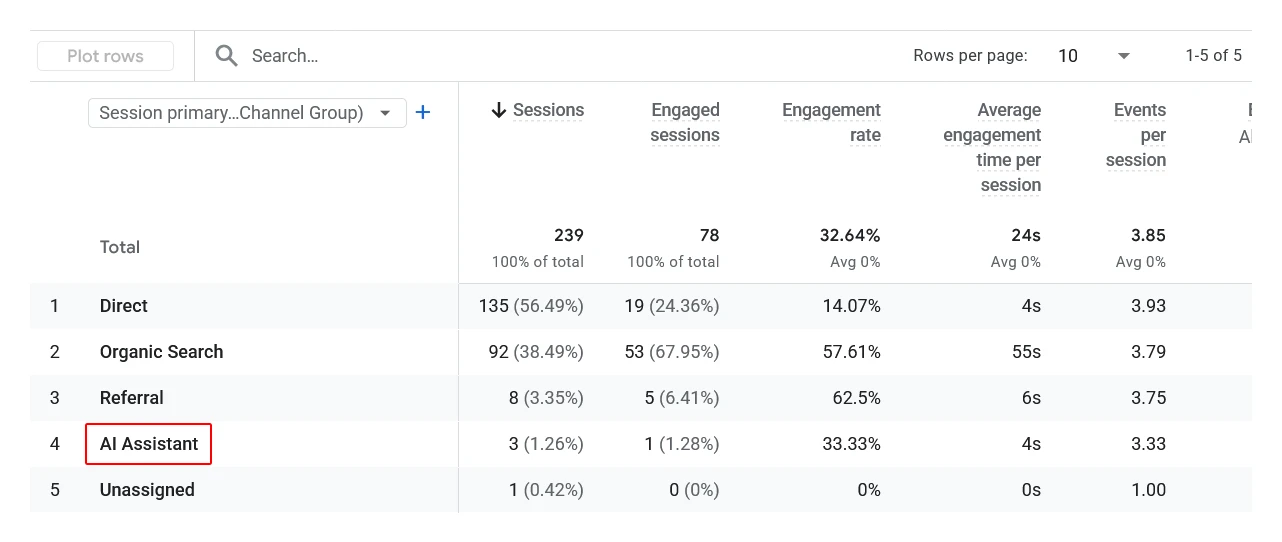
If GA4’s channel groupings are still new to you, I would start with my GA4 for beginners guide before going further into this one.
How to Track AI Traffic in GA4: Step by Step
Here is the fastest way to check whether your site is already showing AI traffic.
- Open your GA4 property and go to Reports.
- Click Acquisition, then Traffic acquisition.
- Look at the primary dimension at the top of the table. It should say Session default channel group.
- Scroll through the channel list. If you have received any AI referral traffic since the rollout, you will see AI Assistant as its own row, sitting alongside Organic Search, Direct, and Referral.
If you want to see which specific platform is sending the traffic, click on the AI Assistant row, or add Session source / medium as a secondary dimension. This will break the number down by chatgpt.com, gemini.google.com, claude.ai, and any other recognized source.
For a refresher on how GA4 defines source and medium in general, my post on GA4 traffic sources explained covers that in more detail.
The Gap Almost Every Guide Leaves Out
Here is what most articles on this topic will not tell you clearly: the AI Assistant channel only catches part of your real AI traffic, and the missing part is large.
In my experience reviewing GA4 properties, AI Assistant traffic is often lower than people expect. That’s because many AI-generated clicks lose their referrer information before reaching the website.
GA4 can only classify a visit as AI Assistant traffic if the click carries a recognizable referrer from the AI tool’s domain. A lot of AI-driven visits never carry that information at all, because:
- Mobile apps and in-app browsers often strip referrer data before the visit reaches your site.
- Many people copy a link out of a chat and paste it into a fresh browser tab, which drops the referrer entirely.
- Some AI platforms simply do not pass referral information the way a normal web link would.
When that happens, the visit does not disappear. It just lands somewhere else in your reports, usually under Direct. This is exactly why Direct traffic numbers have looked strange for a lot of site owners lately. If you have noticed your Direct traffic creeping up for no obvious reason, this is very likely part of why. I go into this in more depth in what’s really inside your Direct traffic in GA4, and if you want to actually clean that number up, how to fix Direct traffic in GA4 walks through the practical steps.
The takeaway here is simple: whatever number you see in the AI Assistant channel, treat it as a floor, not a ceiling. Your real AI-driven traffic is almost certainly higher.
What the AI Assistant Channel Does Not Cover
A few more limits are worth knowing before you start reporting on this number.
The platform list is not fixed
At launch, Google’s documentation named ChatGPT, Gemini, and Claude as the recognized platforms. Within weeks, that list had already changed to include other tools, and it is likely to keep shifting as AI search usage grows. Do not assume the list you read about today is the complete list a few months from now.
Perplexity and some other tools may not show up
Depending on when you read this, tools like Perplexity may not yet be part of Google’s recognized list, which means their traffic stays buried in Referral rather than appearing under AI Assistant. If a specific platform matters to your business, it is worth checking your Referral traffic by source occasionally to see what is hiding there.
This channel does not include Google’s own AI results
Clicks coming from Google AI Overviews or AI Mode inside regular Google Search are not part of the AI Assistant channel. Google still counts those under Organic Search. So if you are trying to understand your full AI-driven visibility, you need to look at both your Organic Search performance in Search Console and the AI Assistant channel in GA4, not just one or the other.
It does not go backward
The AI Assistant channel only started collecting data from May 13, 2026 onward. Sessions from before that date were already classified as Referral or Direct, and GA4 will not reclassify them. If you want to track AI traffic in GA4 going further back than that, including everything before the rollout, you would need to set up a custom channel group with your own rules, which is a more advanced project than what this post covers.
Which AI Traffic Metrics Should You Track in GA4?
| Metric | Why it matters |
|---|---|
| Users | How many unique visitors are arriving from AI platforms |
| Sessions | Total AI-driven visits, including repeat sessions |
| Engaged sessions and engagement rate | Whether AI visitors are actually reading your content or bouncing straight out |
| Average engagement time | How long AI visitors spend on your site compared to other channels |
| Conversions or key events | Whether this traffic is actually turning into leads or sales |
A good habit is to compare these numbers against your Organic Search performance for the same period. Some early data suggests AI-referred visitors can engage differently than typical search visitors, so it is worth watching this yourself rather than assuming it behaves like any other channel.
AI Traffic Is Not the Same as AI Visibility
One mix-up I see constantly: people treat “we are getting AI traffic” and “AI tools are recommending us” as the same thing. They are not.
GA4’s AI Assistant channel only tells you about the click. It cannot tell you when an AI tool mentioned your business or your content but the user never followed through to your site. That earlier step, whether your content actually gets surfaced and cited inside an AI answer in the first place, is a separate discipline that some people call GEO, or generative engine optimization. Structured data and clean technical SEO both play a role in that, which is something I cover in my complete technical SEO guide and schema markup for WordPress.
Think of it as two connected but separate questions: are you being mentioned, and are people clicking through afterward. GA4 only answers the second one.
Why This Is Worth Setting Up Now, Even With Small Numbers
If you check your AI Assistant channel today and see a tiny number, or nothing at all, do not dismiss it. Every major traffic channel looked like a rounding error before it became significant. The point of learning to track AI traffic in GA4 now is having a baseline in place, so that when this channel grows, you already have the history to show it.
AI-driven discovery is becoming one more path people take to find a website, alongside search and social. If you are working on driving more traffic overall, it is worth reading this alongside my broader guide on how to drive traffic to your website, since AI referrals are simply a new acquisition channel to add to that mix, not a replacement for the rest of your strategy.
Frequently Asked Questions
What is the AI Assistant channel in GA4?
It is a default channel group in GA4 that automatically groups website visits arriving from recognized AI platforms like ChatGPT, Gemini, and Claude, instead of leaving them scattered across Referral or Direct traffic.
Why does my GA4 property not show any AI Assistant traffic?
Either your site has not yet received a detectable visit from a recognized AI platform, or the visit arrived without referrer data and was counted under Direct instead. Both are common, especially for smaller sites.
Does the AI Assistant channel track ChatGPT app traffic?
Only when the referrer data survives the click. Visits from native mobile apps often strip that information, so some ChatGPT-driven visits will still land in Direct rather than AI Assistant.
Is Google AI Overview traffic part of the AI Assistant channel?
No. Clicks from Google’s AI Overviews or AI Mode are still counted under Organic Search, not the AI Assistant channel.
Can I see AI traffic from before May 2026?
Not through the native AI Assistant channel. That data was already classified as Referral or Direct before the rollout, and GA4 does not reclassify historical sessions.
Does AI Assistant traffic affect SEO?
No. The AI Assistant channel only reports where visitors came from. It doesn’t influence rankings or indexing.
Can I create a custom report for AI traffic in GA4?
Yes. Although GA4 already provides the AI Assistant channel in standard reports, you can build custom reports or explorations if you need more detailed analysis.

