
Last week I noticed a spam comment sitting on one of my posts — even though there’s no comment form anywhere on my frontend. My first reaction was confusion. I don’t display comments. I don’t even link to a comment section in my theme. So where was it coming from?
I went straight to Settings, and there it was: comments were still enabled at the site level. I had simply forgotten to turn them off. I unchecked the setting, cleared my cache, and assumed that was the end of it.
It wasn’t quite that simple, and if you’re seeing the same thing, it probably won’t be for you either. Here’s what’s actually going on, and how to close every route a spam comment can use to reach your site.
Hidden Comment Form vs. Disabled Comments
The first thing to understand is that “no comment form on the page” and “comments are disabled” are not the same thing. Your theme can simply choose not to display a comment form in its template files while the underlying comment system is still fully active in the background. Visitors never see a form, but WordPress is still ready and willing to accept a comment submission if one arrives.
That’s exactly the gap spam bots exploit. They don’t need to see your form. They just need the endpoint that processes it.
Why Disabling Comments Doesn’t Always Stop Spam
Once I dug into this, I found four separate reasons a site can keep receiving spam comments even after you’ve disabled them in Settings.
1. wp-comments-post.php Still Accepts Direct Requests
wp-comments-post.php always exists and bots can send requests to it directly. However, if comments are properly disabled for a post, WordPress rejects those requests. The reason spam still appears is usually because comments remain enabled on existing posts (or because pingbacks/trackbacks are still allowed), not because the endpoint itself bypasses WordPress’ comment settings.
2. Existing Posts Still Allow Comments
This one caught me off guard. The global “Allow comments” setting in Settings > Discussion only applies to new posts going forward. Every post you published before you changed that setting keeps its own individual comment status, and that status stays open unless you change it post by post.
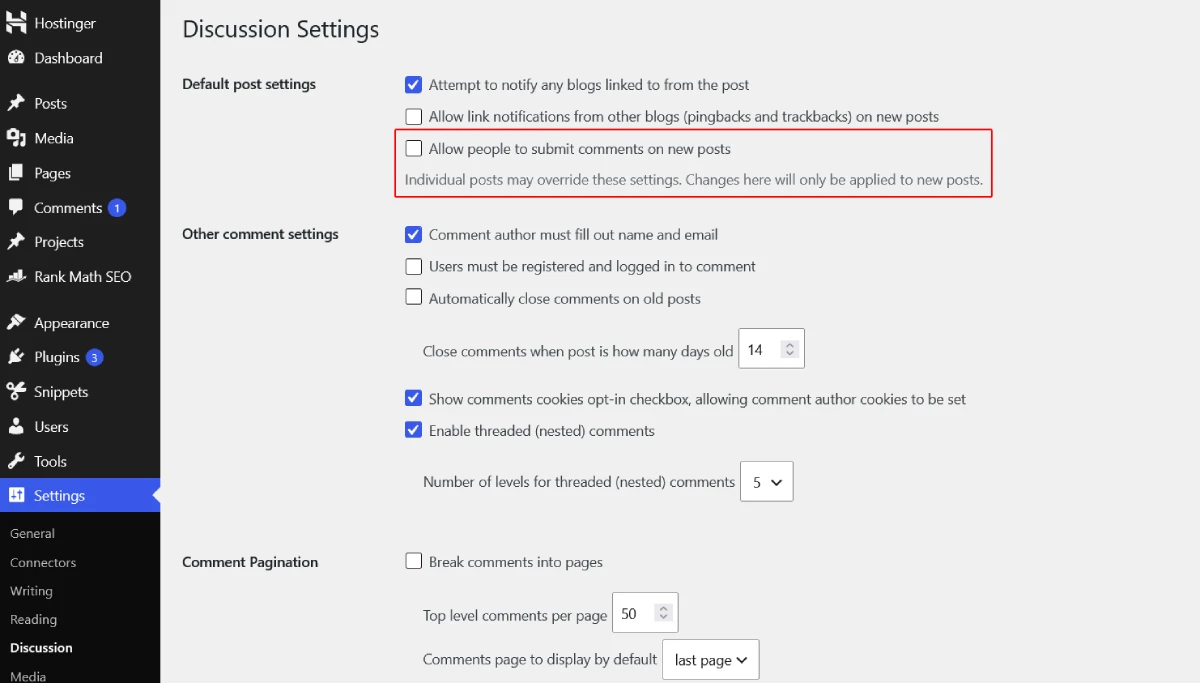
So if your site has been live for a while, disabling comments today does nothing for the dozens or hundreds of older posts sitting there with comments still switched on.
3. Pingbacks and Trackbacks Are a Separate Setting
Pingbacks and trackbacks are WordPress’s built-in way of notifying a post when another site links to it. They run through their own toggle, separate from regular comments, and they have the exact same “future posts only” limitation. If you’ve only unchecked the main comments option, your older posts can still be accepting pingbacks, which spammers use as another entry point.
4. XML-RPC Can Let Spam Through Too
XML-RPC can contribute to spam or abuse on some WordPress sites, particularly through pingbacks. While it’s less common than direct comment spam today, disabling XML-RPC is still considered a good security practice if you don’t use it.
How Bots Submit Comments Without Ever Seeing Your Site
It’s worth saying plainly: most comment spam today isn’t a person typing into your form. It’s an automated script that already knows the standard WordPress comment endpoint and fires requests at it in bulk, across thousands of sites at once. Your site isn’t being targeted personally. It’s just one more address on a list.
That’s why a plugin like Akismet can quietly catch spam even on a site with no visible comment form. It’s intercepting submissions at the processing level, not filtering what shows up on a page.
How to Actually Stop Comment Spam for Good
Here’s the full sequence I used to close every gap, not just the one I noticed first.
- Turn off comments for all future posts. Go to Settings > Discussion and uncheck “Allow people to submit comments on new posts.”
- Close comments on your existing posts. Go to Posts, select all, choose Bulk Actions > Edit > Apply, then set Comments to “Do not allow.” This is a built-in WordPress feature and doesn’t need a plugin.
- Turn off pingbacks and trackbacks the same way. The Discussion settings toggle only covers future posts, so repeat the bulk edit above for existing posts if your theme or plugin exposes that field, or handle it through your host’s database tool if you’re comfortable there.
- Disable XML-RPC if you don’t rely on it. Most sites don’t need it unless you’re using the WordPress mobile app or a specific integration that requires it. Your security plugin or hosting dashboard usually has a simple toggle for this.
- Verify it actually worked. Don’t just trust the settings screen. Try submitting a test comment yourself, or check your site’s response when a request is sent to
wp-comments-post.phpdirectly. If nothing gets through and nothing appears, you’re clear.
That last step matters more than people think. I’ve learned from chasing other WordPress issues that a setting looking correct in the dashboard isn’t the same as confirming the fix at the source.
Frequently Asked Questions
Does disabling comments in Settings stop all spam immediately?
No. It stops comments on new posts only. Existing posts, pingbacks, trackbacks, and XML-RPC each need to be addressed separately.
Do I need a plugin to fix this?
Not necessarily. Bulk-editing your existing posts and adjusting your Discussion settings can be done natively in WordPress. A plugin like Disable Comments can save time if you have a very large number of posts, but it isn’t required.
Why does Akismet catch spam if I have no comment form?
Akismet filters comment submissions at the point WordPress processes them, not based on whether a form is visible on the page. Bots can submit directly to the comment-processing endpoint, and Akismet still intercepts those attempts.
Is comment spam a security risk, or just annoying?
It’s mostly a nuisance and a content-quality issue, but a high volume of spam submissions can also strain server resources and, in some cases, be used to probe a site for other weaknesses. It’s worth closing the gaps rather than ignoring it.

