
For years, most SEOs treated the HTML sitemap as a leftover from the early 2000s. Then Google’s John Mueller and Martin Splitt discussed it on a recent episode of Search Off the Record (covered by Search Engine Journal), and the short version is that HTML sitemaps are not dead. They just do a different job than most people think.
In this guide, I’ll explain what an HTML sitemap is, how it differs from an XML sitemap, what Google actually said, and how I would build one on a WordPress site.
What Is an HTML Sitemap?
An HTML sitemap is a normal web page that lists links to the important sections of your website. It is written for people first. A visitor who lands on it can see how your site is organized and jump to the right section.
Because it is an ordinary page, search engines crawl it like any other page and follow the links on it. That is where the SEO benefit comes from.
HTML Sitemap vs XML Sitemap
The names are confusing, but the two files do different jobs. If you want the full XML side of the story, I covered it in my XML sitemap guide.
| Feature | HTML Sitemap | XML Sitemap |
|---|---|---|
| Main audience | Visitors (and crawlers) | Search engines only |
| Format | A regular web page | A structured XML file |
| Submit in Search Console | No | Yes |
| Usually lists | Key categories and top pages | Every indexable URL |
| Extra data | None | Last modified dates and more |
The key point: an HTML sitemap cannot replace an XML sitemap. You can’t submit it as a sitemap file, and it doesn’t have the strict structure that Google processes in an XML file. It is simply a collection of links.
What Google Said About HTML Sitemaps
According to the discussion, if a crawler finds your HTML sitemap, it can follow those links just like links anywhere else on your site, which helps discovery. Mueller’s point was that the page works as a map for users, and any crawling benefit is a side effect of that.
He also made clear that a good HTML sitemap does not need to list everything. Using an ecommerce store as the example, you would link to the product categories so people can reach the right area, then let them pick individual products from there. You would not list thousands of product URLs on one page.
Google Explains Whether HTML Sitemaps Still Matter (17-Minute Mark)
Do You Actually Need an HTML Sitemap?
Not every site does. Here is how I think about it.
It is worth building if:
- Your site has many categories, services, or sections, and visitors sometimes struggle to find things.
- You run a large WordPress site, blog, or store with deep content hierarchies.
- You have important pages that are hard to reach through the main menu alone.
You can probably skip it if:
- You have a small brochure site with five to ten pages and a clear menu.
- Your navigation and internal linking already make every page easy to reach.
An HTML sitemap is not a fix for poor site structure. If pages are only reachable through the sitemap, the real problem is internal linking. A solid content cluster strategy does far more for discovery than any sitemap page.
What to Include in an HTML Sitemap
- Your main service or product categories
- Top-level blog categories
- Pillar pages and key landing pages
- Important utility pages such as Contact and About
Leave out thank-you pages, tag archives, thin pages, and anything set to noindex. Keep the structure grouped and readable, not one giant alphabetical dump.
How to Create an HTML Sitemap in WordPress
Option 1: Use Your SEO Plugin
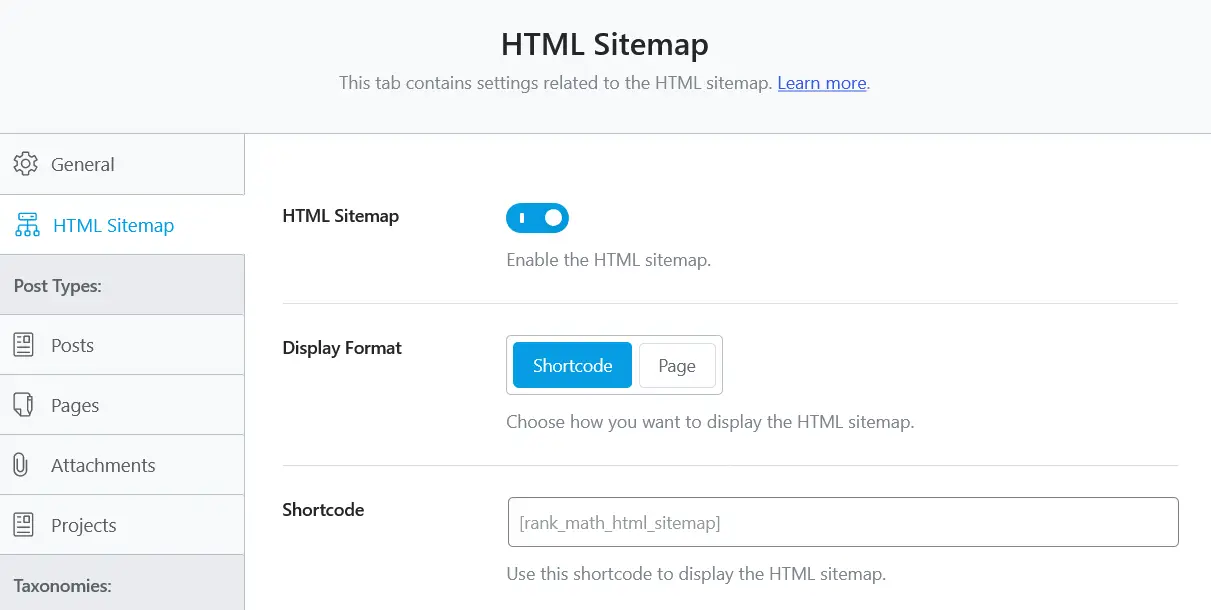
Some SEO plugins can generate an HTML sitemap through a shortcode. Check your plugin’s sitemap settings to see whether this is available, then paste the shortcode into a new page.
Option 2: Build It Manually
For more control, create a new page called “Sitemap” and add your links by hand, grouped under headings such as Services, Blog Categories, and Resources. This takes a little longer, but you decide exactly what appears and the page stays clean and useful.
Option 3: Use WordPress Functions
If you are comfortable with code, wp_list_categories() and wp_list_pages() can output category and page lists automatically, so the sitemap updates itself when you add content.
Whichever route you choose, link to the page from your footer so it is reachable from every page of the site.
Common HTML Sitemap Mistakes
- Listing every URL. A page with hundreds of links is useless to visitors and weak for crawling.
- Treating it as an XML replacement. You still need an XML sitemap submitted in Google Search Console.
- Leaving it outdated. Broken links or removed pages on a sitemap look careless.
- Burying it. If nothing links to it, it does nothing.
How to Check That It Is Working
- Open the page and click through the links to confirm there are no 404s or redirect chains.
- Run the URL through the URL Inspection tool in Google Search Console to confirm it is indexable.
- Crawl your site with a tool like Screaming Frog to see whether the sitemap page is discovered through your footer link.
- Over time, check whether people actually use it in your analytics.
My Take
I would not add an HTML sitemap to a site just because it is “good for SEO.” I would add one when it helps visitors find things faster. If it does that, any crawling benefit is a bonus. This is a good reminder to build for people first. A well-organized HTML sitemap can make important pages easier to find, while its links also give search engine crawlers another way to discover content. Neither benefit guarantees better rankings, but both can support a well-structured website.
Want Your Site Structure and Sitemaps Reviewed?
I audit sitemaps, internal linking, and crawl paths as part of my technical SEO work, so Google can find and understand your most important pages.
Frequently Asked Questions
Does an HTML sitemap help SEO?
It can help indirectly. Crawlers follow its links, and a sitemap that helps visitors navigate improves the overall experience of your site. It is not a ranking factor on its own.
Can I submit an HTML sitemap to Google Search Console?
No. Search Console expects the XML format for sitemap submissions. An HTML sitemap is found by crawling, like any other page.
Should an HTML sitemap list every page?
No. Focus on your main categories and key pages so the page stays easy to use. Your XML sitemap is the place for the complete URL list.
Do I need both an HTML and an XML sitemap?
An XML sitemap is useful for most websites because it helps search engines discover URLs you want indexed. An HTML sitemap is optional and is most useful when it improves navigation on a site with many pages or sections. Neither sitemap replaces good internal linking.
Have a Question About Your Website?
Tell me what you’re working on and I’ll point you in the right direction.

