
Getting Unwanted Enquiries Through Your WordPress Contact Forms?
Many businesses only provide services in specific countries. However, their contact forms are often open to visitors worldwide, resulting in enquiries that are genuine — not spam, not bots — but simply outside their target market.
The usual first instinct is to add more fields to the form: Country, Organization, Business Email, Practice Type, etc. While these fields may help qualify leads, they can also make contact forms longer and discourage genuine visitors from submitting an enquiry. I’ve worked on enough contact forms to know where that usually ends up.
In many cases, there is a better approach.
In this article, we’ll look at different ways to restrict WordPress contact form submissions by country while keeping the user experience simple.
Why Piling On Form Fields Usually Backfires
Most Quick Contact forms exist for one reason: to make it as easy as possible for a genuine visitor to reach out. Every additional required field increases the effort needed to complete the form.
In practice, longer forms tend to:
- Lower conversion rates
- Increase abandonment, especially on mobile
- Discourage genuine enquiries
If your goal is simply to prevent submissions from certain countries, adding several qualification fields may not be necessary.
A Better Approach: Country-based Submission Filtering
Instead of asking visitors where they are located, you can determine their country using their IP address.
The basic workflow looks like this:
- Visitor submits the form as normal
- The server checks the visitor’s country
- If it’s an allowed country, the notification email sends as usual
- If it’s not, the email is quietly suppressed
- The submission gets logged either way, so nothing is lost
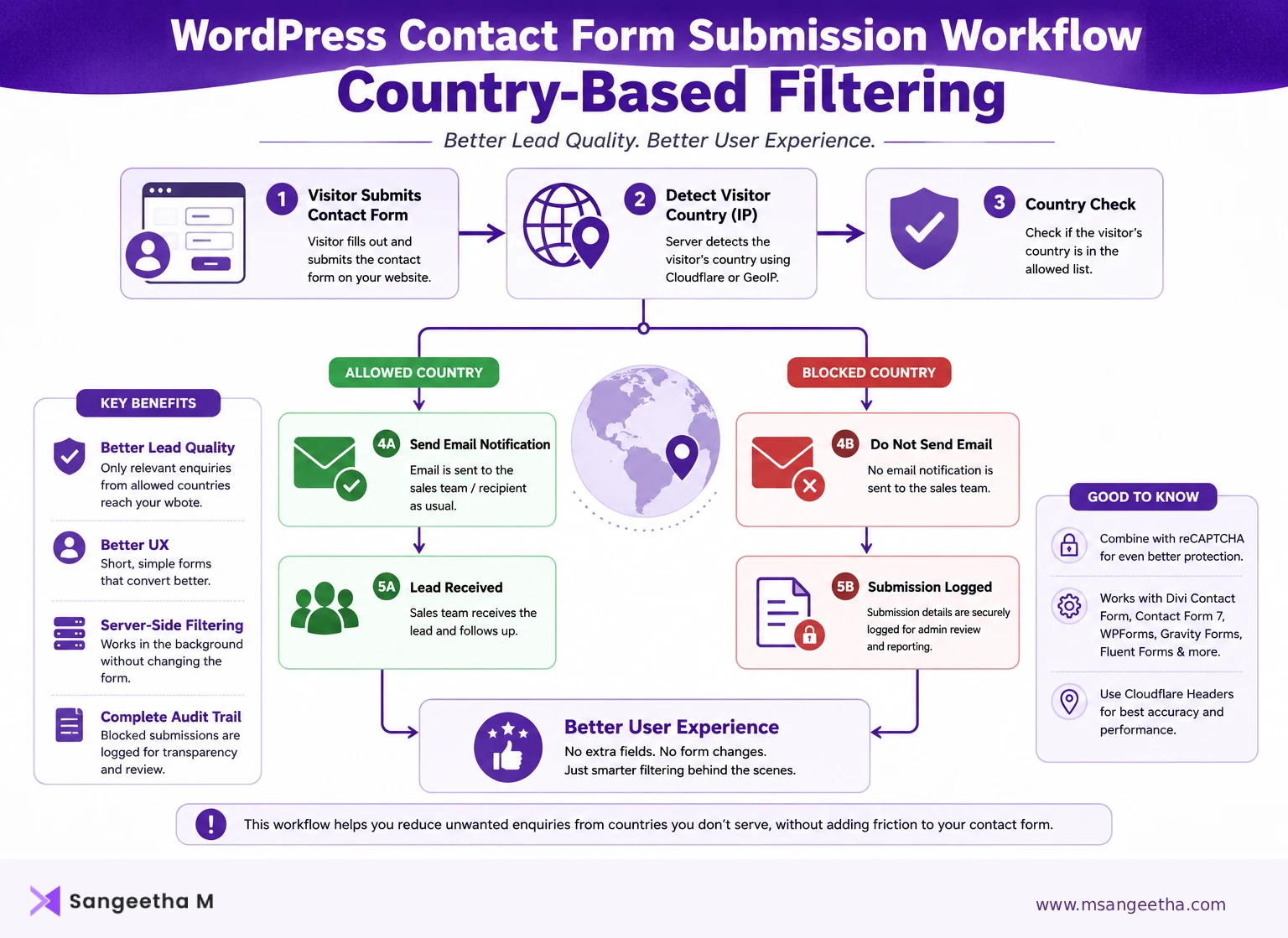
From the visitor’s perspective, the contact form remains exactly the same.
Behind the scenes, your website decides whether the submission should generate an email notification.
Benefits of Server-side Filtering
Filtering submissions on the server offers several advantages.
Better user experience
- No additional fields are required.
- Visitors can complete the form quickly.
Cleaner inbox
Sales teams only receive enquiries from the countries they want to target.
Reduced spam
Although reCAPTCHA helps prevent automated spam, it doesn’t stop legitimate users from submitting enquiries that are outside your target market.
Country-based filtering addresses a different problem.
Complete audit trail
Instead of deleting blocked submissions, you can simply log them.
This allows administrators to:
- Review blocked enquiries
- Confirm that filtering is working correctly
- Recover information if needed
Ways to Detect a Visitor’s Country in WordPress
There isn’t a single method that works for every website – it depends on what’s already in your stack.
Here are some common options.
1. Cloudflare
If your website uses Cloudflare, it can provide the visitor’s country through request headers.
Advantages:
- Fast
- No external API requests
- No additional plugins
- Accurate
This is usually my first choice whenever a site is already on Cloudflare.
2. MaxMind GeoLite2
If Cloudflare isn’t in the picture, the free MaxMind GeoLite2 database is a solid local alternative. Many WordPress sites use it for geolocation.
Advantages:
- Works without Cloudflare
- Runs locally on your server
- No external API calls
The database should be updated periodically to maintain accuracy.
3. Third-party GeoIP APIs
Services such as IP geolocation APIs can also identify visitor countries.
However, they have some drawbacks:
- Additional HTTP requests
- Possible rate limits
- Dependency on an external service
- Slower response times
For high-traffic websites, local solutions are generally preferred.
Does This Work the Same Way Across CF7, WPForms, Gravity Forms, and Divi?
The overall approach is the same regardless of the contact form plugin. Each plugin provides different hooks and filters, but the underlying logic remains the same:
- Detect the visitor’s country.
- Check whether the country is allowed.
- Decide whether to send the email notification.
- Optionally log blocked submissions.
The implementation differs depending on how the form plugin processes submissions. Contact Form 7, WPForms, and Gravity Forms all expose fairly clean hooks and filters for intercepting a submission before the email goes out. Divi’s contact module is a different story — it doesn’t give you the same clean interception point out of the box, and a lot of generic “just add this filter” tutorials don’t actually translate to Divi 4 sites. If you’re running Divi, it takes a slightly different approach to get this working reliably. I’ll walk through the exact Divi implementation, hooks and all, in a follow-up post.
Allow List or Block List? Decide This Before You Build Anything
This sounds like a small decision, but it changes how the code behaves as the business’s needs evolve — so it’s worth deciding deliberately, not defaulting to whichever is quicker to write. Allow list (only these countries get through): safer by default, but every time you want to open up a new market, someone has to go back into the code and add it. Block list (everyone except these countries): easier to open up new markets later without a code change, but you have to be confident you’ve identified every country to exclude. Neither is objectively better — it depends on whether the target market is narrow and fixed (allow list) or broad with a few specific exclusions (block list). Worth getting clear on this before writing a single line of code.
Should You Tell Visitors About The Restriction?
Consider adding a short informational note near your contact form explaining the regions or countries where your services are available.
For example:
Our services are currently available to businesses located within the United States.
This helps set visitor expectations before they submit an enquiry. Whether you go further and show an explicit “sorry, we don’t currently serve your region” message after submission, or just let it fail silently while logging it in the background, is a judgment call based on how transparent you want the site to be about it.
Best Practices I’d Stick To
If you’re planning to restrict contact form submissions by country:
- Keep Quick Contact forms short.
- Perform country validation on the server.
- Log blocked submissions instead of deleting them.
- Use reCAPTCHA alongside country filtering.
- Clearly communicate your service region.
Frequently Asked Questions
Can I allow submissions only from one country?
Yes. You can configure your contact form to allow submissions only from selected countries.
Can I block only specific countries?
Yes. Instead of creating an allow list, you can create a block list for selected countries.
Does reCAPTCHA stop unwanted enquiries?
No. reCAPTCHA is built to stop automated bot submissions. It has no concept of geography, so it won’t do anything to filter out a real person submitting from outside your target market.
Will visitors know their submission was blocked?
That depends on how you implement the solution. Some websites display a message explaining the restriction, while others silently prevent email notifications and log the submission for review.
Which Approach Is Best?
For most business sites in this situation, I’d combine server-side country detection, reCAPTCHA, submission logging, and a short note near the form. None of it touches the visitor’s experience if they’re in your target market, and it quietly handles the rest without turning your contact form into an application. If a contact form is bringing in leads from outside a business’s actual service area, more fields usually isn’t the fix — filtering on the server, before the email ever gets sent, is what actually solves it.
Conclusion
Restricting contact form submissions isn’t always about adding more required fields.
If your goal is simply to reduce enquiries from countries outside your target market, server-side country filtering can provide a cleaner and more user-friendly solution.
By combining IP-based country detection with optional submission logging, you can reduce unwanted email notifications while keeping your contact forms simple and easy to use.
Getting enquiries from outside your target market?
I can set up server-side country filtering on your WordPress site — no extra form fields, no impact on genuine visitors, just a cleaner inbox.

