
If you’ve ever published a great piece of content and watched it go absolutely nowhere in search results, technical SEO is probably the reason why.
You can write the most helpful article on the internet. You can build links. You can optimize your headings and meta descriptions perfectly. But if Google can’t efficiently crawl, render, and index your website — none of that matters. Your pages simply won’t show up.
This pillar guide covers everything you need to know about technical SEO: what it is, why it matters, how it differs from on-page SEO, and a practical roadmap you can follow right now. We’ve also included the content gaps that most other guides miss — like how to prioritize fixes when you’re short on time, how long results take to appear, and what technical SEO looks like in the age of AI search.
Technical SEO in 30 Seconds
- Ensures search engines can crawl and access your website
- Helps your pages get indexed and appear in search results
- Improves site speed, mobile usability, and user experience
- Fixes structural issues that prevent rankings
- Supports both traditional SEO and AI search visibility
What Is Technical SEO?
Technical SEO is the process of optimizing your website’s infrastructure so that search engines can efficiently crawl, render, index, and understand your content.
It’s everything that happens behind the scenes — the plumbing and electrical work of your website. Unlike content SEO (what you write) or link building (who links to you), technical SEO is about how your website works at a structural and server level.
Think of it this way: your website is a building. Your content is everything inside it — the furniture, the art, the decor. Technical SEO is the foundation, the electrical wiring, the plumbing. If the building has no power or a cracked foundation, it doesn’t matter how beautifully decorated the inside is. No one can use it.
Technical SEO covers areas like:
- Whether search engine bots can access and crawl your pages
- How fast your pages load on mobile and desktop
- Whether your site is secure (HTTPS)
- How your pages are structured (site architecture)
- Whether duplicate content is confusing search engines
- How well your website communicates the meaning of your content through structured data
Key stat: According to Semrush data, 85% of websites have at least one critical technical error — and most website owners have no idea, because these issues are invisible to the naked eye. You only catch them with crawl tools or Google Search Console.
Technical SEO vs. On-Page SEO: What’s the Difference?
This is one of the most common points of confusion for people new to SEO — and it’s worth clearing up properly.
| Aspect | Technical SEO | On-Page SEO |
|---|---|---|
| Focus | Website infrastructure & backend | Content & visible page elements |
| Examples | Site speed, robots.txt, sitemaps, HTTPS | Keywords, title tags, headings, meta descriptions |
| Who does it? | Developers / technical SEOs | Content writers, SEOs |
| Impact | Determines if pages CAN rank | Determines HOW WELL pages rank |
| Frequency | Set once, maintained regularly | Ongoing with each new piece of content |
The simplest way to think about this: technical SEO makes your site accessible to search engines. On-page SEO makes individual pages relevant and valuable.
One without the other leaves you stuck:
- Strong technical SEO + weak on-page SEO: Google can crawl and index your pages, but your content doesn’t satisfy search intent, so you won’t rank competitively.
- Strong on-page SEO + weak technical SEO: Your content is excellent, but Google may never properly index it — so it’s essentially invisible.
The sites that consistently rank well do both well. Technical SEO is where you start, because it’s the foundation everything else rests on.
Already familiar with the basics?
- Check out this Technical SEO Checklist for a downloadable step-by-step PDF.
- If you’re just starting out, our On-Page SEO for Beginners guide is a great companion to this post.
Why Technical SEO Still Matters in 2026
Some marketers treat technical SEO as a one-time fix. Set it and forget it. That’s a costly mistake. Here’s why technical SEO has become more important, not less:
Google’s bar keeps rising
Core Web Vitals are a confirmed ranking factor. Less than 33% of websites currently pass Google’s Core Web Vitals assessment — which means fixing yours gives you an immediate competitive edge.
Mobile-first indexing is now complete
Mobile devices now account for over 60% of global web traffic, and Google exclusively uses mobile-first indexing for ranking — meaning your desktop site is no longer the primary version that matters.
AI search has raised new technical requirements
Tools like Google’s AI Overviews, ChatGPT Search, and Perplexity now crawl and extract content from websites to generate answers. If your site structure and structured data are weak, you’re invisible in two ecosystems — traditional search and AI search — instead of one.
Technical problems compound quickly
A single ignored technical issue — like a noindex tag accidentally pushed to production, or a broken sitemap — can cause catastrophic ranking drops overnight. Real-world case: an e-commerce brand lost 95% of their organic traffic (from 655 to just 32 monthly visitors) after a site redesign introduced crawlability barriers and broken sitemaps.
Crawl budget is real
For larger sites, Google won’t crawl every page on every visit. Poor technical setup causes Google to waste crawl budget on low-value URLs, meaning your best content gets crawled less frequently — and updated rankings take longer.
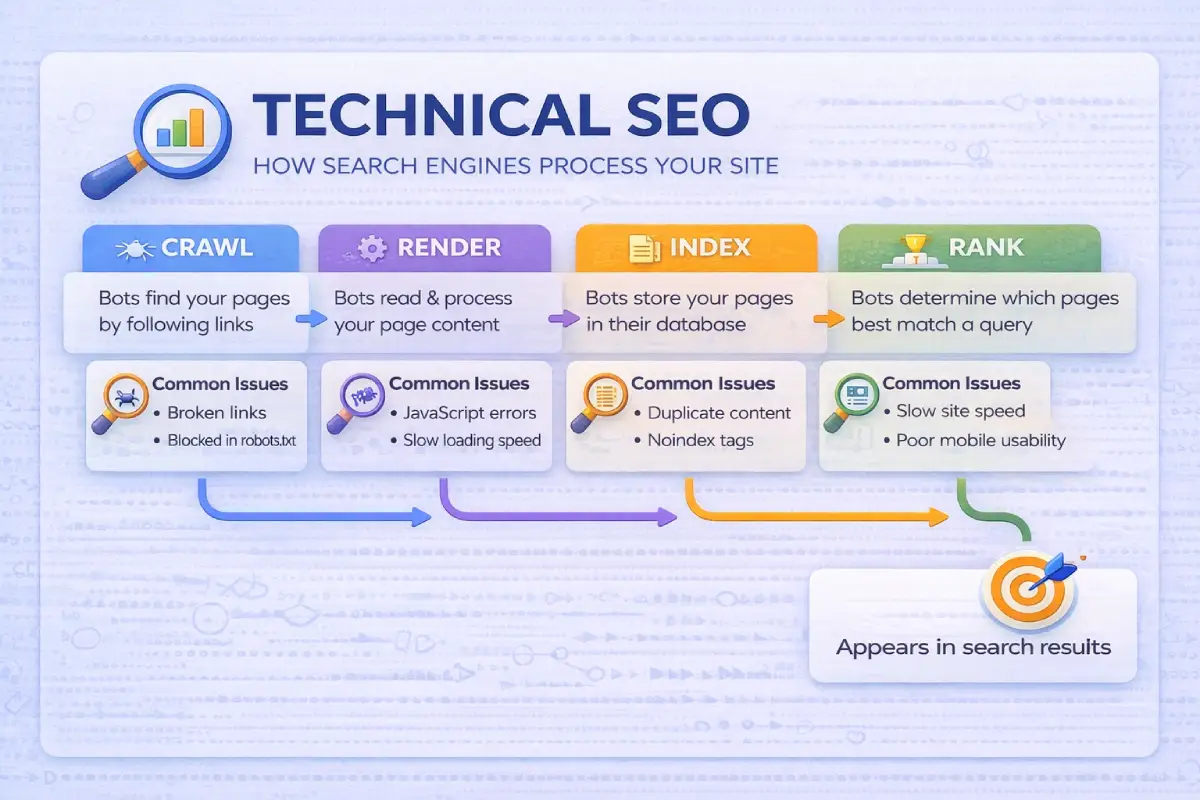
How Google Crawls Your Website (Step by Step)
Understanding what happens when Google visits your site helps you understand why each technical SEO element matters.
- Step 1 — Discovery: Googlebot discovers URLs through links and through sitemaps you submit in Google Search Console. If a page has no inbound links and isn’t in your sitemap, Google may never find it.
- Step 2 — Crawling: Googlebot sends a request to your server and downloads your page’s raw HTML. This is where robots.txt plays a role — it tells bots which pages they’re allowed to access. Blocking the wrong pages here kills rankings.
- Step 3 — Rendering: Google processes the HTML and executes JavaScript to build the full visual page. If your content only appears after JavaScript runs and Google can’t execute it, that content may never be indexed.
- Step 4 — Indexing: Once Google understands the page, it decides whether to add it to its index. Not every crawled page gets indexed. Pages with thin content, duplicate content, or noindex tags are excluded.
- Step 5 — Ranking: Indexed pages are evaluated against hundreds of signals — content relevance, page experience, authority, E-E-A-T — and assigned rankings.
Technical SEO controls steps 1 through 4. If your technical foundation has gaps in those steps, your content never gets the chance to rank.
The Core Pillars of Technical SEO
Pillar 1: Crawlability
Crawlability is the degree to which search engines can access and navigate your website. Key elements to check:
robots.txt — Located at yourdomain.com/robots.txt. A misconfigured robots.txt can accidentally block your most important pages. In 2026, it also serves as a governance layer for AI bots: you can distinguish between training bots (like GPTBot) and retrieval bots (like OAI-SearchBot).
XML Sitemap — Your sitemap is a roadmap you give Google, listing all the important URLs on your site. Submit it via Google Search Console. Keep it clean: only include indexable, canonical URLs.
Crawl Budget — For most small sites (under 1,000 pages), crawl budget isn’t a concern. But for larger sites, faceted navigation on e-commerce pages can generate thousands of near-duplicate URLs that waste crawl budget.
Internal Links — Pages with no internal links pointing to them are called orphan pages. Google may never discover them. Every important page should be reachable via internal links.
Pillar 2: Indexability
A page being crawled doesn’t guarantee it gets indexed. Studies show that up to 50% of pages on large websites are never indexed, often due to technical issues like duplicate content, poor internal linking, or crawl inefficiencies.
Common indexability issues:
noindex tags — A <meta name="robots" content="noindex"> tag tells Google not to index a page. The #1 most devastating mistake in technical SEO is accidentally leaving noindex tags on production pages after a site launch.
Canonical tags — When you have similar content at multiple URLs, canonical tags tell Google which version is the official one. Critical for e-commerce sites where the same product appears under multiple category filters.
Duplicate content — Having the same content at multiple URLs confuses Google and dilutes your authority. Canonical tags and proper 301 redirects solve this.
How to monitor: Go to Google Search Console → Pages report. Look at pages marked ‘Crawled — currently not indexed.‘ These are your biggest quick wins.
Pillar 3: Site Speed & Core Web Vitals
Page speed is a confirmed Google ranking factor. The three Core Web Vitals:
| Metric | What It Measures | Target Score |
|---|---|---|
| LCP (Largest Contentful Paint) | How quickly the largest visible element loads (hero image, main heading) | Under 2.5 seconds |
| INP (Interaction to Next Paint) | How quickly the page responds to clicks and taps | Under 200ms |
| CLS (Cumulative Layout Shift) | Visual stability — do elements shift around while loading? | Under 0.1 |
Quick wins for page speed: compress and convert images to WebP or AVIF, enable browser caching, minify CSS/JavaScript/HTML, use a CDN, and remove unused JavaScript.
Pillar 4: Mobile-First Optimization
Google’s mobile-first indexing means Googlebot crawls and ranks your site based on the mobile version. The desktop version is largely irrelevant for ranking purposes.
- Content parity: Whatever content exists on desktop must also exist on mobile
- Responsive design over separate URLs: A single responsive codebase avoids canonicalization issues
- No intrusive interstitials: Pop-ups blocking mobile screen are penalized by Google
- Font sizes and tap targets: Text must be readable without zooming
Mobile accounts for 63% of organic search traffic globally. If your mobile experience is broken, you’re losing the majority of your potential audience before they’ve read a word.
Pillar 5: Site Architecture & URL Structure
Good site architecture serves two audiences: users (who need to find things quickly) and crawlers (who need to discover and understand everything efficiently).
Flat vs. deep architecture: Any page should be reachable within 3-4 clicks from the homepage. Google assigns more ranking authority to pages closer to the root. Aim for flat architecture.
URL best practices:
- Keep URLs short, lowercase, and descriptive: /technical-seo-guide/ not /category/page/blog-post-id-4892/
- Use hyphens to separate words, not underscores
- Include your primary keyword naturally in the URL
- Avoid session parameters where possible
Pillar 6: HTTPS & Website Security
HTTPS has been a Google ranking signal since 2014, but it’s now table stakes — not a bonus. Google marks HTTP sites as ‘Not Secure’ in Chrome, which destroys user trust and increases bounce rates.
Make sure your SSL certificate is valid, properly installed, and set to auto-renew. Check that all internal links and canonical tags use HTTPS, not HTTP.
Pillar 7: Structured Data & Schema Markup
Structured data is code you add to your pages that explicitly tells search engines what your content means — not just what it says. Schema markup now powers both traditional rich snippets and AI search visibility.
| Schema Type | Best For |
|---|---|
| Article / BlogPosting | Blog content |
| Product | E-commerce pages |
| FAQPage | FAQ sections |
| HowTo | Step-by-step guides |
| LocalBusiness | Local SEO |
| Organization | Brand entity establishment |
| BreadcrumbList | Site navigation |
| Review / AggregateRating | Social proof |
Use Google’s Rich Results Test to validate your implementation and preview how it will appear in search.
Technical SEO by Website Type
One thing most technical SEO guides skip entirely: the priorities are different depending on what kind of site you run.
Blog / Content Site
Biggest concerns: Crawl depth, duplicate content from tag/category pages, paginated content, Core Web Vitals, image optimization.
Quick win: Add noindex to tag and category pages that don’t add unique value, and create a clear silo structure around your topic clusters.
E-Commerce Site
Biggest concerns: Faceted navigation exploding crawl budget, duplicate product pages, JavaScript rendering of product data, site speed with large image catalogs, canonicalization across product variants.
Quick win: Canonicalize faceted navigation URLs to the clean category URL, and audit your sitemap to ensure only canonical product URLs are listed.
Local Business Website
Biggest concerns: Mobile performance, Google Business Profile consistency with on-page NAP (Name, Address, Phone), LocalBusiness schema, page speed.
Quick win: Implement LocalBusiness schema on your homepage and contact page, and ensure your address details are consistent across every page.
SaaS / Software Company
Biggest concerns: JavaScript-heavy SPAs that Google may not fully render, internal linking between feature pages, blog architecture, hreflang for international versions.
Quick win: Run a URL Inspection test in Google Search Console on your homepage and key feature pages to confirm Google can see the rendered content.
How to Prioritize Technical SEO Fixes
When a technical SEO audit surfaces 50+ issues (which it usually does), the biggest mistake is trying to fix everything at once. Here’s a practical prioritization framework:
TIER 1 — Fix These First (Critical)
Issues that prevent pages from being indexed entirely.
- Pages blocked by robots.txt that should be indexed
- Accidental noindex tags on important pages
- Crawl errors blocking key sections
- Broken canonical chains
- 5xx server errors
TIER 2 — Fix These Second (High Impact)
Issues that limit how well content can rank.
- Core Web Vitals failures
- Missing or invalid XML sitemap
- HTTP → HTTPS issues
- Duplicate content without canonical tags
- Redirect chains
TIER 3 — Fix These Third (Optimization)
Issues that improve performance and competitive positioning.
- Missing structured data
- Orphan pages
- Thin content pages
- Image optimization
- robots.txt governance for AI bots
TIER 4 — Ongoing Maintenance
Monthly crawl health checks.
- Core Web Vitals monitoring
- Index coverage reports in GSC
- New structured data opportunities
The golden rule: Never launch a site redesign or migration without a full technical SEO audit before and after. More organic traffic has been lost to botched site migrations than to algorithm updates.
The Best Technical SEO Tools
Free Tools (Start Here)
Google Search Console — Your most important technical SEO tool, full stop. Shows crawl errors, index coverage, Core Web Vitals, mobile usability issues, and search performance. Free, forever, non-negotiable.
Free Schema Markup Generator — Create valid JSON-LD schema markup for articles, FAQs, products, videos, local businesses, and more without writing code. Useful for implementing structured data that can help search engines better understand your content.
Free Video Sitemap Generator — Generate Google-compliant video sitemap XML files for YouTube, Vimeo, and self-hosted videos. Helps search engines discover and index video content more efficiently.
Google PageSpeed Insights — Analyzes loading performance and gives specific fixes. Scores reflect the Core Web Vitals that influence rankings.
Ahrefs Webmaster Tools (AWT) — Free for site owners. Full site audit data and backlink information. Excellent complement to GSC.
Google’s Rich Results Test — Validates structured data and previews rich snippets. Essential after implementing schema markup.
Paid Tools Worth the Investment
Screaming Frog SEO Spider — The closest thing to seeing your website through Google’s eyes. Identifies broken links, redirect chains, missing meta tags, duplicate content, noindex issues across your entire site. Free for up to 500 URLs; $279/year for unlimited.
Ahrefs — The most widely trusted all-in-one SEO platform. In 2026, also tracks your visibility in AI-generated results (ChatGPT, Perplexity, Gemini).
SEMrush — Strong technical audit component. Site Health score gives a running snapshot of your technical SEO status. Best for agencies managing multiple clients.
| Budget Level | Recommended Tools | Monthly Cost |
|---|---|---|
| Free / Starter | Google Search Console + GA4 + PageSpeed Insights | $0 |
| Small Business | Above + Screaming Frog free + Ahrefs Webmaster Tools | $0 |
| Growing Site | Above + Screaming Frog paid + Ahrefs or SEMrush | $50-150/mo |
| Agency / Enterprise | All above + Botify or DeepCrawl for log file analysis | $300+/mo |
How Long Does Technical SEO Take to Show Results?
The honest answer: it depends on the fix and how quickly Google recrawls your pages.
| Fix Type | Typical Time to See Results |
|---|---|
| Removing accidental noindex tags | 3–14 days (once Googlebot recrawls) |
| Fixing redirect chains | 1–4 weeks |
| Submitting updated sitemap | 1–2 weeks |
| HTTPS migration (done correctly) | 4–8 weeks |
| Core Web Vitals improvements | 4–8 weeks after Google updates scores |
| Structured data implementation | 2–4 weeks for rich snippet eligibility |
| Rebuilding site architecture | 2–6 months |
The most important thing: don’t expect technical SEO to deliver overnight results, but don’t wait months to start either. Critical fixes (Tier 1) can show impact within days.
Technical fixes are only one part of the bigger SEO picture. If you’re wondering how long it takes for all your SEO efforts — content, links, and technical work together — to show real results, this realistic SEO timeline guide breaks it down month by month.
Technical SEO for AI Search (GEO)
In 2026, Google’s AI Overviews, ChatGPT Search, and Perplexity are absorbing clicks that used to go directly to your website. Optimizing your technical setup for AI-generated answers is now a real part of technical SEO strategy — sometimes called Generative Engine Optimization (GEO).
- Structured, chunked content — AI engines use Retrieval-Augmented Generation (RAG). They search for relevant ‘chunks’ of text and use them to generate answers. Content buried in dense paragraphs won’t be retrieved. Use clear headings, short paragraphs, and definition-style answers.
- BLUF (Bottom Line Up Front) formatting — Write your page sections so the core answer appears in the first sentence, followed by supporting detail. This is the same structure that earns featured snippets.
- Clean semantic HTML — Use heading tags for hierarchy, not styling. H1 > H2 > H3 should reflect a logical content structure. AI crawlers rely on this hierarchy to understand relationships between ideas.
- robots.txt governance for AI bots — You can block GPTBot (OpenAI’s training crawler) while allowing OAI-SearchBot (OpenAI’s retrieval crawler that powers ChatGPT Search answers).
- Schema markup for AI comprehension — Organization and Author schema strengthen E-E-A-T signals that AI engines use to decide what sources to trust and cite.
GEO is still evolving rapidly, but the technical foundation it requires is the same clean, structured, fast, accessible infrastructure that technical SEO has always prioritized. Getting technical SEO right is getting AI SEO right.
Common Technical SEO Mistakes to Avoid
- Leaving noindex on production pages after a site launch — Developers routinely add noindex tags to staging environments and accidentally leave them in place when the site goes live. Always check critical pages in GSC within the first week of any launch.
- Ignoring Core Web Vitals on mobile — Many sites look fast on desktop but are slow on mobile. Since Google measures and ranks based on mobile performance, a fast desktop score means nothing if mobile fails.
- Redirect chains and redirect loops — Every redirect adds latency and loses link equity. A chain of 4+ redirects (A → B → C → D) should always be collapsed to a direct redirect (A → D).
- Blocking CSS and JavaScript in robots.txt — If Googlebot can’t load your CSS and JavaScript files, it can’t render your page correctly. Never block these file types.
- Launching a site migration without SEO planning — Site migrations are the #1 cause of sudden, dramatic organic traffic loss. Always run a full technical audit before and after. Map every old URL to its new destination.
- Duplicate content from URL variations —
https://yourdomain.com/page/,http://yourdomain.com/page, andwww vs. non-wwwcan all be treated as separate URLs by Google. Implement canonicals and 301 redirects to consolidate. - Ignoring log file analysis — Your server logs record every Googlebot visit — what it crawled, what it skipped, how often. Analyzing these logs is one of the most underused technical SEO techniques.
If a redesign is on the horizon, the preparation you do before a single design element changes is what separates a traffic-safe launch from a traffic disaster. Here is the complete website redesign SEO checklist that covers every step — from auditing your current site and mapping redirects, to testing tracking before go-live.
How to Run a Technical SEO Audit
A technical SEO audit doesn’t have to be intimidating. Here’s a practical 7-step process you can run today:
- Check Google Search Console — Start with the Pages report (index coverage), Core Web Vitals report, and Mobile Usability report. These three reports will surface 80% of your critical issues immediately.
- Run a Crawl with Screaming Frog — Look for: broken links (4xx errors), redirect chains, missing or duplicate title tags and meta descriptions, pages with noindex tags, missing H1 tags, and pages not linked internally.
- Audit Your XML Sitemap — Check that your sitemap exists, is submitted to GSC, and contains only canonical, indexable URLs. No redirects. No noindex pages. No 404s.
- Test Page Speed — Run your most important pages through Google PageSpeed Insights. Note the Core Web Vitals scores for mobile specifically.
- Check for Duplicate Content — Search Google for
site:yourdomain.comand spot-check for duplicate page titles. Review canonical tags on key pages. - Validate Structured Data — Paste your top pages into Google’s Rich Results Test. Fix any errors. If you haven’t implemented schema yet, start with Article, Organization, and BreadcrumbList.
- Review Mobile Experience — Use Google Search Console’s Mobile Usability report and test key pages with Google’s mobile-friendly test.
Run this audit once when you first optimize your site, then monthly as ongoing maintenance — or immediately after any major content change, platform migration, or site redesign.
Don’t Let Technical SEO Issues Hold Your Rankings Back
Technical SEO isn’t glamorous. You won’t see it when you browse a website, and explaining it to clients or stakeholders can feel like describing plumbing. But the results are undeniable.
Every piece of content you publish, every link you build, every keyword you optimize — all of it depends on a clean technical foundation. Without it, you’re pouring effort into a leaky bucket. With it, everything else you do becomes exponentially more effective.
The good news: you don’t need to fix everything at once. Start with Google Search Console. Find your Tier 1 issues. Fix them in order. Run a Screaming Frog crawl when you’re ready to go deeper. The process is methodical, and the improvements compound over time.
If you’d rather not run through all seven pillars yourself, this is exactly the kind of work I handle as part of my technical SEO services — audit, fixes, and ongoing monitoring.
Want This Handled For You?
From crawlability to Core Web Vitals to structured data — I audit and fix the technical foundation your rankings depend on.
Frequently Asked Questions About Technical SEO
What is technical SEO in simple terms?
Technical SEO is the process of optimizing your website so search engines can crawl, index, and understand it properly. It focuses on backend elements like site speed, structure, and accessibility.
Is technical SEO difficult to learn?
Technical SEO can seem complex at first, but most fundamentals are easy to understand with practice. Tools like Google Search Console simplify the process by highlighting issues clearly.
How often should you do technical SEO?
Technical SEO should be monitored continuously, with a full audit performed monthly or after major changes like redesigns, migrations, or content updates.
What are the most important technical SEO factors?
The most important factors include crawlability, indexability, site speed, mobile optimization, site architecture, and structured data.
Does technical SEO affect rankings directly?
Yes. Technical SEO determines whether your pages can be indexed and how efficiently search engines process them. Without it, even great content may never rank.
Start Fixing What Matters First
Start with the highest-impact issues first. This checklist shows you exactly what to fix, in the right order — so you don’t waste time on low-priority tasks.

