
Most WordPress Site Owners Ignore Bing. That Is a Mistake.
When SEO professionals talk about search console tools, they almost always mean Google Search Console. Bing Webmaster Tools rarely gets a mention, and most site owners never set it up at all.
I understand why. Google dominates search. If you are going to spend time on SEO, the Google ecosystem deserves the most attention. But dismissing Bing Webmaster Tools entirely is leaving useful data and visibility on the table, especially now that Bing powers AI-generated results through Microsoft Copilot and feeds search data to DuckDuckGo, Yahoo, and several other search engines.
Bing Webmaster Tools is free, takes about ten minutes to set up, and offers several features that are genuinely useful — some of which Google Search Console does not offer in the same way. I set it up for all the sites I manage, including msangeetha.com, and I have found it particularly helpful for identifying indexing gaps and getting content discovered faster.
In this guide, I will walk you through everything: what Bing Webmaster Tools does, how to set it up on your WordPress site, how to submit your sitemap, and which features are worth paying attention to.
What Is Bing Webmaster Tools?
Bing Webmaster Tools is Microsoft’s free platform for monitoring how your website performs in Bing search. It works similarly to Google Search Console — you verify ownership of your site, submit your sitemap, and then get access to data about how Bing crawls, indexes, and ranks your pages.
Bing’s market share is smaller than Google’s, but it is not insignificant. Bing powers search results on Microsoft Edge by default, feeds results to DuckDuckGo and Yahoo, and is integrated into Microsoft Copilot’s AI search features. Getting your content properly indexed in Bing means reaching users across all of these surfaces.
For a complete picture of your site’s technical health, I always recommend running both Google Search Console and Bing Webmaster Tools in parallel. They surface different data and occasionally flag different issues. I cover the broader technical SEO framework in my complete technical SEO guide.
Why Use Bing Webmaster Tools?
- Free website monitoring tool
- Submit XML sitemaps
- Request indexing of new pages
- Access Bing keyword data
- Run free SEO site audits
- Monitor backlinks
- Enable IndexNow for faster discovery
How to Set Up Bing Webmaster Tools
Step 1: Create or Sign In to Your Microsoft Account
Go to bing.com/webmasters and sign in with a Microsoft account. If you do not have one, you can create a free account using any email address. A Microsoft account is required — you cannot use a Google account to log in.
Step 2: Add Your Site
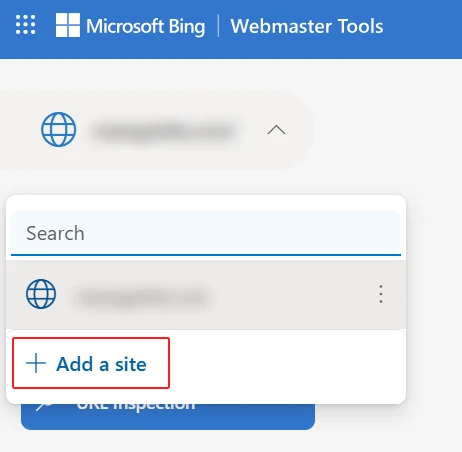
After logging in, click the “Add a site” button. Enter your full website URL including the protocol — for example, https://www.msangeetha.com. Make sure you use the canonical version of your URL, the same version you use everywhere else. If your site uses www, enter the www version. If it uses non-www, enter that.
Step 3: Verify Site Ownership
Bing offers three verification methods:
- XML file — download a file from Bing and upload it to the root of your WordPress site via FTP or your hosting file manager
- Meta tag — add a meta tag to the
<head>of your homepage; in WordPress, your SEO plugin handles this without touching code - CNAME record — add a DNS record through your domain registrar or hosting panel
The easiest method for most WordPress users is the meta tag option. In Rank Math, go to General Settings → Webmaster Tools → Bing Webmaster and paste the verification code. Yoast has an equivalent field under SEO → General → Webmaster Tools. Save, then click Verify in Bing Webmaster Tools.
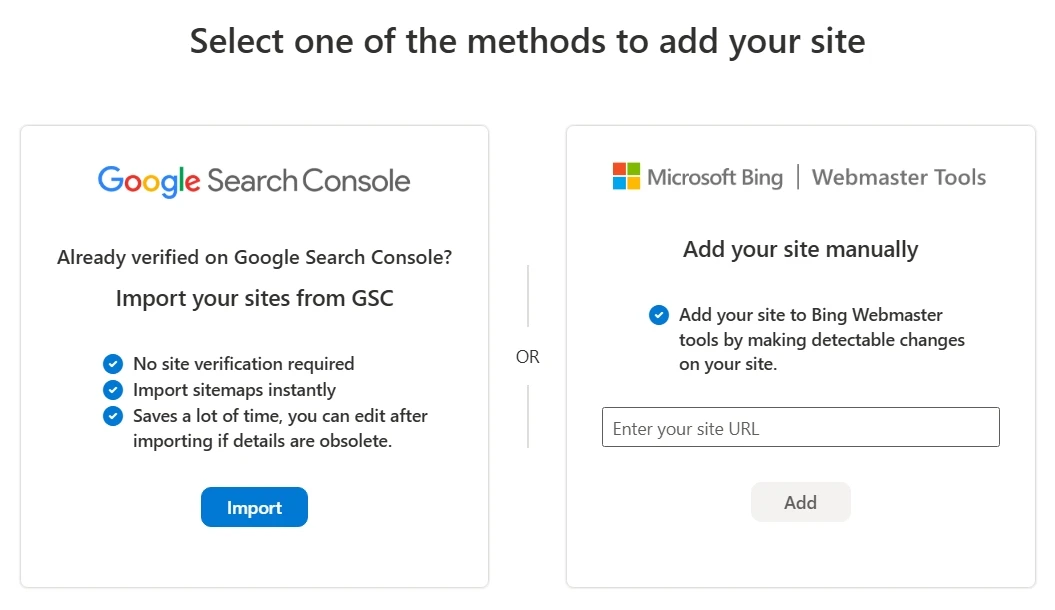
There is also a fourth option worth knowing: if you have already verified your site in Google Search Console, Bing allows you to import that verification directly. Click “Import from Google Search Console” on the verification screen, authorize access, and Bing completes the verification automatically. This is the fastest route if GSC is already set up.
Step 4: Submit Your Sitemap
After verification, go to Sitemaps in the left navigation and submit your XML sitemap URL. For most WordPress sites using Rank Math, your sitemap URL will be something like https://www.yourdomain.com/sitemap_index.xml. Yoast uses /sitemap_index.xml as well.
If you are not sure what your sitemap URL is, I have a full explanation in my XML sitemap guide. Submit the sitemap index rather than individual sitemaps where possible — it gives Bing a complete picture of your site structure in one submission.
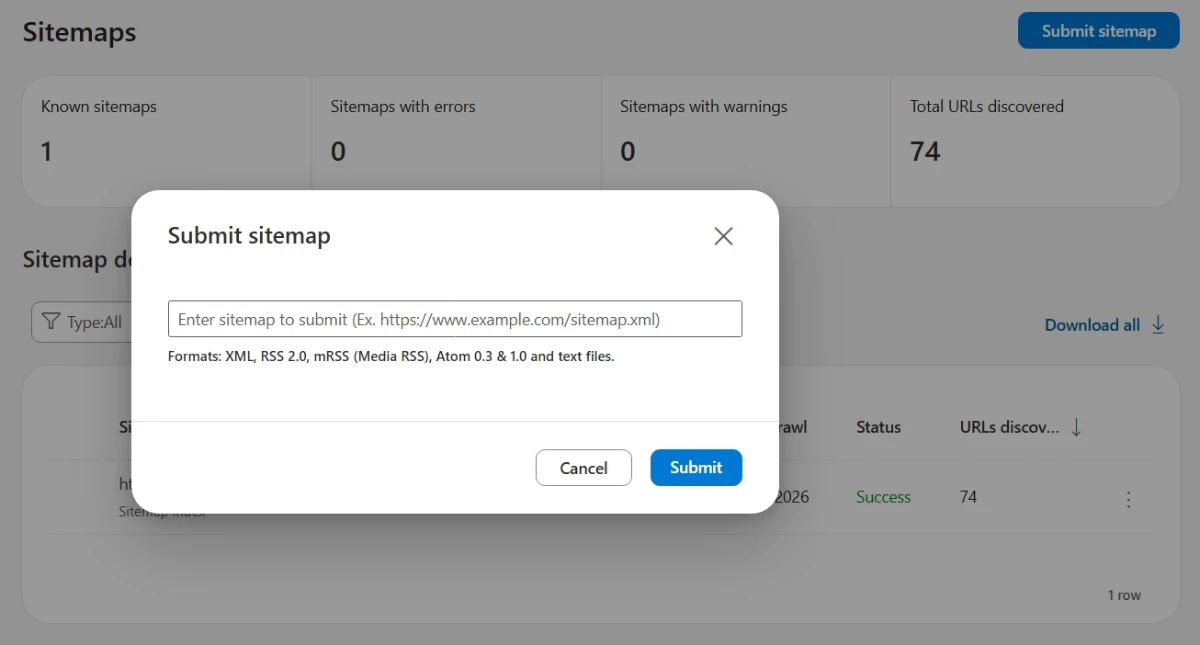
Bing will begin crawling the URLs in your sitemap. You can check the status of the submission in the Sitemaps section, where it will show how many URLs were submitted, how many were indexed, and whether any errors were found.
Key Features of Bing Webmaster Tools
Dashboard Overview
The dashboard shows a summary of your site’s performance including total clicks, impressions, average click-through rate, and average position in Bing search results. This mirrors the performance data in Google Search Console, but for Bing’s search index specifically.
The data here is useful for understanding which pages are performing in Bing and spotting any significant gaps between how your site performs in Google versus Bing. If a page ranks well in Google but has zero impressions in Bing, it may have an indexing issue in Bing worth investigating.
Search Performance Report
This report shows the keywords driving impressions and clicks from Bing, broken down by query, page, country, and device. The query data is particularly valuable — unlike Google Search Console, which encrypts some query data, Bing tends to provide more complete keyword visibility.
I use this report to cross-reference with my keyword research and to spot keywords that are getting impressions on Bing but not converting to clicks. A low click-through rate on a keyword with decent impressions often points to a title or meta description that needs improvement.
URL Inspection Tool
Similar to Google Search Console’s URL Inspection tool, this feature lets you check the indexing status of any specific URL on your site. You can see whether Bing has crawled the page, when it was last crawled, and whether there are any issues with the page as Bing sees it.

If you have just published a new post and want to get it indexed in Bing quickly, the URL Inspection tool also has a “Request Indexing” button that submits the page directly to Bing’s crawl queue. This is the Bing equivalent of the URL inspection and indexing request feature in Google Search Console that I covered in my GSC indexing status guide.
Sitemaps
The Sitemaps section shows all submitted sitemaps and their processing status. You can see how many URLs were submitted versus how many were indexed, and whether Bing flagged any URLs as having errors or warnings.
Common sitemap issues flagged by Bing include URLs that are blocked by robots.txt, pages that return non-200 HTTP status codes, and pages with noindex directives. If you see a large gap between submitted URLs and indexed URLs, the Sitemaps report is a good starting point for investigation. My coverage report guide explains how to interpret similar data in Google Search Console — the diagnostic logic is largely the same for Bing.
Site Scan (SEO Audit Tool)
This is one of Bing Webmaster Tools’ standout features. The Site Scan tool crawls your website and reports on common SEO issues — missing meta descriptions, duplicate title tags, broken links, missing alt text, redirect chains, and more.
You can run a scan on demand or schedule regular scans. The results are categorized by severity and type, making it easy to prioritize fixes. I run Site Scan on new client sites as part of my initial technical SEO audit process — it surfaces issues quickly and the report is easy to share with clients.
The Site Scan is free and unlimited, which makes it a genuinely useful addition to your SEO toolkit even if Bing is not your primary traffic source.
Backlinks Report
Bing Webmaster Tools includes a backlinks report that shows which external sites are linking to your pages. This data comes from Bing’s own crawl index, so it differs from what you would see in Ahrefs or Semrush, but it provides a useful complementary view of your link profile.
The backlinks report shows the linking page URL, the linked page on your site, and the anchor text used. You can filter by linked page to see which of your posts have the most external links — useful for identifying your strongest pages for internal linking purposes. Speaking of which, internal links are just as important as backlinks; my internal links for SEO guide covers that in detail.
IndexNow
IndexNow is a protocol developed by Microsoft and adopted by several search engines including Bing, Yandex, and others. It allows you to notify participating search engines instantly when a page on your site is published, updated, or deleted — rather than waiting for the crawler to discover the change on its own.
In Bing Webmaster Tools, you can find your IndexNow API key under Settings → API Access. Rank Math supports IndexNow natively — you can connect your API key in Rank Math’s settings and new or updated content will be submitted to Bing automatically on publish.
This is particularly useful for sites that publish frequently or update existing posts regularly. Getting content into Bing’s index faster means it has more time to rank before competitors publish similar content.
Robots.txt Tester
Bing Webmaster Tools includes a robots.txt tester that lets you check whether specific URLs on your site are blocked or allowed by your current robots.txt file. This is a simple but important diagnostic tool.
If you are unsure how your robots.txt file is configured or whether it is accidentally blocking pages you want Bing to crawl, the tester gives you a quick way to verify without waiting for a crawl report.
Crawl Control
This setting lets you adjust the rate at which Bingbot crawls your site. You can set crawl times by hour and day of the week, which is useful if your site experiences performance issues during peak traffic periods. For most WordPress sites this is not a concern, but for larger sites or sites on lower-tier hosting, throttling Bingbot during business hours can help maintain site performance.
Bing Webmaster Tools vs Google Search Console: Key Differences
| Feature | Bing Webmaster Tools | Google Search Console |
|---|---|---|
| Sitemap Submission | Yes | Yes |
| URL Inspection | Yes | Yes |
| Site Audit Tool | Yes | No |
| Backlink Report | Yes | Limited |
| Core Web Vitals | No | Yes |
| IndexNow | Yes | Limited Support |
Both tools serve the same fundamental purpose, but there are meaningful differences worth knowing:
- Bing provides more complete keyword data — less query data is encrypted compared to Google
- Google Search Console has more detailed Core Web Vitals reporting; Bing does not have an equivalent Core Web Vitals report
- Bing Webmaster Tools includes a built-in SEO audit (Site Scan) that Google Search Console does not have
- Google Search Console has richer coverage reporting with more granular indexing status categories
- Bing supports IndexNow natively; Google has its own indexing API but it requires separate setup
- Google Search Console integrates with Google Analytics; Bing Webmaster Tools does not have a native analytics integration
My recommendation is to use both. They take about the same time to set up, and having visibility into both ecosystems gives you a more complete picture of your site’s search health. Neither one replaces the other.
Bing and AI Search: Why It Matters More Now
One reason Bing Webmaster Tools deserves more attention in 2026 than it did even two years ago is the rise of Microsoft Copilot and AI-powered search. Bing’s index powers the web results that feed into Copilot’s AI responses, and Bing is also one of the primary signals used by AI citation tools and research assistants built on Microsoft’s infrastructure.
If your content is not indexed in Bing, it is less likely to appear in AI-generated responses on Copilot and other Microsoft-integrated surfaces. For anyone building content with AI visibility in mind — and given how search is evolving, most site owners should be — getting your content properly indexed in Bing is increasingly important.
Properly structured content with clear schema markup and well-defined canonical tags also helps Bing understand your content more accurately, which translates to better representation in AI-generated responses.
Frequently Asked Questions
Is Bing Webmaster Tools free?
Yes, completely free. There are no paid tiers or premium features. You sign in with a free Microsoft account and get access to the full platform.
Do I need Bing Webmaster Tools if I already use Google Search Console?
Yes, I recommend setting up both. They serve different search engines, surface different data, and Bing Webmaster Tools has features like the built-in Site Scan audit that Google Search Console does not offer. Setup takes about ten minutes and the ongoing maintenance is minimal.
How long does Bing take to index a new page?
Without intervention, Bing can take anywhere from a few days to several weeks to crawl and index a new page. Submitting your sitemap and using the URL Inspection tool to request indexing speeds up the process significantly. Using IndexNow through Rank Math can get new content submitted to Bing within minutes of publishing.
Does Bing use the same ranking factors as Google?
There is significant overlap — both search engines value relevant content, quality backlinks, technical health, and page experience. But there are differences. Bing tends to place more weight on exact-match keywords, social signals, and domain age than Google does. Bing also indexes and ranks some content differently in multilingual contexts.
Can I verify multiple sites in Bing Webmaster Tools?
Yes. You can add and manage multiple sites within a single Bing Webmaster Tools account. This is useful for agencies or freelancers managing SEO across several client sites.
What is IndexNow and should I use it?
IndexNow is a protocol that lets you notify search engines immediately when a page is published or updated, rather than waiting for the crawler to find it. Bing supports IndexNow natively. If you use Rank Math, you can connect your IndexNow API key in the plugin settings and new content will be submitted automatically on publish. It is a simple setup with a clear benefit — use it.
Does Bing Webmaster Tools help with ranking on DuckDuckGo?
Indirectly, yes. DuckDuckGo uses Bing’s index for a significant portion of its results. Getting your site properly indexed and performing well in Bing improves your visibility on DuckDuckGo as well. Submitting your sitemap to Bing is therefore relevant for both search engines.
Can I use Bing Webmaster Tools with WordPress?
Yes. Bing Webmaster Tools works with any WordPress website. Popular SEO plugins such as Rank Math and Yoast SEO make verification and sitemap submission easy without editing code.

